Nonlinearity
When solving real-world science and engineering problems, you often need to model nonlinearities. Simulink® provides a comprehensive set of lookup table blocks, objects, and tools that you can use to efficiently model nonlinearities. Lookup tables map input values of a system to its output values and store the mapped data in a table. During real-time computations, the lookup tables use the stored data to look up outputs that correspond to different inputs of a system.
You can use lookup table blocks, objects, and tools to:
Model stateless nonlinear systems by approximating mathematical functions or experimental data using lookup tables.
Simulate, analyze, and tune look up tables within a Model-Based Design workflow.
Optimize lookup tables to balance memory usage, execution performance, and numerical accuracy.
Generate production ready code for supported target languages with industry-standard interfaces.

Blocks
| 1-D Lookup Table | Approximate one-dimensional function |
| 2-D Lookup Table | Approximate two-dimensional function |
| Direct Lookup Table (n-D) | Index into n-dimensional table to retrieve element, vector, or 2-D matrix |
| Interpolation Using Prelookup | Use precalculated index and fraction values to accelerate approximation of N-dimensional function |
| Lookup Table Dynamic | Approximate a one-dimensional function using dynamic table |
| n-D Lookup Table | Approximate n-dimensional function |
| Prelookup | Compute index and fraction for Interpolation Using Prelookup block |
| Sine, Cosine | Implement fixed-point sine or cosine wave using lookup table approach that exploits quarter wave symmetry |
Objects
Simulink.LookupTable | Store and share lookup table and breakpoint data, and configure data for ASAP2 and AUTOSAR code generation |
Simulink.Breakpoint | Store and share data for breakpoint set, and configure the data for ASAP2 and AUTOSAR code generation |
Simulink.lookuptable.Evenspacing | Configure evenly spaced breakpoint set for lookup table object |
Simulink.lookuptable.Table | Configure table data for lookup table object |
Simulink.lookuptable.Breakpoint | Configure breakpoint set data for lookup table object |
Simulink.lookuptable.StructTypeInfo | Configure settings for structure type that lookup table object uses in generated code |
Tools
| Lookup Table Editor | Create, edit, and manage lookup tables in models (Since R2022a) |
Topics
Work with Lookup Tables
- Edit Lookup Table Data with Lookup Table Spreadsheet
Work with lookup table objects with a lookup table spreadsheet. - Enter Breakpoints and Table Data
Specify breakpoint vectors and table data for lookup table blocks. - Import Lookup Table Data from MATLAB
You can import table and breakpoint data from variables in the MATLAB workspace by referencing them in the Table and Breakpoints tab of the dialog box. - Import Lookup Table Data from Excel Using readtable
Import data into a lookup table with thereadtablefunction. - Visualize Lookup Tables Visualized Through Lookup Table Control
Work with custom lookup tables from the Lookup Table Control. - Register Custom Lookup Table Blocks
You can use the Lookup Table Editor to register custom lookup table blocks that you have created. - Create a Logarithm Lookup Table
Work with lookup table blocks. - Optimize Generated Code for Lookup Table Blocks
Optimize code for lookup table blocks. - Row-Major Algorithm in Existing Models Containing Lookup Table Blocks
Update existing models to use row-major layout. - Optimize Lookup Tables for Memory-Efficiency (Fixed-Point Designer)
Optimize Lookup Tables using the Lookup Table Optimizer.
About Lookup Tables
- About Lookup Table Blocks
A lookup table block uses an array of data to map input values to output values, approximating a mathematical function. - Anatomy of a Lookup Table
Breakpoint and table data are components of a lookup table. - Breakpoint and Table Size Features in Lookup Tables
Simulink lookup tables have multiple breakpoint and table size features. - Guidelines for Choosing a Lookup Table
Select the best lookup table for your application. - Prelookup and Interpolation Blocks
Use Prelookup and Interpolation Using Prelookup blocks together. - Characteristics of Lookup Table Data
Comply with lookup table data requirements and represent discontinuous data. - Methods for Approximating Function Values
Set the method by which lookup table blocks approximate function values.
Update Lookup Tables from Previous Release
- Update Lookup Table Blocks to New Versions
Update existing models to use current versions of lookup table blocks.
Featured Examples

Model an Anti-Lock Braking System
Model a simple Anti-Lock Braking System (ABS). The model simulates the dynamic behavior of a vehicle under hard braking conditions. The model represents a single wheel, which may be replicated a number of times to create a model for a multi-wheel vehicle.

Design a Guidance System in MATLAB and Simulink
Use the model of the missile airframe presented in a number of published papers on the use of advanced control methods applied to missile autopilot design. See [1], [2], and [3]. The model represents a tail-controlled missile traveling between Mach 2 and Mach 4, at altitudes ranging between 10,000 ft (3,050 m) and 60,000 ft (18,290 m), with typical angles of attack ranging between +/- 20 degrees.
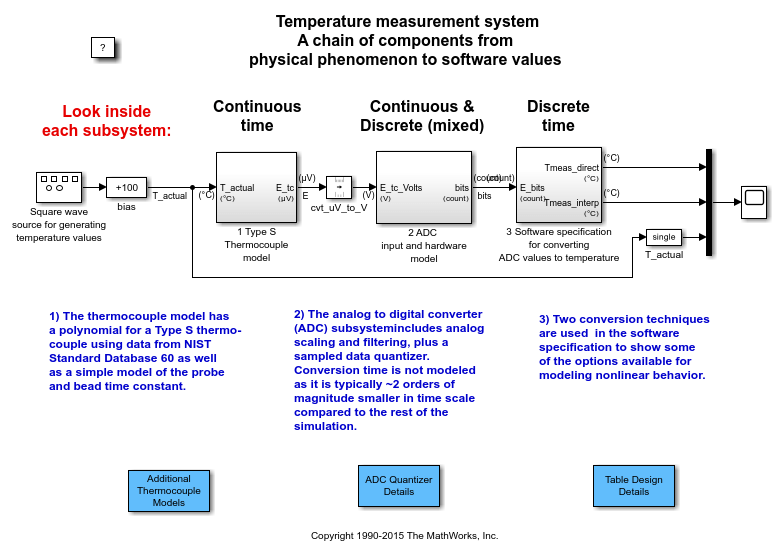
Temperature Measurement System Using Nonlinear Behavioral Data of Type S Thermocouple
Build and simulate a temperature measurement system that uses a nonlinear dataset describing the behavior of a type S thermocouple.

Using the Prelookup and Interpolation Blocks
Use the Prelookup and Interpolation Using Prelookup blocks.

Saving Memory in Prelookup and Interpolation Blocks by Using Smaller Data
Save memory in Prelookup and Interpolation blocks. The Prelookup and Interpolation Using Prelookup blocks allow you to explicitly set data type storing breakpoints and table data. Note that the Prelookup block allows the breakpoint data to differ from the input data type, and the Interpolation Using Prelookup block allows the table data to differ from the output data type.

