rlDDPGAgent
R2026bDeep deterministic policy gradient (DDPG) reinforcement learning agent
Description
The deep deterministic policy gradient (DDPG) algorithm is an off-policy actor-critic method for environments with a continuous action-space. A DDPG agent learns a deterministic policy while also using a Q-value function critic to estimate the value of the optimal policy. It features a target actor and critic as well as an experience buffer. DDPG agents supports offline training (training from saved data, without an environment).
For more information, see Deep Deterministic Policy Gradient (DDPG) Agent. For more information on the different types of reinforcement learning agents, see Reinforcement Learning Agents.
Creation
Syntax
Description
Create Default Agent from Observation and Action Specifications
agent = rlDDPGAgent(observationInfo,actionInfo)
agent = rlDDPGAgent(observationInfo,actionInfo,initOpts)initOpts object. For more information on
the initialization options, see rlAgentInitializationOptions.
Create Agent from Actor and Critic
agent = rlDDPGAgent(actor,critic,agentOptions)
Specify Agent Options
agent = rlDDPGAgent(___,agentOptions)AgentOptions
property to the agentOptions input argument. Use this syntax after
any of the input arguments in the previous syntaxes.
Input Arguments
Properties
Object Functions
train | Train reinforcement learning agents within a specified environment |
sim | Simulate trained reinforcement learning agents within specified environment |
getAction | Obtain action from agent, actor, or policy object given environment observations |
getActor | Extract actor from reinforcement learning agent |
setActor | Set actor of reinforcement learning agent |
getCritic | Extract critic from reinforcement learning agent |
setCritic | Set critic of reinforcement learning agent |
generatePolicyFunction | Generate MATLAB function that evaluates policy of an agent or policy object |
Examples
Create an environment with a continuous action space, and obtain its observation and action specifications. For this example, load the environment used in the example Compare DDPG Agent to LQR Controller. The observation from the environment is a vector containing the position and velocity of a mass. The action is a scalar representing a force, applied to the mass, ranging continuously from -2 to 2 Newton.
env = rlPredefinedEnv("DoubleIntegrator-Continuous");Obtain observation and action specifications.
obsInfo = getObservationInfo(env);
actInfo = getActionInfo(env);
The agent creation function initializes the actor and critic networks randomly. To reproduce the results of this section, specify the seed and algorithm used for random number generation.
rng(0,"twister")Create a policy gradient agent from the environment observation and action specifications.
agent = rlDDPGAgent(obsInfo,actInfo)
agent =
  rlDDPGAgent with properties:

        ExperienceBuffer: [1×1 rl.replay.rlReplayMemory]
            AgentOptions: [1×1 rl.option.rlDDPGAgentOptions]
    UseExplorationPolicy: 0
         ObservationInfo: [1×1 rl.util.rlNumericSpec]
              ActionInfo: [1×1 rl.util.rlNumericSpec]
              SampleTime: 1
       UseGPUForLearning: "off"
         IntrinsicReward: []
To check your agent, use the getAction function to return the action from a batch of 10 random observations.
robs = rand([obsInfo(1).Dimension 10]);
a = getAction(agent,{robs});
Display the seventh element of the action batch.
a{1}(7)ans = -0.0053
You can now test and train the agent within the environment. You can also use getActor and getCritic to extract the actor and critic, respectively, and getModel to extract the approximator model (by default a deep neural network) from the actor or critic.
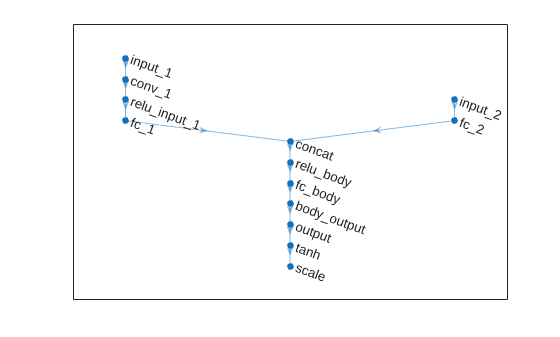
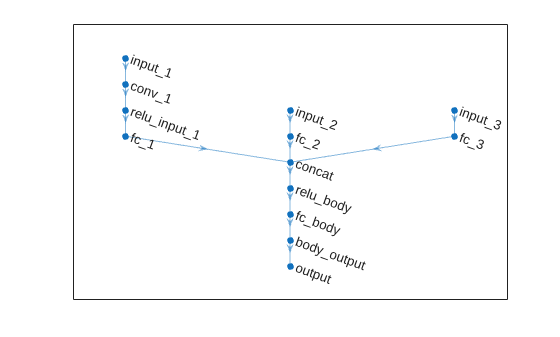
Create an environment with a continuous action space and obtain its observation and action specifications. For this example, load the environment used in the example Train DDPG Agent with Custom Networks Using Image Observation. This environment has two observations: a 50-by-50 grayscale image and a scalar (the angular velocity of the pendulum). The action is a scalar representing a torque ranging continuously from -2 to 2 Nm.
env = rlPredefinedEnv("SimplePendulumWithImage-Continuous");Obtain observation and action specifications.
obsInfo = getObservationInfo(env);
actInfo = getActionInfo(env);
Create an agent initialization option object, specifying that each hidden fully connected layer in the network must have 128 neurons (instead of the default number, 256).
initOpts = rlAgentInitializationOptions(NumHiddenUnit=128);
The agent creation function initializes the actor and critic networks randomly. You can ensure reproducibility by fixing the seed of the random generator.
rng(0,"twister")Create a DDPG agent from the environment observation and action specifications.
agent = rlDDPGAgent(obsInfo,actInfo,initOpts);
Extract the deep neural networks from both the agent actor and critic.
actorNet = getModel(getActor(agent));
criticNet = getModel(getCritic(agent));
To verify that each hidden fully connected layer has 128 neurons, you can display the layers on the MATLAB® command window,
criticNet.Layers
or visualize the structure interactively using analyzeNetwork.
analyzeNetwork(criticNet)
Plot actor and critic networks.
plot(actorNet)
plot(criticNet)
To check your agent, use the getAction function to return the action from a random observation.
getAction(agent,{rand(obsInfo(1).Dimension),rand(obsInfo(2).Dimension)})ans = 1×1 cell array
{[-0.0364]}
You can now test and train the agent within the environment.
Create an environment with a continuous action space and obtain its observation and action specifications. For this example, load the environment used in the example Compare DDPG Agent to LQR Controller. The observation from the environment is a vector containing the position and velocity of a mass. The action is a scalar representing a force ranging continuously from -2 to 2 Newton.
env = rlPredefinedEnv("DoubleIntegrator-Continuous");Obtain the environment observation and action specification objects.
obsInfo = getObservationInfo(env);
actInfo = getActionInfo(env);
The actor and critic networks are initialized randomly. To reproduce the results of this section, specify the seed and algorithm used for random number generation.
rng(0,"twister")DDPG agents use a parameterized Q-value function approximator to estimate the value of the policy. A Q-value function critic takes the current observation and an action as inputs and returns a single scalar as output (the estimated discounted cumulative long-term reward for taking the action from the state corresponding to the current observation, and following the policy thereafter).
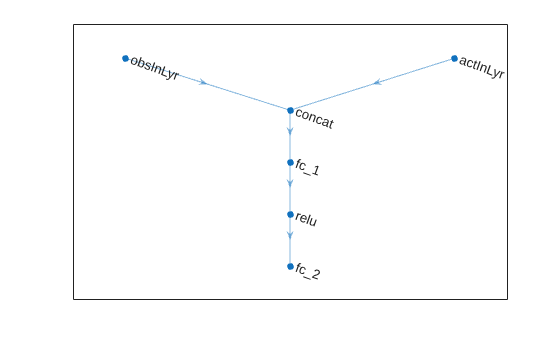
To model the parameterized Q-value function within the critic, use a neural network with two input layers (one for the observation channel, as specified by obsInfo, and the other for the action channel, as specified by actInfo) and one output layer (which returns the scalar value).
Note that prod(obsInfo.Dimension) and prod(actInfo.Dimension) return the number of dimensions of the observation and action spaces, respectively, regardless of whether they are arranged as row vectors, column vectors, or matrices.
Define each network path as an array of layer objects and assign names to the input and output layers of each path. These names allow you to connect the paths and then later explicitly associate the network input and output layers with the appropriate environment channel.
% Define observation and action paths
obsPath = featureInputLayer(prod(obsInfo.Dimension),Name="obsInLyr");
actPath = featureInputLayer(prod(actInfo.Dimension),Name="actInLyr");

% Define common path: concatenate along first dimension.
commonPath = [
    concatenationLayer(1,2,Name="concat")
    fullyConnectedLayer(50)
    reluLayer
    fullyConnectedLayer(1)
    ];
Assemble dlnetwork object and add layers.
criticNet = dlnetwork;
criticNet = addLayers(criticNet, obsPath);
criticNet = addLayers(criticNet, actPath);
criticNet = addLayers(criticNet, commonPath);
Connect paths.
criticNet = connectLayers(criticNet,"obsInLyr","concat/in1");
criticNet = connectLayers(criticNet,"actInLyr","concat/in2");
Plot the network.
plot(criticNet)
Initialize the network.
criticNet = initialize(criticNet);
Display the number of weights.
summary(criticNet)
   Initialized: true

   Number of learnables: 251

   Inputs:
      1   'obsInLyr'   2 features
      2   'actInLyr'   1 features
Create the critic approximator object using criticNet, the environment observation and action specifications, and the names of the network input layers to be connected with the environment observation and action channels. For more information, see rlQValueFunction.
critic = rlQValueFunction(criticNet,obsInfo,actInfo, ...
    ObservationInputNames="obsInLyr", ...
    ActionInputNames="actInLyr");
Check the critic with random observation and action inputs.
getValue(critic,{rand(obsInfo.Dimension)},{rand(actInfo.Dimension)})ans = single
-0.4260
DDPG agents use a parameterized deterministic policy over continuous action spaces, which is learned by a continuous deterministic actor. This actor takes the current observation as input and returns as output an action that is a deterministic function of the observation.
To model the parameterized policy within the actor, use a neural network with one input layer (which receives the content of the environment observation channel, as specified by obsInfo) and one output layer (which returns the action to the environment action channel, as specified by actInfo).
Define the network as an array of layer objects.
actorNet = [
    featureInputLayer(prod(obsInfo.Dimension))
    fullyConnectedLayer(16)
    tanhLayer
    fullyConnectedLayer(16)
    tanhLayer
    fullyConnectedLayer(prod(actInfo.Dimension))
    ];
Convert to dlnetwork object.
actorNet = dlnetwork(actorNet);
Initialize network.
actorNet = initialize(actorNet);
Display the number of weights.
summary(actorNet)
   Initialized: true

   Number of learnables: 337

   Inputs:
      1   'input'   2 features
Create the actor using actorNet and the observation and action specifications. For more information on continuous deterministic actors, see rlContinuousDeterministicActor.
actor = rlContinuousDeterministicActor(actorNet,obsInfo,actInfo);
Check the actor with a random observation input.
getAction(actor,{rand(obsInfo.Dimension)})ans = 1×1 cell array
{[-0.5493]}
Create the DDPG agent using the actor and critic.
agent = rlDDPGAgent(actor,critic)
agent =
  rlDDPGAgent with properties:

        ExperienceBuffer: [1×1 rl.replay.rlReplayMemory]
            AgentOptions: [1×1 rl.option.rlDDPGAgentOptions]
    UseExplorationPolicy: 0
         ObservationInfo: [1×1 rl.util.rlNumericSpec]
              ActionInfo: [1×1 rl.util.rlNumericSpec]
              SampleTime: 1
       UseGPUForLearning: "off"
         IntrinsicReward: []
Specify agent options, including training options for the actor and critic.
agent.AgentOptions.SampleTime=env.Ts;
agent.AgentOptions.TargetSmoothFactor=1e-3;
agent.AgentOptions.ExperienceBufferLength=1e6;
agent.AgentOptions.DiscountFactor=0.99;
agent.AgentOptions.MiniBatchSize=32;

agent.AgentOptions.CriticOptimizerOptions.LearnRate=5e-3;
agent.AgentOptions.CriticOptimizerOptions.GradientThreshold=1;

agent.AgentOptions.ActorOptimizerOptions.LearnRate=1e-4;
agent.AgentOptions.ActorOptimizerOptions.GradientThreshold=1;
Check the agent with a random observation input.
getAction(agent,{rand(obsInfo.Dimension)})ans = 1×1 cell array
{[-0.5947]}
You can now train the agent within the environment.
For this example, load the environment used in the example Compare DDPG Agent to LQR Controller. The observation from the environment is a vector containing the position and velocity of a mass. The action is a scalar representing a force ranging continuously from -2 to 2 Newton.
env = rlPredefinedEnv("DoubleIntegrator-Continuous");Get the observation and action specification objects.
obsInfo = getObservationInfo(env);
actInfo = getActionInfo(env);
DDPG agents use a parameterized Q-value function approximator to estimate the value of the policy.
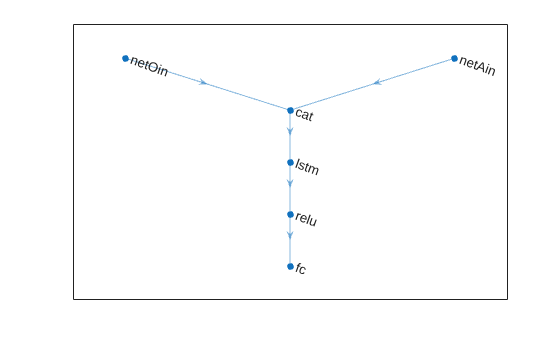
To model the parameterized Q-value function within the critic, use a recurrent neural network, which must have two input layers and one output layer (returning the scalar value).
Define each network path as an array of layer objects. To create a recurrent neural network, use sequenceInputLayer as the input layer and include an lstmLayer as one of the other network layers.
% Define observation and action paths
obsPath = sequenceInputLayer(prod(obsInfo.Dimension),Name="netOin");
actPath = sequenceInputLayer(prod(actInfo.Dimension),Name="netAin");

% Define common path: concatenate along first dimension
commonPath = [
    concatenationLayer(1,2,Name="cat")
    lstmLayer(50)
    reluLayer
    fullyConnectedLayer(1)
    ];
Create dlnetwork object and add layers.
criticNet = dlnetwork();
criticNet = addLayers(criticNet, obsPath);
criticNet = addLayers(criticNet, actPath);
criticNet = addLayers(criticNet, commonPath);
Connect layers.
criticNet = connectLayers(criticNet,"netOin","cat/in1");
criticNet = connectLayers(criticNet,"netAin","cat/in2");
Plot network.
plot(criticNet)
Initialize network and display the number of weights.
criticNet = initialize(criticNet);
summary(criticNet)
   Initialized: true

   Number of learnables: 10.9k

   Inputs:
      1   'netOin'   Sequence input with 2 channels
      2   'netAin'   Sequence input with 1 channels
Create the critic approximator object using criticNet, the environment observation and action specifications, and the names of the network input layers to be connected with the environment observation and action channels. For more information, see rlQValueFunction.
critic = rlQValueFunction(criticNet,obsInfo,actInfo, ...
    ObservationInputNames="netOin",ActionInputNames="netAin");
Check the critic with a batch of 10 random observations and actions.
robs = rand([obsInfo.Dimension 10]);
ract = rand([actInfo.Dimension 10]);
v = getValue(critic,{robs},{ract});
Display the sixth element of the batch.
v(6)
ans = single

-0.0078
DDPG agents use a continuous deterministic actor to approximate the policy. Because the critic has a recurrent network, you must use a recurrent network for the actor too.
Define the network as an array of layer objects.
actorNet = [
    sequenceInputLayer(prod(obsInfo.Dimension))
    lstmLayer(10)
    reluLayer
    fullyConnectedLayer(prod(actInfo.Dimension))
    ];
Convert to dlnetwork object, initialize network and display the number of weights.
actorNet = dlnetwork(actorNet);
actorNet = initialize(actorNet);
summary(actorNet)
   Initialized: true

   Number of learnables: 531

   Inputs:
      1   'sequenceinput'   Sequence input with 2 channels
Create the actor using actorNet and the observation and action specifications. For more information on continuous deterministic actors, see rlContinuousDeterministicActor.
actor = rlContinuousDeterministicActor(actorNet,obsInfo,actInfo);
Check the actor with a batch of 10 random observation inputs.
robs = rand([obsInfo.Dimension 10]);
a = getAction(actor,{robs});
a{1}(7)
ans = single
-0.1019
Specify some training options for the critic.
criticOpts = rlOptimizerOptions( ...
    LearnRate=5e-3,GradientThreshold=1);
Specify some training options for the actor.
actorOpts = rlOptimizerOptions( ...
    LearnRate=1e-4,GradientThreshold=1);
Specify agent options. To use a DDPG agent with recurrent neural networks, you must specify a SequenceLength greater than 1.
agentOpts = rlDDPGAgentOptions( ...
    SampleTime=env.Ts, ...
    TargetSmoothFactor=1e-3, ...
    ExperienceBufferLength=1e6, ...
    DiscountFactor=0.99, ...
    SequenceLength=20, ...
    MiniBatchSize=32, ...
    CriticOptimizerOptions=criticOpts, ...
    ActorOptimizerOptions=actorOpts);
Create the DDPG agent using the actor and critic.
agent = rlDDPGAgent(actor,critic,agentOpts)
agent =
  rlDDPGAgent with properties:

        ExperienceBuffer: [1×1 rl.replay.rlReplayMemory]
            AgentOptions: [1×1 rl.option.rlDDPGAgentOptions]
    UseExplorationPolicy: 0
         ObservationInfo: [1×1 rl.util.rlNumericSpec]
              ActionInfo: [1×1 rl.util.rlNumericSpec]
              SampleTime: 0.1000
       UseGPUForLearning: "off"
         IntrinsicReward: []
To check your agent return the actions from a random observation.
getAction(agent,{rand(obsInfo.Dimension)})ans = 1×1 cell array
{[-0.0848]}
To evaluate the agent using sequential observations, use the sequence length (time) dimension. For example, obtain actions for a sequence of 9 observations.
robs = rand([obsInfo.Dimension 1 9]);
[action,state] = getAction(agent,{robs});
Display the action corresponding to the seventh element of the observation.
action = action{1};
action(1,1,1,7)
ans = -0.2942
You can now test and train the agent within the environment.
Extended Capabilities
Version History
Introduced in R2019a
See Also
Apps
Functions
getAction|getActor|getCritic|generatePolicyFunction|generatePolicyBlock|getActionInfo|getObservationInfo
Objects
rlDDPGAgentOptions|rlAgentInitializationOptions|rlQValueFunction|rlContinuousDeterministicActor|rlTD3Agent|rlSACAgent
Blocks
Topics
- Train Default DDPG Agent to Swing Up and Balance Continuous Cart-Pole
- Control Water Level in a Tank Using a DDPG Agent
- Train DDPG Agent to Control Two-Thruster Sliding Vehicle
- Compare DDPG Agent to LQR Controller
- Train Reinforcement Learning Agents
- Deep Deterministic Policy Gradient (DDPG) Agent
- Reinforcement Learning Agents

