Smooth Data
R2026bSmooth noisy data in the Live Editor
Description
The Smooth Data task lets you interactively smooth noisy data. The task automatically generates MATLAB® code for your live script.
Using this task, you can:
Customize the method for smoothing data in a workspace variable.
Adjust parameters to generate less or more smoothing.
Visualize the input data compared to the smoothed data.
For more information on Live Editor tasks, see Add Interactive Tasks to Live Scripts.
Related Functions
Smooth Data generates code that uses the smoothdata function.
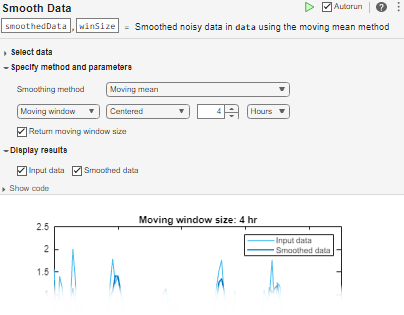
Open the Task
To add the Smooth Data task to a live script in the MATLAB Editor:
On the Live Editor tab, select Task > Smooth Data.
In a code block in the script, type a relevant keyword, such as
smooth,noisy,movmedian, orlowess. SelectSmooth Datafrom the suggested command completions. For some keywords, the task automatically updates one or more corresponding parameters.
Examples
Interactively increase smoothing to reduce noise by adjusting the smoothing factor using the Smooth Data task in the Live Editor.
First, create a vector of noisy data.
x = 1:100;
rng(0,"twister")
data = cos(2*pi*0.05*x+2*pi*rand) + 0.5*randn(1,100);
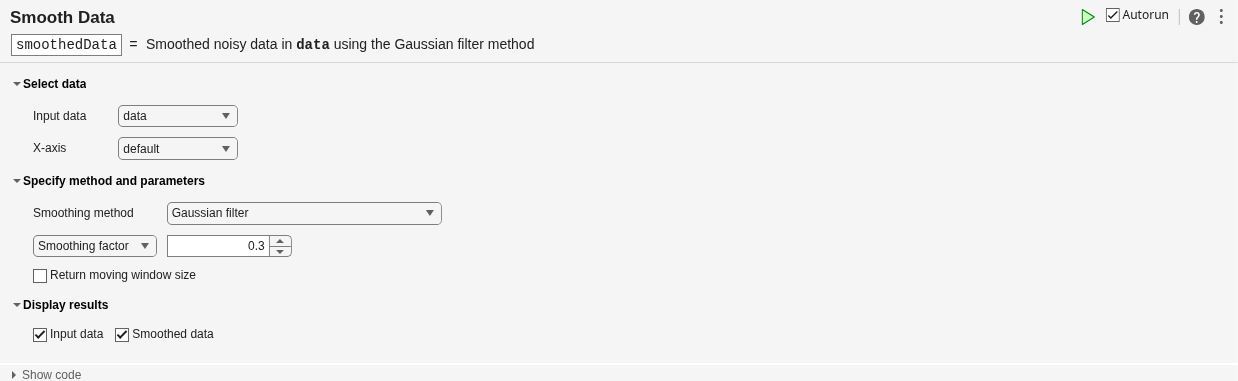
Open the Smooth Data task in the Live Editor. To smooth the noisy data, select data as the input data. Because the sample points are the same as the default vector of x-axis locations, you do not need to specify x in the X-axis field.
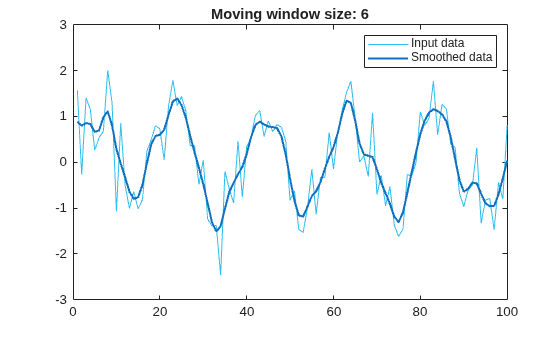
Smooth the vector with a Gaussian-weighted moving average filter by selecting the Gaussian filter method in the Smoothing method field. The title of the plot indicates that the smoothing window has length 4. Alternatively, you can select Return moving window size to return the window size in addition to the smoothed data.
Smooth using a larger window size, resulting in more smoothing, by increasing the smoothing factor from the default value of 0.25 to 0.3. The title of the plot updates to indicate that the smoothing window has length 6.
Related Examples
Parameters
Limitations
The Smooth Data task does not support 2-D smoothing windows.
Version History
Introduced in R2019bSee Also
Functions
Live Editor Tasks
- Clean Missing Data | Clean Outlier Data | Find Change Points | Find Local Extrema | Find and Remove Trends | Normalize Data | Compute by Group

