Normalize Data
R2026bCenter and scale data in the Live Editor
Description
The Normalize Data task lets you interactively normalize data by choosing centering and scaling methods, such as z-score. The task automatically generates MATLAB® code for your live script.
Using this task, you can:
Customize how to center and scale data in a workspace variable such as a table or timetable.
Visualize the input data compared to the normalized data.
Return the centering and scaling values used to compute the normalization.
For more information on Live Editor tasks, see Add Interactive Tasks to Live Scripts.
Related Functions
Normalize Data generates code that uses the normalize
function.

Open the Task
To add the Normalize Data task to a live script in the MATLAB Editor:
On the Live Editor tab, select Task > Normalize Data.
In a code block in the script, type a relevant keyword, such as
normalize,range, orscale. SelectNormalize Datafrom the suggested command completions. For some keywords, the task automatically updates one or more corresponding parameters.
Examples
Interactively normalize a data set and return the computed parameter values using the Normalize Data task in the Live Editor. Then, reuse the parameters to apply the same normalization to another data set.
Create a timetable with two variables: Temperature and WindSpeed. Then create a second timetable with the same variables, but with the samples taken a year later.
Time1 = (datetime(2019,1,1):days(1):datetime(2019,1,10))';
Temperature = randi([10 40],10,1);
WindSpeed = randi([0 20],10,1);
T1 = timetable(Temperature,WindSpeed,RowTimes=Time1)
T1 = 10×2 timetable
       Time        Temperature    WindSpeed
    ___________    ___________    _________

    01-Jan-2019        35             3
    02-Jan-2019        38            20
    03-Jan-2019        13            20
    04-Jan-2019        38            10
    05-Jan-2019        29            16
    06-Jan-2019        13             2
    07-Jan-2019        18             8
    08-Jan-2019        26            19
    09-Jan-2019        39            16
    10-Jan-2019        39            20
Time2 = (datetime(2020,1,1):days(1):datetime(2020,1,10))';
Temperature = randi([10 40],10,1);
WindSpeed = randi([0 20],10,1);
T2 = timetable(Temperature,WindSpeed,RowTimes=Time2)
T2 = 10×2 timetable
       Time        Temperature    WindSpeed
    ___________    ___________    _________

    01-Jan-2020        30            14
    02-Jan-2020        11             0
    03-Jan-2020        36             5
    04-Jan-2020        38             0
    05-Jan-2020        31             2
    06-Jan-2020        33            17
    07-Jan-2020        33            14
    08-Jan-2020        22             6
    09-Jan-2020        30            19
    10-Jan-2020        15             0
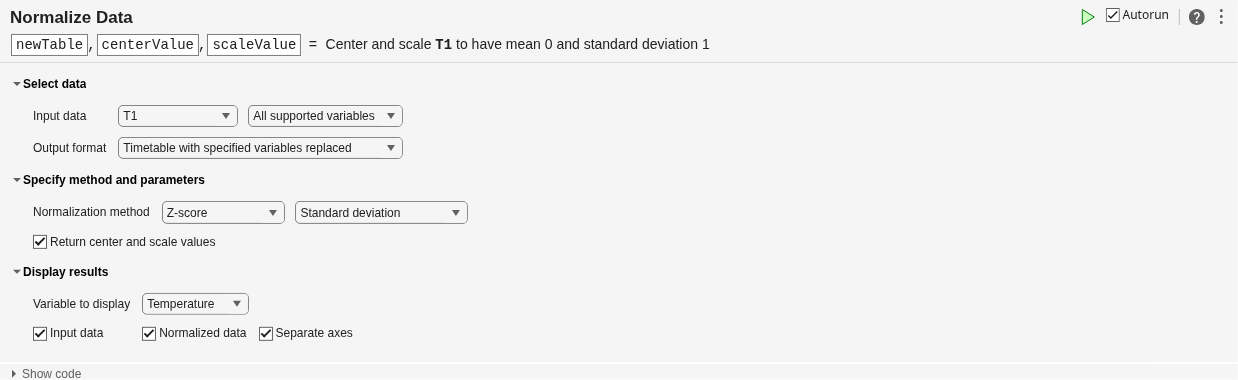
Open the Normalize Data task in the Live Editor. To normalize the first timetable, select T1 as the input data and normalize all supported variables.
By default, the Normalize Data task returns the normalized data. In addition to the normalized data, return the centering and scaling parameter values that the task uses to perform the normalization by selecting Return center and scale values in the Specify method and parameters section of the task.
The output arguments newTable, centerValue, and scaleValue represent the normalized values, the centering values, and the scaling values, respectively.
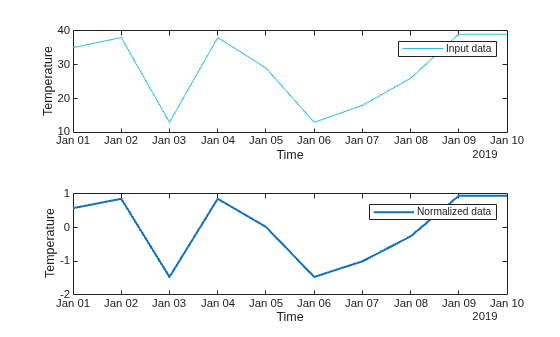
You can use the output arguments of a Live Editor task in subsequent code. Use the normalize function to normalize the second timetable T2 using the parameter values from the first normalization. This technique ensures that the data in T2 is centered and scaled in the same way as T1.
T2_norm = normalize(T2,"center",centerValue,"scale",scaleValue)
T2_norm = 10×2 timetable
       Time        Temperature    WindSpeed
    ___________    ___________    _________

    01-Jan-2020      0.11165      0.084441
    02-Jan-2020      -1.6562       -1.8858
    03-Jan-2020      0.66992       -1.1822
    04-Jan-2020        0.856       -1.8858
    05-Jan-2020       0.2047       -1.6044
    06-Jan-2020      0.39078       0.50665
    07-Jan-2020      0.39078      0.084441
    08-Jan-2020      -0.6327       -1.0414
    09-Jan-2020      0.11165       0.78812
    10-Jan-2020       -1.284       -1.8858
Related Examples
Parameters
More About
Version History
Introduced in R2021bSee Also
Functions
Live Editor Tasks
- Clean Outlier Data | Clean Missing Data | Find Local Extrema | Smooth Data | Find and Remove Trends | Find Change Points | Compute by Group

