verifyNetworkRobustness
Syntax
Description
Add-On Required: This feature requires the AI Verification Library for Deep Learning Toolbox add-on.
dlnetwork robustness
verifies whether the network result = verifyNetworkRobustness(net,XLower,XUpper,label)net is adversarially robust with respect
to the class label when the input is between XLower
and XUpper. For more information, see Adversarial Examples.
A network is robust to adversarial examples for a specific input if the predicted
class does not change when the input takes any value between XLower and
XUpper. For more information, see Algorithms.
[
also returns details of the verification results for each class. (since R2026a)result,detailedResult] = verifyNetworkRobustness(net,XLower,XUpper,label)
verifies the adversarial robustness with additional options specified by one or more
name-value arguments.result = verifyNetworkRobustness(___,Name=Value)
ONNX and PyTorch network robustness
Since R2026a
This syntax requires the Deep Learning Toolbox Interface for alpha-beta-CROWN Verifier add-on.
verifies whether the pretrained ONNX™ or PyTorch® network in result = verifyNetworkRobustness(modelfile,XLower,XUpper,label,numClasses)modelfile is adversarially robust with
respect to the class label when the input is between
XLower and XUpper and the network has
numClasses. For more information, see Adversarial Examples.
A network is robust to adversarial examples for a specific input if the predicted
class does not change when the input takes any value between XLower and
XUpper.
verifies the adversarial robustness with additional options specified by one or more
name-value arguments.result = verifyNetworkRobustness(___,Name=Value)
Examples
Verify the adversarial robustness of an image classification network.
Load a pretrained classification network. This network is a dlnetwork object that has been trained to predict the class label of images of handwritten digits.
load("digitsRobustClassificationConvolutionNet.mat")Load the test data.
[XTest,TTest] = digitTest4DArrayData;
Select the first ten images.
X = XTest(:,:,:,1:10); label = TTest(1:10);
Convert the test data to a dlarray object.
X = dlarray(X,"SSCB");Verify the network robustness to an input perturbation between –0.01 and 0.01 for each pixel. Create lower and upper bounds for the input.
perturbation = 0.01; XLower = X - perturbation; XUpper = X + perturbation;
Verify the network robustness for each test image.
result = verifyNetworkRobustness(netRobust,XLower,XUpper,label);
summary(result,Statistics="counts")result: 10×1 categorical
verified 10
violated 0
unproven 0
Since R2026a
Load a pretrained classification network. This network is a dlnetwork object that has been trained to predict the class label of images of handwritten digits.
load("digitsRobustClassificationConvolutionNet.mat")Load the test data.
[XTest,TTest] = digitTest4DArrayData;
Randomly select images to test.
idx = randi(numel(TTest),500,1); X = XTest(:,:,:,idx); labels = TTest(idx);
Convert the test data to a dlarray object.
X = dlarray(X,"SSCB");Verify the network robustness to an input perturbation between –0.01 and 0.01 for each pixel. Create lower and upper bounds for the input.
perturbation = 0.1; XLower = X - perturbation; XUpper = X + perturbation;
Verify the network robustness for each test image. For each observation, if the software is unable to guarantee that an adversarial example does not exists for any class or the other than the true class, then the result is "unproven" or "violated".
[verificationResults,classVerificationResults] = verifyNetworkRobustness(netRobust,XLower,XUpper,labels,MiniBatchSize=32);
summary(verificationResults,Statistics="counts")verificationResults: 500×1 categorical
verified 38
violated 0
unproven 462
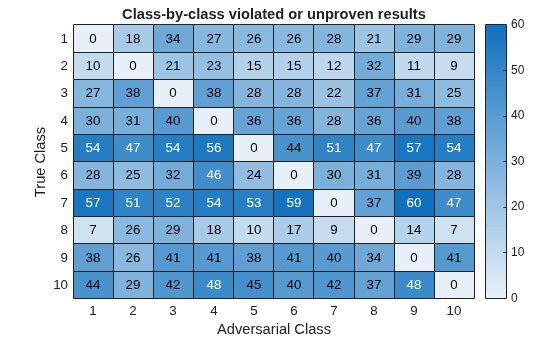
You can also see more detailed results of when an adversarial examples exists for each class. Visualize the detailed verification results for status "verified" using the helper function verificationMatrix.
verificationMatrix(classVerificationResults,"verified");
Visualize the detailed verification results for status "violated" or "unproven" using the helper function verificationMatrix.
verificationMatrix(classVerificationResults,["violated","unproven"]);
Helper Function
Use the verificationMatrix to visualize the detailed results output of the verifyNetworkRobustness function.
function verificationMatrix(detailedResults,verifiedStatus) % Initialize the verification matrix numClasses = size(detailedResults,2); vMat = zeros(numClasses); % Calculate the verification matrix entries for ii = 1:numClasses missingIdx = ismissing(detailedResults(:, ii)); v = 1:numClasses; v(ii) = []; classMatrix = detailedResults(missingIdx, v); tf = ismember(classMatrix, verifiedStatus); tfSum = sum(tf, 1); vMat(ii,v) = tfSum; end titleStatus = strjoin(verifiedStatus," or "); % Create a heatmap figure heatmap(vMat,Title="Class-by-class " + titleStatus + " results", ... XLabel="Adversarial Class", ... YLabel="True Class", ... ColorbarVisible="on"); end
Since R2026a
Load a pretrained classification network.
load("digitsRobustClassificationConvolutionNet.mat")Load the test data.
[XTest,TTest] = digitTest4DArrayData;
Randomly select images to test.
idx = randi(numel(TTest),500,1); X = XTest(:,:,:,idx); labels = TTest(idx);
Convert the test data to a dlarray object.
X = dlarray(X,"SSCB");Verify the network robustness to an input perturbation between –0.01 and 0.01 for each pixel. Create lower and upper bounds for the input.
perturbation = 0.01; XLower = X - perturbation; XUpper = X + perturbation;
Create an AlphaCROWN options object. Optimize the interval and optimize over the average objective.
opts = alphaCROWNOptions(InitialLearnRate=0.9,MaxEpochs=20, ... Objective="interval", ... ObjectiveMode="average", ... Verbose=true);
Verify the network robustness for each test image.
result = verifyNetworkRobustness(netRobust,XLower,XUpper,labels,Algorithm=opts);
Number of mini-batches to process: 4 .... (4 mini-batches) Total time = 242.6 seconds.
summary(result,Statistics="counts")result: 500×1 categorical
verified 493
violated 2
unproven 5
Since R2026a
Load a pretrained classification network. This network is a PyTorch® model that has been trained to predict the class label of images of handwritten digits.
modelfile = "digitsClassificationConvolutionNet.pt";Load the test data and select the first 20 images.
[XTest,TTest] = digitTest4DArrayData; X = XTest(:,:,:,1:20); labels = TTest(1:20);
Verify the network robustness to an input perturbation between –0.01 and 0.01 for each pixel. Create lower and upper bounds for the input.
perturbation = 0.01; XLower = X - perturbation; XUpper = X + perturbation;
Create a custom network verification options object to use the "crown" algorithm with 100 projected gradient descent (PGD) restarts.
options = networkVerificationOptions(GeneralCompleteVerifier="skip",... SolverBoundPropMethod="crown",... AttackPgdRestarts=100);
Verify the network robustness for each test image with the created network verification options. Specify the input data permutation from MATLAB to Python® dimension ordering as [4 3 1 2] and number of classes as 10.
numClasses = 10; result = verifyNetworkRobustness(modelfile,XLower,XUpper,labels,numClasses, ... Algorithm=options, ... InputDataPermutation=[4 3 1 2]);
Warning: Starting and configuring the Python interpreter for the alpha-beta-CROWN verifier. This may take a few minutes.
summary(result)
result: 20×1 categorical
verified 4
violated 13
unproven 3
<undefined> 0
Find the maximum adversarial perturbation that you can apply to an input without changing the predicted class.
Load a pretrained classification network. This network is a dlnetwork object that has been trained to predict the class of images of handwritten digits.
load("digitsRobustClassificationConvolutionNet.mat")Load the test data.
[XTest,TTest] = digitTest4DArrayData;
Select a test image.
idx = 3; X = XTest(:,:,:,idx); label = TTest(idx);
Create lower and upper bounds for a range of perturbation values.
perturbationRange = 0:0.005:0.1; for i = 1:numel(perturbationRange) XLower(:,:,:,i) = X - perturbationRange(i); XUpper(:,:,:,i) = X + perturbationRange(i); end
Repeat the class label for each set of bounds.
label = repmat(label,numel(perturbationRange),1);
Convert the bounds to dlarray objects.
XLower = dlarray(XLower,"SSCB"); XUpper = dlarray(XUpper,"SSCB");
Verify the adversarial robustness for each perturbation.
result = verifyNetworkRobustness(netRobust,XLower,XUpper,label); plot(perturbationRange,result,"*") xlabel("Perturbation")
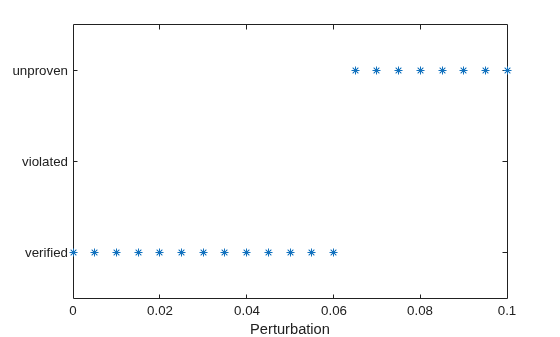
Find the maximum perturbation value for which the function returns verified.
maxIdx = find(result=="verified",1,"last"); maxPerturbation = perturbationRange(maxIdx)
maxPerturbation = 0.0600
Input Arguments
Input lower bound, specified as a dlarray
object or a numeric array.
If you provide a
dlnetworkobject as input,XLowermust be a formatteddlarrayobject. For more information aboutdlarrayformats, see thefmtinput argument ofdlarray.If you provide an ONNX or PyTorch
modelfileas input,XLowercan be a numeric array or adlarrayobject. See Input Dimension Ordering for more information.
The lower and upper bounds, XLower and XUpper, must have the same size and format. The function computes the results across the batch ("B") dimension of the input lower and upper bounds.
For ONNX and PyTorch networks, the batch dimension is the first dimension of the data after it is permuted to Python® dimension ordering.
Input upper bound, specified as a formatted dlarray
object or a numeric array.
The lower and upper bounds, XLower and XUpper, must have the same size and format. The function computes the results across the batch ("B") dimension of the input lower and upper bounds.
For ONNX and PyTorch networks, the batch dimension is the first dimension of the data after it is permuted to Python dimension ordering.
Class label, specified as a numeric index or a categorical, or a vector of these
values. The length of label must match the size of the batch
("B") dimension of the lower and upper bounds.
The function verifies that the predicted class that the network returns matches
label for any input in the range defined by the lower and upper
bounds.
Note
If you specify label as a categorical, then the order of the
categories must match the order of the outputs in the network.
Data Types: single | double | int8 | int16 | int32 | int64 | uint8 | uint16 | uint32 | uint64 | categorical
dlnetwork only
Network, specified as an initialized dlnetwork object. To initialize a dlnetwork object, use the initialize function.
The function supports these layers:
| Layer | Notes and Limitations |
|---|---|
| |
| Supported when PaddingValue is set to
0. |
| |
| |
| Supported when Dilation is set to [1
1] or 1 and
PaddingValue is set to
0. |
| |
| |
Supported when Normalization is set to "none" (since R2022b) or "zerocenter", "zscore",
"rescale-symmetric",
"rescale-zero-one" (since R2023a). Custom
normalization functions are not supported. | |
| |
| |
| |
| |
Supported when Normalization is set to "none" (since R2022b) or "zerocenter", "zscore",
"rescale-symmetric",
"rescale-zero-one" (since R2023a). Custom
normalization functions are not supported. | |
| You can optimize this layer using the α-CROWN algorithm. |
| |
| Supported when DataFormat is set to
"CB" or "SSCB". The data
format is commonly set by the InputDataFormats and
OutputDataFormats options of the
importNetworkFromONNX function. |
| |
| |
You can optimize this layer using the α-CROWN algorithm. | |
| |
The function does not support networks with multiple inputs and multiple outputs.
The function verifies the network using the final layer. If your final layer is a softmax layer, then the function uses the penultimate layer instead as this provides better verification results. (since R2026a)
Before R2026a: If your final layer is a softmax layer, then remove this layer before calling the function.
ONNX or PyTorch only
Since R2026a
ONNX or PyTorch model file name specified as a character vector or a string scalar. The
modelfile must be a full PyTorch model (saved using torch.save()) or an ONNX model with the .onnx extension.
Note
The Python classification network must be saved without a softmaxLayer in the output.
Number of output classes specified as a numeric integer. This is the number of output classes in the pretrained ONNX or PyTorch network.
Data Types: single | double | int8 | int16 | int32 | int64 | uint8 | uint16 | uint32 | uint64
Name-Value Arguments
Specify optional pairs of arguments as
Name1=Value1,...,NameN=ValueN, where Name is
the argument name and Value is the corresponding value.
Name-value arguments must appear after other arguments, but the order of the
pairs does not matter.
Example: verifyNetworkRobustness(net,XLower,XUpper,label,MiniBatchSize=32,ExecutionEnvironment="multi-gpu")
verifies the network robustness using a mini-batch size of 32 and using multiple
GPUs.
All Model Types
Since R2026a
Verification algorithm, specified as one of these values:
"crown"— Use the CROWN algorithm [4]. This option is the same as using aNetworkVerificationOptionsobject with the default values if used with a ONNX or PyTorch network."alpha-crown"— Use the α-CROWN algorithm [6] with default options. This option is the same as using anAlphaCROWNOptionsobject with the default values if used with adlnetwork."alpha-beta-crown"— Use the α-β-CROWN algorithm with default options. This option is only available with ONNX or PyTorch networks.AlphaCROWNOptionsobject — Use the α-CROWN algorithm with custom options. Create anAlphaCROWNOptionsobject using thealphaCROWNOptionsfunction. This option is only available withdlnetwork.NetworkVerificationOptionsobject — Use the α-β-CROWN algorithm with custom options. Create aNetworkVerificationOptionsobject using thenetworkVerificationOptionsfunction. This option is only available with ONNX or PyTorch networks.
For more information, see CROWN, α-CROWN, and α,β-CROWN.
The α-CROWN algorithm produces tighter bounds at the cost of longer computation times and higher memory requirements.
Since R2024a
Hardware resource, specified as one of these values:
"auto"– Use a local GPU if one is available. Otherwise, use the local CPU."cpu"– Use the local CPU."gpu"– Use the local GPU."multi-gpu"– Use multiple GPUs on one machine, using a local parallel pool based on your default cluster profile. If there is no current parallel pool, the software starts a parallel pool with pool size equal to the number of available GPUs. Only available when input is adlnetworkobject."parallel-auto"– Use a local or remote parallel pool. If there is no current parallel pool, the software starts one using the default cluster profile. If the pool has access to GPUs, then only workers with a unique GPU perform the computations and excess workers become idle. If the pool does not have GPUs, then the computations take place on all available CPU workers instead. Only available when input is adlnetworkobject."parallel-cpu"– Use CPU resources in a local or remote parallel pool, ignoring any GPUs. If there is no current parallel pool, the software starts one using the default cluster profile. Only available when input is adlnetworkobject."parallel-gpu"– Use GPUs in a local or remote parallel pool. Excess workers become idle. If there is no current parallel pool, the software starts one using the default cluster profile. Only available when input is adlnetworkobject.
The "gpu", "multi-gpu", "parallel-auto", "parallel-cpu", and "parallel-gpu" options require Parallel Computing Toolbox™. To use a GPU for deep learning, you must also have a supported GPU device. For information on supported devices, see GPU Computing Requirements (Parallel Computing Toolbox). If you choose one of these options and Parallel Computing Toolbox or a suitable GPU is not available, then the software returns an error.
For more information on when to use the different execution environments, see Scale Up Deep Learning in Parallel, on GPUs, and in the Cloud.
Dependency
If you specify Algorithm as an AlphaCROWNOptions object, then the execution
environment specified in the options object takes precedence.
dlnetwork only
Since R2023b
Size of the mini-batch, specified as a positive integer.
Larger mini-batch sizes require more memory, but can lead to faster computations.
Dependency
If you specify Algorithm as an AlphaCROWNOptions object, then the value of the
mini-batch size in the options object takes precedence.
Data Types: single | double | int8 | int16 | int32 | int64 | uint8 | uint16 | uint32 | uint64
Since R2026a
Adversarial class label for verification, specified as a categorical scalar,
numeric scalar, or [].
The function verifies that the network is robust to adversarial inputs with the
specified adversarial class label, between the specified lower and upper bounds. If
AdversarialLabel is [], then the function
verifies if the network is robust to adversarial inputs from each of the
classes.
Note
If you specify the adversarial label as a categorical scalar, then the order of the categories must match the order of the outputs in the network.
Data Types: single | double | int8 | int16 | int32 | int64 | uint8 | uint16 | uint32 | uint64 | categorical
Since R2026a
Option to enable verbose output, specified as a numeric or logical
1 (true) or
0 (false). When you set this
input to 1 (true), the function
returns the progress of the algorithm by indicating which mini-batch the
function is processing and the total number of mini-batches.
Dependency
If you specify Algorithm as an AlphaCROWNOptions object, then the verbose value
specified in the options object takes precedence.
Data Types: single | double | int8 | int16 | int32 | int64 | uint8 | uint16 | uint32 | uint64 | logical
ONNX or PyTorch only
Since R2026a
Input dimension ordering specified as a numeric row vector. The ordering is the
desired permutation of data in XLower and
XUpper from MATLAB to Python dimension ordering. See Input Dimension Ordering for more
information.
Example: [4 3 1 2]
Number of dimensions in input data specified as a positive integer.
Example: 4
Output Arguments
Verification result, returned as an N-by-1 categorical array, where N is the number of observations. For each set of input lower and upper bounds, the function returns the corresponding element of this array as one of these values:
"verified"— The network is robust to adversarial inputs between the specified bounds."violated"— The network is not robust to adversarial inputs between the specified bounds."unproven"— Unable to prove whether the network is robust to adversarial inputs between the specified bounds.
The function computes the results across the batch ("B")
dimension of the input lower and upper bounds. If you supply k upper
bounds, lower bounds, and labels, then result(k) corresponds to the
verification result for the kth input lower and upper bounds. For
more information, see Network Robustness.
For an observation to return "verified", for each class different
from the target class, there must not exist an adversarial example. To get a more
granular result showing the verification status for each observation for each class,
return detailedResult.
Since R2026a
Detailed verification result, returned as an N-by-C categorical array, where N is the number of observations and C is the number of classes.
For each observation, the detailed results show the verification result for each
observation, for each class. For example, detailedResult(i,j)
indicates if there exists an adversarial example within the specified input bounds that
causes the model to classify observation i as class
j.
Each element of detailedResultcan be one of these values:
"verified"— The network is robust to adversarial inputs between the specified bounds."violated"— The network is not robust to adversarial inputs between the specified bounds."unproven"— Unable to prove whether the network is robust to adversarial inputs between the specified bounds."<undefined>"— The adversarial class label is the same as the true class label, so the property to verify is invalid.
For more information, see Network Robustness.
Note
This output is not available for ONNX or PyTorch networks.
More About
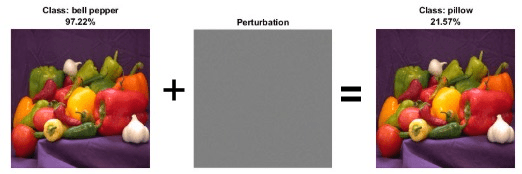
Neural networks can be susceptible to a phenomenon known as adversarial examples [1], where very small changes to an input can cause the network predictions to significantly change. For example, making a small change to an image that causes the network to misclassify it. These changes are often imperceptible to humans.
For example, this image shows that adding an imperceptible perturbation to an image of peppers means that the classification changes from "bell pepper" to "pillow".
A network is adversarially robust if the output of the network does not change significantly when the input is perturbed. For classification tasks, adversarial robustness means that the output of the fully connected layer with the highest value does not change, and therefore the predicted class does not change.
Algorithms
To verify the robustness of a network for an input, the function checks that when the input is perturbed between the specified lower and upper bound, the output does not significantly change.
Let X be an input with respect to which you want to test the
robustness of the network. To use the verifyNetworkRobustness function,
you must specify a lower and upper bound for the input. For example, let be a small perturbation. You can define a lower and upper bound for the input
as and , respectively.
To verify the adversarial robustness of the network, the function checks that, for all inputs between Xlower and Xupper, no adversarial example exists. To check for adversarial examples, the function uses these steps.
Create an input set using the lower and upper input bounds.
Pass the input set through the network and return an output set. To reduce computational overhead, the function performs abstract interpretation by approximating the output of each layer using the CROWN method [4] (also known as DeepPoly).
Check if the specified label remains the same for the entire input set. Because the algorithm uses overapproximation when it computes the output set, the result can be unproven if part of the output set corresponds to an adversarial example. For each class, the function checks that the input cannot be perturbed in such a way as to switch the label to that class.
If you return
result, then the algorithm summarizes the results for each class. Such that, if an adversarial example exists for just one class, then the result for that observation is"violated". If you returndetailedResult, then the software returns the verification result for each class.
If you specify multiple pairs of input lower and upper bounds, then the function verifies the robustness for each pair of input bounds.
Note
Soundness with respect to floating point: In rare cases, floating-point rounding errors can accumulate which can cause the network output to be outside the computed bounds and the verification results to be different. This can also be true when working with networks you produced using C/C++ code generation.
CROWN (equivalently DeepPoly) and alpha-CROWN are algorithms for neural network verification that use abstract interpretation to prove properties of the neural networks [3], [4], [5], [6].
α-β-CROWN is an algorithm for neural network verification. The algorithm efficiently propagates input bounds through the neural network to produce bounds on the output. You can use the output bounds to verify properties of a neural network, such as the robustness of the network to input perturbations.
CROWN [4] — Formal verification framework that uses convex relaxations to compute certified bounds on neural network outputs under input and/or weight perturbations. It enables provable, scalable robustness guarantees by efficiently bounding worst-case behavior layer-by-layer without exhaustive enumeration. CROWN is an incomplete verification algorithm, meaning that for networks with nonlinear behavior, the bounds on neural network outputs are not exact and overapproximate the exact bounds.
α-CROWN [6] — Extends CROWN using tighter, optimization-based bounds by introducing learnable dual variables (α) that are optimized to strengthen layer-wise convex relaxations. Compared to CROWN, α-CROWN has increased memory and runtime costs. Similar to CROWN, α-CROWN is also an incomplete verification algorithm.
β-CROWN [7] — Further refines bounds by jointly optimizing split constraints (β), enabling branch-and-bound with strong, data-dependent relaxations that significantly tighten certificates and scale to larger networks. For networks with only piecewise linear activations, such as ReLU layers, and no other sources of non-linearity, β-CROWN provides complete verification. This means that β-CROWN has the capacity to return exact neural network output bounds. However, this can add significant memory and runtime costs.
| Algorithm | Tightness of Bounds | Speed of Computation | Memory Consumption |
|---|---|---|---|
CROWN | Loosest bounds | Fastest | Lowest |
α-CROWN | Tighter bounds | Slower | Higher |
α-β-CROWN | Tightest bounds | Slowest | Highest |
References
[1] Goodfellow, Ian J., Jonathon Shlens, and Christian Szegedy. “Explaining and Harnessing Adversarial Examples.” Preprint, submitted March 20, 2015. https://arxiv.org/abs/1412.6572.
[2] Singh, Gagandeep, Timon Gehr, Markus Püschel, and Martin Vechev. “An Abstract Domain for Certifying Neural Networks”. Proceedings of the ACM on Programming Languages 3, no. POPL (January 2, 2019): 1–30. https://dl.acm.org/doi/10.1145/3290354.
[3] Singh, Gagandeep, Timon Gehr, Markus Püschel, and Martin Vechev. “An Abstract Domain for Certifying Neural Networks.” Proceedings of the ACM on Programming Languages 3, no. POPL (January 2, 2019): 1–30. https://doi.org/10.1145/3290354.
[4] Zhang, Huan, Tsui-Wei Weng, Pin-Yu Chen, Cho-Jui Hsieh, and Luca Daniel. “Efficient Neural Network Robustness Certification with General Activation Functions.” arXiv, 2018. https://doi.org/10.48550/ARXIV.1811.00866.
[5] Xu, Kaidi, Zhouxing Shi, Huan Zhang, Yihan Wang, Kai-Wei Chang, Minlie Huang, Bhavya Kailkhura, Xue Lin, and Cho-Jui Hsieh. “Automatic Perturbation Analysis for Scalable Certified Robustness and Beyond.” arXiv, 2020. https://doi.org/10.48550/ARXIV.2002.12920.
[6] Xu, Kaidi, Huan Zhang, Shiqi Wang, Yihan Wang, Suman Jana, Xue Lin, and Cho-Jui Hsieh. “Fast and Complete: Enabling Complete Neural Network Verification with Rapid and Massively Parallel Incomplete Verifiers.” arXiv, 2020. https://doi.org/10.48550/ARXIV.2011.13824.
[7] Wang, Shiqi, Huan Zhang, Kaidi Xu, Xue Lin, Suman Jana, Cho-Jui Hsieh, and J. Zico Kolter. "Beta-crown: Efficient bound propagation with per-neuron split constraints for neural network robustness verification." Advances in neural information processing systems 34 (2021)
Extended Capabilities
The verifyNetworkRobustness function fully supports GPU acceleration.
By default, verifyNetworkRobustness uses a GPU if one is available. You can
specify the hardware that the verifyNetworkRobustness function uses by specifying
the ExecutionEnvironment name-value argument.
For more information, see Run MATLAB Functions on a GPU (Parallel Computing Toolbox).
Version History
Introduced in R2022bVerify network robustness for networks with these layers:
Verify networks with a softmax layer as the final layer. If your network has a softmaxLayer as the
final layer, then the function ignores it and uses the layer before it for verification
instead as this provides better verification results.
Before R2026a: If your final layer is a softmax layer, then remove this layer before calling the function.
The verifyNetworkRobustness function supports verifying pretrained ONNX or PyTorch network robustness using the new Deep Learning Toolbox™ Interface for alpha-beta-CROWN
Verifier. This new interface supports algorithms like
"alpha-beta-crown" which produce tighter bounds than CROWN leading to
fewer unknown results.
Use the Algorithm property to specify the algorithm to use. To specify
custom options for the α,β-CROWN algorithm, set
Algorithm to a NetworkVerificationOptions object.
Starting in R2025a Update 1, the verifyNetworkRobustness function supports
verifying robustness using the α-CROWN algorithm.
α-CROWN produces tighter bounds than CROWN, so it can produce fewer
unknown results [6].
Use the Algorithm property to specify the algorithm to use. To use
α-CROWN with the default options, set Algorithm to
"alpha-crown". To specify custom options for the
α-CROWN algorithm, set Algorithm to an AlphaCROWNOptions
object.
Starting in R2025a, you can return the verification results by class. You can use the
detailed results to better understand for which classes an adversarial example exists. For
more information, see detailedResult.
Starting in R2025a, you can track verification progress using the Verbose option. When Verbose is set to
true, the function returns the progress of the algorithm by indicating
which mini-batch the function is processing and the total number of mini-batches.
Verify network robustness for networks with these layers:
nnet.onnx.layer.FlattenInto2dLayer(built-in ONNX layer)nnet.onnx.layer.CustomOutputLayer(built-in ONNX layer) withDataFormatset to"CB"or"SSCB". The data format is commonly set by theInputDataFormatsandOutputDataFormatsoptions of theimportNetworkFromONNXfunction.
The verifyNetworkRobustness function now supports networks with addition
layers. You can use addition layers to create branched networks. To add an addition layer to
your network, use the additionLayer
function.
Starting from R2024a Update 1, the verifyNetworkRobustness function
supports verifying network robustness in parallel. To perform computations in parallel, set
the ExecutionEnvironment option. By default, the function uses a GPU if
one is available. Performing computations in parallel requires a Parallel Computing Toolbox license.
Before R2024a Update 1, the verifyNetworkRobustness function only uses a GPU if
the input data is a gpuArray object.
The verifyNetworkRobustness function shows improved performance
because it now uses mini-batches when computing the results. You can use the
MiniBatchSize name-value option to control how many observations the
function processes at once. Larger mini-batch sizes require more memory, but can lead to
faster computations.
Verify network robustness for networks with these layers:
maxPooling2dLayer— 2-D max pooling layerglobalMaxPooling2dLayer— 2-D global max pooling layernnet.onnx.layer.ElementwiseAffineLayer— ONNX built-in layer
You can also verify network robustness for networks with imageInputLayer
and featureInputLayer layers
with the Normalization option set to "zerocenter",
"zscore", "rescale-symmetric",
"rescale-zero-one", or "none".
Verify network robustness for networks with these layers:
convolution2dLayerwithDilationset to[1 1]or1andPaddingValueset to0averagePooling2dLayerwithPaddingValueset to0
MATLAB Command
You clicked a link that corresponds to this MATLAB command:
Run the command by entering it in the MATLAB Command Window. Web browsers do not support MATLAB commands.
Select a Web Site
Choose a web site to get translated content where available and see local events and offers. Based on your location, we recommend that you select: .
You can also select a web site from the following list
How to Get Best Site Performance
Select the China site (in Chinese or English) for best site performance. Other MathWorks country sites are not optimized for visits from your location.
Americas
- América Latina (Español)
- Canada (English)
- United States (English)
Europe
- Belgium (English)
- Denmark (English)
- Deutschland (Deutsch)
- España (Español)
- Finland (English)
- France (Français)
- Ireland (English)
- Italia (Italiano)
- Luxembourg (English)
- Netherlands (English)
- Norway (English)
- Österreich (Deutsch)
- Portugal (English)
- Sweden (English)
- Switzerland
- United Kingdom (English)