Main Content

upsample

R2026b

Increase sample rate by integer factor

Description

y = upsample(x,n) increases the sample rate of x by inserting n – 1 zeros between samples. If x is a matrix, the function treats each column as a separate sequence.

example

y = upsample(x,n,phase) specifies the number of samples by which to offset the upsampled sequence.

example

Examples

collapse all

Increase the sample rate of a sequence by a factor of 3.

x = [1 2 3 4];
y = upsample(x,3)
y = 1×12

     1     0     0     2     0     0     3     0     0     4     0     0

Increase the sample rate of the sequence by a factor of 3 and add a phase offset of 2.

x = [1 2 3 4];
y = upsample(x,3,2)
y = 1×12

     0     0     1     0     0     2     0     0     3     0     0     4

Increase the sample rate of a matrix by a factor of 3.

x = [1 2;
     3 4;
     5 6];
y = upsample(x,3)
y = 9×2

     1     2
     0     0
     0     0
     3     4
     0     0
     0     0
     5     6
     0     0
     0     0

Since R2026b

Generate a 101-second sine waveform with a fundamental frequency of 0.01 Hz and a space of 5 seconds between consecutive samples.

ts = 5;
tx = (1:ts:101)';
x = sin(2*pi*0.01*tx);

Upsample the signal using an upsampling factor of 3. Compare the original and upsampled signals. To produce the upsampled signal, the upsample function inserts two zeros between sine samples.

n = 3;
ty = (1:ts/n:ts*numel(x))';
y = upsample(x,n);
plot(tx,x,"o",ty,y,".")
legend(["Original" "Upsampled"])
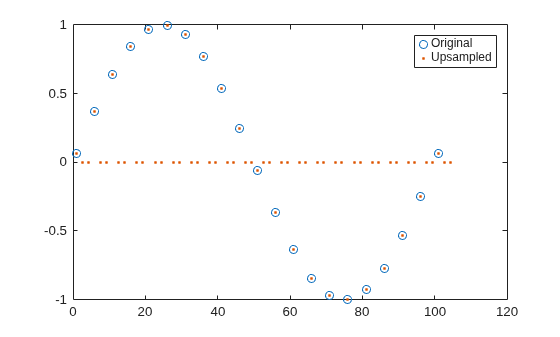
Figure contains an axes object. The axes object contains 2 objects of type line. One or more of the lines displays its values using only markers These objects represent Original, Upsampled.

Upsample the signal using an upsampling factor of 3 and a phase offset of 1. Compare the original and upsampled signals. Because of the specified phase offset, the first sample of the original signal matches with the second sample on the upsampled signal.

p = 1;
ty = (1:ts/n:ts*numel(x))';
y = upsample(x,n,p);
plot(ts/n*p+tx,x,"o",ty,y,".")
legend(["Original" "Upsampled"])
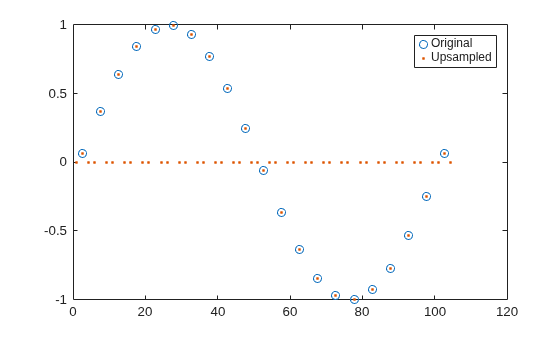
Figure contains an axes object. The axes object contains 2 objects of type line. One or more of the lines displays its values using only markers These objects represent Original, Upsampled.

Input Arguments

collapse all

Input array, specified as a vector or matrix. If x is a matrix, the function treats the columns as independent channels.

Example: cos(pi/4*(0:159)) + randn(1,160) specifies a sinusoid embedded in white Gaussian noise.

Example: cos(pi./[4;2]*(0:159))' + randn(160,2) specifies a two-channel noisy sinusoid.

Upsampling factor, specified as a positive integer.

Data Types: single | double

Offset, specified as a positive integer from 0 to n – 1.

Data Types: single | double

Output Arguments

collapse all

Upsampled array, returned as a vector or matrix. y has x × n samples.

Tip

To remove the imaging artifacts from the upsampled output y, apply a lowpass filter to y with cutoff normalized frequency of pi/n rad/sample. Alternatively, use the interp function.

Extended Capabilities

expand all

C/C++ Code Generation
Generate C and C++ code using MATLAB® Coder™.

GPU Code Generation
Generate CUDA® code for NVIDIA® GPUs using GPU Coder™.

Version History

Introduced before R2006a

expand all