Main Content

Receive Service Request

R2026b

Receive service request from ROS 2 network

Since R2024a

  • Receive Service Request block icon.

Libraries:
ROS Toolbox / ROS 2

Description

Use the Receive Service Request and Send Service Response blocks in the same model to implement a ROS 2 service server in Simulink®. The Receive Service Request block enables you to receive a ROS 2 service request message from a service client, process it in the model to construct an appropriate response, and then send the response to the client using a Send Service Response block. The service server is associated with the ROS 2 node of the Simulink model.

Depending on the parameter, the block can either check for new requests at each simulation step, outputting the request if available or repeating the last request if none arrives, or process requests immediately upon arrival, triggering an event signal to execute a Function-Call Subsystem asynchronously.

Depending on the Process Service Request parameter setting, the block either check for new requests at each simulation step or processes them immediately upon arrival. In the latter case, it triggers an event to handle the request asynchronously. This asynchronous mode is supported only for code generation.

Specify the name for your ROS 2 service, the service type, and the quality of service (QoS) parameters in the block mask. QoS parameters for this block must be compatible with the service clients to receive requests and send responses.

Note

For each Receive Service Request you add to a model, you must click Paired Send Response Block in the block mask to create a paired Send Service Response block. Adding a Send Service Response block from the library is not recommended.

Examples
Ports

Output

expand all

Indicates whether a new service request was received during the current sample time, returned as a logical. When the Process Service Request parameter is set to At sample time, this output returns 1 if a new service request was received since the last sample hit, and 0 otherwise. You can use this signal to trigger subsystems for synchronous processing of requests at the block’s sample time. If Process Service Request is set to Immediately on arrival, this port is not available, and the block instead provides the OnReqArrivalEvent output port for asynchronous processing.

Dependencies

  • To enable this output port, set the Process Service Request parameter to At sample time.

Data Types: Boolean

Event signal to trigger execution of subsystems when a new service request arrives, specified as a function-call signal. When the Process Service Request parameter is set to Immediately on arrival, this output port emits a function-call signal whenever a service request is received. Connect the port to a Function-Call Subsystem to process requests asynchronously upon arrival. If Process Service Request is set to At sample time, this port is not available, and the block instead provides the IsNew indicator output.

Dependencies

  • To enable this output port, set the Process Service Request parameter to Immediately on arrival.

Data Types: bus

Service request message, returned as a non-virtual bus corresponding to the service request type. The service request message type depends on the service type specified in the Service Type parameter.

Data Types: bus

Default response message, returned as a non-virtual bus corresponding to the default response message type.

Dependencies

Data Types: bus

Parameters

expand all

To edit block parameters interactively, use the Property Inspector. From the Simulink Toolstrip, on the Simulation tab, in the Prepare gallery, select Property Inspector.

Main

Service name, specified as a character vector. This is the name of the service server which clients can then use to connect and send service requests.

Service type, specified as a character vector. Each service name has a corresponding type. Click the Select button to select from a full list of supported ROS 2 service types.

If you are using a custom service type, first build the associated service definitions using the ros2genmsg function. Then, you can specify your custom service type using the Select button.

Check this box to enable the DefaultResp output.

Use this parameter to specify when the service server processes incoming service requests. Specify the parameter as one of these two options:

  • At sample time — Process service requests in sync with the sample time of the block.

  • Immediately on arrival — Process service requests asynchronously as soon as they arrive. Enabling asynchronous behavior disables the Sample time parameter in the dialog box.

Path to the Send Service Response block paired with this Receive Service Request block, specified as the following options:

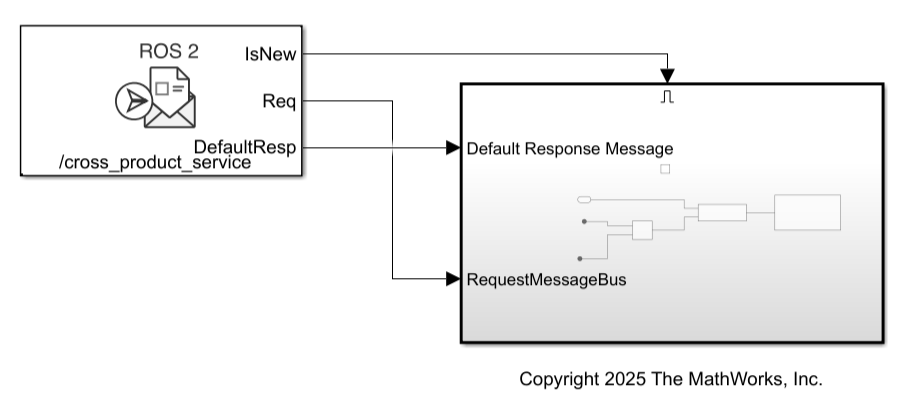
  • Create paired Send Response block inside Enable subsystem — Set the Process Service Request parameter to At sample time to enable this option. Click it to create a Enable subsystem that contains a paired Send Service Response block. In this case, the callback in the service server runs the response logic inside this subsystem, triggered by the IsNew output port. The response block executes only when a new request arrives, keeping processing aligned with the block’s sample time.

  • Create paired Send Response block inside Function-Call subsystem — Set the Process Service Request parameter to Immediately on arrival to enable this option. Click it to create a Function-Call subsystem that contains a paired Send Service Response block. In this case, the callback in the service server runs the response logic inside this subsystem, triggered by the OnReqArrivalEvent output port. The response block executes as soon as a new request arrives, keeping processing asynchronous with request arrival.

After you create a paired Send Service Response block by clicking the corresponding option, clicking the path displays and highlights the Send Service Response block in your model.

Tips

  • For correct service server implementation, only use the specified option from the block mask to create the Send Service Response associated with this Receive Service Request block. Adding a Send Service Response block from the library is not recommended.

Interval between outputs, specified as –1 or a scalar value. In simulation, the sample time follows simulation time and not actual wall-clock time.

This default value indicates that the block sample time is inherited.

For more information about the inherited sample time type, see Specify Sample Time (Simulink).

Dependencies

  • When the Process Service Request parameter is set to Immediately on arrival, the block ignores this parameter. In asynchronous mode, message processing is event-driven and not governed by a fixed sample time.

Type of ROS 2 callback group to assign to the service server, specified as one of these values:

  • Default — Assign the service server to the default callback group of the ROS 2 node. The default callback group is mutually exclusive, which means that only one callback in the group can execute at a time. This is the standard ROS 2 behavior.

  • Mutually exclusive — Assign the service server to a named mutually exclusive callback group. Only one callback in this group can execute at a time, but callbacks in different groups can execute concurrently. Specify the group name using the Callback Group Name parameter. Blocks that share a name share a group.

  • Reentrant — Assign the service server to a reentrant callback group. Multiple callbacks in this group can execute concurrently. Use this option when your algorithm is thread-safe and you need concurrent callback execution for improved throughput.

    Note

    When using a reentrant callback group:

    • The ROS 2 executor might run multiple instances of the same callback concurrently.

    • Service requests might be processed out of order.

    Use reentrant callback groups only when your algorithm is thread-safe and does not depend on strict ordering.

    If a service server callback waits for data from a subscriber and both are in the same mutually exclusive callback group (including the default callback group), a deadlock occurs. Assign the service server and subscriber to different callback groups or use a reentrant callback group to avoid this scenario.

Name of the callback group, specified as a character vector. Use this parameter to assign the service server to a specific callback group. Multiple blocks that share the same callback group name belong to the same callback group, allowing you to control which callbacks are grouped together for concurrency management.

Dependencies

To enable this parameter, set the Callback group type parameter to Mutually exclusive.

Quality of Service (QoS)

Determines the mode of storing requests in the queue. If the queue fills with requests waiting to be processed, then old requests will be dropped to make room for new. If set to Keep last, the queue stores the number of requests set by the Depth parameter. If set to Keep all, the queue stores all requests up to the MATLAB® resource limits.

Size of the request queue in number of requests stored in the queue, specified as a non-negative scalar integer.This only applies when History is set to Keep last.

Requirement on delivery guarantee of request and response, specified as Reliable or Best effort. If Reliable, then delivery is guaranteed, but may retry multiple times. If Best effort, then attempt delivery and do not retry. Reliable setting is recommended for services.

Note

The quality of service settings must be compatible between service servers and clients for a connection to be made.

Requirement on persistence of the client, specified as Volatile or Transient local. If Volatile, then requests are not required to persist. If Transient local, then the server will require clients to persist and receive responses for the number of previous requests specified by Depth. Volatile setting is recommended to prevent servers from receiving out of date requests in the event of a server restart.

Note

The quality of service settings must be compatible between service servers and clients for a connection to be made.

Maximum amount of time allowed between receiving a service request and sending a response, specified as a positive scalar. The Deadline QoS parameter of service clients sending requests to the block must be greater than or equal to the value of this parameter.

The default value is Inf which implies that after the service server receives a service request, it can wait for an infinite period of time before sending response to that request.

Note

The quality of service settings must be compatible between service servers and clients for a connection to be made.

Length of time a service request is considered valid, specified as a positive scalar. The block does not process service requests persisting longer than the specified lifespan in the queue.

The default value is Inf which implies that a service request received by service server is considered valid for infinite period of time.

Note

The quality of service settings must be compatible between service servers and clients for a connection to be made.

Level of liveliness reporting provided by the block and expected from the connected service clients, specified as automatic.

Liveliness set to automatic implies that after the block receives a service request from a connected client, the block considers that client to be alive for another Lease Duration.

Note

The quality of service settings must be compatible between service servers and clients for a connection to be made.

Maximum amount of time before which a connected service client has to assert liveliness, specified as a positive scalar.

The default value is Inf which implies that the service client connected to the server can assert liveliness for infinite period of time.

Note

The quality of service settings must be compatible between service servers and clients for a connection to be made.

Extended Capabilities

expand all

Version History

Introduced in R2024a

expand all