vaelstmAD
R2026bCreate anomaly detector model that combines variational autoencoder (VAE) and long short-term memory (LSTM) networks to detect anomalies in time series
Since R2025a
Description
Add-On Required: This feature requires the Time Series Anomaly Detection for MATLAB add-on.
detector = vaelstmAD(numChannels)VaelstmDetector model with numChannels channels for each
time series input to the detector.
After you create the detector model, you can train, test, and modify it to obtain the level of performance you require. For more information about the anomaly detector workflow, see Detecting Anomalies in Time Series.
This detector requires Deep Learning Toolbox™
detector = vaelstmAD(
sets additional options using one or more name-value arguments.numChannels,Name=Value)
For example, detector = vaelstmAD(3,Normalization="range") creates a
detector model for data containing three input channels and with a data normalization method
of "range", which, by default, rescales the data range to [0 1].
Examples
Load the file sineWaveAnomalyData.mat, which contains two sets of synthetic three-channel sinusoidal signals.
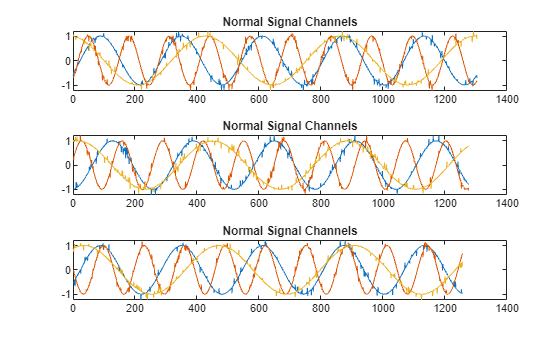
sineWaveNormal contains 10 sinusoids of stable frequency and amplitude. Each signal has a series of small-amplitude impact-like imperfections. The signals have different lengths and initial phases.
load sineWaveAnomalyData.mat sineWaveNormal sineWaveAbnormal
s1 = 3;
Plot Input Signals
Plot the first three normal signals. Each signal contains three input channels.
tiledlayout("vertical")
ax = zeros(s1,1);
for kj = 1:s1
ax(kj) = nexttile;
    plot(sineWaveNormal{kj})
    title("Normal Signal Channels")
end
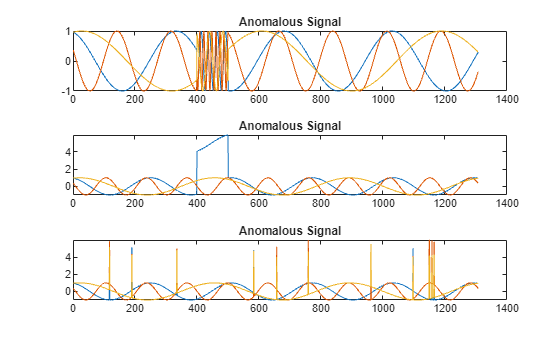
sineWaveAbnormal contains three signals, all of the same length. Each signal in the set has one or more anomalies.
All channels of the first signal have an abrupt change in frequency that lasts for a finite time.
The second signal has a finite-duration amplitude change in one of its channels.
The third signal has spikes at random times in all channels.
Plot the three signals with anomalies.
tiledlayout("vertical")
ax = zeros(s1,1);
for kj = 1:s1
ax(kj) = nexttile;
    plot(sineWaveAbnormal{kj})
    title("Anomalous Signal")
end
Create Detector
Use the vaelstAD function to create a VaelstmDetector object with default options.
detector_vaelstm = vaelstmAD(3)
detector_vaelstm =
  VaelstmDetector with properties:

    ObservationWindowLength: 100
      DetectionWindowLength: 10
        NumDownsampleLayers: 2
                 FilterSize: [5 5]
         DropoutProbability: 0.2500
                 NumFilters: [32 32]
             LatentSpaceDim: 5
             NumHiddenUnits: [16 16]
             TrainingStride: 1
                  IsTrained: 0
                NumChannels: 3
                     Layers: {[9×1 nnet.cnn.layer.Layer]  [6×1 nnet.cnn.layer.Layer]  [4×1 nnet.cnn.layer.Layer]}
                      Dlnet: {[1×1 dlnetwork]  [1×1 dlnetwork]  [1×1 dlnetwork]}
                  Threshold: []
            ThresholdMethod: "kSigma"
         ThresholdParameter: 3
          ThresholdFunction: []
              Normalization: "zscore"
            DetectionStride: 10
Train Detector
Prepare to train detector_Vaelstm by customizing a trainingOptions option set with a solver of "adam" and a limit of 100 for the number of LSTM training epochs. Set VerboseFrequency to 500 to limit the amount of status outputs without reducing the amount of training.
trainopts = trainingOptions("adam",MaxEpochs=100, VerboseFrequency=500);Train detector_Vaelstm using the normal data. Specify a limit of 8 (default is 10) for VAE training epochs. VAE training does not use trainingOptions specifications.
detector_vaelstm = train(detector_vaelstm,sineWaveNormal,trainingOpts=trainopts,VaeMaxEpochs=8);
VAE training in progress...
|=====================================================================|
| Iteration | Epoch |  Time Elapsed  | Base Learning |  VAE Training  |
|           |       |   (hh:mm:ss)   |      Rate     |      Loss      |
|=====================================================================|
|         1 |     1 |       00:00:00 |        0.0010 |        27.2797 |
|        50 |     1 |       00:00:02 |        0.0010 |         6.5803 |
|       100 |     2 |       00:00:04 |        0.0010 |         5.9021 |
|       150 |     2 |       00:00:06 |        0.0010 |         5.8214 |
|       200 |     3 |       00:00:08 |        0.0010 |         5.3328 |
|       250 |     3 |       00:00:10 |        0.0010 |         5.3979 |
|       300 |     4 |       00:00:13 |        0.0010 |         5.3392 |
|       350 |     4 |       00:00:15 |        0.0010 |         5.3896 |
|       400 |     5 |       00:00:17 |        0.0010 |         5.4085 |
|       450 |     5 |       00:00:19 |        0.0010 |         5.0810 |
|       500 |     6 |       00:00:21 |        0.0010 |         5.3262 |
|       550 |     6 |       00:00:23 |        0.0010 |         5.2490 |
|       600 |     7 |       00:00:25 |        0.0010 |         5.3297 |
|       650 |     7 |       00:00:27 |        0.0010 |         5.1760 |
|       700 |     8 |       00:00:29 |        0.0010 |         5.1214 |
|       750 |     8 |       00:00:31 |        0.0010 |         4.9849 |
|=====================================================================|
VAE training completed.
Preparing data for LSTM training...
LSTM training in progress...
    Iteration    Epoch    TimeElapsed    LearnRate    TrainingLoss
    _________    _____    ___________    _________    ____________
            1        1       00:00:00        0.001          2.9286
          500        6       00:00:08        0.001          1.5617
         1000       11       00:00:16        0.001          1.5378
         1500       17       00:00:23        0.001          1.5893
         2000       22       00:00:30        0.001          1.6214
         2500       28       00:00:38        0.001          1.5011
         3000       33       00:00:47        0.001          1.6012
         3500       39       00:00:55        0.001          1.5583
         4000       44       00:01:04        0.001          1.5676
         4500       49       00:01:12        0.001          1.5671
         5000       55       00:01:19        0.001          1.5413
         5500       60       00:01:28        0.001          1.5398
         6000       66       00:01:36        0.001          1.5095
         6500       71       00:01:44        0.001          1.5786
         7000       77       00:01:52        0.001          1.6137
         7500       82       00:02:00        0.001          1.5439
         8000       87       00:02:08        0.001          1.6162
         8500       93       00:02:15        0.001          1.5325
         9000       98       00:02:24        0.001          1.5678
         9200      100       00:02:27        0.001          1.5593
Training stopped: Max epochs completed
LSTM training completed.
Computing threshold...
Threshold computation completed.
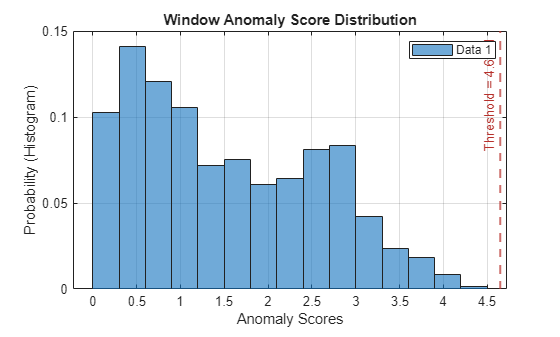
View the threshold that train computes and saves within detector_vaelstm. This computed value is influenced by random factors, such as which subsets of the data are used for training, and can change somewhat for different training sessions and different machines.
thresh = detector_vaelstm.Threshold
thresh =
4.6481
Plot the histogram of the anomaly scores for the normal data. Each score is calculated over a single detection window. The threshold, plotted as a vertical line, does not always completely bound the scores.
plotHistogram(detector_vaelstm,sineWaveNormal)
Use Detector to Identify Anomalies
Use the detect function to determine the anomaly scores for the anomalous data.
results = detect(detector_vaelstm, sineWaveAbnormal)
results = 3×1 cell array
    121×3 table
    121×3 table
    121×3 table
results is a cell array that contains three tables, one table for each channel. Each cell table contains three variables: WindowLabel, WindowAnomalyScore, and WindowStartIndices. Confirm the table variable names.
varnames = results{1}.Properties.VariableNamesvarnames = 1×3 cell array
"'Labels'" "'AnomalyScores'" "'StartIndices'"
Plot Results
Plot a histogram that shows the normal data, the anomalous data, and the threshold in one plot.
plotHistogram(detector_vaelstm,sineWaveNormal,sineWaveAbnormal)
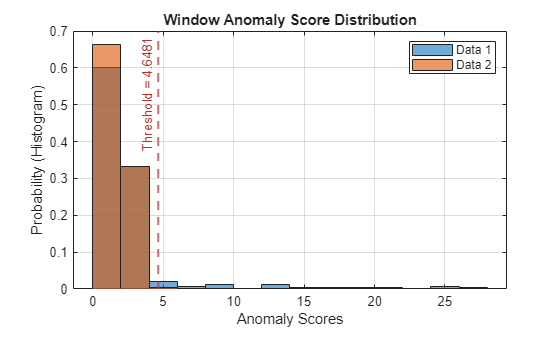
The histogram uses different colors for the normal and anomalous data.
Plot the detected anomalies of the third abnormal signal set.
plot(detector_vaelstm,sineWaveAbnormal{3})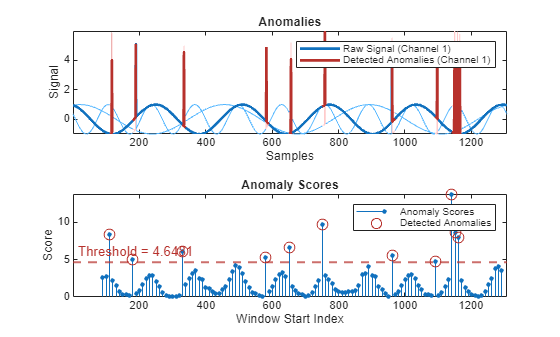
The top plot shows an overlay of red where the anomalies occur. The bottom plot shows how effective the threshold is at dividing the normal from the abnormal scores for Signal set 3.

