Main Content

phased.HeterogeneousConformalArray

Heterogeneous conformal array

Description

The phased.HeterogeneousConformalArray System object™ constructs a conformal array containing a heterogeneous set of antenna elements. A heterogeneous array is an array which consists of different kinds of antenna elements or an array of different kinds of microphone elements. A conformal array can have elements in any position pointing in any direction.

To compute the response for each element in the array for specified directions:

  1. Create the phased.HeterogeneousConformalArray object and set its properties.

  2. Call the object with arguments, as if it were a function.

To learn more about how System objects work, see What Are System Objects?

Creation

Description

array = phased.HeterogeneousConformalArray creates a heterogeneous conformal array System object, array. This object models a heterogeneous conformal array formed with different kinds of sensor elements.

array = phased.HeterogeneousConformalArray(Name=Value) creates the object, array, with each specified property Name set to the specified Value. You can specify additional name-value pair arguments in any order as (Name1=Value1,...,NameN=ValueN).

example

Properties

expand all

Unless otherwise indicated, properties are nontunable, which means you cannot change their values after calling the object. Objects lock when you call them, and the release function unlocks them.

If a property is tunable, you can change its value at any time.

For more information on changing property values, see System Design in MATLAB Using System Objects.

Set of elements used in the sensor array, specified as a row MATLAB® cell array. Elements specified in the ElementSet property must be either Phased Array System Toolbox™ antennas, microphones, or transducers System objects or Antenna Toolbox™ System object. In addition, all specified antenna elements must have the same polarization capability.

Data Types: double

Elements location assignment.

The mapping of elements in the array, specified as a length-N row vector. The property assigns elements to their locations in the array using the indices into the ElementSet property. In this vector, N represents the number of elements in the array. The values in the vector specified by ElementIndices must be less than or equal to the number of entries in the ElementSet property.

Data Types: double

The positions of the elements in the conformal array, specified as a 3-by-N matrix, where N indicates the number of elements in the conformal array. Each column of ElementPosition represents the position, in the form [x; y; z] (in meters), of a single element in the local coordinate system of the array. The local coordinate system has its origin at an arbitrary point.

Data Types: double

The normal directions of the elements in the conformal array, specified as either a 2-by-N matrix or a 2-by-1 column vector. Angle units are degrees. The variable N indicates the number of elements in the array. If the value of ElementNormal is a matrix, each column specifies the normal direction of the corresponding element in the form [azimuth;elevation] with respect to the local coordinate system. The local coordinate system aligns the positive x-axis with the direction normal to the conformal array. If the value of ElementNormal is a 2-by-1 column vector, it specifies the pointing direction of all elements in the array.

You can use the ElementPosition and ElementNormal properties to represent any arrangement in which pairs of elements differ by certain transformations. The transformations can combine translation, azimuth rotation, and elevation rotation. However, you cannot use transformations that require rotation about the normal.

Data Types: double

Element tapering or weighting, specified as a complex-valued scalar, 1-by-N row vector, or N-by-1 column vector. The quantity N is the number of elements in the array as determined by the size of the ElementIndices property. Tapers, also known as weights, are applied to each sensor element in the sensor array and modify both the amplitude and phase of the received data. If Taper is a scalar, the same taper value is applied to all elements. If Taper is a vector, each taper value is applied to the corresponding sensor element.

Data Types: double

Usage

Description

RESP = array(FREQ,ANG) returns the array elements’ responses RESP at operating frequencies specified in FREQ and directions specified in ANG.

Input Arguments

expand all

Operating frequencies of array, specified as a length-L row vector. Values are within the frequency range of an array element, specified by either the FrequencyRange or FrequencyVector property, depending on the type of element in the array. The element has zero response at frequencies outside that range. Units are in Hz.

Data Types: double

Response direction, specified as. a real-valued 2-by-M matrix or a real-valued row vector of length M. Units are in degrees,

If ANG is a 2-by-M matrix, each column of the matrix specifies the direction in the form [azimuth;elevation]. The azimuth angle must lie between –180° and 180°, inclusive. The elevation angle must lie between –90° and 90°, inclusive.

If ANG is a row vector of length M, each element specifies the azimuth angle of the direction. In this case, the corresponding elevation angle is assumed to be 0°.

Data Types: double

Output Arguments

expand all

Voltage responses of the phased array. The output depends on whether the array supports polarization or not.

  • If the array is not capable of supporting polarization, the voltage response, RESP, has the dimensions N-by-M-by-L. N is the number of elements in the array. The dimension M is the number of angles specified in ANG. L is the number of frequencies specified in FREQ. For any element, the columns of RESP contain the responses of the array elements for the corresponding direction specified in ANG. Each of the L pages of RESP contains the responses of the array elements for the corresponding frequency specified in FREQ.

  • If the array is capable of supporting polarization, the voltage response, RESP, is a MATLAB struct containing two fields, RESP.H and RESP.V. The field, RESP.H, represents the array’s horizontal polarization response, while RESP.V represents the array’s vertical polarization response. Each field has the dimensions N-by-M-by-L. N is the number of elements in the array, and M is the number of angles specified in ANG. L is the number of frequencies specified in FREQ. Each column of RESP contains the responses of the array elements for the corresponding direction specified in ANG. Each of the L pages of RESP contains the responses of the array elements for the corresponding frequency specified in FREQ.

Object Functions

To use an object function, specify the System object as the first input argument. For example, to release system resources of a System object named obj, use this syntax:

release(obj)

expand all

beamwidthCompute and display beamwidth of an array
collectPlaneWaveSimulate received plane waves
directivityDirectivity of heterogeneous conformal array
getElementNormalNormal vector to array elements
getElementPositionPositions of array elements
getNumElementsNumber of elements in array
getTaperArray element tapers
isPolarizationCapablePolarization capability
patternPlot heterogeneous conformal array pattern
patternAzimuthPlot heterogeneous conformal array directivity or pattern versus azimuth
patternElevationPlot heterogeneous conformal array directivity or pattern versus elevation
perturbationsPerturbations defined on array
perturbedArrayApply perturbations to phased array
perturbedPatternDisplay pattern of perturbed array
viewArrayView array geometry

expand all

stepRun System object algorithm
releaseRelease resources and allow changes to System object property values and input characteristics
resetReset internal states of System object

Examples

collapse all

Construct an 8-element uniform circular array using the phased.HeterogeneousConformalArray System object™. Assume the operating frequency is 1 GHz. Find the response of each element in this array in the direction of 30° azimuth and 5°.

antenna1 = phased.CosineAntennaElement('CosinePower',1.5);
antenna2 = phased.CosineAntennaElement('CosinePower',1.8);
N = 8;
azang = (0:N-1)*360/N-180;
array = phased.HeterogeneousConformalArray(...
    'ElementPosition',...
    [cosd(azang);sind(azang);zeros(1,N)],...
    'ElementNormal', zeros(2,N),...
    'ElementSet',{antenna1,antenna2},...
    'ElementIndices',[1 1 1 1 2 2 2 2]);
fc = 1e9;
ang = [30;5];
resp = array(fc,ang)
resp = 8×1

    0.8013
    0.8013
    0.8013
    0.8013
    0.7666
    0.7666
    0.7666
    0.7666

Construct an 8-element heterogeneous uniform circular array (UCA) using the ConformalArray System object™. Four of the elements have a cosine pattern with a power of 1.6 while the remaining elements have a cosine pattern with a power of 2.0. Plot the 3-D power response. Assume a 1 GHz operating frequency. The wave propagation speed is the speed of light.

Construct the Array

sElement1 = phased.CosineAntennaElement(CosinePower=1.6);
sElement2 = phased.CosineAntennaElement(CosinePower=2.0);
N = 8;
azang = (0:N-1)*360/N-180;
sArray = phased.HeterogeneousConformalArray(...
    ElementSet={sElement1,sElement2}, ...
    ElementIndices=[1 1 1 1 2 2 2 2], ...
    ElementPosition=[cosd(azang);sind(azang);zeros(1,N)], ...
    ElementNormal=[azang;zeros(1,N)]);
c = physconst("LightSpeed");
fc = 1e9;

Create the 3-D Power Pattern

pattern(sArray,fc,[-180:180],[-90:90], ...
    CoordinateSystem="polar", ...
    Type="power")
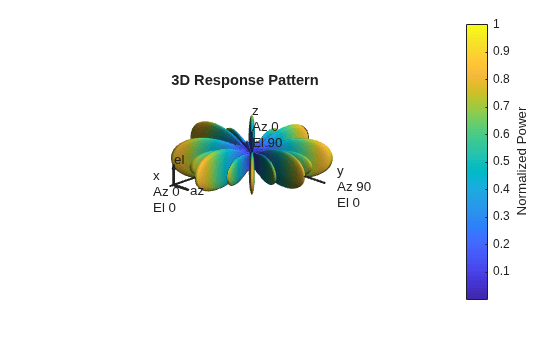
Figure contains an axes object. The hidden axes object with title 3D Response Pattern contains 13 objects of type surface, line, text, patch.

References

[1] Josefsson, L. and P. Persson. Conformal Array Antenna Theory and Design. Piscataway, NJ: IEEE Press, 2006.

[2] Van Trees, H. Optimum Array Processing. New York: Wiley-Interscience, 2002.

Extended Capabilities

expand all

Version History

Introduced in R2013a