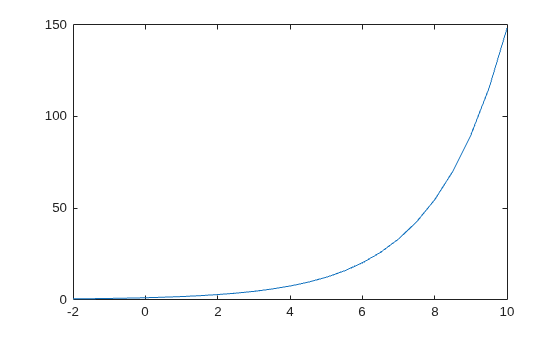
exp
R2026bExponential
Syntax
Description
Examples
Euler's identity is the equality .
Compute the value of .
Y = exp(1i*pi)
Y = -1.0000 + 0.0000i
Input Arguments
Input array, specified as a scalar, vector, matrix, multidimensional array, table, or timetable.
Data Types: single | double | table | timetable
Complex Number Support: Yes
Output Arguments
Exponential values, returned as a scalar, vector, matrix, multidimensional array, table, or timetable.
For real values of X in the interval (-Inf, Inf), Y is
in the interval (0,Inf). For
complex values of X, Y is complex.
The data type of Y is the same as that of X.
Extended Capabilities
The
exp function fully supports tall arrays. For more
information, see Tall Arrays.
C/C++ Code Generation
Generate C and C++ code using MATLAB® Coder™.
GPU Code Generation
Generate CUDA® code for NVIDIA® GPUs using GPU Coder™.
The exp function supports HDL code generation with
native floating-point for the single data type. For more
information, see Support for Functions in Math Function Block (HDL Coder).
The exp
function fully supports thread-based environments. For more information, see Run MATLAB Functions in Thread-Based Environment.
The
exp function fully supports GPU arrays.
To run the function on a GPU, specify the input data as a gpuArray (Parallel Computing Toolbox). For more
information, see Run MATLAB Functions on a GPU (Parallel Computing Toolbox).
The
exp function fully supports distributed arrays. For more
information, see Run MATLAB Functions with Distributed Arrays (Parallel Computing Toolbox).
Version History
Introduced before R2006aThe exp function can calculate on all variables within a table or
timetable without indexing to access those variables. All variables must have data types
that support the calculation. For more information, see Direct Calculations on Tables and Timetables.
MATLAB Command
You clicked a link that corresponds to this MATLAB command:
Run the command by entering it in the MATLAB Command Window. Web browsers do not support MATLAB commands.
Select a Web Site
Choose a web site to get translated content where available and see local events and offers. Based on your location, we recommend that you select: .
You can also select a web site from the following list
How to Get Best Site Performance
Select the China site (in Chinese or English) for best site performance. Other MathWorks country sites are not optimized for visits from your location.
Americas
- América Latina (Español)
- Canada (English)
- United States (English)
Europe
- Belgium (English)
- Denmark (English)
- Deutschland (Deutsch)
- España (Español)
- Finland (English)
- France (Français)
- Ireland (English)
- Italia (Italiano)
- Luxembourg (English)
- Netherlands (English)
- Norway (English)
- Österreich (Deutsch)
- Portugal (English)
- Sweden (English)
- Switzerland
- United Kingdom (English)