Main Content

Valve Piston (IL-PB)

R2026b

Valve piston for hydromechanical valves

Since R2026b

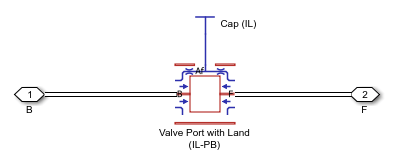
  • Block icon

Libraries:
Simscape / Fluids / Isothermal Liquid / Valves & Orifices / Hydromechanical Valves

Description

The Valve Piston (IL-PB) block represents a piston that blocks liquid flow within the valve body. The block models pressure force on the piston.

Port Relations

Ports F and B are hydromechanical valve composite ports that have valve_body, spool, and fluid nodes, where:

  • The positions of F.valve_body and B.valve_body are equal because the block does not model valve body length.

  • The position of F.spool relative to B.spool is equal to the value of the Piston width along valve axis parameter.

  • When you clear Side B contains liquid or Side F contains liquid, the named side of the block does not contain liquid and does not use the node B.fluid or F.fluid, respectively. The adjacent component cannot contain liquid.

Block Sub-Components

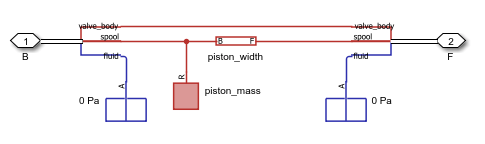
When you select Side B contains liquid and Side F contains liquid, the Valve Piston (IL-PB) block is equivalent to a composite component that comprises these blocks:

The equivalent diagram is:
system screenshot

When you select either Side B contains liquid or Side F contains liquid, the equivalent diagram is the same, but uses either a Valve Port with Land Edge at B (IL-PB) or Valve Port with Land Edge at F (IL-PB) block.

When you clear Side B contains liquid and Side F contains liquid, the Valve Piston (IL-PB) block is equivalent to a composite component that comprises these blocks:

The equivalent diagram is:

system screenshot

Variables

To set the priority and initial target values for the block variables prior to simulation, use the Initial Targets section in the block dialog box or Property Inspector. For more information, see Set Priority and Initial Target for Block Variables.

Nominal values provide a way to specify the expected magnitude of a variable in a model. Using system scaling based on nominal values increases the simulation robustness. Nominal values can come from different sources, one of which is the Nominal Values section in the block dialog box or Property Inspector. For more information, see Modify Nominal Values for a Block Variable.

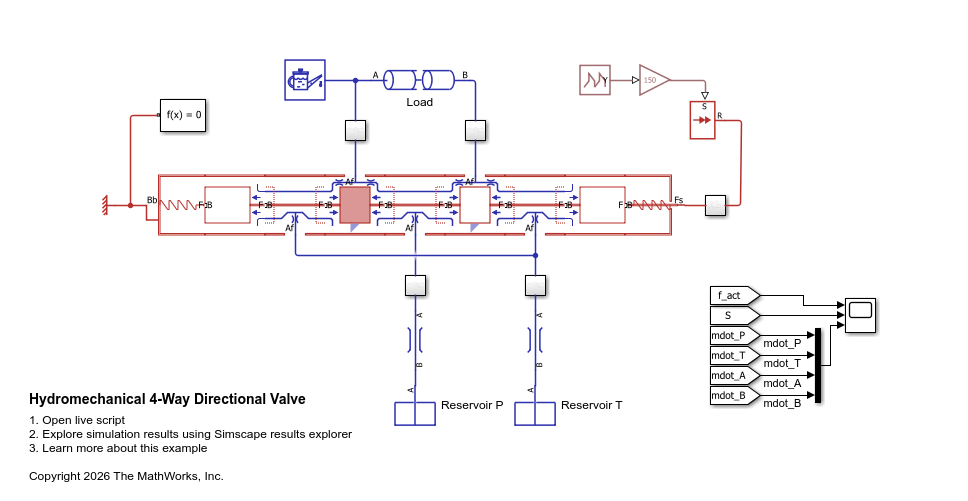
Examples
Ports

Conserving

expand all

Hydromechanical valve composite port that comprises three nodes:

  • B.valve_body — Position-based translational node along the valve body.

  • B.spool — Position-based translational node that moves along the spool. This node represents the side of the piston.

  • B.fluid — Isothermal liquid node associated with the flow path inside the valve. If you select Side B contains liquid, this node represents flow to and from an adjacent valve component. Otherwise, this node is unused.

Programmatic Use

Port: B

Hydromechanical valve composite port that comprises three nodes:

  • F.valve_body — Position-based translational node along the valve body.

  • F.spool — Position-based translational node that moves along the spool. This node represents the side of the piston.

  • F.fluid — Isothermal liquid node associated with the flow path inside the valve. If you select Side F contains liquid, this node represents flow to and from an adjacent valve component. Otherwise, this node is unused.

Programmatic Use

Port: F

Parameters

expand all

Piston width, defined along the direction of the valve axis.

Programmatic Use

Parameter: piston_width

Option to model liquid on side B.

Programmatic Use

Parameter: contains_liquid_B
Values: "true" | "false"

Option to model liquid on side F.

Programmatic Use

Parameter: contains_liquid_F
Values: "true" | "false"

Effective surface area of the piston on side B over which the fluid pressure acts.

Dependencies

To enable this parameter, select Side B contains liquid.

Programmatic Use

Parameter: piston_area_B

Effective surface area of the piston on side F over which the fluid pressure acts.

Dependencies

To enable this parameter, select Side F contains liquid.

Programmatic Use

Parameter: piston_area_F

Option to model piston mass.

Programmatic Use

Parameter: enable_piston_mass
Values: "true" | "false"

Mass of the piston.

Dependencies

To enable this parameter, select Enable piston mass.

Programmatic Use

Parameter: piston_mass

Option to model damping between the piston and the valve body.

Dependencies

To enable this parameter, select Side B contains liquid or Side F contains liquid.

Programmatic Use

Parameter: enable_damping
Values: "true" | "false"

Scale factor for damping between the piston and the valve body. Adjust the value of this parameter to empirically tune the damping in the valve.

Dependencies

To enable this parameter, select Enable damping between piston and valve body.

Programmatic Use

Parameter: damping_scale

Outer diameter of the piston.

Dependencies

To enable this parameter, select Enable damping between piston and valve body.

Programmatic Use

Parameter: piston_diameter

Distance between the outer piston edge and the valve body, defined along the radial direction.

Dependencies

To enable this parameter, select Enable damping between piston and valve body.

Programmatic Use

Parameter: radial_clearance

Extended Capabilities

expand all

C/C++ Code Generation
Generate C and C++ code using Simulink® Coder™.

Version History

Introduced in R2026b