Main Content

dsp.Chirp

R2026b

Generate swept-frequency cosine (chirp) signal

Description

The dsp.Chirp System object™ generates a swept-frequency cosine (chirp) signal. The chirp function also generates a swept-frequency cosine (chirp) signal. However, the object can process large streams of real-time data and handle system states automatically. The function performs one-time computations on data that is readily available and cannot handle system states. For a comparison between the two, see System Objects vs MATLAB Functions.

To generate the chirp signal:

  1. Create the dsp.Chirp object and set its properties.

  2. Call the object with arguments, as if it were a function.

To learn more about how System objects work, see What Are System Objects?

Creation

Description

chirp = dsp.Chirp returns a chirp signal, chirp, with unity amplitude.

chirp = dsp.Chirp(PropertyName=Value) sets properties using one or more name-value arguments. For example, to specify a logarithmic frequency sweep type, set Type to "Logarithmic".

example

Properties

expand all

Unless otherwise indicated, properties are nontunable, which means you cannot change their values after calling the object. Objects lock when you call them, and the release function unlocks them.

If a property is tunable, you can change its value at any time.

For more information on changing property values, see System Design in MATLAB Using System Objects.

Shape of the frequency sweep, specified as "Swept cosine", "Linear", "Logarithmic", or "Quadratic". This property specifies how the output instantaneous frequency sweep varies over time.

Direction of the frequency sweep, specified as "Unidirectional" or "Bidirectional". When you set this property to "Unidirectional", the frequency sweeps from the initial frequency to the target frequency. When you set this property to "Bidirectional", the frequency sweeps from the initial frequency to the target frequency and back.

Frequency at the start of the sweep, specified as a nonnegative scalar in Hz.

This property specifies the initial instantaneous frequency in hertz of the output chirp signal. When the sweep is logarithmic, the initial frequency must be greater than 0 and less than the target frequency specified by the TargetFrequency property.

Tunable: Yes

Data Types: single | double | int8 | int16 | int32 | int64 | uint8 | uint16 | uint32 | uint64

Target frequency, specified as a nonnegative scalar in Hz.

When you set the Type property to "Linear", "Quadratic", or "Logarithmic", this property specifies the instantaneous frequency of the output signal in hertz at the target time. When you set the Type property to "Swept cosine", the target frequency is the instantaneous frequency of the output at half the target time. Also, when the sweep is logarithmic, the target frequency must be greater than the initial frequency, specified by the InitialFrequency property.

Tunable: Yes

Data Types: single | double | int8 | int16 | int32 | int64 | uint8 | uint16 | uint32 | uint64

Time duration of the frequency sweep, specified as a positive scalar.

When you set the SweepDirection property to "Unidirectional", the sweep time in seconds is the period of the output frequency sweep. When you set the SweepDirection property to "Bidirectional", the sweep time is half the period of the output frequency sweep. The sweep time must be greater than or equal to the target time specified by the TargetTime property.

The following diagram illustrates the relationship between the sweep time, target time, initial frequency, and target frequency for a unidirectional linear sweep.

Tunable: Yes

Data Types: single | double | int8 | int16 | int32 | int64 | uint8 | uint16 | uint32 | uint64

Since R2026b

Mode to inherit target time from sweep time, specified as one of these:

  • true — Inherit target time from sweep time.

  • false — Specify target time using the TargetTime property. The target time must be less than or equal to the sweep time.

Data Types: logical

Time at which the chirp reaches the specified target frequency, specified as a nonnegative scalar. The target time must be less than or equal to the sweep time.

When you set the Type property to "Linear", "Quadratic", or "Logarithmic", this property specifies the target time in seconds at which the target frequency is reached. When you set the Type property to "Swept cosine", this property specifies the time at which the sweep reaches 2ftgt – finit Hz, where ftgt is the TargetFrequency and finit is the InitialFrequency.

Tunable: Yes

Dependencies

To enable this property, set InheritTargetTime to false.

Data Types: single | double | int8 | int16 | int32 | int64 | uint8 | uint16 | uint32 | uint64

Phase offset of the frequency sweep, specified as a real scalar. This property determines the initial phase of the output in radians at time t = 0.

Tunable: Yes

Data Types: single | double | int8 | int16 | int32 | int64 | uint8 | uint16 | uint32 | uint64

Sampling rate of the frequency sweep, specified as a positive scalar in Hz.

Data Types: single | double

Number of samples to buffer into each output, specified as a positive integer.

Data Types: single | double | int8 | int16 | int32 | int64 | uint8 | uint16 | uint32 | uint64

Data type of the chirp signal, specified as double or single.

Usage

Description

y = chirp() returns a swept-frequency cosine output, y.

example

Output Arguments

expand all

Swept-frequency cosine output, returned as a scalar or a column vector. The length of the output vector equals the value you specify in the SamplesPerFrame property.

Data Types: single | double

Object Functions

To use an object function, specify the System object as the first input argument. For example, to release system resources of a System object named obj, use this syntax:

release(obj)

expand all

stepRun System object algorithm
releaseRelease resources and allow changes to System object property values and input characteristics
resetReset internal states of System object

Examples

collapse all

Generate a bidirectional chirp signal with these settings:

  • Target frequency of 25 Hz

  • Initial frequency of 0 Hz

  • Sweep time of 1 second

  • Target time of 1 second

  • 400 samples per frame

  • Sample rate of 400 Hz

Inherit Target Time From Sweep Time

Construct a dsp.Chirp object. Set the InheritTargetTime property to true to inherit the target time from the sweep time.

chirp = dsp.Chirp(...
    SweepDirection="Bidirectional", ...
    TargetFrequency=25, ...
    InitialFrequency=0,...
    InheritTargetTime=true, ...
    SweepTime=1, ...
    SamplesPerFrame=400, ...
    SampleRate=400)
chirp = 
  dsp.Chirp with properties:

                 Type: 'Linear'
       SweepDirection: 'Bidirectional'
     InitialFrequency: 0
      TargetFrequency: 25
            SweepTime: 1
    InheritTargetTime: true
         InitialPhase: 0
      SamplesPerFrame: 400
           SampleRate: 400
       OutputDataType: 'double'

Plot the chirp signal.

plot(chirp());
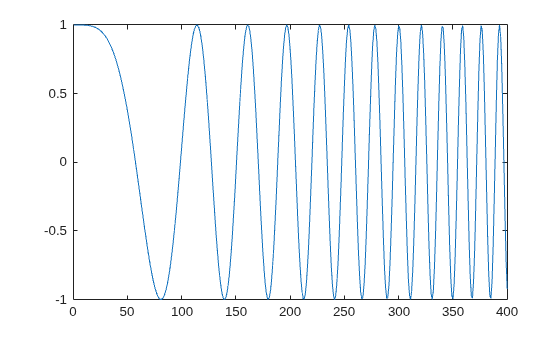
Figure contains an axes object. The axes object contains an object of type line.

Initialize the spectrumAnalyzer object to show the spectrogram.

specAna = spectrumAnalyzer(ViewType="spectrogram",...
    Method="welch",...
    FrequencyResolutionMethod="window-length",...
    WindowLength=128,...
    FFTLengthSource="auto",...
    SpectrumUnits="dBm",...
    TimeSpanSource="property",...
    TimeSpan=6,...
    FrequencySpan="start-and-stop-frequencies",...
    StartFrequency=0,...
    StopFrequency=40,...
    Window="hamming",...
    OverlapPercent=80,...
    SampleRate=400,...
    FrequencyOffset=0,...
    Colormap="parula",...
    AveragingMethod="exponential",...
    ForgettingFactor=0,...
    PlotAsTwoSidedSpectrum=true)
specAna = 
  spectrumAnalyzer handle with properties:

               InputDomain: 'time'
              SpectrumType: 'power'
                  ViewType: 'spectrogram'
                SampleRate: 400
                    Method: 'welch'
    PlotAsTwoSidedSpectrum: 1
            FrequencyScale: 'linear'
               AxesScaling: 'auto'

  Show all properties

Stream in the chirp signal and view its spectrogram in the spectrum analyzer.

for i = 1:1000
    input = chirp();
    specAna(input);
end
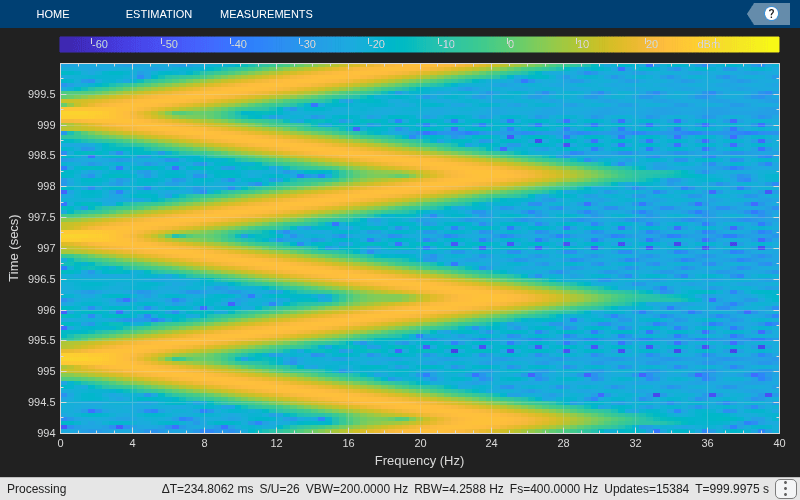
Manually Specify Target Time

Set the InheritTargetTime property to false. Specify a target time of 0.5 seconds. The sweep time is 1 second.

release(chirp)
chirp.InheritTargetTime = false;
chirp.TargetTime = 0.5;

Plot the chirp signal.

plot(chirp())
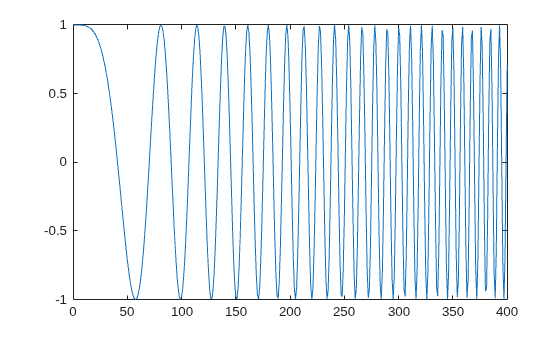
Figure contains an axes object. The axes object contains an object of type line.

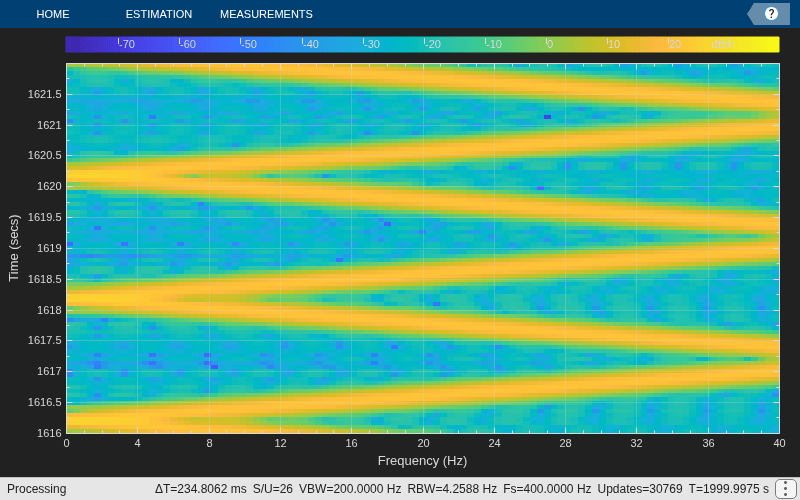
Stream in the chirp signal and view its spectrogram in spectrum analyzer.

for i = 1:1000
    input = chirp();
    specAna(input);
end
Algorithms

This object implements the algorithm, inputs, and outputs described on the Chirp block reference page. The object properties correspond to the block parameters.

Extended Capabilities

expand all

C/C++ Code Generation
Generate C and C++ code using MATLAB® Coder™.

Version History

Introduced in R2012a

expand all

See Also

Functions

Objects