Main Content

Texture

R2026b

Texture image with sampler and UV transform settings

Since R2026b

Description

Add-On Required: This feature requires the 3D Asset Processing Library for MATLAB add-on.

The Texture object holds image data along with sampler settings and per-texture UV transform parameters.

Use this object to define texture maps such as base color, normal, emissive, and occlusion for an Material object.

Creation

Description

texObj = asset3d.Texture creates an empty texture object texObj with no image data.

texObj = asset3d.Texture(Name=Value) creates a texture object texObj with properties specified by one or more name-value arguments. For example, Image=imread("basecolor.png") specifies the texture image data.

example

Name-Value Arguments

expand all

Specify optional pairs of arguments as Name1=Value1,...,NameN=ValueN, where Name is the argument name and Value is the corresponding value. Name-value arguments must appear after other arguments, but the order of the pairs does not matter.

Example: asset3d.Texture(Image=imread("basecolor.png"),Scale=[4 4],Wrap="repeat") creates a texture with 4x tiling and repeat wrapping.

Texture image data, specified as an H-by-W-by-C array. H is the image height in pixels, W is the image width, and C is the number of channels (1, 3, or 4).

This argument sets the Image property.

Data Types: uint8

UV translation, specified as a two-element row vector of the form [u v].

This argument sets the Offset property.

Data Types: double

UV tiling, specified as a two-element row vector of the form [u v].

This argument sets the Scale property.

Data Types: double

UV rotation, specified as a scalar in radians. The rotation is counter-clockwise around the origin.

This argument sets the Rotation property.

Data Types: double

Wrap mode, specified as one of these values:

  • "repeat" — Tile the texture by repeating the image.

  • "clamp" — Clamp UV coordinates to the range [0, 1].

  • "mirror" — Tile the texture with mirrored repetition.

This argument sets the Wrap property.

Data Types: string

Sampling mode, specified as one of these values:

  • "linear" — Bilinear interpolation between neighboring pixels.

  • "nearest" — Nearest-neighbor sampling.

This argument sets the Interpolation property.

Data Types: string

Output Arguments

expand all

Texture object, returned as a Texture object.

Properties

expand all

Texture image data, specified as an H-by-W-by-C array. H is the image height in pixels, W is the image width, and C is the number of channels (1, 3, or 4).

Data Types: uint8

UV translation, specified as a two-element row vector of the form [u v].

Data Types: double

UV tiling, specified as a two-element row vector of the form [u v].

Data Types: double

UV rotation, specified as a scalar in radians. The rotation is counter-clockwise around the origin.

Data Types: double

Wrap mode, specified as "repeat", "clamp", or "mirror".

Data Types: string

Sampling mode, specified as "linear" or "nearest".

Data Types: string

This property is read-only.

Image width in pixels, represented as a nonnegative integer.

Data Types: double

This property is read-only.

Image height in pixels, represented as a nonnegative integer.

Data Types: double

This property is read-only.

Number of image channels (1, 3, or 4), represented as a nonnegative integer.

Data Types: double

Object Functions

sampleSample texture at UV coordinates

Examples

collapse all

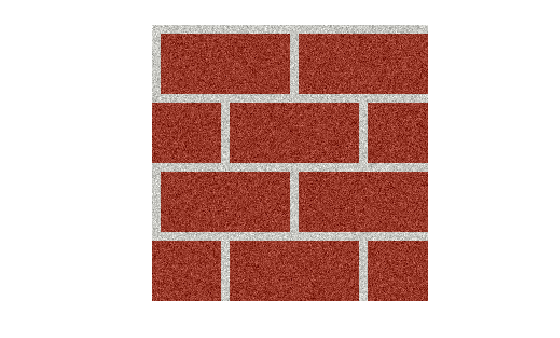
Read a texture image and display.

img = imread("brick.png");
imshow(img)
Create a texture object with repeat wrap mode, then sample it.

tex = asset3d.Texture(Image=img,Wrap="repeat",Scale=[2 2],Offset=[0.1 0.1]);
colors = sample(tex,[0.5 0.5; 1.5 1.5])
colors = 2×4 uint8 matrix

    162    67    52    255
    162    67    52    255

Create a textured material object.

texturedMat = asset3d.Material(Name="textured",BaseColorTexture=tex);

Create a pyramid mesh with textured material on it. Duplicate vertices so that each face gets independent UV coordinates.

faceIdx = [1 2 5; 2 3 5; 3 4 5; 4 1 5; 1 3 2; 1 4 3];
p = [0 0 0; 1 0 0; 1 1 0; 0 1 0; 0.5 0.5 1];
pyramidVerts = p(faceIdx',:);
pyramidFaces = reshape(1:18,3,[])';
uv = repmat([0 0; 1 0; 0.5 1],6,1);
texturedPyramid = asset3d.Mesh(pyramidVerts,pyramidFaces,UV=uv,Material=texturedMat);

Display the textured pyramid mesh.

show(texturedPyramid,Grid=true)
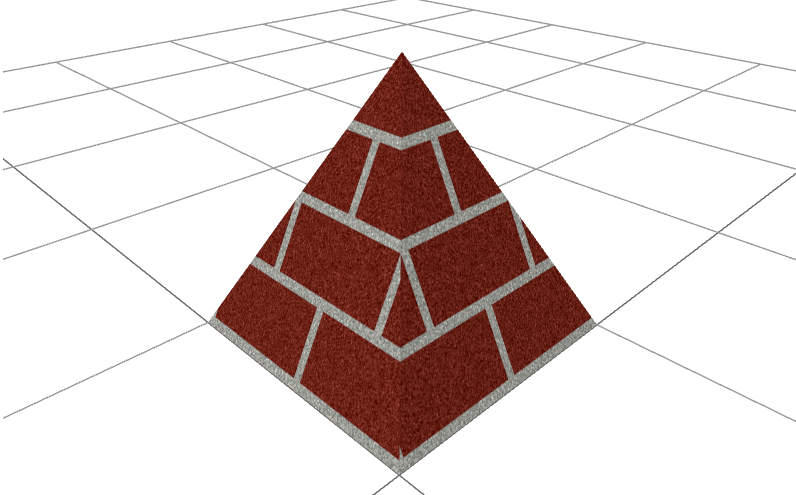
Displays a pyramid mesh with textured material

Version History

Introduced in R2026b