Mesh
R2026bDescription
Add-On Required: This feature requires the 3D Asset Processing Library for MATLAB add-on.
The Mesh object represents a triangular mesh composed of vertices
and faces with optional colors, textures, and Physically Based Rendering (PBR)
materials.
Use this object to store 3D geometry along with optional per-vertex or per-face colors, UV
texture coordinates, and PBR materials. You can visualize the mesh in an interactive 3D
viewer, convert it to a triangulation or
patch object, and
apply spatial transformations such as translate, rotate, scale, and resize.
Creation
Description
meshObj = asset3d.Mesh(vertices,faces,Name=Value)meshObj using one or more
name-value arguments. For example,
Material=material specifies the PBR material as
material.
Input Arguments
Name-Value Arguments
Output Arguments
Properties
Object Functions
show | Display mesh or scene object in interactive 3D viewer |
patch | Convert mesh or scene object to patch for visualization in axes |
snapshot | Capture snapshot of mesh or scene as image |
triangulation | Convert mesh to triangulation object |
transform | Apply homogeneous transformation to mesh or scene object |
rotate | Rotate mesh or scene object |
translate | Translate mesh or scene object using translation vector |
scale | Scale mesh or scene object |
resize | Resize mesh or scene object to absolute dimensions in world units |
setUpAxis | Change up axis convention for mesh or scene object |
copy | Create copy of mesh or scene object |
Examples
Define a simple pyramid with 5 vertices and 6 triangular faces.
vertices = [0 0 0; 1 0 0; 1 1 0; 0 1 0; 0.5 0.5 1];
faces = [1 2 5; 2 3 5; 3 4 5; 4 1 5; 1 3 4; 1 2 3];
Create a mesh with per-face color.
faceColors = uint8([230 50  50;    % red - front
                    50  180 50;    % green - right
                    50  100 230;   % blue - back
                    230 180 25;    % yellow - left
                    150 75  200;   % purple - bottom 1
                    25  200 200]); % cyan - bottom 2
pyramidMesh = asset3d.Mesh(vertices,faces,FaceColors=faceColors);
Display the mesh.
show(pyramidMesh,Background="#CCCCCC",Grid=true,Axes=true)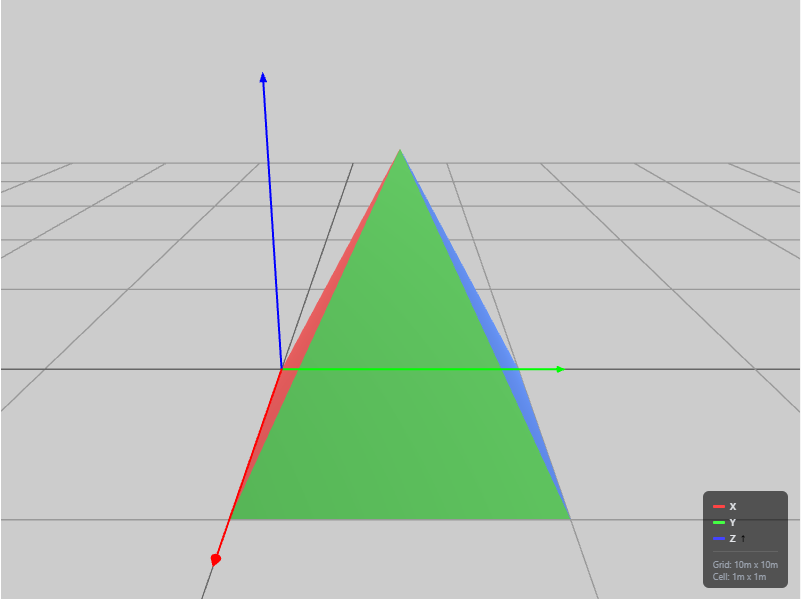
Version History
Introduced in R2026b
See Also
Scene | Material | Texture | trellis | asset3d.read | asset3d.write

