Main Content

Material

R2026b

Physically based rendering (PBR) material

Since R2026b

Description

Add-On Required: This feature requires the 3D Asset Processing Library for MATLAB add-on.

The asset3d.Material object represents a PBR material following the glTF 2.0 metallic-roughness model.

Use this object to define the visual appearance of a mesh, including base color, metalness, roughness, normal maps, ambient occlusion, emissive properties, and alpha blending.

Creation

Description

matObj = asset3d.Material creates a default material object matObj with white base color, full metalness, and full roughness.

matObj = asset3d.Material(Name=Value) creates a material object matObj with properties specified by one or more name-value arguments. For example, BaseColorFactor=[0.8 0.2 0.1 1] specifies a red base color.

example

Name-Value Arguments

expand all

Specify optional pairs of arguments as Name1=Value1,...,NameN=ValueN, where Name is the argument name and Value is the corresponding value. Name-value arguments must appear after other arguments, but the order of the pairs does not matter.

Example: asset3d.Material(BaseColorFactor=[0.8 0.2 0.1 1],MetallicFactor=0) creates a non-metallic red material.

Material name, specified as a string scalar or character vector.

This argument sets the Name property.

Data Types: string | char

Base color, specified as a three-element row vector of RGB values or four-element row vector of RGBA values in the range [0, 1]. If you specify a three-element row vector, the object auto-expands the RGB value to RGBA with alpha = 1.

This argument sets the BaseColorFactor property.

Data Types: double

Base color texture, specified as a Texture object. The texture image can be RGB (3-channel) or RGBA (4-channel). If the image has an alpha channel, it defines per-texel transparency for the material. The final base color is the element-wise product of the sampled texture value and BaseColorFactor.

This argument sets the BaseColorTexture property.

Metalness factor, specified as a scalar in the range [0, 1]. A value of 0 represents a dielectric, non-metallic surface. A value of 1 represents a fully metallic surface.

This argument sets the MetallicFactor property.

Data Types: double

Roughness factor, specified as a scalar in the range [0, 1]. A value of 0 represents a perfectly smooth, mirror-like surface. A value of 1 represents a fully rough, diffuse surface.

This argument sets the RoughnessFactor property.

Data Types: double

Combined metallic-roughness texture, specified as a Texture object. The blue channel stores metalness and the green channel stores roughness, following the glTF 2.0 convention.

This argument sets the MetallicRoughnessTexture property.

Normal map texture, specified as a Texture object.

This argument sets the NormalTexture property.

Normal map strength, specified as a scalar that scales the effect of the normal map. A value of 1 applies full normal map detail.

This argument sets the NormalScale property.

Data Types: double

Ambient occlusion texture, specified as a Texture object.

This argument sets the OcclusionTexture property.

Occlusion strength, specified as a scalar in the range [0, 1]. The value controls how much the occlusion texture darkens indirect lighting.

This argument sets the OcclusionStrength property.

Data Types: double

Emissive color, specified as a three-element row vector of RGB values in the range [0, 1]. Represents the color and intensity of light that the surface emits.

This argument sets the EmissiveFactor property.

Data Types: double

Emissive map texture, specified as a Texture object.

This argument sets the EmissiveTexture property.

Alpha blending mode, specified as one of these values:

  • "OPAQUE" — The renderer ignores the alpha value and renders the output as fully opaque.

  • "MASK" — The renderer discards fragments with alpha below AlphaCutoff and renders all other fragments as fully opaque.

  • "BLEND" — The renderer composites the source and destination colors using the alpha value.

This argument sets the AlphaMode property.

Data Types: string

Alpha cutoff threshold when the AlphaMode argument is set to "MASK", specified as a scalar in the range [0, 1]. The renderer discards fragments with alpha values below this threshold.

This argument sets the AlphaCutoff property.

Data Types: double

Double-sided rendering, specified as a logical 1 (true) or 0 (false). When set to true, the renderer draws both front and back faces of the geometry.

This argument sets the DoubleSided property.

Data Types: logical

Lighting mode, specified as "on" or "off". When set to "off", the material uses the unlit extension and renders without lighting calculations.

This argument sets the Lighting property.

Data Types: string

Output Arguments

expand all

PBR material, returned as a Material object.

Properties

expand all

Material name, specified as a string scalar or character vector.

Data Types: string | char

Base color RGBA, specified as a four-element row vector of values in the range [0, 1].

Data Types: double

Base color texture, specified as a Texture object. The texture image can be a 3-channel RGB or 4-channel RGBA. If the image has an alpha channel, it defines per-texel transparency for the material. The final base color is the element-wise product of the sampled texture value and BaseColorFactor.

Metalness factor, specified as a scalar in the range [0, 1]. A value of 0 represents a dielectric surface. A value of 1 represents a fully metallic surface.

Data Types: double

Roughness factor, specified as a scalar in the range [0, 1]. A value of 0 represents a perfectly smooth surface. A value of 1 represents a fully rough surface.

Data Types: double

Combined metallic-roughness texture, specified as a Texture object. The blue channel stores metalness and the green channel stores roughness, following the glTF 2.0 convention.

Normal map texture, specified as a Texture object.

Normal map strength, specified as a scalar that scales the effect of the normal map.

Data Types: double

Ambient occlusion texture, specified as a Texture object.

Occlusion strength, specified as a scalar in the range [0, 1]. The value controls how much the occlusion texture darkens indirect lighting.

Data Types: double

Emissive color, specified as a three-element row vector of RGB values in the range [0, 1].

Data Types: double

Emissive map texture, specified as a Texture object.

Alpha blending mode, specified as "OPAQUE", "MASK", or "BLEND".

Data Types: string

Alpha cutoff threshold when the AlphaMode argument is set to "MASK", specified as a scalar in the range [0, 1].

Data Types: double

Double-sided rendering, specified as a logical 1 (true) or 0 (false).

Data Types: logical

Lighting mode, specified as "on" or "off". When set to "off", the material uses the unlit extension.

Data Types: string

Examples

collapse all

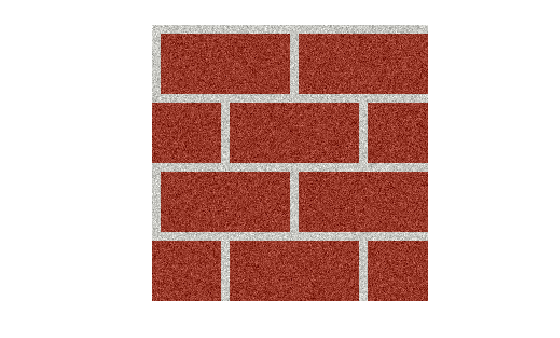
Read a texture image and display.

img = imread("brick.png");
imshow(img)
Create a texture object with repeat wrap mode, then sample it.

tex = asset3d.Texture(Image=img,Wrap="repeat",Scale=[2 2],Offset=[0.1 0.1]);
colors = sample(tex,[0.5 0.5; 1.5 1.5])
colors = 2×4 uint8 matrix

    162    67    52    255
    162    67    52    255

Create a textured material object.

texturedMat = asset3d.Material(Name="textured",BaseColorTexture=tex);

Create a pyramid mesh with textured material on it. Duplicate vertices so that each face gets independent UV coordinates.

faceIdx = [1 2 5; 2 3 5; 3 4 5; 4 1 5; 1 3 2; 1 4 3];
p = [0 0 0; 1 0 0; 1 1 0; 0 1 0; 0.5 0.5 1];
pyramidVerts = p(faceIdx',:);
pyramidFaces = reshape(1:18,3,[])';
uv = repmat([0 0; 1 0; 0.5 1],6,1);
texturedPyramid = asset3d.Mesh(pyramidVerts,pyramidFaces,UV=uv,Material=texturedMat);

Display the textured pyramid mesh.

show(texturedPyramid,Grid=true)
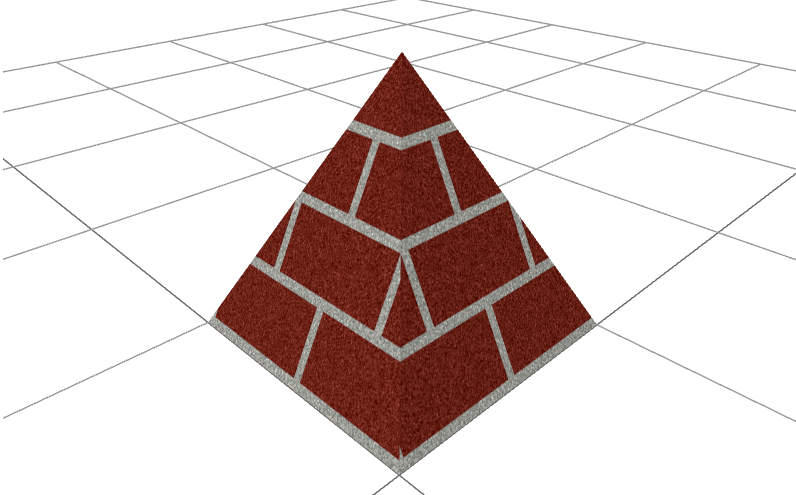
Displays a pyramid mesh with textured material

Version History

Introduced in R2026b