Neural Network Weight Tying
R2026bThis example shows how to create and edit neural networks that have layers that share learnable parameters.
Weight tying, also known as weight sharing or learnable parameter sharing, is a technique that allows different layers in a neural network to use the same set of learnable parameters. Because the neural network stores only one copy of the learnable parameters, weight tying can reduce the memory footprint of the neural network.
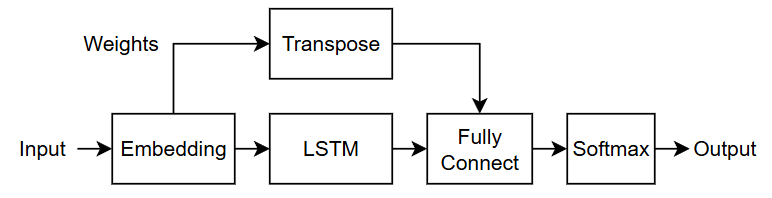
This diagram shows the flow of data through a neural network that uses weight tying. The embedding layer shares weights with the fully connected layer. For this network, the embedding layer and the fully connected layer each require the weights in a different layout, so the network applies a transpose operation to the weights before passing them to the fully connected layer.
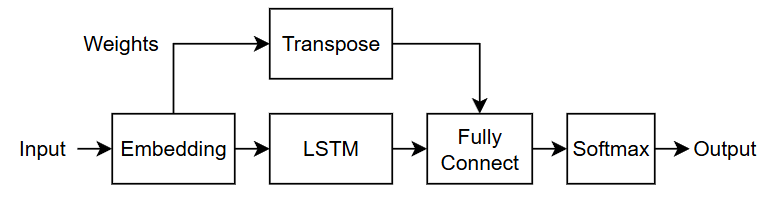
This example shows how to create a neural network with weight tying, how to remove weight tying from a neural network, and how to set up neural networks with weight tying for transfer learning.
Import Neural Network with Weight Tying from External Platforms
Import neural networks from external platforms by using the corresponding MATLAB® import function. For example, to import a neural network from a PyTorch® model file model.pt, use the importNetworkFromPyTorch function with this command.
net = importNetworkFromPyTorch("model.pt");
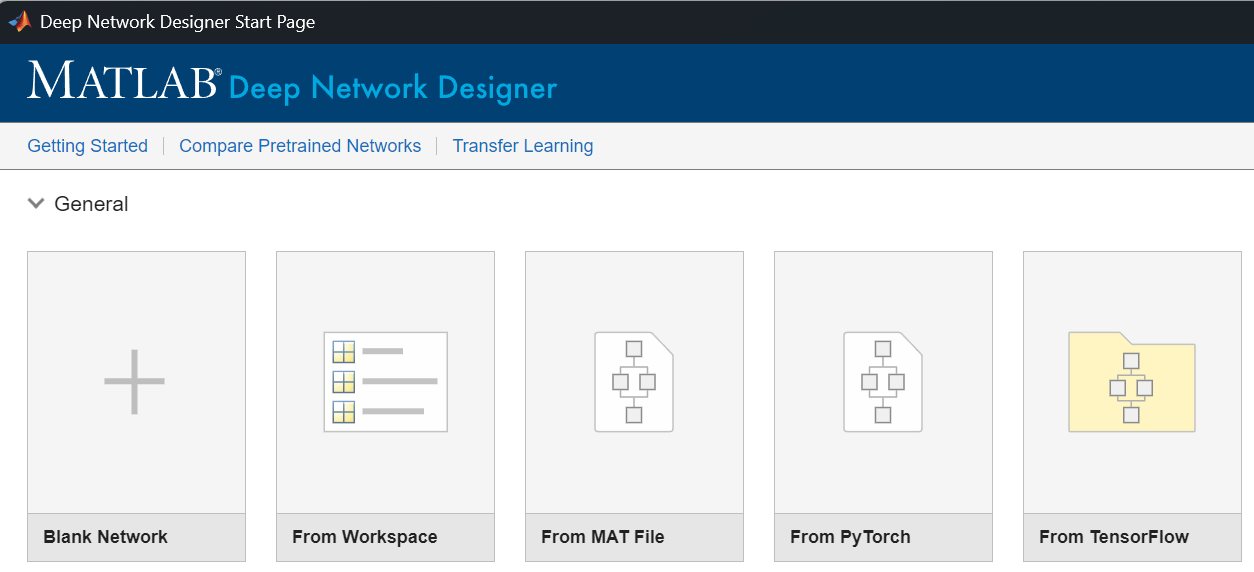
Alternatively, import the neural network using the Deep Network Designer app. In the Deep Network Designer Start Page window, click the icon for the platform from which you want to import your model and specify any import options.
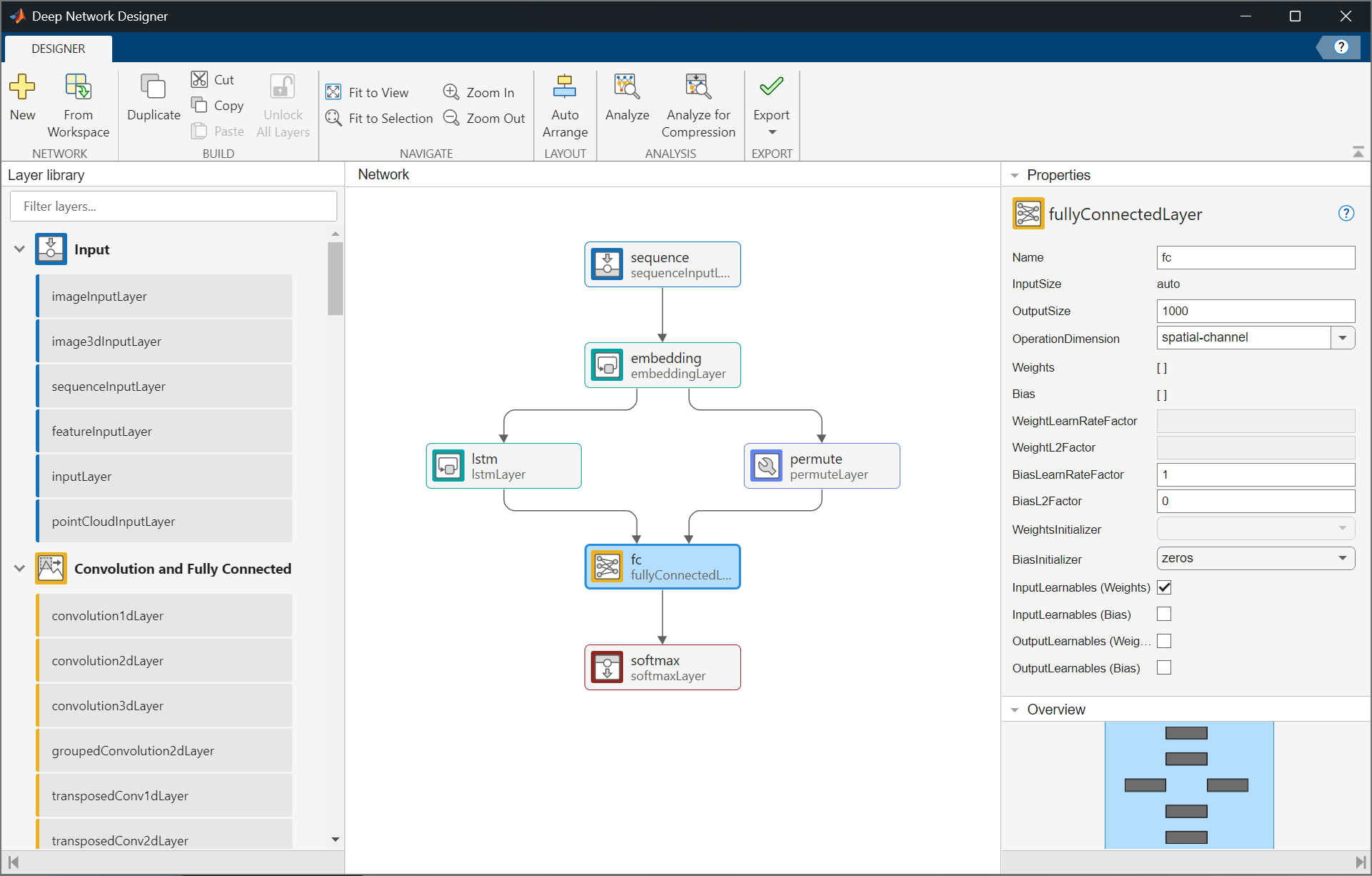
View the imported model.
For more information, see Interoperability Between Deep Learning Toolbox, TensorFlow, PyTorch, and ONNX.
Create Neural Network with Weight Tying
Create an LSTM autoencoder neural network with an input embedding that shares weights with an output fully connected layer.
Specify the layer sizes. For the embedding layer, set the output size to 300 and the maximum index to 1000.
embSize = 300;
maxIndex = 1000;
Create the neural network. First, specify the layers of the main branch of the network.
net = dlnetwork;

layers = [
    sequenceInputLayer(1)
    embeddingLayer(embSize,maxIndex,OutputLearnables="weights",Name="emb")
    lstmLayer(embSize)
    fullyConnectedLayer(maxIndex,InputLearnables="weights",Name="fc")
    softmaxLayer];
net = addLayers(net,layers);
The fully connected layer has an input size that matches the output size of the embedding layer, and an output size that matches the input size of the embedding layer. To ensure that the size of the fully connected layer weights is consistent with the layer input data, the network must transpose the weights before passing them to the fully connected layer. To transpose the weights, include a permute layer. Connect the permute layer to the Weights output of the embedding layer.
layer = permuteLayer([2 1],Name="transpose");
net = addLayers(net,layer);
net = connectLayers(net,"emb/weights","transpose");
Connect the output of the permute layer to the Weights input of the fully connected layer.
net = connectLayers(net,"transpose","fc/weights");
Analyze the neural network by using the analyzeNetwork function. The fully connected layer has learnable parameters for the bias only.
analyzeNetwork(net)
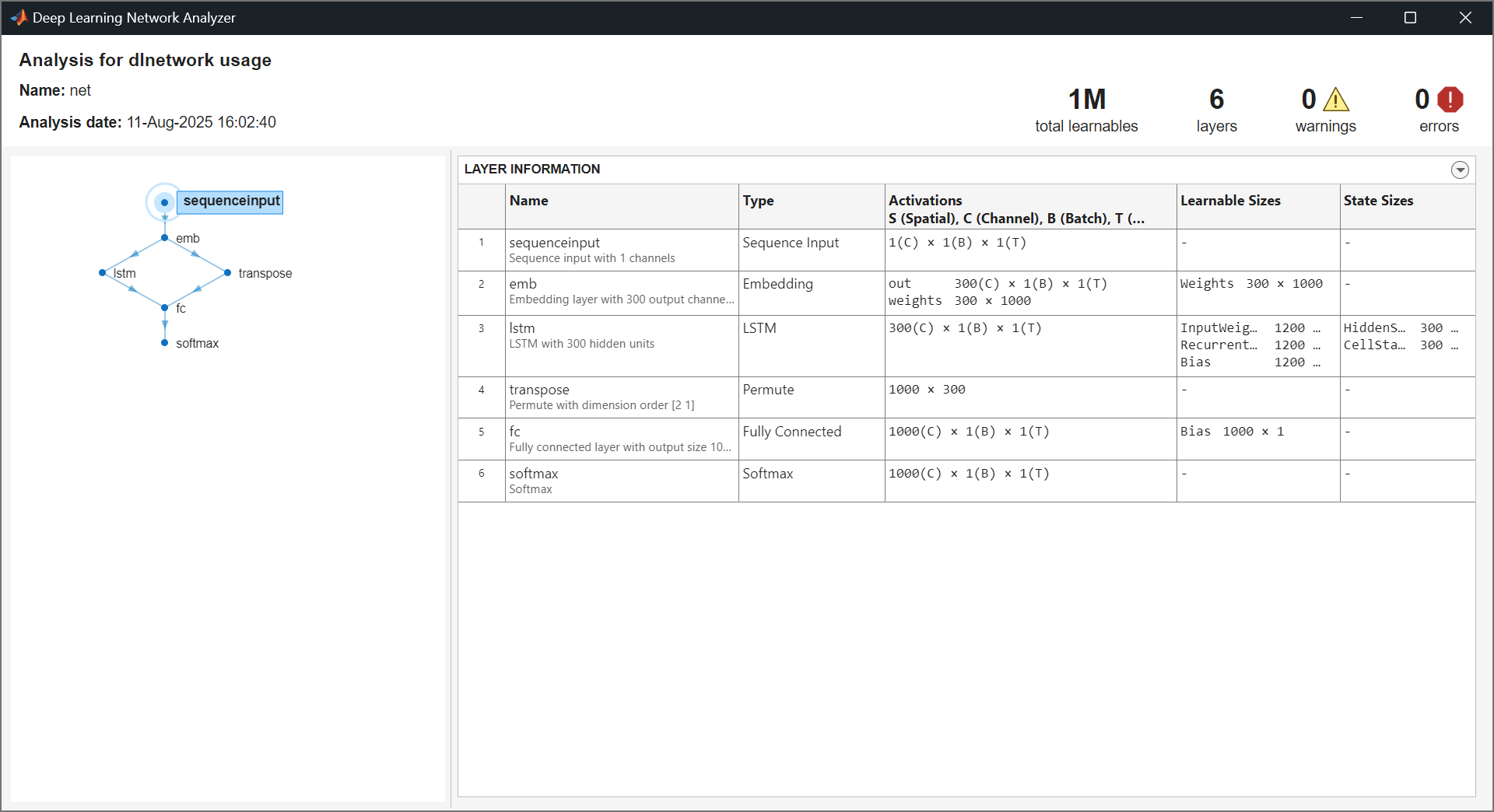
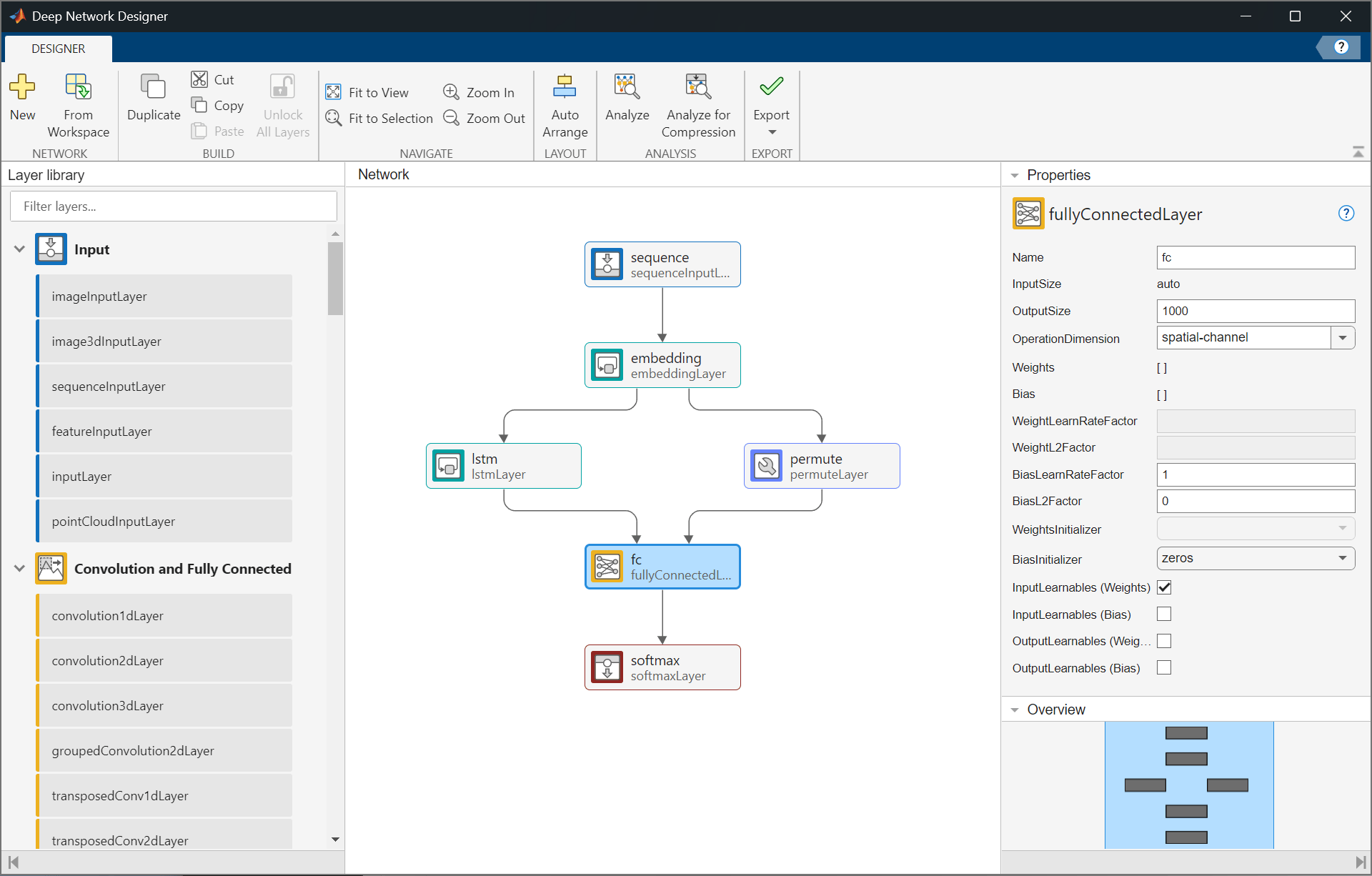
Alternatively, to create a neural network with weight tying in the Deep Network Designer app, enable the learnable parameter layer inputs and outputs by using the corresponding property. For this example, select the OutputLearnables (Weights) property of the embedding layer and the InputLearnables (Weights) property of the fully connected layer.
Modify Neural Network for Transfer Learning
To modify a neural network for transfer learning, you typically replace the last learnable layer with a new layer that has an output size that matches your data. If the last learnable layer shares learnable parameters with other layers, then you must remove the connections for the learnable parameters and update the connected layers.
Modify the neural network that you created in the Create Neural Network with Weight Tying section of this example so that it makes predictions with an output size of 15.
Create a copy of the original network to modify.
netTransfer = net;
Specify the output size for the modified neural network.
newSize = 15;
Because the last learnable layer (the fully connected layer) uses shared weights from another layer (the embedding layer), remove any layers between them. In this case, remove the permute layer that transposes the weights.
netTransfer = removeLayers(netTransfer,"transpose");After you remove the permute layer, the embedding layer has a disconnected output. Remove the disconnected output from the OutputNames property of the network.
idx = netTransfer.OutputNames == "emb/weights";
netTransfer.OutputNames(idx) = [];
Replace the fully connected layer with a new fully connected layer that has an output size that matches the new task. For transfer learning, also increase the weight and bias learning rate factors.
newLayer = fullyConnectedLayer(newSize, ...
    Name="fcNew", ...
    WeightLearnRateFactor=10, ...
    BiasLearnRateFactor=10);

netTransfer = replaceLayer(netTransfer,"fc",newLayer);
Analyze the neural network using the analyzeNetwork function. The fully connected layer has learnable parameters for both the weights and the bias, and the sizes of the learnable parameters are consistent with the output size for the new task.
analyzeNetwork(netTransfer)
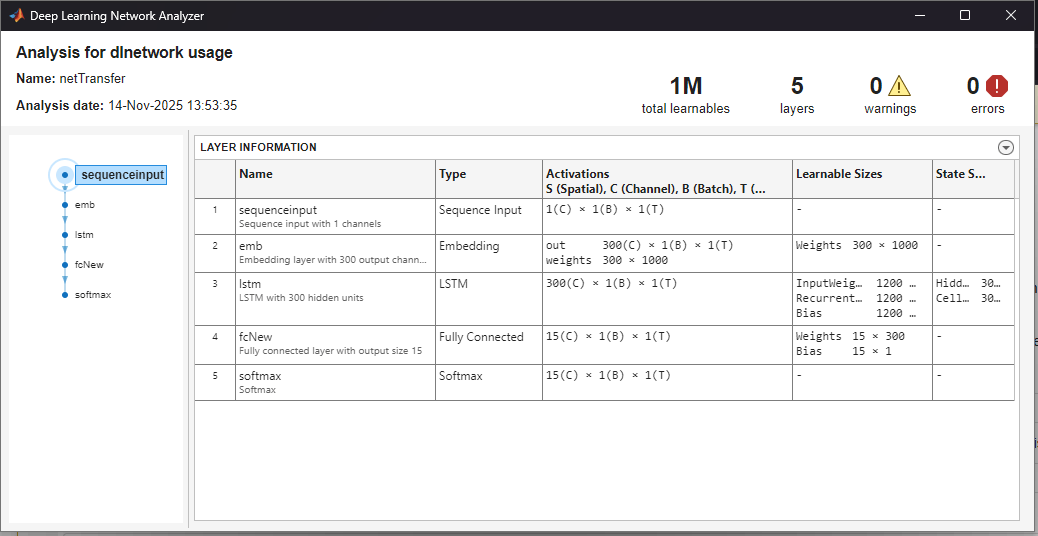
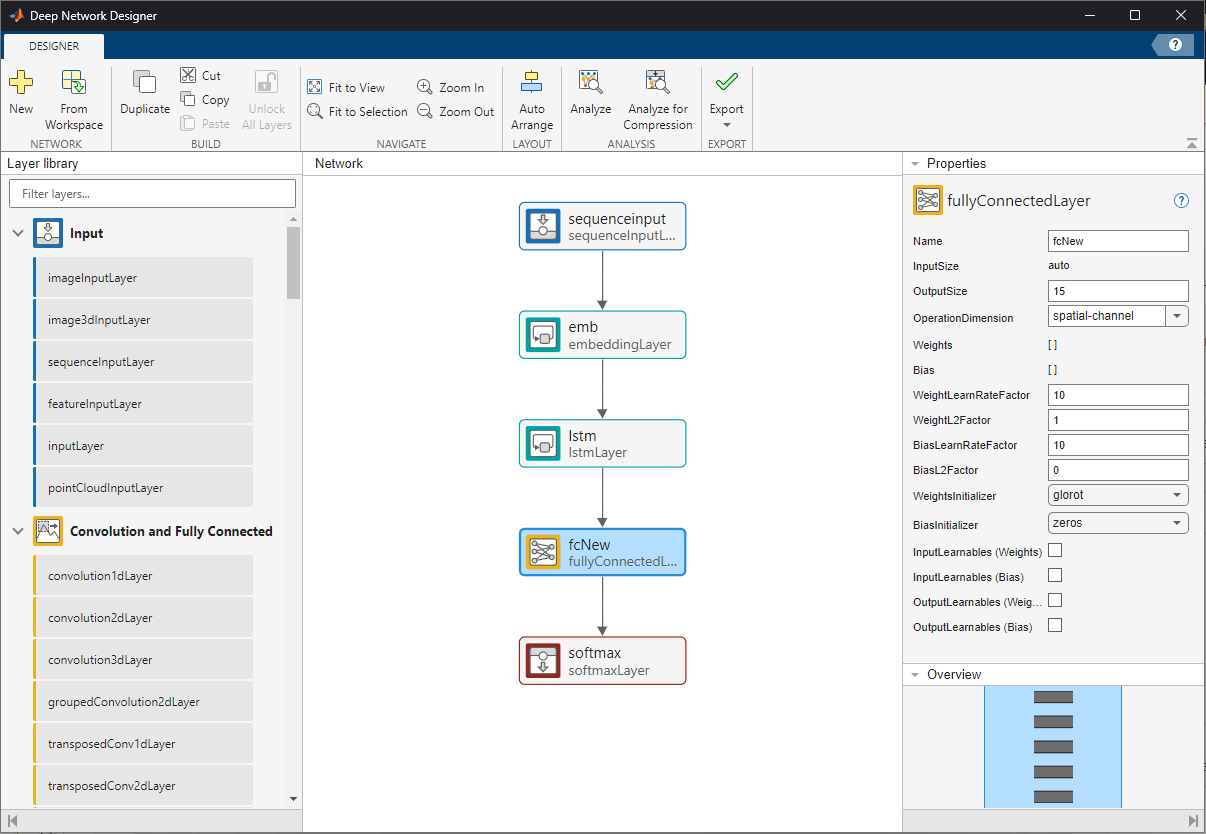
Alternatively, to modify a neural network for transfer learning in the Deep Network Designer app, first replace the fully connected layer with a new fully connected layer that has an output size that matches the new task. Then, remove the permute layer and its connections. Clear the OutputLearnables (Weights) property of the embedding layer.
Untie Shared Weights
To untie shared weights, you must remove the connections that pass learnable parameters between layers and configure each layer so that it owns its own copies of the learnable parameters.
Modify the neural network that you created in the Create Neural Network with Weight Tying section of this example so that it does not have any tied weights and the layers have their own learnable parameters.
Create a copy of the original network to modify.
netUntied = net;
Remove any layers between the fully connected layer and the embedding layer. In this case, remove the permute layer that transposes the weights.
netUntied = removeLayers(netUntied,"transpose");After you remove the permute layer, the embedding layer has a disconnected output. Remove the disconnected output from the OutputNames property of the network.
idx = netUntied.OutputNames == "emb/weights";
netUntied.OutputNames(idx) = [];
Replace the fully connected layer with a new fully connected layer that has the same properties, but does not have the additional input for the weights. Set the weights to the same values as for the embedding layer. To account for the transpose transformation, manually transpose the weights.
layer = getLayer(netUntied,"emb");
weights = layer.Weights;

name = "fc";
layer = getLayer(netUntied,name);
outputSize = layer.OutputSize;

layerNew = fullyConnectedLayer(outputSize,Weights=weights',Name=name);
netUntied = replaceLayer(netUntied,name,layerNew);
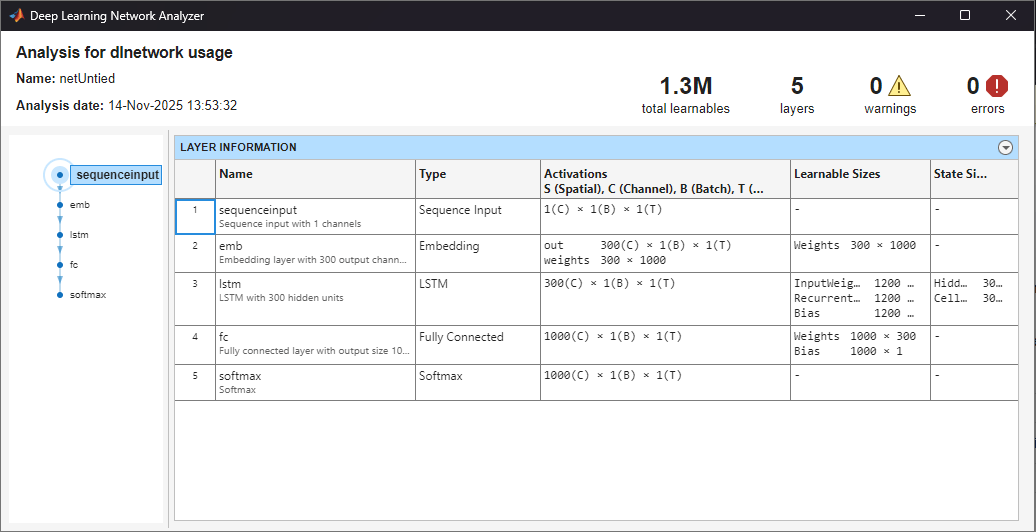
Analyze the neural network by using the analyzeNetwork function. The fully connected layer has learnable parameters for both the weights and the bias.
analyzeNetwork(netUntied)
See Also
sequenceInputLayer | embeddingLayer | lstmLayer | fullyConnectedLayer | dlnetwork | getLayer | replaceLayer

