txsite
Create RF transmitter site
Description
Use a txsite object to create a radio frequency (RF)
transmitter site.
A transmitter consists of an RF circuit and an antenna, where the RF circuit excites the antenna with a signal and power. Key characteristics of a transmitter include its output power, operating frequency, and antenna radiation pattern.
Creation
Description
sets properties using one or more name-value arguments. This syntax is
useful for creating multiple transmitter sites. tx = txsite(___,PropertyName=Value)
For geographic transmitter sites, you can specify the location by setting the
Latitude,Longitude, andAntennaHeightproperties.For Cartesian transmitter sites, you can specify the location by setting the
AntennaPositionproperty.
Input Arguments
Coordinate system used to the reference the location of the site,
specified as "geographic" or
"cartesian". This argument sets the CoordinateSystem property of the site.
Output Arguments
Transmitter site, returned as a txsite object or a
vector of txsite objects.
Properties
Site name, specified as one of these options:
A string scalar or a character vector. Use this option to create one site or to create multiple sites with the same name.
A string vector or a cell array of character vectors. Use this option to create multiple sites and use a different name for each site. The number of names must match the number of sites.
When updating the Name property after creation, if
tx is a vector of sites, you must update the
property of each site individually by indexing into the vector and
specifying a string scalar or a character vector, for example
tx(1).Name = "Fenway Park".
Data Types: char | string | cell
Coordinate system used to the reference the location of the site,
specified as 'geographic' or
'cartesian'.
'geographic'— Geographic coordinate system. Specify the locations of the transmitter sites using theLatitude,Longitude, andAntennaHeightproperties.'cartesian'— Cartesian coordinate system. Specify the locations of the transmitter sites using theAntennaPositionproperty.
Data Types: char | string
Latitude coordinates of the site, in degrees, specified as one of these options:
A numeric scalar in the range [–90, 90]. Use this option to create one site or to create multiple sites with the same latitude coordinate.
A numeric vector with elements in the range [–90, 90]. Use this option to create multiple sites and use a different latitude coordinate for each site. The length of the vector must match the number of sites.
Latitude assumes that the coordinates use the World
Geodetic System of 1984 (WGS 84) reference ellipsoid.
When updating the Latitude property after creation,
if tx is a vector of sites, you must update the
property of each site individually by indexing into the vector and
specifying a numeric scalar, for example tx(1).Latitude =
45.098.
Dependencies
To enable this property, the value of
CoordinateSystem must be
'geographic'.
Longitude coordinates of the site, in degrees, specified as one of these options:
A numeric scalar. Use this option to create one site or to create multiple sites with the same longitude coordinate.
A numeric vector. Use this option to create multiple sites and use a different longitude coordinate for each site. The length of the vector must match the number of sites.
Longitude assumes that the coordinates use the WGS 84
reference ellipsoid.
When updating the Longitude property after creation,
if tx is a vector of sites, you must update the
property of each site individually by indexing into the vector and
specifying a numeric scalar, for example tx(1).Longitude =
-71.0972.
Dependencies
To enable this property, the value of
CoordinateSystem must be
'geographic'.
Antenna element or array, specified as 'isotropic', an
antenna object, an array object, a vector of antenna objects, or a vector of
array objects. The txsite object supports these antenna
options:
'isotropic'which models an antenna that radiates uniformly in all directions.An antenna object from the Antenna Catalog or an array object from the Array Catalog. To specify an antenna object, design the antenna at the required receive frequency by using the
designfunction. Then, add the antenna to the transmitter site.An
arrayConfig(Communications Toolbox) object. This option requires a Communications Toolbox™ license.An antenna object from Antennas, Microphones, and Sonar Transducers (Phased Array System Toolbox) or an array object from Array Geometries and Analysis (Phased Array System Toolbox). This option requires a Phased Array System Toolbox™ license.
A
measuredAntennaobject. TheEandEmbeddedEproperties of the object must be empty. TheDirectivityproperty of the object must be nonempty. (since R2026a)
Specify a value for Antenna depending on the number
of sites you want to create:
To create one site or to create multiple sites with the same antenna, specify a scalar antenna or array object.
To create multiple sites and use a different antenna for each site, specify a vector of antenna or array objects. The length of the vector must match the number of sites.
When updating the Antenna property after creation, if
tx is a vector of sites, you must update the
property of each site individually by indexing into the vector and
specifying an antenna or array object, for example tx(1).Antenna = monopole.
Antenna x-axis angle with respect to a local Cartesian coordinate system, in degrees, specified as one of these options:
A numeric scalar that specifies the azimuth angle. Use this option to create one site or to create multiple sites with the same azimuth angle. When you specify a scalar, the elevation angle is 0.
A 2-by-1 numeric vector that specifies the azimuth and elevation angles of the antenna. Use this option to create one site or to create multiple sites with the same azimuth and elevation angles.
A 2-by-N numeric matrix that specifies the azimuth and elevation angles of the antenna, where N is the number of sites. Use this option to create multiple sites and use different azimuth and elevation angles for each site.
For sites with geographic coordinates, the azimuth angle is measured counterclockwise from the east along the antenna x-axis. For sites with Cartesian coordinates, the azimuth angle is measured from the global x-axis around the global z-axis. Specify the azimuth angle in the range [–180, 180].
The elevation angle is measured from the antenna x-axis along the horizontal (or xy) plane. Specify the elevation angle in the range [–90, 90].
When updating the AntennaAngle property after
creation, if tx is a vector of sites, you must update
the property of each site individually by indexing into the vector and
specifying a numeric scalar or a 2-by-1 numeric vector, for example
tx(1).AntennaAngle = [25 -80].
Antenna height above the ground or building surface, in meters, specified as one of these options:
A nonnegative scalar. Use this option to create one site or to create multiple sites with the same antenna height.
A vector of nonnegative values. Use this option to create multiple sites and use a different antenna height for each site. The length of the vector must match the number of sites.
Antenna heights must be less than or equal to 6,371,000 m.
When the site coincides with a building, the antenna height measures from the top of the building to the center of the antenna. Otherwise, the height measures from the ground to the center of the antenna.
When updating the AntennaHeight property after
creation, if tx is a vector of sites, you must update
the property of each site individually by indexing into the vector and
specifying a nonnegative scalar, for example tx(1).AntennaHeight =
15.
Dependencies
To enable this property, the value of
CoordinateSystem must be
'geographic'.
Data Types: double
Position of the antenna center, in meters, specified as one of these options:
A three-element vector that specifies the Cartesian xyz-coordinates of the antenna center. Use this option to create one site or to create multiple sites with the same antenna position.
A 3-by-N matrix, where N is the number of sites, and each column specifies the Cartesian xyz-coordinates of the antenna center for that site. Use this option to create multiple sites and use a different antenna position for each site.
When updating the AntennaPosition property after
creation, if tx is a vector of sites, you must update
the property of each site individually by indexing into the vector and
specifying a 3-element vector, for example tx(1).AntennaPosition =
[0; 2; 4].
Dependencies
To enable this property, the value of
CoordinateSystem must be
'cartesian'.
Data Types: double
System loss, in dB, specified as one of these options:
A nonnegative scalar. Use this option to create one site or to create multiple sites with the same system loss.
A vector of nonnegative values. Use this option to create multiple sites and use a different system loss for each site. The size of the vector must match the number of sites.
System loss includes transmission line loss and any other miscellaneous system losses.
When updating the SystemLoss property after creation,
if tx is a vector of sites, you must update the
property of each site individually by indexing into the vector and
specifying a nonnegative scalar, for example tx(1).SystemLoss =
10.
Data Types: double
Transmitter operating frequency, in Hz, specified as one of these options:
A positive scalar. Use this option to create one site or to create multiple sites with the same operating frequency.
A vector of positive values. Use this option to create multiple sites and use a different operating frequency for each site. The size of the vector must match the number of sites.
When the Antenna property contains an antenna element
from the Antenna Catalog or an array element from the
Array Catalog, the frequency must be in the range [1e3, 200e9].
When you use the transmitter site in a propagation analysis, the frequency must be within the frequency range for the propagation model. For more information about the valid frequency ranges for different propagation models, see Choose a Propagation Model.
When updating the TransmitterFrequency property after
creation, if tx is a vector of sites, you must update
the property of each site individually by indexing into the vector and
specifying a positive scalar, for example
tx(1).TransmitterFrequency = 30e9.
Data Types: double
Signal power at transmitter output, in W, specified as one of these options:
A positive scalar. Use this option to create one site or to create multiple sites with the same signal power.
A vector of positive values. Use this option to create multiple sites and use a different signal power for each site. The size of the vector must match the number of sites.
The transmitter out is connected to the antenna. When
Antenna specifies an antenna array, this property
specifies the total signal power to the array.
When updating the TransmitterPower property after
creation, if tx is a vector of sites, you must update
the property of each site individually by indexing into the vector and
specifying a positive scalar, for example tx(1).TransmitterPower =
30.
Data Types: double
Object Functions
show | Show site in Site Viewer |
hide | Hide site from Site Viewer |
distance | Distance between sites |
angle | Angle between sites |
elevation | Elevation of site |
location | Coordinates at distance and angle from site |
los | Display or compute line-of-sight (LOS) visibility status |
coverage | Display or compute coverage map |
sinr | Display or compute signal-to-interference-plus-noise (SINR) ratio |
pattern | Display antenna radiation pattern in Site Viewer |
Examples
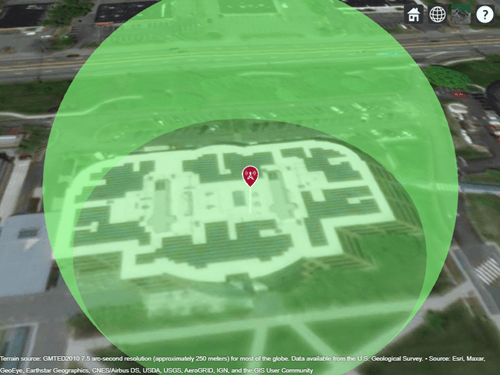
Create a transmitter site. By default, transmitter sites use geographic coordinates. Specify the latitude as 42.3001 degrees and the longitude as -71.3504 degrees.
tx = txsite(Name="MathWorks Apple Hill", ... Latitude=42.3001,Longitude=-71.3504);
Display the antenna radiation pattern for the site.
pattern(tx)
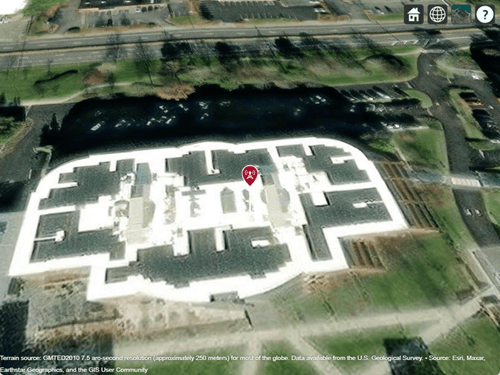
Create a dipole antenna that has a resonant frequency of 2.5e9 Hz. Create a transmitter site in geographic coordinates that uses the dipole antenna.
fq = 2.5e9; ant = design(dipole,fq); tx = txsite(Name="MathWorks Apple Hill", ... Latitude=42.3001,Longitude=-71.3504, ... Antenna=ant,TransmitterFrequency=fq);
Display the transmitter site.
show(tx)
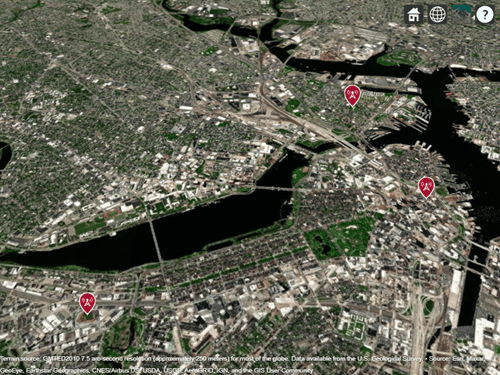
Specify the names, latitudes, and longitudes of three locations.
name = ["Fenway Park","Faneuil Hall","Bunker Hill Monument"]; lat = [42.3467 42.3598 42.3763]; lon = [-71.0972 -71.0545 -71.0611];
Specify the frequency of the transmitters in Hz.
fq = 2.5e9;
Create an array of transmitter sites in geographic coordinates that uses dipole antennas.
txs = txsite(Name=name,Latitude=lat,Longitude=lon, ...
Antenna=dipole,TransmitterFrequency=fq);Display the transmitter sites.
show(txs)
Version History
Introduced in R2017bCreate sites from measured pattern data by specifying the
Antenna property as a measuredAntenna object.
These name-value arguments now accept additional input sizes:
AntennaPositionaccepts a three-element row vector or a 3-by-N matrix, where N is the number of sites. In previous releases, the argument required you to specify a three-element column vector.AntennaHeight,SystemLoss,TransmitterFrequency, andTransmitterPoweraccept column vectors. In previous releases, the arguments required you to specify scalars or row vectors.
MATLAB Command
You clicked a link that corresponds to this MATLAB command:
Run the command by entering it in the MATLAB Command Window. Web browsers do not support MATLAB commands.
Select a Web Site
Choose a web site to get translated content where available and see local events and offers. Based on your location, we recommend that you select: .
You can also select a web site from the following list
How to Get Best Site Performance
Select the China site (in Chinese or English) for best site performance. Other MathWorks country sites are not optimized for visits from your location.
Americas
- América Latina (Español)
- Canada (English)
- United States (English)
Europe
- Belgium (English)
- Denmark (English)
- Deutschland (Deutsch)
- España (Español)
- Finland (English)
- France (Français)
- Ireland (English)
- Italia (Italiano)
- Luxembourg (English)
- Netherlands (English)
- Norway (English)
- Österreich (Deutsch)
- Portugal (English)
- Sweden (English)
- Switzerland
- United Kingdom (English)