measuredAntenna
R2026bStore field data for analysis, excitation, pattern multiplication, and integration with RF systems
Since R2023a
Description
The measuredAntenna object enables port and field analysis
using antenna or array field data, and facilitates integration of this data into RF
systems.
You can import field data from .txt, .csv,
.xlsx, or .ffd files into the MATLAB®
workspace and assign it to object properties. To import data from
.ffs files, use the ffsReader
function.
Supported data includes:
Electric and embedded electric field components (V/m)
Directivity
Observation point coordinates (spherical)
Phase center
Number of excitation ports
Measurement frequencies
S-parameters
You can use the measuredAntenna object to:
Excite curved reflector antennas and analyze them using the physical optics (PO) solver
Create RF sites by assigning it to the
Antennaproperty of thetxsiteorrxsiteobjectsDefine elements in the
linearArray,rectangularArray, andcircularArrayobjects and compute array radiation patterns using thepatternMultiplyfunction
To integrate the measuredAntenna object into RF systems, assign it to:
Antenna object parameter of the Antenna (RF Blockset) block
Antenna Object parameter of Transmitter, Receiver, and TxRxAntenna elements in the RF Budget Analyzer (RF Toolbox) app
Antennaproperty ofTransmitter(Satellite Communications Toolbox) andReceiver(Satellite Communications Toolbox) objects
To use the measuredAntenna object in phased arrays, assign it to:
Elementproperty of these homogeneous array objects —phased.UCA,phased.ULA,phased.URA,phased.ConformalArrayElementSetproperty of these heterogeneous array objects —phased.HeterogeneousConformalArray,phased.HeterogeneousULA,phased.HeterogeneousURA,phased.NRRectangularPanelArrayUnitCellproperty of thephased.RectangularRISobject
You can then use these phased arrays (with a measuredAntenna
element) as sensor arrays in beamformer and direction-of-arrival (DOA) estimator objects in
the Phased Array System Toolbox™, as well as in the constant gamma
clutter System object™ in the Radar Toolbox.
Creation
Description
m = measuredAntenna
m = measuredAntenna(PropertyName=Value)PropertyName is the property
name and Value is the corresponding value. You can specify several
name-value arguments in any order as
PropertyName1=Value1,...,PropertyNameN=ValueN. Properties that you
do not specify, retain their default values.
For example, m = measuredAntenna(NumPorts=4) creates an antenna
field data object and sets the number ports to four.
You can also create a measuredAntenna object using the ffsReader
function.
Properties
Object Functions
EHfields | Electric and magnetic fields of antennas or embedded electric and magnetic fields of antenna element in arrays |
pattern | Plot radiation pattern of antenna, array, or embedded element of array |
sparameters | S-parameters for antenna or array |
Note
When measuredAntenna is an input argument to the above
functions:
The
EHfieldsfunction can be used only to visualize the E-field data contained in theEproperty of themeasuredAntenna.The
patternfunction can have itsTypeargument set toefield,directivity,power,powerdb, orphase.The
sparametersfunction plots the S-parameters when no output argument is specified or creates asparametersobject when an output argument is specified.
Examples
Use the electric field data of a dipole antenna to excite a parabolic reflector.
Design a dipole antenna operating at 10 GHz.
freq = 10e9;
lambda = physconst("LightSpeed")/freq;
ant = design(dipole(Tilt=90,TiltAxis=[0 1 0]),freq);
Define a sampling grid using the spherical coordinate system.
az = linspace(-180, 180, 181);
el = linspace(-90, 90, 91);
r = lambda;
Convert these points to the Cartesian coordinates using the computeSpatialPoints function. The conversion follows the Antenna Toolbox convention, where elevation = 90° − THETA, with THETA measured from the positive z-axis.
[pts, PHI, ELE] = computeSpatialPoints(az,el,r);
Use the EHfields function to generate the electric field data.
[E,~] = EHfields(ant,freq,pts)
E = 3×16471 complex

    -6.0762 -26.1913i    -6.0762 -26.1913i    -6.0762 -26.1913i    -6.0762 -26.1913i    -6.0762 -26.1913i    -6.0762 -26.1913i    -6.0762 -26.1913i    -6.0762 -26.1913i    -6.0762 -26.1913i    -6.0762 -26.1913i    -6.0762 -26.1913i    -6.0762 -26.1913i    -6.0762 -26.1913i    -6.0762 -26.1913i    -6.0762 -26.1913i    -6.0762 -26.1913i    -6.0762 -26.1913i    -6.0762 -26.1913i    -6.0762 -26.1913i    -6.0762 -26.1913i    -6.0762 -26.1913i    -6.0762 -26.1913i    -6.0762 -26.1913i    -6.0762 -26.1913i    -6.0762 -26.1913i    -6.0762 -26.1913i    -6.0762 -26.1913i    -6.0762 -26.1913i    -6.0762 -26.1913i    -6.0762 -26.1913i
    -0.0088 - 0.0038i    -0.0088 - 0.0038i    -0.0088 - 0.0038i    -0.0088 - 0.0038i    -0.0088 - 0.0038i    -0.0088 - 0.0038i    -0.0088 - 0.0038i    -0.0088 - 0.0038i    -0.0088 - 0.0038i    -0.0088 - 0.0038i    -0.0088 - 0.0038i    -0.0088 - 0.0038i    -0.0088 - 0.0038i    -0.0088 - 0.0038i    -0.0088 - 0.0038i    -0.0088 - 0.0038i    -0.0088 - 0.0038i    -0.0088 - 0.0038i    -0.0088 - 0.0038i    -0.0088 - 0.0038i    -0.0088 - 0.0038i    -0.0088 - 0.0038i    -0.0088 - 0.0038i    -0.0088 - 0.0038i    -0.0088 - 0.0038i    -0.0088 - 0.0038i    -0.0088 - 0.0038i    -0.0088 - 0.0038i    -0.0088 - 0.0038i    -0.0088 - 0.0038i
    -0.0000 - 0.0000i    -0.0000 - 0.0000i    -0.0000 - 0.0000i    -0.0000 - 0.0000i    -0.0000 - 0.0000i    -0.0000 - 0.0000i    -0.0000 - 0.0000i    -0.0000 - 0.0000i    -0.0000 - 0.0000i    -0.0000 - 0.0000i    -0.0000 - 0.0000i    -0.0000 - 0.0000i    -0.0000 - 0.0000i    -0.0000 - 0.0000i    -0.0000 - 0.0000i    -0.0000 - 0.0000i    -0.0000 - 0.0000i    -0.0000 - 0.0000i    -0.0000 - 0.0000i    -0.0000 - 0.0000i    -0.0000 - 0.0000i    -0.0000 - 0.0000i    -0.0000 - 0.0000i    -0.0000 - 0.0000i    -0.0000 - 0.0000i    -0.0000 - 0.0000i    -0.0000 - 0.0000i    -0.0000 - 0.0000i    -0.0000 - 0.0000i    -0.0000 - 0.0000i
Visualize the electric field vectors of this dipole antenna.
fig = figure;
EHfields(ant,freq,ViewField="E");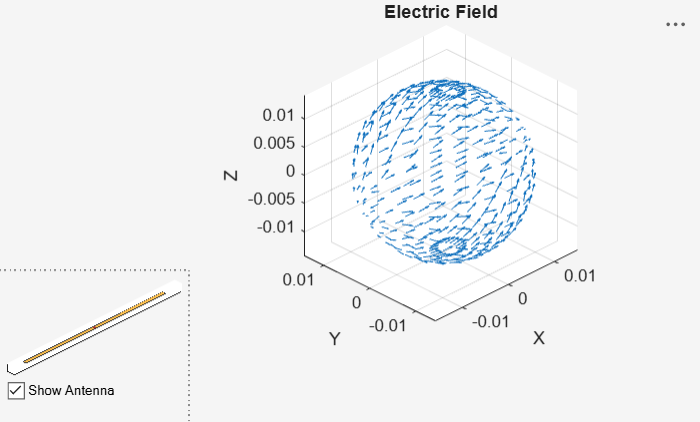
Create a measuredAntenna object and set its properties using the electric field data, spherical coordinates of the observation points, and the phase center. Assume the phase center location at 5λ along the z‑axis.
ms = measuredAntenna;
ms.E = E';
ms.Direction = [PHI(:), ELE(:), r*ones(numel(PHI),1)];
ms.FieldFrequency = freq;
ms.PhaseCenter = [0 0 5*lambda];
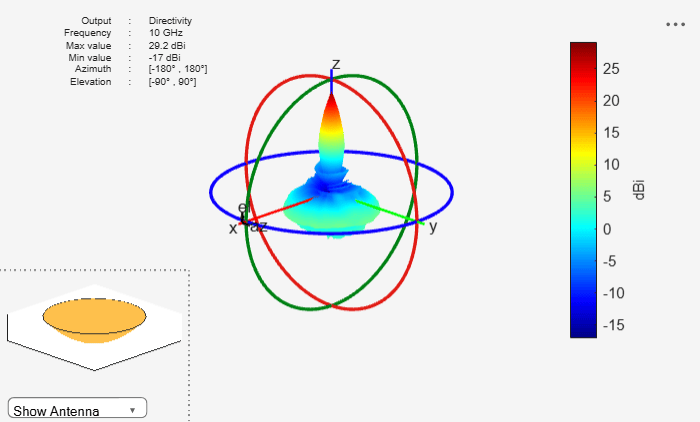
Create a parabolic reflector antenna with the measuredAntenna as its exciter. Plot the radiation pattern of this antenna at 10 GHz.
back = reflectorParabolic;
back.Exciter = ms;
figure
pattern(back,freq)
Import the pattern data of a linear array of dipoles from a text file using the readmatrix function. Define the frequency range for the data and number of antenna elements in the array.
The text file contains measured field data at 1.6 GHz, 2 GHz, and 2.4 GHz frequencies.
fRange = [1.6e9 2e9 2.4e9];
numAnt = 2;
patternData = readmatrix("MeasuredData.txt");
patternData
patternData = 2701×30 complex
102 ×
0.0000 - 0.0000i 0.0000 + 0.0000i 0.0000 + 0.0000i -0.0000 + 0.0000i 0.0000 - 0.0000i 0.0000 + 0.0000i -0.0000 - 0.0000i 0.0000 - 0.0000i 0.0000 - 0.0000i -1.8000 + 0.0000i -0.9000 + 0.0000i 0.1500 + 0.0000i 0.0000 - 0.0000i 0.0000 + 0.0000i 0.0000 + 0.0000i -0.0000 + 0.0000i 0.0000 + 0.0000i 0.0000 + 0.0000i -0.0000 - 0.0000i 0.0000 - 0.0000i 0.0000 + 0.0000i 0.0000 + 0.0000i 0.0000 - 0.0000i 0.0000 + 0.0000i -0.0000 - 0.0000i 0.0000 - 0.0000i 0.0000 - 0.0000i 0.0000 + 0.0000i 0.0000 - 0.0000i 0.0000 - 0.0000i
0.0000 - 0.0000i 0.0000 + 0.0000i 0.0000 + 0.0000i -0.0000 + 0.0000i 0.0000 - 0.0000i 0.0000 + 0.0000i -0.0000 - 0.0000i 0.0000 - 0.0000i 0.0000 - 0.0000i -1.7500 + 0.0000i -0.9000 + 0.0000i 0.1500 + 0.0000i 0.0000 - 0.0000i 0.0000 + 0.0000i 0.0000 + 0.0000i -0.0000 + 0.0000i 0.0000 + 0.0000i 0.0000 + 0.0000i -0.0000 - 0.0000i 0.0000 - 0.0000i 0.0000 + 0.0000i 0.0000 + 0.0000i 0.0000 - 0.0000i 0.0000 + 0.0000i -0.0000 - 0.0000i 0.0000 - 0.0000i 0.0000 - 0.0000i 0.0000 + 0.0000i 0.0000 - 0.0000i 0.0000 - 0.0000i
0.0000 - 0.0000i 0.0000 + 0.0000i 0.0000 + 0.0000i -0.0000 + 0.0000i 0.0000 - 0.0000i 0.0000 + 0.0000i -0.0000 - 0.0000i 0.0000 - 0.0000i 0.0000 - 0.0000i -1.7000 + 0.0000i -0.9000 + 0.0000i 0.1500 + 0.0000i 0.0000 - 0.0000i 0.0000 + 0.0000i 0.0000 + 0.0000i -0.0000 + 0.0000i 0.0000 + 0.0000i 0.0000 + 0.0000i -0.0000 - 0.0000i 0.0000 - 0.0000i 0.0000 + 0.0000i 0.0000 + 0.0000i 0.0000 - 0.0000i 0.0000 + 0.0000i -0.0000 - 0.0000i 0.0000 - 0.0000i 0.0000 - 0.0000i 0.0000 + 0.0000i 0.0000 - 0.0000i 0.0000 - 0.0000i
0.0000 - 0.0000i 0.0000 + 0.0000i 0.0000 + 0.0000i -0.0000 + 0.0000i 0.0000 - 0.0000i 0.0000 + 0.0000i -0.0000 - 0.0000i 0.0000 - 0.0000i 0.0000 - 0.0000i -1.6500 + 0.0000i -0.9000 + 0.0000i 0.1500 + 0.0000i 0.0000 - 0.0000i 0.0000 + 0.0000i 0.0000 + 0.0000i -0.0000 + 0.0000i 0.0000 + 0.0000i 0.0000 + 0.0000i -0.0000 - 0.0000i 0.0000 - 0.0000i 0.0000 + 0.0000i 0.0000 + 0.0000i 0.0000 - 0.0000i 0.0000 + 0.0000i -0.0000 - 0.0000i 0.0000 - 0.0000i 0.0000 - 0.0000i 0.0000 + 0.0000i 0.0000 - 0.0000i 0.0000 - 0.0000i
0.0000 - 0.0000i 0.0000 + 0.0000i 0.0000 + 0.0000i -0.0000 + 0.0000i 0.0000 - 0.0000i 0.0000 + 0.0000i -0.0000 - 0.0000i 0.0000 - 0.0000i 0.0000 - 0.0000i -1.6000 + 0.0000i -0.9000 + 0.0000i 0.1500 + 0.0000i 0.0000 - 0.0000i 0.0000 + 0.0000i 0.0000 + 0.0000i -0.0000 + 0.0000i 0.0000 + 0.0000i 0.0000 + 0.0000i -0.0000 - 0.0000i 0.0000 - 0.0000i 0.0000 + 0.0000i 0.0000 + 0.0000i 0.0000 - 0.0000i 0.0000 + 0.0000i -0.0000 - 0.0000i 0.0000 - 0.0000i 0.0000 - 0.0000i 0.0000 + 0.0000i 0.0000 - 0.0000i 0.0000 - 0.0000i
0.0000 - 0.0000i 0.0000 + 0.0000i 0.0000 + 0.0000i -0.0000 + 0.0000i 0.0000 - 0.0000i 0.0000 + 0.0000i -0.0000 - 0.0000i 0.0000 - 0.0000i 0.0000 - 0.0000i -1.5500 + 0.0000i -0.9000 + 0.0000i 0.1500 + 0.0000i 0.0000 - 0.0000i 0.0000 + 0.0000i 0.0000 + 0.0000i -0.0000 + 0.0000i 0.0000 + 0.0000i 0.0000 + 0.0000i -0.0000 - 0.0000i 0.0000 - 0.0000i 0.0000 + 0.0000i 0.0000 + 0.0000i 0.0000 - 0.0000i 0.0000 + 0.0000i -0.0000 - 0.0000i 0.0000 - 0.0000i 0.0000 - 0.0000i 0.0000 + 0.0000i 0.0000 - 0.0000i 0.0000 - 0.0000i
0.0000 - 0.0000i 0.0000 + 0.0000i 0.0000 + 0.0000i -0.0000 + 0.0000i 0.0000 - 0.0000i 0.0000 + 0.0000i -0.0000 - 0.0000i 0.0000 - 0.0000i 0.0000 - 0.0000i -1.5000 + 0.0000i -0.9000 + 0.0000i 0.1500 + 0.0000i 0.0000 - 0.0000i 0.0000 + 0.0000i 0.0000 + 0.0000i -0.0000 + 0.0000i 0.0000 + 0.0000i 0.0000 + 0.0000i -0.0000 - 0.0000i 0.0000 - 0.0000i 0.0000 + 0.0000i 0.0000 + 0.0000i 0.0000 - 0.0000i 0.0000 + 0.0000i -0.0000 - 0.0000i 0.0000 - 0.0000i 0.0000 - 0.0000i 0.0000 + 0.0000i 0.0000 - 0.0000i 0.0000 - 0.0000i
0.0000 - 0.0000i 0.0000 + 0.0000i 0.0000 + 0.0000i -0.0000 + 0.0000i 0.0000 - 0.0000i 0.0000 + 0.0000i -0.0000 - 0.0000i 0.0000 - 0.0000i 0.0000 - 0.0000i -1.4500 + 0.0000i -0.9000 + 0.0000i 0.1500 + 0.0000i 0.0000 - 0.0000i 0.0000 + 0.0000i 0.0000 + 0.0000i -0.0000 + 0.0000i 0.0000 + 0.0000i 0.0000 + 0.0000i -0.0000 - 0.0000i 0.0000 - 0.0000i 0.0000 + 0.0000i 0.0000 + 0.0000i 0.0000 - 0.0000i 0.0000 + 0.0000i -0.0000 - 0.0000i 0.0000 - 0.0000i 0.0000 - 0.0000i 0.0000 + 0.0000i 0.0000 - 0.0000i 0.0000 - 0.0000i
0.0000 - 0.0000i 0.0000 + 0.0000i 0.0000 + 0.0000i -0.0000 + 0.0000i 0.0000 - 0.0000i 0.0000 + 0.0000i -0.0000 - 0.0000i 0.0000 - 0.0000i 0.0000 - 0.0000i -1.4000 + 0.0000i -0.9000 + 0.0000i 0.1500 + 0.0000i 0.0000 - 0.0000i 0.0000 + 0.0000i 0.0000 + 0.0000i -0.0000 + 0.0000i 0.0000 + 0.0000i 0.0000 + 0.0000i -0.0000 - 0.0000i 0.0000 - 0.0000i 0.0000 + 0.0000i 0.0000 + 0.0000i 0.0000 - 0.0000i 0.0000 + 0.0000i -0.0000 - 0.0000i 0.0000 - 0.0000i 0.0000 - 0.0000i 0.0000 + 0.0000i 0.0000 - 0.0000i 0.0000 - 0.0000i
0.0000 - 0.0000i 0.0000 + 0.0000i 0.0000 + 0.0000i -0.0000 + 0.0000i 0.0000 - 0.0000i 0.0000 + 0.0000i -0.0000 - 0.0000i 0.0000 - 0.0000i 0.0000 - 0.0000i -1.3500 + 0.0000i -0.9000 + 0.0000i 0.1500 + 0.0000i 0.0000 - 0.0000i 0.0000 + 0.0000i 0.0000 + 0.0000i -0.0000 + 0.0000i 0.0000 + 0.0000i 0.0000 + 0.0000i -0.0000 - 0.0000i 0.0000 - 0.0000i 0.0000 + 0.0000i 0.0000 + 0.0000i 0.0000 - 0.0000i 0.0000 + 0.0000i -0.0000 - 0.0000i 0.0000 - 0.0000i 0.0000 - 0.0000i 0.0000 + 0.0000i 0.0000 - 0.0000i 0.0000 - 0.0000i
0.0000 - 0.0000i 0.0000 + 0.0000i 0.0000 + 0.0000i -0.0000 + 0.0000i 0.0000 - 0.0000i 0.0000 + 0.0000i -0.0000 - 0.0000i 0.0000 - 0.0000i 0.0000 - 0.0000i -1.3000 + 0.0000i -0.9000 + 0.0000i 0.1500 + 0.0000i 0.0000 - 0.0000i 0.0000 + 0.0000i 0.0000 + 0.0000i -0.0000 + 0.0000i 0.0000 + 0.0000i 0.0000 + 0.0000i -0.0000 - 0.0000i 0.0000 - 0.0000i 0.0000 + 0.0000i 0.0000 + 0.0000i 0.0000 - 0.0000i 0.0000 + 0.0000i -0.0000 - 0.0000i 0.0000 - 0.0000i 0.0000 - 0.0000i 0.0000 + 0.0000i 0.0000 - 0.0000i 0.0000 - 0.0000i
0.0000 - 0.0000i 0.0000 + 0.0000i 0.0000 + 0.0000i -0.0000 + 0.0000i 0.0000 - 0.0000i 0.0000 + 0.0000i -0.0000 - 0.0000i 0.0000 - 0.0000i 0.0000 - 0.0000i -1.2500 + 0.0000i -0.9000 + 0.0000i 0.1500 + 0.0000i 0.0000 - 0.0000i 0.0000 + 0.0000i 0.0000 + 0.0000i -0.0000 + 0.0000i 0.0000 + 0.0000i 0.0000 + 0.0000i -0.0000 - 0.0000i 0.0000 - 0.0000i 0.0000 + 0.0000i 0.0000 + 0.0000i 0.0000 - 0.0000i 0.0000 + 0.0000i -0.0000 - 0.0000i 0.0000 - 0.0000i 0.0000 - 0.0000i 0.0000 + 0.0000i 0.0000 - 0.0000i 0.0000 - 0.0000i
0.0000 - 0.0000i 0.0000 + 0.0000i 0.0000 + 0.0000i -0.0000 + 0.0000i 0.0000 - 0.0000i 0.0000 + 0.0000i -0.0000 - 0.0000i 0.0000 - 0.0000i 0.0000 - 0.0000i -1.2000 + 0.0000i -0.9000 + 0.0000i 0.1500 + 0.0000i 0.0000 - 0.0000i 0.0000 + 0.0000i 0.0000 + 0.0000i -0.0000 + 0.0000i 0.0000 + 0.0000i 0.0000 + 0.0000i -0.0000 - 0.0000i 0.0000 - 0.0000i 0.0000 + 0.0000i 0.0000 + 0.0000i 0.0000 - 0.0000i 0.0000 + 0.0000i -0.0000 - 0.0000i 0.0000 - 0.0000i 0.0000 - 0.0000i 0.0000 + 0.0000i 0.0000 - 0.0000i 0.0000 - 0.0000i
0.0000 - 0.0000i 0.0000 + 0.0000i 0.0000 + 0.0000i -0.0000 + 0.0000i 0.0000 - 0.0000i 0.0000 + 0.0000i -0.0000 - 0.0000i 0.0000 - 0.0000i 0.0000 - 0.0000i -1.1500 + 0.0000i -0.9000 + 0.0000i 0.1500 + 0.0000i 0.0000 - 0.0000i 0.0000 + 0.0000i 0.0000 + 0.0000i -0.0000 + 0.0000i 0.0000 + 0.0000i 0.0000 + 0.0000i -0.0000 - 0.0000i 0.0000 - 0.0000i 0.0000 + 0.0000i 0.0000 + 0.0000i 0.0000 - 0.0000i 0.0000 + 0.0000i -0.0000 - 0.0000i 0.0000 - 0.0000i 0.0000 - 0.0000i 0.0000 + 0.0000i 0.0000 - 0.0000i 0.0000 - 0.0000i
0.0000 - 0.0000i 0.0000 + 0.0000i 0.0000 + 0.0000i -0.0000 + 0.0000i 0.0000 - 0.0000i 0.0000 + 0.0000i -0.0000 - 0.0000i 0.0000 - 0.0000i 0.0000 - 0.0000i -1.1000 + 0.0000i -0.9000 + 0.0000i 0.1500 + 0.0000i 0.0000 - 0.0000i 0.0000 + 0.0000i 0.0000 + 0.0000i -0.0000 + 0.0000i 0.0000 + 0.0000i 0.0000 + 0.0000i -0.0000 - 0.0000i 0.0000 - 0.0000i 0.0000 + 0.0000i 0.0000 + 0.0000i 0.0000 - 0.0000i 0.0000 + 0.0000i -0.0000 - 0.0000i 0.0000 - 0.0000i 0.0000 - 0.0000i 0.0000 + 0.0000i 0.0000 - 0.0000i 0.0000 - 0.0000i
⋮
Extract the field data, direction data, and embedded field data from the imported data. Further, extract azimuth and elevation data from the direction data.
% E-field data
eField(:,:,1) = patternData(:,1:3);
eField(:,:,2) = patternData(:,4:6);
eField(:,:,3) = patternData(:,7:9);

% Direction, azimuth, and elevation data
dir = patternData(:,10:12);
az = dir(1:73,1);
el = dir(1:73:end,2);

% Embedded E-field data
embE(:,:,1,1) = patternData(:,13:15);
embE(:,:,2,1) = patternData(:,16:18);
embE(:,:,1,2) = patternData(:,19:21);
embE(:,:,2,2) = patternData(:,22:24);
embE(:,:,1,3) = patternData(:,25:27);
embE(:,:,2,3) = patternData(:,28:30);
Import and extract S-parameters data from Touchstone files.
% Import S-parameters data
sParamData1 = sparameters("Parameters_1.6ghz.s2p");
sParamData2 = sparameters("Parameters_2ghz.s2p");
sParamData3 = sparameters("Parameters_2.4ghz.s2p");

% Extract S-parameters data
sParam(:,:,1) = sParamData1.Parameters;
sParam(:,:,2) = sParamData2.Parameters;
sParam(:,:,3) = sParamData3.Parameters;
sParamFreq(:,1) = sParamData1.Frequencies;
sParamFreq(:,2) = sParamData2.Frequencies;
sParamFreq(:,3) = sParamData3.Frequencies;
sParam
sParam =
sParam(:,:,1) =

   0.6991 - 0.5140i   0.0523 + 0.0366i
   0.0523 + 0.0366i   0.6991 - 0.5140i


sParam(:,:,2) =

   0.2076 - 0.0674i  -0.0918 - 0.1830i
  -0.0918 - 0.1830i   0.2076 - 0.0674i


sParam(:,:,3) =

   0.6581 + 0.2567i  -0.0490 + 0.0871i
  -0.0490 + 0.0871i   0.6581 + 0.2567i
sParamFreq
sParamFreq = 1×3
109 ×

    1.6000    2.0000    2.4000
s = sparameters(sParam,sParamFreq);
Create a measuredAntenna object and set its properties using the extracted data.
mesAnt = measuredAntenna(E=eField, Direction=dir, NumPorts=numAnt,...
    Azimuth=az, Elevation=el, FieldCoordinate="polar",...
    EmbeddedE=embE, FieldFrequency=fRange, Sparameters=s)
mesAnt =
  measuredAntenna with properties:

                       E: [2701×3×3 double]
             Directivity: []
               Direction: [2701×3 double]
             PhaseCenter: [0 0 0.0750]
                NumPorts: 2
          FieldFrequency: [3×1 double]
         FieldCoordinate: "polar"
                 Azimuth: [-180 -175 -170 -165 -160 -155 -150 -145 -140 -135 -130 -125 -120 -115 -110 -105 -100 -95 -90 -85 -80 -75 -70 -65 -60 -55 -50 -45 -40 -35 -30 -25 -20 -15 -10 -5 0 5 10 15 20 25 30 35 40 45 50 55 60 65 70 75 80 … ] (1×73 double)
               Elevation: [-90 -85 -80 -75 -70 -65 -60 -55 -50 -45 -40 -35 -30 -25 -20 -15 -10 -5 0 5 10 15 20 25 30 35 40 45 50 55 60 65 70 75 80 85 90]
             Sparameters: [1×1 sparameters]
          AmplitudeTaper: 1
              PhaseShift: 0
               EmbeddedE: [2701×3×2×3 double]
    TerminationImpedance: 50
     CalculateTotalField: 0
Visualize Measured Pattern Data
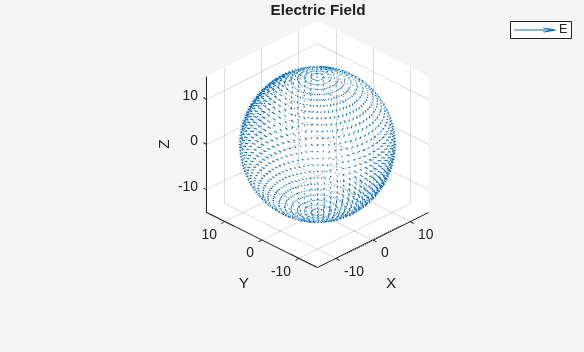
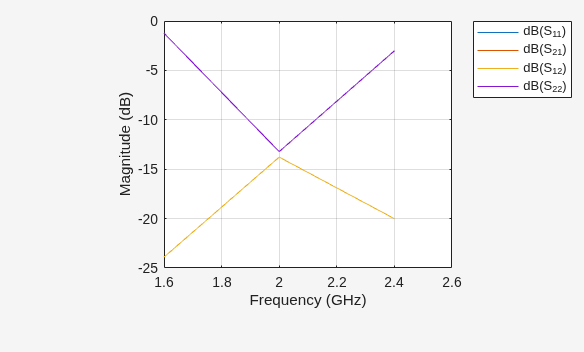
Plot the radiation pattern and electric field for this measuredAntenna at 2 GHz, while plot S-parameters over the entire frequency range.
pattern(mesAnt,fRange(2),Type="efield")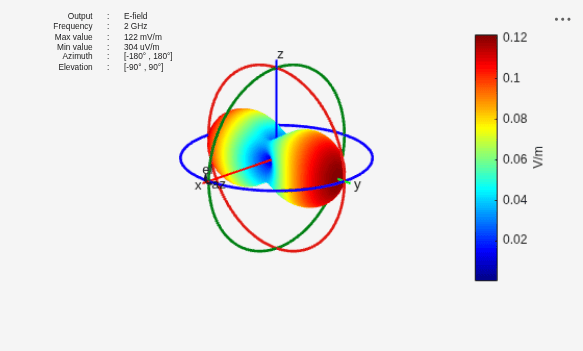
EHfields(mesAnt,fRange(2))
sp = sparameters(mesAnt,fRange);
rfplot(sp)
The .ffd file contains far-field data generated by the HFSS™ software. Load the radiation pattern data from the .ffd file into the workspace by using the loadData helper function defined in the Supporting Function section of this example. Specify the coordinate system angle convention used for this data in the .ffd file.
fileName = sprintf("RefFFDdata.ffd"); CoordinateSystem ="Phi-Theta"; [theta1,phi1,numFreqs,Etheta,Ephi,freqs] = loadData(fileName,CoordinateSystem); if CoordinateSystem == "Phi-Theta" elev = 90 - theta1; else elev = theta1; end
Calculate the number of data points.
numPt = numel(theta1)*numel(phi1);
Extract the electric field data from the data in the workspace.
ESph = [Ephi;Etheta;zeros(numPt,3)];
eField = reshape(ESph,numPt,3,numFreqs);
Calculate the spherical coordinates of the electric field points.
lambda = 3e8/max(freqs);
radius = 100*lambda*ones(numPt,1);
[theta,phi] = meshgrid(elev,phi1);
phi = phi(:);
theta = theta(:);
direction = [phi theta radius];
Create a measuredAntenna object with the number of ports equal to those in the .ffd file data. Specify the E property using eField, and set the Direction property using calculated spherical coordinates. Set the Azimuth and Elevation properties using phi1 and elev, respectively. Specify the phase center. This example assumes the phase center at (0,0,0). Set the FieldFrequency property using the frequencies of the electric field data.
mAnt = measuredAntenna(NumPorts=1);
mAnt.E = eField;
mAnt.Direction = direction;
mAnt.PhaseCenter = [0 0 0];
mAnt.FieldFrequency = freqs;
mAnt.Azimuth = phi1;
mAnt.Elevation = elev;
mAnt.FieldCoordinate = 'polar';
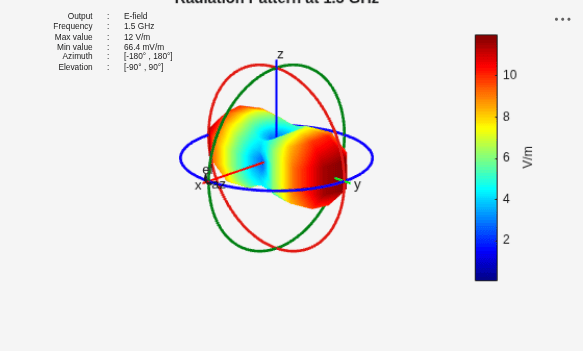
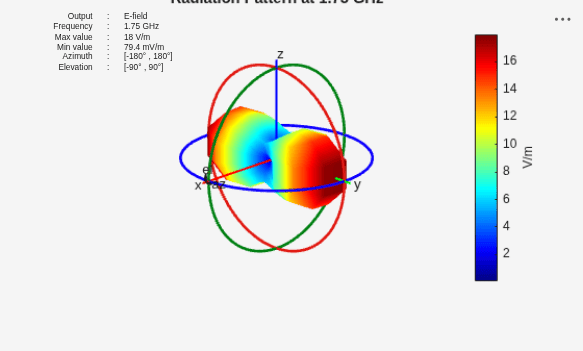
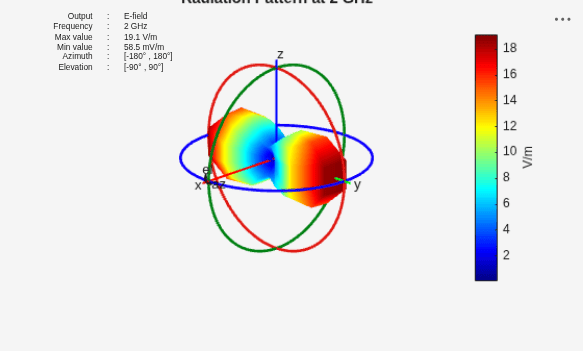
Visualize the radiation patterns at the individual frequencies.
for i=1:numFreqs
figure
pattern(mAnt,freqs(i))
title(strcat("Radiation Pattern at ",num2str(freqs(i)/1e9)," GHz"))
end
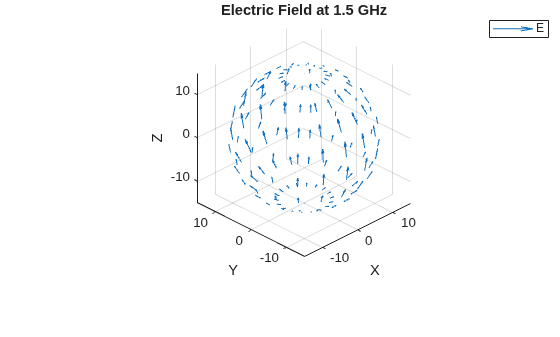
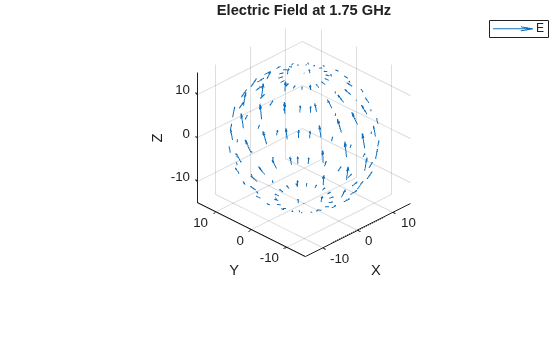
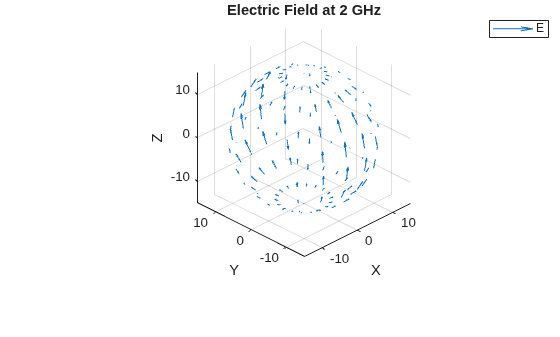
Visualize the corresponding electric fields.
for i=1:numFreqs
figure
EHfields(mAnt,freqs(i))
title(strcat("Electric Field at ",num2str(freqs(i)/1e9)," GHz"))
end
Supporting Function
The loadData helper function extracts the number of frequencies, angle values for the data points, and the electric field values from the .ffd file.
function [theta1,phi1,numFreqs,Etheta,Ephi,freqs] = loadData(fileName,CoordinateSystem)
fid = fopen(fileName);

if CoordinateSystem == "Phi-Theta"
    numHeaderLines = 3;
else
    textscan(fid,'%s',1);
    numHeaderLines = 4;
end

data = num2cell(fscanf(fid,'%d',3));
theta1 = linspace(data{:});
data = num2cell(fscanf(fid,'%d',3));
phi1 = linspace(data{:});
C1 = textscan(fid,'%s %d',1);
numFreqs = C1{2};
fclose(fid);

Mfull = readmatrix(fileName,FileType="text",NumHeaderLines=numHeaderLines);
freqs = Mfull(isnan(Mfull(:,1)),2);
MData = Mfull(~isnan(Mfull(:,1)),:);
Etheta = reshape(MData(:,1) + 1j*MData(:,2),length(phi1)*length(theta1),[]);
Ephi = reshape(MData(:,3) + 1j*MData(:,4),length(phi1)*length(theta1),[]);
end
Load the measured E-field data. Define the field frequency, azimuth, and elevation angles.
load("mesAnt_rect_array.mat")
freq = 3e9;
az = -180:5:180;
el = -90:5:90;
Create a measuredAntenna object and set its properties using the defined parameters.
mesAnt = measuredAntenna(E=Efield,Direction=Dir,NumPorts=1, ...
    Azimuth=az,Elevation=el,FieldCoordinate="rectangular", ...
    FieldFrequency=freq)
mesAnt =
  measuredAntenna with properties:

                  E: [2701×3 double]
        Directivity: []
          Direction: [2701×3 double]
        PhaseCenter: [0 0 0.0750]
           NumPorts: 1
     FieldFrequency: 3.0000e+09
    FieldCoordinate: "rectangular"
            Azimuth: [-180 -175 -170 -165 -160 -155 -150 -145 -140 -135 -130 -125 -120 -115 -110 -105 -100 -95 -90 -85 -80 -75 -70 -65 -60 -55 -50 -45 -40 -35 -30 -25 -20 -15 -10 -5 0 5 10 15 20 25 30 35 40 45 50 55 60 65 70 75 80 85 90 … ] (1×73 double)
          Elevation: [-90 -85 -80 -75 -70 -65 -60 -55 -50 -45 -40 -35 -30 -25 -20 -15 -10 -5 0 5 10 15 20 25 30 35 40 45 50 55 60 65 70 75 80 85 90]
        Sparameters: []
Create a 2-by-2 rectangular array with 0.0665 m row and column spacing and use the measuredAntenna object as its element.
rectArr = rectangularArray(Element=mesAnt,RowSpacing=0.0665,ColumnSpacing=0.0665)
rectArr =
  rectangularArray with properties:

           Element: [1×1 measuredAntenna]
              Size: [2 2]
        RowSpacing: 0.0665
     ColumnSpacing: 0.0665
           Lattice: 'Rectangular'
    AmplitudeTaper: 1
        PhaseShift: 0
              Tilt: 0
          TiltAxis: [1 0 0]
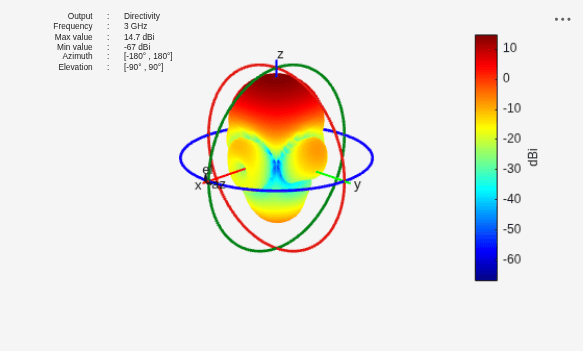
Perform pattern multiplication and plot the resultant array directivity pattern.
figure
patternMultiply(rectArr,freq)
Import horizontal and vertical slice directivity data of a dipole antenna operating at 75 MHz. This data includes magnitude, phi, and theta values at an angular resolution of 5 degrees.
load("slices_data.mat");Reconstruct 3-D pattern of the antenna from the horizontal and vertical slices.
[patS,thout,phiout] = patternFromSlices(vertSlice,theta,horizSlice,phi,Method="CrossWeighted");Calculate azimuth and elevation values.
frequency = 75e6;
lambda = physconst("LightSpeed")/frequency;
R = 100*lambda;
[az,el] = meshgrid(phiout,90-thout);
Dir = [az(:) el(:) R*ones(numel(az),1)];
Create a measuredAntenna object and set its properties. You can integrate this object into your workflow.
mAnt = measuredAntenna(E=[],Directivity=patS(:),Direction=Dir, ...
    FieldFrequency=frequency,FieldCoordinate="polar", ...
    PhaseCenter=[0 0 0],Azimuth=phiout,Elevation=90-thout);
Compute pattern with default resolution.
figure
pattern(mAnt,frequency)
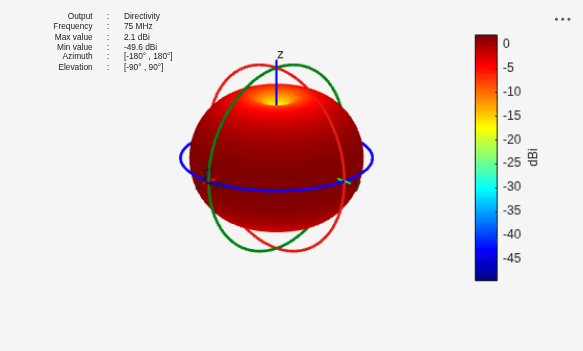
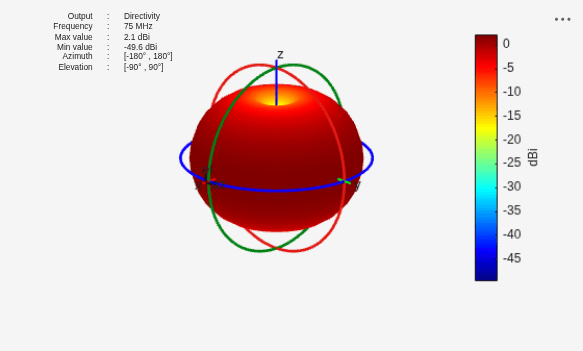
Compute pattern with lower resolution.
figure
pattern(mAnt,frequency,-180:15:180,-90:10:90)
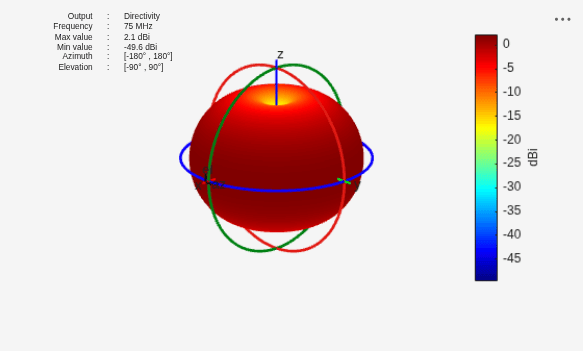
Compute pattern with higher resolution.
figure
pattern(mAnt,frequency,-180:1:180,-90:1:90)
Load the file containing pattern data into the workspace. Define frequencies, azimuth, and elevation ranges for the data.
load("pattern_data.mat")
freq = 70e6:10e6:100e6;
Calculate directions for the pattern data. Create a measuredAntenna object and set its properties using the pattern data.
lambda = physconst("LightSpeed")/70e6;
R = 100*lambda;
[az1, el1] = meshgrid(az,el);

Dir = [az1(:) el1(:) R*ones(numel(az1),1)];

mAnt = measuredAntenna(E=[],Directivity=patT,Direction=Dir,FieldFrequency=freq, ...
    Azimuth=az,Elevation=el,PhaseCenter=[0 0 0]);
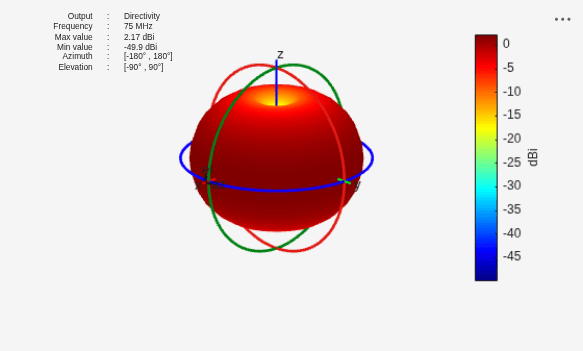
Calculate and plot the directivity pattern at 75 MHz. The measuredAntenna object interpolates pattern data for the frequencies, azimuth, and elevation angles that are within the specified range.
[mPat,mAz,mEl] = pattern(mAnt,75e6,-180:25:180,-90:20:90)
mPat = 10×15

  -49.9273  -49.9273  -49.9273  -49.9273  -49.9273  -49.9273  -49.9273  -49.9273  -49.9273  -49.9273  -49.9273  -49.9273  -49.9273  -49.9273  -49.9273
   -9.2430   -9.2447   -9.2458   -9.2464   -9.2465   -9.2460   -9.2450   -9.2434   -9.2415   -9.2396   -9.2383   -9.2380   -9.2387   -9.2403   -9.2423
   -3.0441   -3.0446   -3.0449   -3.0452   -3.0452   -3.0450   -3.0447   -3.0442   -3.0438   -3.0435   -3.0432   -3.0432   -3.0433   -3.0436   -3.0440
    0.3401    0.3399    0.3395    0.3391    0.3391    0.3394    0.3398    0.3401    0.3400    0.3396    0.3393    0.3392    0.3394    0.3398    0.3401
    1.9635    1.9632    1.9626    1.9621    1.9620    1.9625    1.9631    1.9635    1.9633    1.9626    1.9620    1.9619    1.9622    1.9629    1.9634
    1.9635    1.9632    1.9625    1.9620    1.9619    1.9624    1.9631    1.9635    1.9633    1.9627    1.9621    1.9620    1.9623    1.9630    1.9634
    0.3401    0.3399    0.3396    0.3392    0.3392    0.3395    0.3399    0.3401    0.3399    0.3395    0.3392    0.3391    0.3393    0.3397    0.3400
   -3.0441   -3.0437   -3.0434   -3.0432   -3.0432   -3.0433   -3.0437   -3.0441   -3.0445   -3.0449   -3.0451   -3.0452   -3.0451   -3.0447   -3.0443
   -9.2430   -9.2411   -9.2393   -9.2382   -9.2381   -9.2390   -9.2407   -9.2426   -9.2444   -9.2457   -9.2463   -9.2465   -9.2461   -9.2452   -9.2437
  -49.9273  -49.9273  -49.9273  -49.9273  -49.9273  -49.9273  -49.9273  -49.9273  -49.9273  -49.9273  -49.9273  -49.9273  -49.9273  -49.9273  -49.9273
mAz = 1×15

  -180  -155  -130  -105   -80   -55   -30    -5    20    45    70    95   120   145   170
mEl = 1×10

   -90   -70   -50   -30   -10    10    30    50    70    90
figure
pattern(mAnt,75e6)
Calculate and plot the directivity pattern at 90 MHz.
[mPat1,mAz1,mEl1] = pattern(mAnt,90e6,-180:25:180,-90:20:90)
mPat1 = 10×15

  -50.0580  -50.0580  -50.0580  -50.0580  -50.0580  -50.0580  -50.0580  -50.0580  -50.0580  -50.0580  -50.0580  -50.0580  -50.0580  -50.0580  -50.0580
  -10.2357  -10.2503  -10.2619  -10.2685  -10.2691  -10.2636  -10.2529  -10.2388  -10.2237  -10.2106  -10.2021  -10.2001  -10.2048  -10.2154  -10.2296
   -3.5977   -3.6030   -3.6073   -3.6098   -3.6101   -3.6080   -3.6040   -3.5988   -3.5935   -3.5889   -3.5861   -3.5854   -3.5870   -3.5906   -3.5955
    0.2452    0.2430    0.2408    0.2393    0.2392    0.2404    0.2425    0.2448    0.2467    0.2479    0.2485    0.2486    0.2483    0.2475    0.2460
    2.1480    2.1471    2.1457    2.1447    2.1446    2.1455    2.1468    2.1479    2.1481    2.1477    2.1472    2.1470    2.1474    2.1480    2.1481
    2.1480    2.1481    2.1476    2.1471    2.1470    2.1475    2.1480    2.1481    2.1473    2.1460    2.1448    2.1445    2.1452    2.1465    2.1477
    0.2452    0.2470    0.2481    0.2486    0.2486    0.2482    0.2473    0.2456    0.2434    0.2412    0.2395    0.2391    0.2401    0.2420    0.2444
   -3.5977   -3.5925   -3.5882   -3.5857   -3.5855   -3.5876   -3.5915   -3.5966   -3.6020   -3.6066   -3.6095   -3.6102   -3.6086   -3.6049   -3.5999
  -10.2357  -10.2208  -10.2085  -10.2012  -10.2005  -10.2065  -10.2181  -10.2327  -10.2475  -10.2599  -10.2676  -10.2695  -10.2652  -10.2554  -10.2418
  -50.0580  -50.0580  -50.0580  -50.0580  -50.0580  -50.0580  -50.0580  -50.0580  -50.0580  -50.0580  -50.0580  -50.0580  -50.0580  -50.0580  -50.0580
mAz1 = 1×15

  -180  -155  -130  -105   -80   -55   -30    -5    20    45    70    95   120   145   170
mEl1 = 1×10

   -90   -70   -50   -30   -10    10    30    50    70    90
figure
pattern(mAnt,90e6)
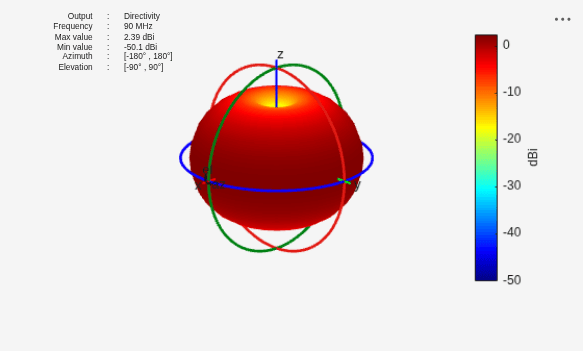
Load the pattern data file into the workspace. Define the frequency for the pattern data and calculate directions. Create a measuredAntenna object and set its properties using the imported pattern data.
load("rf_site_data.mat");
frequency = 2.5e9;
lambda = physconst("LightSpeed")/frequency;
R = 100*lambda;
[az1, el1] = meshgrid(az,el);
Dir = [az1(:) el1(:) R*ones(numel(az1),1)];
mAnt = measuredAntenna(E=[],Directivity=pat(:),Direction=Dir,FieldFrequency=frequency, ...
    Azimuth=az,Elevation=el,PhaseCenter=[0 0 0]);
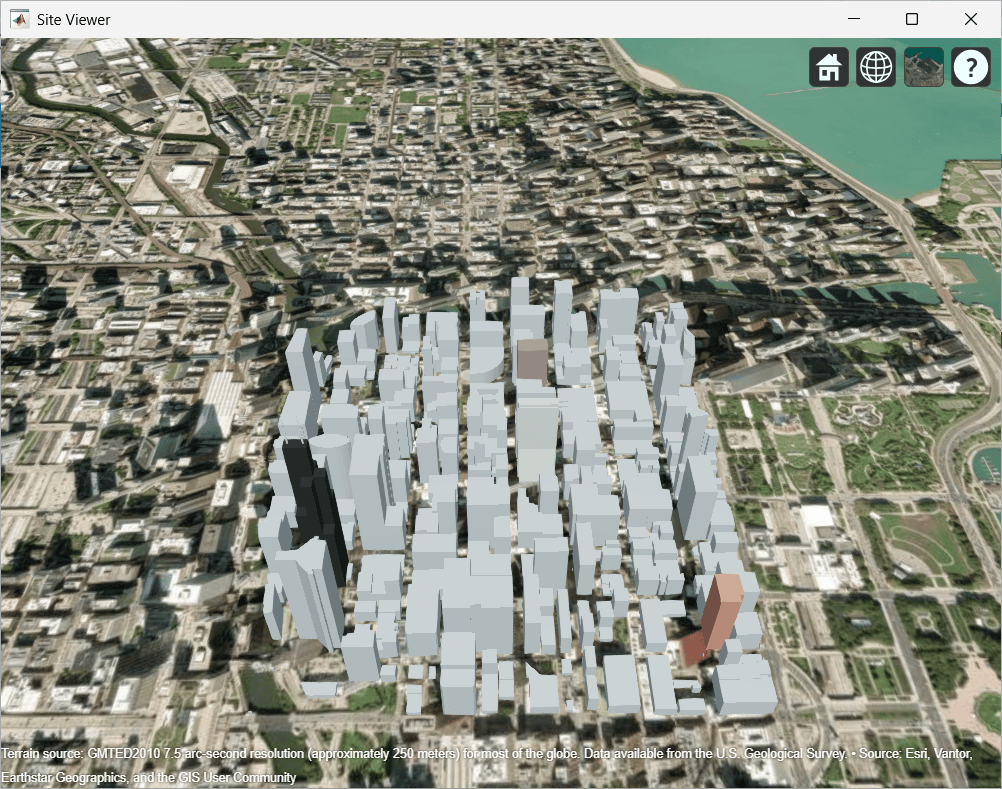
Create a site viewer, and Tx and Rx sites with their Antenna property specified using the measuredAntenna object.
viewer = siteviewer(Buildings="chicago.osm");Warning: Unable to access basemap 'satellite', which uses an online source. Using 'darkwater' instead. More details: The connection to the URL 'https://services.arcgisonline.com/ArcGIS/rest/services/World_Imagery/MapServer' timed out.
tx = txsite(Latitude=41.8800, ...
    Longitude=-87.6295, ...
    TransmitterFrequency=2.5e9,Antenna=mAnt);

rx = rxsite(Latitude=41.881352, ...
    Longitude=-87.629771, ...
    AntennaHeight=30,Antenna=mAnt);
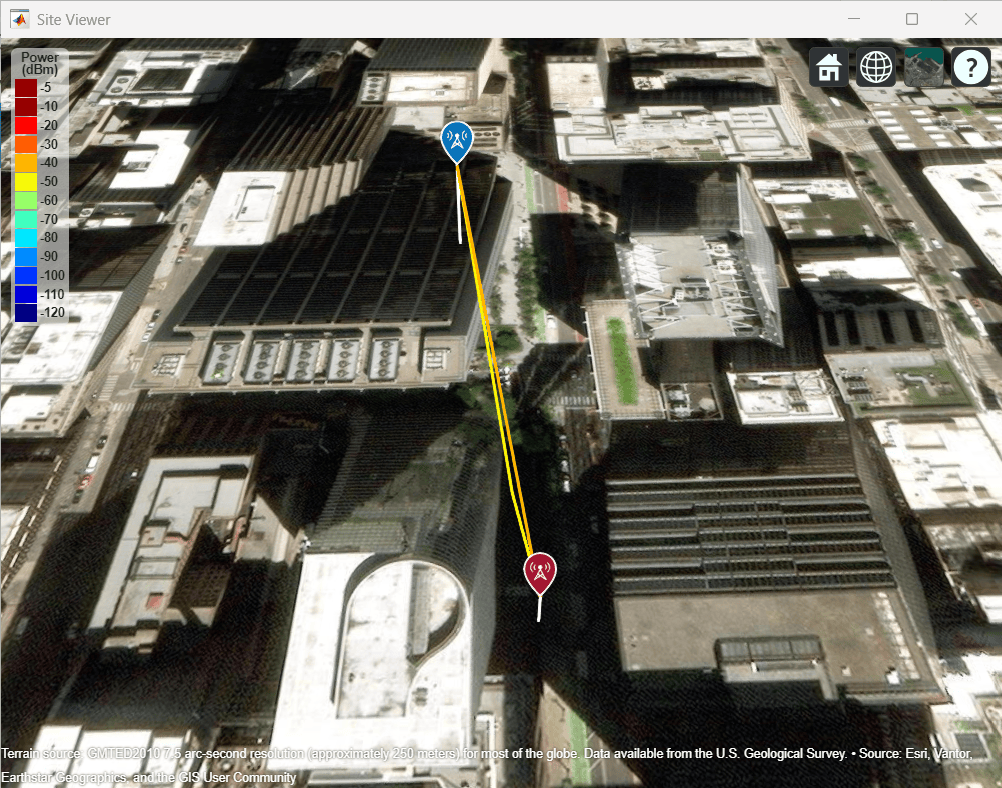
Use the raytracing propagation model to calculate the signal strength and perform raytracing.
pm = propagationModel("raytracing");
ss = sigstrength(rx,tx,pm)
ss = -50.0058
raytrace(tx,rx,pm)
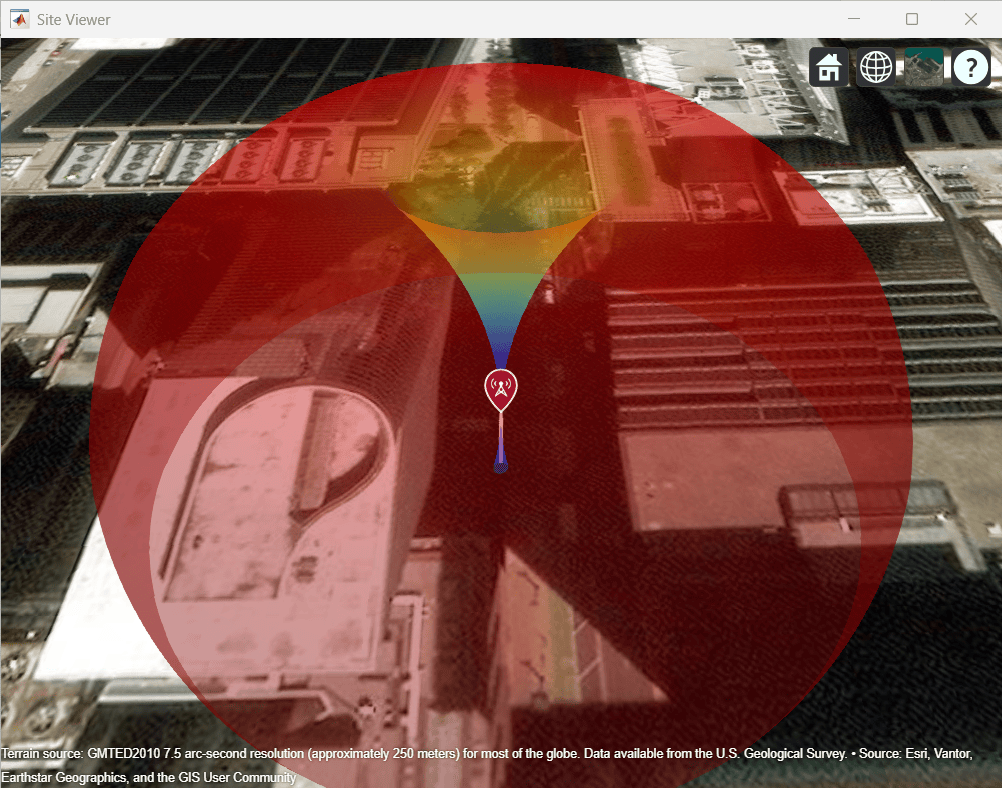
Plot the radiation pattern of the transmitter.
pattern(tx)
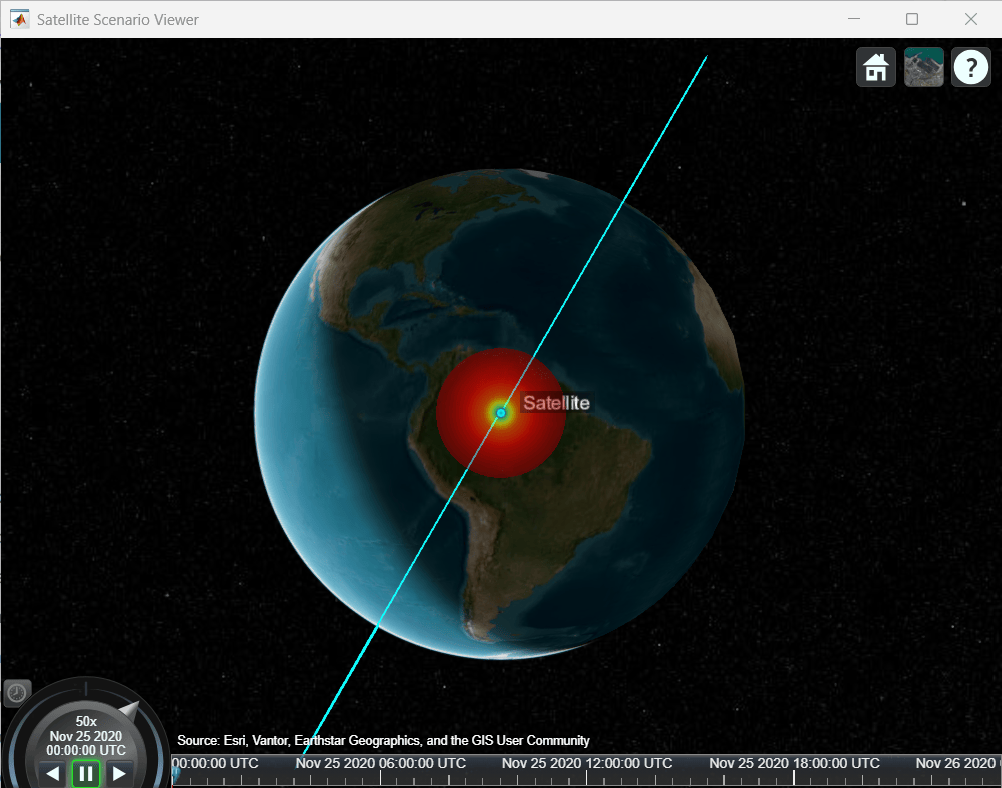
Create the satelliteScenario object.
startTime = datetime(2020,11,25,0,0,0);
stopTime = startTime + days(1);
sampleTime = 60;
sc = satelliteScenario(startTime,stopTime,sampleTime);
Create the Satellite object. Create the Gimbal object for the satellite scenario using the Satellite object.
semiMajorAxis = 10000000;                                 % meters
eccentricity = 0;
inclination = 60;                                         % degrees
rightAscensionOfAscendingNode = 0;                        % degrees
argumentOfPeriapsis = 0;                                  % degrees
trueAnomaly = 0;                                          % degrees
sat = satellite(sc,semiMajorAxis,eccentricity,inclination, ...
    rightAscensionOfAscendingNode,argumentOfPeriapsis, ...
    trueAnomaly,Name="Satellite");
gimbaltxSat = gimbal(sat);
Specify parameters for the Transmitter object.
frequency = 27e9;                                    % Hz
power = 20;                                          % dBW
bitRate = 20;                                        % Mbps
systemLoss = 3;                                      % dB
Load the pattern data file into the workspace. Calculate the directions. Create a measuredAntenna object and set its properties using the imported pattern data.
load("ant_sat_data.mat");
lambda = physconst("LightSpeed")/frequency;
R = 100*lambda;
[az1, el1] = meshgrid(az,el);

Dir = [az1(:) el1(:) R*ones(numel(az1),1)];

mAnt = measuredAntenna(E=[],Directivity=pat(:),Direction=Dir, ...
    FieldFrequency=frequency,Azimuth=az,Elevation=el);
Create a Transmitter object. View the antenna radiation pattern in the scenario.
txSat = transmitter(gimbaltxSat,Name="Satellite Transmitter",Frequency=frequency, ...
    Power=power,BitRate=bitRate,SystemLoss=systemLoss,Antenna=mAnt);
viewer = satelliteScenarioViewer(sc);
pattern(txSat);
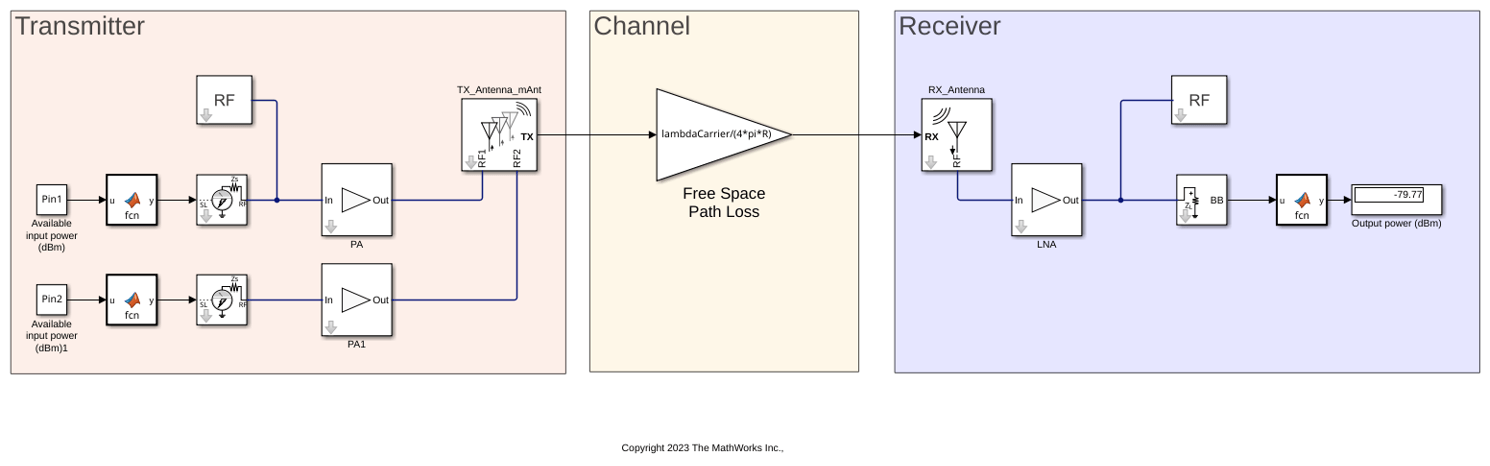
This example shows how to use measuredAntenna object in the Antenna block to model a measured antenna or array characterized by means of its S-parameters and frequency dependent far-field radiation pattern including both polarization components. The measuredAntenna object lets you replace the physical antennas from the antenna catalog with measured field data of the antenna. This example extracts data from a linear array to create a measuredAntenna object using hcreate_mAnt helper function.
System Configuration
Define the carrier frequency in Hz and set it in these parameters:
Radiated carrier frequency parameter in the Transmit Antenna block
Incident carrier frequency parameter in the Receiver Antenna block
Carrier frequencies parameter in the Inport and Outport blocks
FreqCarrier = 5e9;
Define gain for the Gain block. This Gain block acts as a free-space path-loss channel.
lambdaCarrier = physconst('lightspeed')/FreqCarrier; %[m]
Define the input impedance of the low noise amplifier (LNA) in ohms.
Zin_r =71.3819 - 1j*2.1795;
Define the available input power in dBm for the two RF transmitter chains and assign the variables to Pin 1 and Pin 2 in the Constant block.
Pin1 = -30;
Pin2 = -30;
Create a linear antenna array and extract data from it to create a measuredAntenna object. The data extracted from the linear array is a substitute of real-world measured data that can be inputted by changing the hcreate_mAnt helper function so as to read the embedded electric fields from data file.
dist = lambdaCarrier*0.5;
d1 = design(dipole,FreqCarrier);
antElems = [d1 copy(d1)];
la = linearArray('Element',antElems,'ElementSpacing',dist);
la.TiltAxis = [0 1 0];
la.Tilt = 90;
freqRange = (4.5:0.05:5.5)*1e9;
[mAnt,R] = hcreate_mAnt(la,freqRange);
Compute impedances in ohms for PA and PA1 Amplifier blocks in the transmitter.
z = impedance(la,freqRange);
z = z(freqRange==FreqCarrier,:);
Zin_t1 = z(1);
Zin_t2 = z(2);
Simulate Model
Open and simulate the measuredAnt.slx model. Observe the output power at the receiver.
open_system("measuredAnt.slx")
sim("measuredAnt.slx");
Since R2026b
Import the field data of a circular microstrip patch antenna operating at 10 GHz.
load("field_data.mat")
freq = 10e9;
c = physconst("LightSpeed");
lambda = c/freq;
Create a measuredAntenna object and set its properties using this data.
mesAnt = measuredAntenna(E=Etotal,...
    Direction=Dir,...
    Azimuth=az,...
    Elevation=el,...
    FieldFrequency=freq,...
    PhaseCenter=[0 0 0],...
    NumPorts=1);
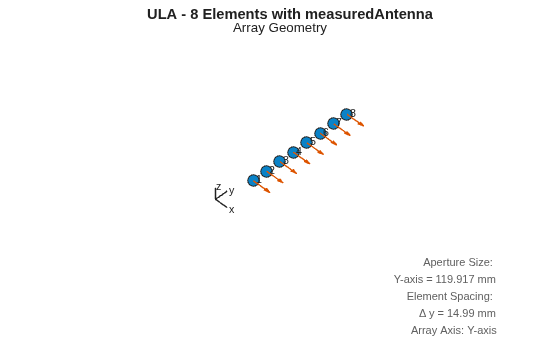
Create an ULA with measuredAntenna as its element.
numElements_ULA = 8;
elementSpacing_ULA = lambda/2;
ula = phased.ULA(NumElements=numElements_ULA,...
    ElementSpacing=elementSpacing_ULA,...
    Element=mesAnt,...
    ArrayAxis="y");
View the array geometry.
figure(Name="ULA Geometry");
viewArray(ula,ShowNormals=true,ShowIndex="All");
title("ULA - 8 Elements with measuredAntenna");
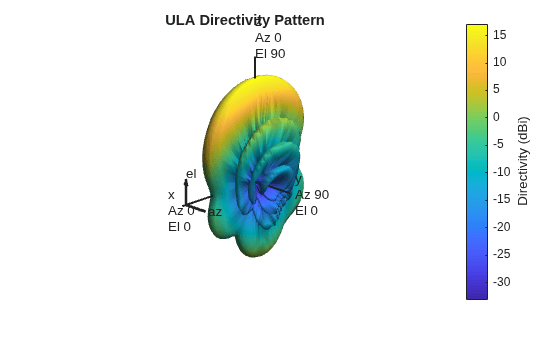
Plot 3-D directivity pattern of the array.
figure;
pattern(ula,freq,Type="directivity");
title("ULA Directivity Pattern");
For grating lobe analysis, create an array with a larger element spacing.
spacing_small = elementSpacing_ULA;
spacing_large = 2*elementSpacing_ULA;
ula_large = phased.ULA(NumElements=numElements_ULA,ElementSpacing=spacing_large,Element=mesAnt,ArrayAxis="y");
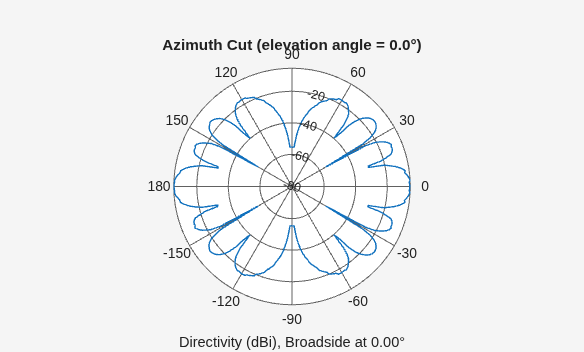
Plot the grating lobe diagram and azimuth pattern for the array with λ/2 element spacing. For half-wavelength spacing, the array satisfies the spatial sampling criterion and does not exhibit grating lobes in the visible region.
figure
plotGratingLobeDiagram(ula,freq,0);
title(sprintf("λ/2 Spacing (%.3f m)",spacing_small));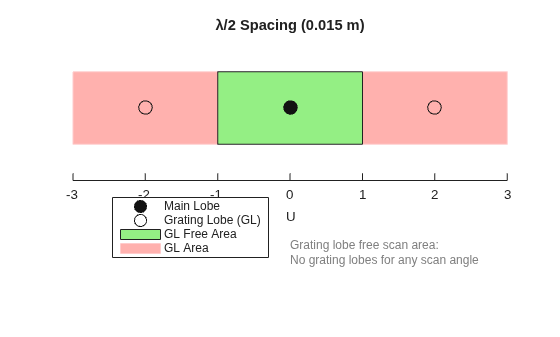
figure
patternAzimuth(ula,freq,0);
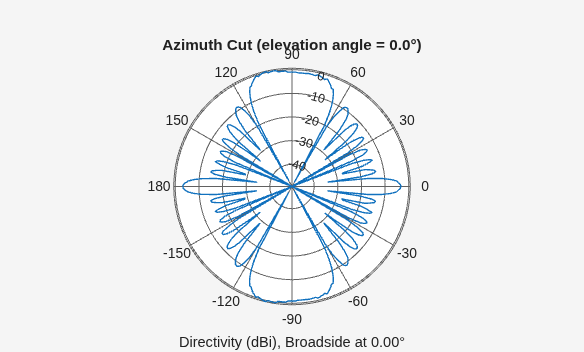
Plot the grating lobe diagram and azimuth pattern for the array with λ element spacing. When the element spacing is increased to one wavelength, additional lobes appear due to spatial aliasing. These grating lobes are visible both in the grating-lobe diagram and in the azimuth radiation pattern.
figure
plotGratingLobeDiagram(ula_large,freq,0);
title(sprintf("λ Spacing (%.3f m)",spacing_large));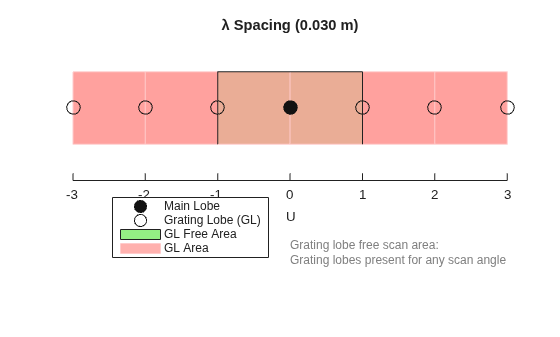
figure
patternAzimuth(ula_large,freq,0);
Since R2026b
Import the field data of a circular microstrip patch antenna operating at 10 GHz.
load("field_data.mat")
freq = 10e9;
c = physconst("LightSpeed");
lambda = c/freq;
Create a measuredAntenna object and set its properties using this data.
mesAnt = measuredAntenna(E=Etotal,...
    Direction=Dir,...
    Azimuth=az,...
    Elevation=el,...
    FieldFrequency=freq,...
    PhaseCenter=[0 0 0],...
    NumPorts=1);
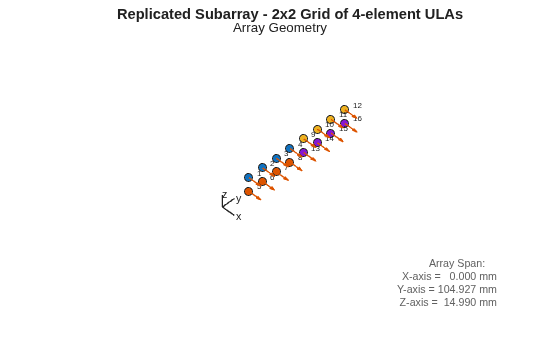
Create an uniform linear array (ULA) using the antenna field data. Use this ULA to create a 2-by-2 replicated subarray.
subarrayElement = phased.ULA(NumElements=4,ElementSpacing=lambda/2,Element=mesAnt);
numSubarrays = 4;
subarraySpacing = 2*lambda;

repSubarray = phased.ReplicatedSubarray(Subarray=subarrayElement,...
    Layout="Rectangular",...
    GridSize=[2, 2],...
    GridSpacing="Auto",...
    SubarraySteering="Phase");
Visualize the array geometry.
figure(Name="Replicated Subarray Geometry");
viewArray(repSubarray,ShowNormals=true,ShowIndex="All");
title("Replicated Subarray - 2x2 Grid of 4-element ULAs");
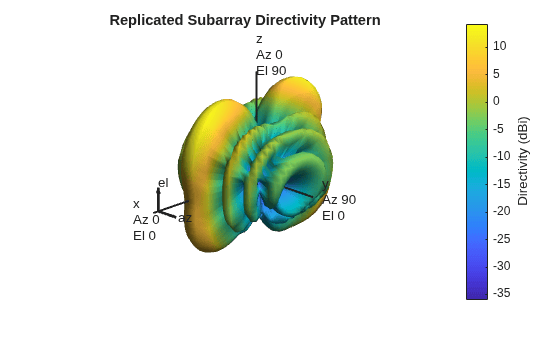
Plot 3-D directivity pattern of the array.
figure(Name="Replicated Subarray - 3D Pattern");
pattern(repSubarray,freq,Type="directivity");
title("Replicated Subarray Directivity Pattern");
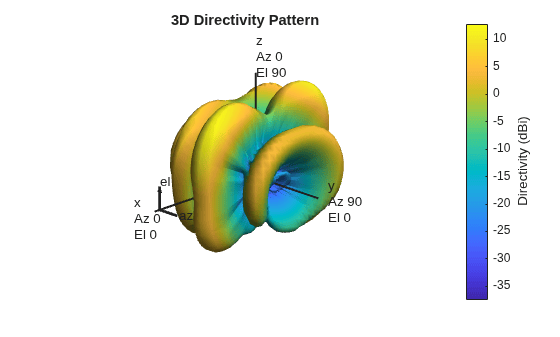
Steer the beam to 40° azimuth using the phased.SteeringVector System object™.
steeringAngle = [40; 0];
sv = phased.SteeringVector(SensorArray=repSubarray,PropagationSpeed=3e8);
weights = step(sv,freq,steeringAngle);
Plot the steered directivity pattern.
figure(Name="Replicated Subarray - Steered Pattern");
pattern(repSubarray,freq,Type="directivity",Weights=weights,...
    CoordinateSystem="polar")
Version History
Introduced in R2023aSee Also
Objects
cassegrain|cassegrainOffset|gregorian|gregorianOffset|reflectorParabolic|reflectorSpherical
Functions
Topics
- Multi-Hop Satellite Communications Link Between Two Ground Stations (Satellite Communications Toolbox)
- Coverage Maps for Satellite Constellation (Satellite Communications Toolbox)

