optimize
Optimize antenna and array catalog elements using SADEA or TR-SADEA algorithm
Syntax
Description
optimizes the antenna or the array at the specified frequency using the specified objective
function and the antenna or array properties and their bounds.optimizedelement = optimize(element,frequency,objectivefunction,propertynames,bounds)
optimizes the antenna or the array using additional options specified by one or more name-value
arguments.optimizedelement = optimize(___,Name=Value)
Examples
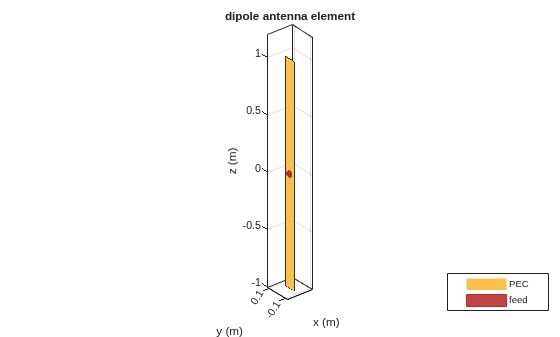
Create and view a default dipole antenna.
ant = dipole; show(ant)
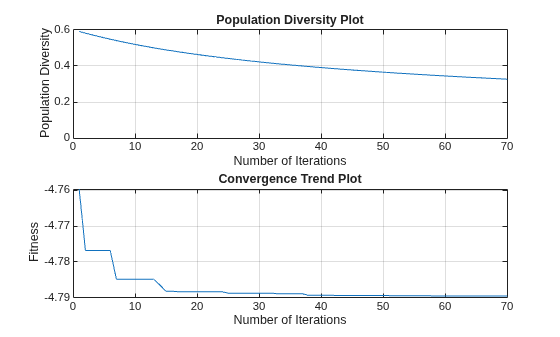
Maximize the gain of the antenna by changing the antenna length from 3 m to 7 m and the width from 0.11 m to 0.13 m.
Optimize the antenna at a frequency of 75 MHz.
optAnt = optimize(ant,75e6,"maximizeGain", ... {'Length','Width'}, {3 0.11; 7 0.13})
optAnt =
dipole with properties:
Length: 4.7979
Width: 0.1100
FeedOffset: 0
Conductor: [1×1 metal]
Tilt: 0
TiltAxis: [1 0 0]
Load: [1×1 lumpedElement]
show(optAnt)

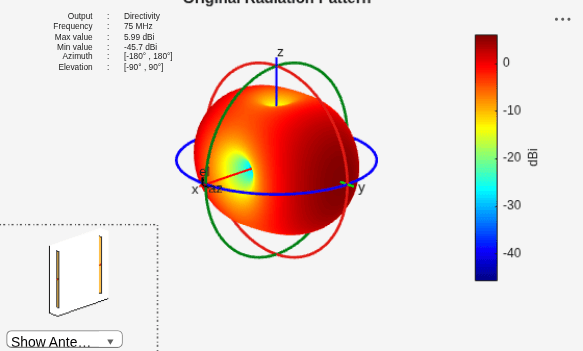
Create a linear array of 2 dipole antennas operating at 75 MHz with default element spacing. Plot the directivity pattern of this array.
f = 75e6; arr = linearArray(Element=dipole,NumElements=2); arr.ElementSpacing
ans = 2
figure
pattern(arr,f);
title("Original Radiation Pattern")
Define custom objective function for optimization.
function val = maximizeGainDipole(obj) fc = 75e6; val = pattern(obj,fc,Azimuth=0,Elevation=0); val = -1*val; end
Optimize the element spacing for the custom objective function defined in maximizeGainDipole.
optArr = optimize(arr,f,@maximizeGainDipole,{'ElementSpacing'},{2; 3});
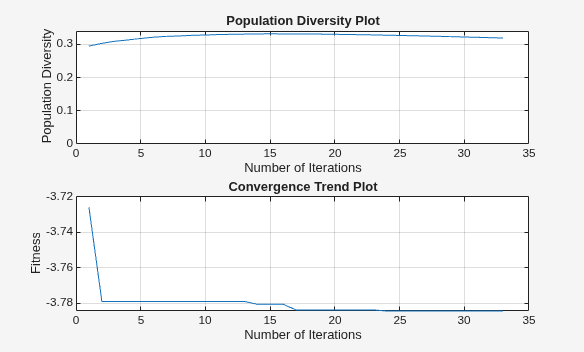
optArr.ElementSpacing
ans = 3.0000
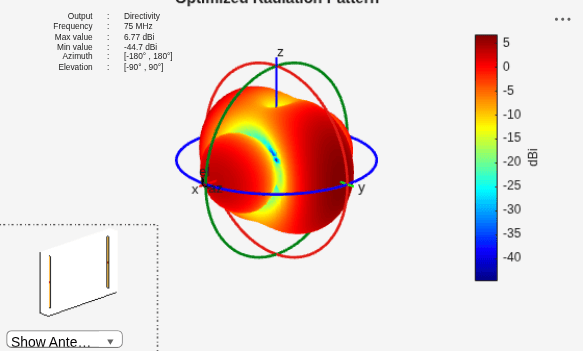
Plot the directivity pattern of the optimized array.
figure
pattern(optArr,f);
title("Optimized Radiation Pattern")
This example shows how to optimize an E-Notch microstrip patch antenna for gain with constraints on its geometry.
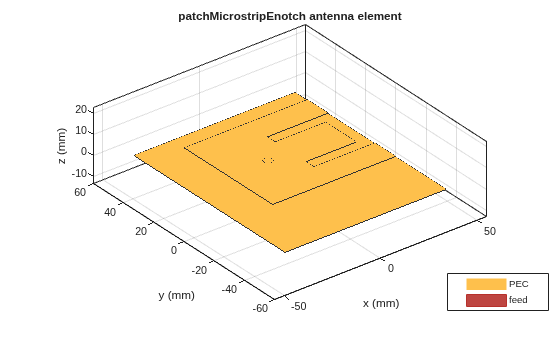
Create an E-Notch microstrip patch antenna operating at 2 GHz and vary its center arm notch length and width.
% Create E-notch microstrip antenna
ant = design(patchMicrostripEnotch,2e9);
ant.CenterArmNotchLength = 0.0052;
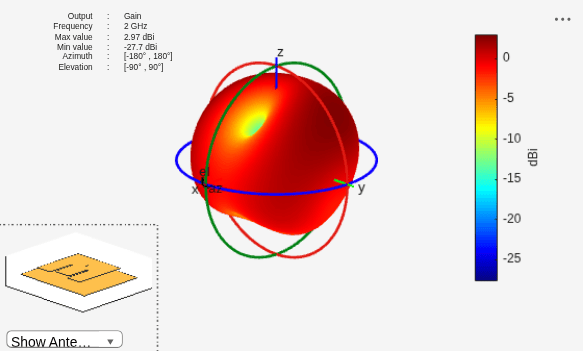
ant.CenterArmNotchWidth = 0.0211;Plot its radiation pattern and check the maximum gain value.
% Check the gain figure pattern(ant,2e9,Type="gain")
Define the design variables, and their lower and upper bounds.
designVariables = {'CenterArmNotchLength','NotchLength','Width','CenterArmNotchWidth','NotchWidth'};
XVmin = [0.001, 0.03, 0.03, 0.01, 0.001];
XVmax = [0.02, 0.06, 0.07, 0.03, 0.009];Define geometric constraints for optimization.
Prepare coefficients in the form of a matrix with reference to below linear inequalities:
Rewrite the inequalities 1 & 2 in the form of
Convert these inequalities to a matrix of form , where is coefficient matrix and is constant matrix. Write the coefficients as per the order of design variables.
A = [5,-1,0,0,0;...
0,0,-1,1,2];
b = [0;0];Define a structure to contain both the coefficient and constant matrices.
constraintsStructure.A = A; constraintsStructure.b = b;
Run the optimization on E-Notch microstrip patch antenna leveraging these constraints. Visualize the optimized design and plot the radiation pattern.
optAnt = optimize(ant, 2e9, "maximizeGain", designVariables, {XVmin;XVmax}, Iterations=50, GeometricConstraints=constraintsStructure);
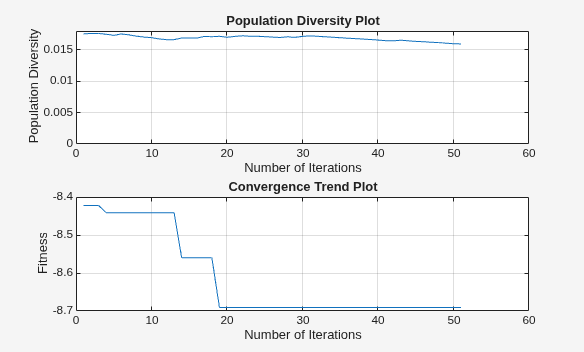
figure show(optAnt)
figure
pattern(optAnt,2e9,Type="gain")
Define operating frequency of antenna. Create a dipole antenna.
f = 75e6; d = dipole
d =
dipole with properties:
Length: 2
Width: 0.1000
FeedOffset: 0
Conductor: [1×1 metal]
Tilt: 0
TiltAxis: [1 0 0]
Load: [1×1 lumpedElement]
Use dipole's length and width as design variables for the optimization. Define their lower and upper bounds. Maximize the gain of this dipole antenna under the nonlinear geometric constraint defined at the end of this example.
lb = [0.5 0.01]; ub = [2 1]; gc = initGeomConstraint; gc.nlcon = @roc; gc.nrlv = [1 1]; [optAnt,optinfo]= optimize(d,f,"maximizeGain",{'Length', 'Width'},{lb; ub},... Iterations=25, GeometricConstraints=gc);
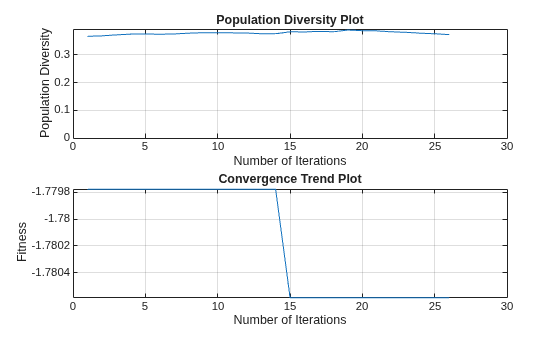
View the parameters of the optimized antenna.
optAnt
optAnt =
dipole with properties:
Length: 0.6934
Width: 0.1386
FeedOffset: 0
Conductor: [1×1 metal]
Tilt: 0
TiltAxis: [1 0 0]
Load: [1×1 lumpedElement]
Verify that the geometric constraint has been followed.
[optAnt.Length]^2 + [optAnt.Width]^2
ans = 0.5000
View the optimizer parameters.
optinfo
optinfo =
OptimizerSADEA with properties:
Bounds: [2×2 double]
CustomEvaluationFunction: []
Weights: []
UseParallel: 0
GeometricConstraints: [1×1 struct]
EnableLog: 0
View the optimization process data for the third iteration and verify that the geometric constraint has been followed.
iter = getIterationData(optinfo); dv = iter.members(3,:)
dv = 1×2
0.7010 0.0928
[dv(1)]^2 + [dv(2)]^2
ans = 0.5000
Compute the maximum gain of the optimized antenna.
maxGain = max(max(pattern(optAnt,f,Type="gain")))maxGain = 1.7806
Define nonlinear geometric constraints for the optimization. 'x' is a vector of design variables (length and width).
The geometric constraint equation is:
function [c, ceq] = roc(x) c = 0; % Define nonlinear inequality ceq = ((x(1))^2) + ((x(2))^2) - 0.5; % Define nonlinear equality end
Input Arguments
Antenna or array to optimize, specified as an antenna object from the antenna catalog, array object from the
array
catalog, or customAntenna object.
Note
To optimize pcbStack antenna, use PCB Antenna
Designer app.
Example: dipole
Example: linearArray(Element=dipole)
Example: customAntenna(Shape=shape.Rectangle)
Operating frequency of the antenna or array to optimize, specified as a positive scalar in Hertz.
Example: 70e6
Data Types: double
Objective of antenna or array optimization, specified as a string from one of the following:
maximizeGain— Maximize the gain of the given antenna or array elementfronttoBackRatio— Increase the front-lobe-to-back-lobe ratio of the antenna or array elementmaximizeBandwidth— Maximize the operation bandwidth of the antenna or array element. Use this objective function for optimizing antennas or arrays for wideband applications.minimizeBandwidth— Minimize the operation bandwidth of the antenna or array element. Use this objective function for optimizing antennas or arrays for narrowband applications.maximizeSLL— Maximize the ratio between the front lobe and the first side lobes of the antenna or array pattern.minimizeArea— Minimizes the maximum area occupied by the antenna or the array element. If the dimension of the element in the array is smaller than the aperture, the objective function minimizes the array aperture.Custom objective function — Optimizes the antenna or array as per the user defined objective function.
Anonymous function handle — Optimizes the antenna or array for the objectives defined using the anonymous function handle.
Data Types: string
Properties of the antenna or array object to optimize, specified as a cell array of character vectors. The property names are selected as the design variables in optimization.
Example: {'Length','Width'}
Data Types: cell
Lower and upper bounds of design variables, specified as a two-row cell array.
Example: {3 0.11; 7 0.13}
Data Types: double
Name-Value Arguments
Specify optional pairs of arguments as
Name1=Value1,...,NameN=ValueN, where Name is
the argument name and Value is the corresponding value.
Name-value arguments must appear after other arguments, but the order of the
pairs does not matter.
Example: Constraints={'Area < 0.03'}
Optimization constraints, specified as a cell array of strings or character vectors. Each character vector or string must be specified in the following format: (analysis function) (inequality sign) (value). You can specify any of the following analysis functions:
Areain meter squareVolumein meter cubeS11in dBGainin dBiF/Bin dBiSLLin dBi
The inequality signs '<' or '>' and the
values specifies the analysis function limits. For example, 'Area <
0.03' indicates that the area of the optimizing antenna must be less than
0.03 square meter.
Example: {'Area < 0.03'}
Data Types: char | string
Weight or penalty of each constraint function, specified as a vector of positive integers in the range (1,100). If the penalty is set to high, a higher priority is given to the constraint function in case of multiple constraint optimization. All constraint functions are weighted equally by default.
Example: 8
Data Types: double
Range of frequencies for vector frequency analysis like S-parameters, specified as a vector of positive numbers with each element unit in Hertz.
The default frequency range is obtained from the center frequency considering a bandwidth of less than 10 percent.
Example: linspace(1e9,2e9,10)
Data Types: double
Reference impedance of antenna or array being optimized, specified as a scalar in ohms.
Example: 75
Data Types: double
Azimuth and elevation of main lobe of antenna or array being optimized, specified as a two-element vector with each element unit in degrees. The first element represents azimuth and the second element represents elevation.
Example: [20 30]
Data Types: double
Number of iterations to run the optimizer after you build the model, specified as a positive scalar.
Example: 40
Data Types: double
Option to enable parallel pool, specified as a logical value. The default value is
false. Set this option to true to enable the
parallel pool. Use parallel pool to speed up the optimization for computationally
large antennas and arrays. To use this feature, you need a license to the Parallel Computing Toolbox™.
Use the canUseParallelPool function to check if Parallel Computing Toolbox is installed and licensed for use, a default parallel pool is configured
and supported, and automatic creation of parallel pools is enabled.
Example: true
Data Types: logical
Option to enable mutual coupling of elements in an array during optimization,
specified as a logical true to enable or false
to disable. By default, this option is enabled.
Example: false
Data Types: logical
Option to print iteration number and value of convergence on the command line,
specified as a logical true to enable or false
to disable. By default, this option is disabled.
Example: true
Data Types: logical
Geometric constraints for optimization, specified as a structure containing six
fields representing linear and nonlinear equality and inequality constraints. You can
create an empty geometric constraints structure and then set the field values. Create
an empty geometric constraints structure using the using the
initGeomConstraint
function:
>>gc = initGeomConstraint
gc =
struct with fields:
A: []
b: []
Aeq: []
beq: []
nlcon: []
nrlv: []
In this structure:
Aholds the coefficients of the linear inequality constraints defined using the design variables.Ais a real M-by-N matrix where M is the number of inequalities, and N is the number of design variables.bholds the constants of inequalities.bis a real M-element column vector.Aeqholds the coefficients of the linear equality constraints defined using the design variables.Aeqis a Me-by-N matrix, where Me is the number of equalities, and N is the number of design variables.beqholds the constants of equalities.beqis a real Me-element column vector.nlconholds the nonlinear constraints.nlconis a handle to a function of design variables defining nonlinear constraints with two output arguments. First argument,c, stores nonlinear inequality and second argument,ceq, stores nonlinear equality.nrlvholds the information on relevance of a design variable fromnlconfor optimization.nrlvis a 1-by-N vector of0and1, where N is the number of design variables innlcon. Each index innrlvcorresponds to a design variable innlconin that sequence. A value of1at an index innrlvindicates to theoptimizefunction that the corresponding design variable is relevant for optimization, whereas a value of0indicates that it is not relevant.
For examples on how to specify geometric constraints, see How to specify geometric constraints?. For additional
information on linear, nonlinear equalities and nonlinear inequalities, see the
fmincon (Optimization Toolbox) function documentation.
Data Types: struct
Algorithm to use for antenna or array optimization, specified as a string. By
default, the optimize function uses SADEA algorithm. Use TR-SADEA
for applications where the evaluation of the objective function is computationally
expensive. For more information, see optimization
algorithms.
Example: UseAlgorithm="TR-SADEA"
Data Types: string
Output Arguments
Optimized antenna or array element, returned as an antenna, array, or
customAntenna object.
Optimization process data, returned as an OptimizerSADEA or
OptimizerTRSADEA object. Use functions of these objects to get more
information on optimization such as initialization data, iteration data, number of
evaluations, convergence status, and best member data.
More About
Linear inequalities: Consider an optimization problem consisting of five design variables as follows:
designVariables = {'CenterArmNotchLength','NotchLength','Width',...
'CenterArmNotchWidth','NotchWidth'};5*CenterArmNotchLength - NotchLength < 0
CenterArmNotchWidth + 2*Notchwidth - Width < 0
Define the A and b fields as
follows:
>>gc = initGeomConstraint;
gc.A = [5,-1,0,0,0;...
0,0,-1,1,2];
gc.b = [0;0];
Linear equalities: Consider an optimization problem consisting of two design variables as follows:
designVariables = {'Length','Width'};Length - 5*Width = 0
Define the Aeq and beq fields as
follows:
>>gc = initGeomConstraint; gc.Aeq = [1 -5]; gc.beq = 0;
Nonlinear constraints: Consider an optimization problem consisting of two design variables as follows:
designVariables = {'Length','Width'};Length2 + Width2 = 0.5
Define these nonlinear constraints using a function as follows:
>>function [c, ceq] = roc(x)
c = ((x(1))^2) + ((x(2))^2) - 0.5; % Compute nonlinear inequalities
ceq = 0; % Compute nonlinear equalities
end
nlcon and nrlv fields as
follows:>>gc = initGeomConstraint; gc.nlcon = @roc; gc.nrlv = [1 1];
Version History
Introduced in R2020bThe optimize function now returns the parameters history of the
specified optimizer (SADEA or TR-SADEA) along with the optimization results. To view the
history, specify an additional output argument when calling the function.
The optimize function has added three new features:
You can now use custom geometric constraints defined by linear equalities and
nonlinear inequalities for antenna or array optimization. Define the custom geometric
constraints in the GeometricConstraints property of the
optimize function using the opt structure that
contains the coefficients of linear inequalities (A,
b) and equalities (Aeq, beq)
and nonlinear inequalities (nlcon, nrlv).
Optimize large antennas and arrays using the TR-SADEA algorithm in the
optimize function. Set the new UseAlgorithm
argument in the optimize function to "TR-SADEA" to
use TR-SADEA algorithm for your optimization task. To use this feature, you need a license
for Statistics and Machine Learning Toolbox™ in addition to
Antenna Toolbox™.
You can now use an anonymous function handle to define antenna or array optimization
objectives in the optimize function.
Specify a custom objective function to define antenna or array optimization objectives.
Use custom geometric constraints defined by linear inequalities of design variables for antenna or array optimization. Specify custom geometric constraints in the new
GeometricConstraintsname-value argument.
See Also
Functions
canUseParallelPool|fmincon(Optimization Toolbox)
Objects
Topics
- SADEA Optimization of Six-Element Yagi-Uda Antenna using Custom Objective Function
- Direct Search Based Optimization of Six-Element Yagi-Uda Antenna
- Surrogate Based Optimization of Six-Element Yagi-Uda Antenna
- Optimization of Antenna Array Elements Using Antenna Array Designer App
- Maximizing Gain and Improving Impedance Bandwidth of E-Patch Antenna
- Antenna and Array Optimization Algorithms
MATLAB Command
You clicked a link that corresponds to this MATLAB command:
Run the command by entering it in the MATLAB Command Window. Web browsers do not support MATLAB commands.
Select a Web Site
Choose a web site to get translated content where available and see local events and offers. Based on your location, we recommend that you select: .
You can also select a web site from the following list
How to Get Best Site Performance
Select the China site (in Chinese or English) for best site performance. Other MathWorks country sites are not optimized for visits from your location.
Americas
- América Latina (Español)
- Canada (English)
- United States (English)
Europe
- Belgium (English)
- Denmark (English)
- Deutschland (Deutsch)
- España (Español)
- Finland (English)
- France (Français)
- Ireland (English)
- Italia (Italiano)
- Luxembourg (English)
- Netherlands (English)
- Norway (English)
- Österreich (Deutsch)
- Portugal (English)
- Sweden (English)
- Switzerland
- United Kingdom (English)