Results for

I want to control the level my water tank with a esp8266 and Thingspeak.
I can see the level in Thingspeak. This is working.
Now I want to send 2 emails :
- One daily email with the actual level
- Alarm email when level is below a setpoint.
How can I incorporate the value from a channel in the email ?
What I have now for the daily email , but with errors :
alert_body = 'huidig peil regenput';
channelID = ..........;
% Provide the ThingSpeak alerts API key. All alerts API keys start with TAK.
alertApiKey = 'TAK...............';
% Set the address for the HTTTP call
alertUrl="https://api.thingspeak.com/alerts/send";
% webwrite uses weboptions to add required headers. Alerts needs a ThingSpeak-Alerts-API-Key header.
options = weboptions("HeaderFields", ["ThingSpeak-Alerts-API-Key", alertApiKey ]);
% Set the email subject.
alertSubject = sprintf("Niveau regenput " );
% Read the recent data.
peil = thingSpeakRead(channelID,'Fields',1);
% Check to make sure the data was read correctly from the channel.
% Set the outgoing message
webwrite(alertUrl , "body", alertBody, "subject", alertSubject,'Fields',peil);
% Catch errors so the MATLAB code does not disable a TimeControl if it fails
try
webwrite(alertUrl , "body", alert_body, "subject", alertSubject, options);
catch someException
fprintf("Failed to send alert: %s\n", someException.message);
end
The errors I receive :
Unrecognized function or variable 'alert_Body'.
Error in Read Channel to Trigger Email 1 (line 24)
webwrite(alertUrl , "body", alert_Body, "subject", alertSubject,"Fields",peil);
Manny thanks in advance

Hallo,
ich Neuling hier, und habe das Beispiel WriteMultipleFields benutzt um die Funktionsweise zu verstehen.
So weit so gut, hat auch alles grklappt. Jetzt nach 2 Tagen bekomme ich immer eine Fehlermeldung.
Problem updating channel. HTTP error code -401 abwechselnd mit
Channel update successful.
Es ist immernoch die gleiche Software, Board ist WiFi LoRa 32 V3.

Buongiorno, non mi è possibile connetermi al canale di thingspeak che ho creato, per passare i dati tramite MQTT. Il codice segue la libreria PubSubClient su arduino ide, l'errore restituito dal serial monitor dell'ide é: -4 : MQTT_CONNECTION_TIMEOUT - the server didn't respond within the keepalive time.
Allego il codice per eventuali verifiche:
Grazie per a disponibilità
#include "PubSubClient.h"
#include <ESP8266WiFi.h>
#include "secrets.h"
bool DEBUG = false; // true=serial message of debug enabled
char* server = "mqtt.thingspeak.com";
WiFiClient wifiClient;
PubSubClient client(server, 1883, wifiClient);
String payload;
// BME280 Setting
#include <Wire.h>
#include <Adafruit_BME280.h>
//#define SEALEVELPRESSURE_HPA (1013.25)
Adafruit_BME280 bme; // I2C
bool BMEStatus;
ADC_MODE(ADC_VCC); // Set ADC for read Vcc
// Update time in seconds. Min with Thingspeak is ~20 seconds
const int UPDATE_INTERVAL_SECONDS = 3600; //il clock interno ha un errore del 5% questo valore va tarato sperimentalmente
//const int UPDATE_INTERVAL_SECONDS = 60; // caricamento ogni minuto solo per test
void setup()
{
// Connect BME280 GND TO pin14 OR board's GND
pinMode(14, OUTPUT);
digitalWrite(14, LOW);
Serial.begin(115200);
delay(10);
// BME280 Initialise I2C communication as MASTER
Wire.begin(13, 12); //Wire.begin([SDA], [SCL])
BMEStatus = bme.begin();
if (!BMEStatus)
{
if (DEBUG) { Serial.println("Could not find BME280!"); }
//while (1);
}
// Weather monitoring See chapter 3.5 Recommended modes of operation
bme.setSampling(Adafruit_BME280::MODE_FORCED,
Adafruit_BME280::SAMPLING_X1, // temperature
Adafruit_BME280::SAMPLING_X1, // pressure
Adafruit_BME280::SAMPLING_X1, // humidity
Adafruit_BME280::FILTER_OFF );
// read values from the sensor
float temperature, humidity, pressure;
if (BMEStatus)
{
temperature = bme.readTemperature();
humidity = bme.readHumidity();
pressure = bme.readPressure() / 100.0F;
}
else
{
if (DEBUG) Serial.println("Could not find BME280!");
temperature=0;
humidity=0;
pressure=0;
}
float voltage = ESP.getVcc();
voltage = voltage/1024.0; //volt
if (DEBUG)
{
Serial.println("T= " + String(temperature) + "°C H= " + String(humidity) + "% P=" + String(pressure) + "hPa V=" + voltage + "V");
}
// Construct MQTT payload
payload="field1=";
payload+=temperature;
payload+="&field2=";
payload+=humidity;
payload+="&field3=";
payload+=pressure;
payload+="&field4=";
payload+=voltage;
payload+="&status=MQTTPUBLISH";
//Connect to Wifi
if (DEBUG)
{
Serial.println();
Serial.print("\nConnecting to WiFi SSID ");
Serial.print(SECRET_SSID);
}
WiFi.begin(SECRET_SSID, SECRET_PASS);
int timeOut=10; // Time out to connect is 10 seconds
while ((WiFi.status() != WL_CONNECTED) && timeOut>0)
{
delay(1000);
if (DEBUG) { Serial.print("."); }
timeOut--;
}
if (timeOut==0) //No WiFi!
{
if (DEBUG) Serial.println("\nTimeOut Connection, go to sleep!\n\n");
ESP.deepSleep(1E6 * UPDATE_INTERVAL_SECONDS);
}
if (DEBUG) // Yes WiFi
{
Serial.print("\nWiFi connected with IP address: ");
Serial.println(WiFi.localIP());
}
// Reconnect if MQTT client is not connected.
if (!client.connected())
{
reconnect();
}
mqttpublish();
delay(200); // Waiting for transmission to complete!!! (ci vuole)
WiFi.disconnect( true );
delay( 1 );
if (DEBUG) { Serial.println("Go to sleep!\n\n"); }
// Sleep ESP and disable wifi at wakeup
ESP.deepSleep( 1E6 * UPDATE_INTERVAL_SECONDS, WAKE_RF_DISABLED );
}
void loop()
{
//there's nothing to do
}
void mqttpublish()
{
// read values from the sensor
float temperature, humidity, pressure;
if (DEBUG)
{
Serial.print("Sending payload: ");
Serial.println(payload);
}
// Create a topic string and publish data to ThingSpeak channel feed.
String topicString ="channels/" + String( channelID ) + "/publish/"+String(writeAPIKey);
unsigned int length=topicString.length();
char topicBuffer[length];
topicString.toCharArray(topicBuffer,length+1);
if (client.publish(topicBuffer, (char*) payload.c_str()))
{
if (DEBUG) Serial.println("Publish ok");
}
else
{
if (DEBUG) Serial.println("Publish failed");
}
}
void reconnect()
{
String clientName="MY-ESP";
// Loop until we're reconnected
while (!client.connected())
{
if (DEBUG) Serial.println("Attempting MQTT connection...");
// Try to connect to the MQTT broker
if (client.connect((char*) clientName.c_str()))
{
if (DEBUG) Serial.println("Connected");
}
else
{
if (DEBUG)
{
Serial.print("failed, try again");
// Print to know why the connection failed.
// See http://pubsubclient.knolleary.net/api.html#state for the failure code explanation.
Serial.print(client.state());
Serial.println(" try again in 2 seconds");
}
delay(2000);
}
}
}

I have been having problems sending ThingSpeak alerts so I created a simple routine that demonstrates the problem. The code executes successfully but I never receive an email with the alert. What am I doing wrong?
% Set Thingspeak address, alerts API key, and options for the HTTTP call
alertUrl = "https://api.thingspeak.com/alerts/send";
alertApiKey = "TAKxxxxxxxxxxxxxxxx";
options = weboptions("HeaderFields",["ThingSpeak-Alerts-API-Key",alertApiKey]);
% Set content for email subject and body.
alertSubject = "ThingSpeak Alert Subject";
alertBody = "ThingSpeak Alert Body";
% Catch errors so the MATLAB code does not disable a TimeControl if it fails
try
webwrite(alertUrl, "body", alertBody, "subject", alertSubject, options);
catch Exception
fprintf("Failed to send alert: %s\n", Exception.message);
end

Am running multiple sensors in the field producing strings of data then sending them to a node. The node is an Arduino Uno on which SIM 800 is attached for internet connectivity. After computation, the result is several strings that i want to display to things speak. The code i have so far can only upload numerical data. Am in need of help to display these strings in Thingsspeak.Help me.

Dear Team,
I have populated my data on ThingsBoard platform using ESP8266, now I want to read that data using MATLAB Industrial Communication Toolbox. I have written a code for this purpose below,
% Replace these values with your ThingsBoard MQTT broker details
brokerAddress = "ssl://demo.thingsboard.io"; % Adjust the broker address
port = 1883; % Use the appropriate port for secure MQTT
% Replace these values with your ThingsBoard device details
clientID = "";
userName = "";
password = ""; % Leave empty if not required
% Replace this with the path to the root certificate you downloaded
rootCert = "";
% Create an MQTT client
mqClient = mqttclient(brokerAddress, 'Port', port, 'ClientID', clientID, ...
'Username', userName, 'Password', password, 'CARootCertificate', rootCert);
% Check if the connection is established
mqClient.Connected
% Expected output: ans = int32(1)
% Subscribe to the telemetry topic
topicToSub = "v1/devices/me/telemetry";
subscribe(mqClient, topicToSub);
% Wait for a while to receive messages (adjust the time as needed)
pause(60);
% Peek at the MQTT client to view received messages
peek(mqClient);
% Close the MQTT client
clear mqClient;
%%%%__________________Output Result______________________%%%%%
>> MQTT_Receive
Warning: Using a port that allows unencrypted communication. For confidential matters, considering using an encryption
enforcing port, such as 8883.
Error using MQTT_Receive
Failed to establish a connection with broker "ssl://demo.thingsboard.io".
I desperately seeking your assistance in this regard

I'm logging data which I'd like to see on a daily basis. ie each day the chart x axis resets to 12midnight to 12midnight for the current day and just shows todays data. Is this possible please ?

Hello
I have been using ThingSpeak for about 2 years with no problems. I am observing sensor data and connecting widgets to some of the values. Since yesterday, there are some of the widgets that send blank values. Have you changed something?
Thank you

Hello, I would like to send temperature and humidity data from my ThingSpeak channel to the https://www.wunderground.com/ service. I managed to configure the initial connection through ThingHTTP, and on the WeatherUnderground website, there is information about data updates, but there are no actual values: https://www.wunderground.com/dashboard/pws/IKORON5/table/2023-11-19/2023-11-19/daily
I don't know how to correctly configure all the options in ThingHTTP and in the Apps - React section.

The title is resonably non-descript, but I can explain it easily:
Say I have an initial Emax model:
v = emax1*[G]^n1/(ec501^n1+[G]^n1)
And I want to place v inside of a second Emax model:
y = emax2*v^n2/(ex502^n2+v^n2)
Currently, I have the full function of v inside y, twice, it's very long and whilst I only need to get it correct once, for readability in the future I'd rather have it in form #2. I've played around with non-constant parameters but I need the steady state to be v, not the rate rule, and I haven't worked out how to make a parameter shift to a form like v, as an observation might.
Are there any recommended solutions or do I simply need to keep with having v fully expressed in y?
Thank you,
Dan

when I examine the data stream on an arduino ide I get a lot of "stuff" which I dont understand.
1 what does it mean?
2 how do I prevent it?

Hello,
i want to write the power data from my Tasmota IR Device to my channels, but it does not work.
I have created 3 channels and i use the correct write API in the script. I use the following script:
>D
>B
=>sensor53 r
>S
if upsecs%20==0
then
=>WebSend [api.thingspeak.com] /update.json? api_key=xxxxxxxxxxxxxxxx&field1=%sml[1]%&field2=%sml[2]%&field3=%sml[3]%
endif
>M 1
+1,3,s,0,9600,
1,77070100010800ff@1000,Total consumption,kWh,total_in,2
1,77070100020800ff@1000,Total feed-in,kWh,total_out,2
1,77070100100700ff@1,Power,W,power_curr,0
#
I get the messages in the console that the data was send but my channels stay empty.
What do i miss ?
Thanks for help

I am collecting Data at 1 minute intervals using esp8266, the data is then sent to Thingspeak on the minute intervals. However I would like to store the data collection on the esp Ram. I am using batteries to power the circuits , if I can store the data and send it on demand I can save quite a bit of battery energy (used up by wifi) - (I already use sleep mode between intervals). As well as using Thingspeak to visuliase the data, I also use a third part app called Thingview which 'feeds' off thingspeak. I am looking for a way to trigger the 'data send' upon opening thinkspeak chanel,so rather than sending every minute it might need to be accessed two or three times a day, is this possible?
Thanks Edward

Hi!
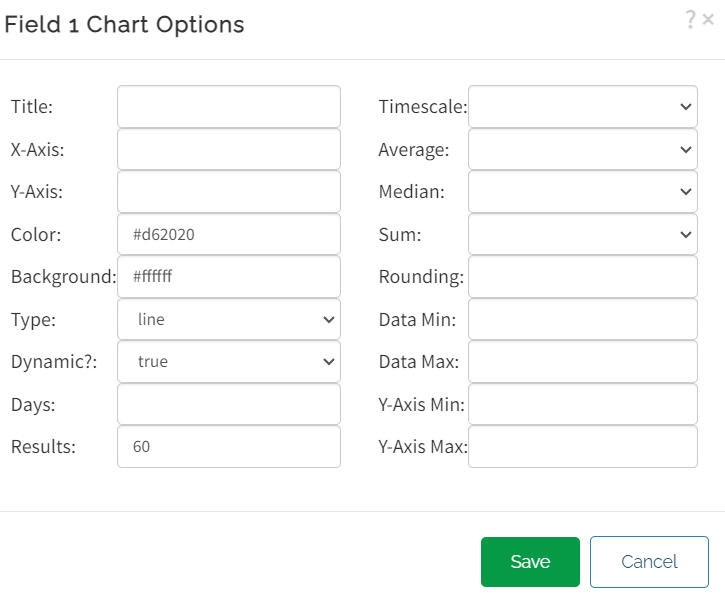
I can't see my data in the charts. I'm using arduino wifi and the connection works.
Maybe I did something wrong in this options

Is there a way to get a handle or link to the database each time I do a WRITE or group of WRITEs? I need to access the set of records that comprises a user session, which could be many WRITEs. My impression is that Thingspeak appears as a continuous stream with no way to mark a set of WRITEs as a group or session. Methods I have tried like retrieval (READs) using timestamps and other after-the-fact queries are not very accurate or user friendly. Thanks.
Hi All,
I'm currently attempting to implement a Hodgkin-Huxley-type model of membrane potential, ideally I would like a species that represents the membrane potential as its own distinct entity, so as the reference elsewhere. I've currently established a molarity-based work around but it would be great if I could set the units for the species as millivolt, but that throws an error.
Is there an established way to do this? I imagine I'm not the first person to be trying to model a voltage-gated ion channel!
Thank you for your help.

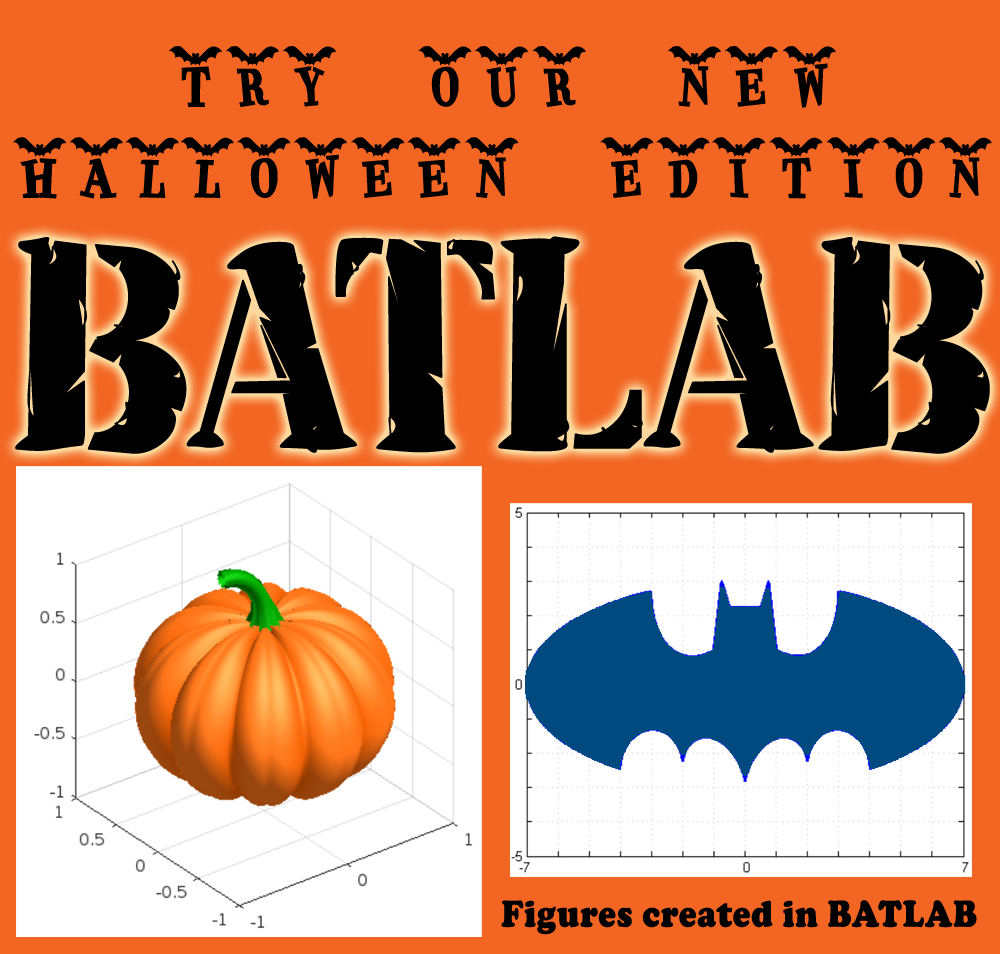


Share your fun photos in the comments!

Here's a MATLAB class I wrote that leverages the MATLAB Central Interface for MATLAB toolbox, which in turn uses the publicy available Community API. Using this class, I've created a few Favorites that show me what's going on in MATLAB Central - without having to leave MATLAB 🙂
The class has a few convenient queries:
- Results for the last 7 days
- Results for the last 30 days
- Results for the current month
- Results for today
And supporting a bunch of different content scopes:
- All MATLAB Central
- MATLAB Answers
- Blogs
- Cody
- Contests
- File Exchange
- Exclude Answers content
The results are displayed in the command window (which worked best for me) and link to each post. Here's what that looks like for this command
>> CommunityFeed.thisMonth("app designer", CommunityFeed.Scope.ExcludeAnswers)

Let me know if you find this class useful and feel free to suggest changes.
Hello,
I've looked around and I haven't found anything obvious about this, but is it possible to link to species/reactions, graphically, in a non-mass transfer sense? I have areas in my model where it would conceptually make sense to be able to see that species or reactions are linked, but if I link them in the standard way it demands that it be involved in the stoichiometry.
Perhaps some kind of dotted line, or similar?
Thank you, best regards,
Dan

