connectImagePairs
R2026bDescription
The connectImagePairs function builds a view graph of the
input images for structure-from-motion (SfM) by connecting visually similar images.
Use the connectImagePairs function as the first step in the SfM pipeline
after creating an sfm object, followed by the
verifyImagePairs function, which filters out geometrically inconsistent
connections in the view graph.
The connectImagePairs function detects SIFT features in each image,
computes pairwise similarity using a bag of words vocabulary from the DBoW2 library, and
matches features between candidate pairs. The function then connects image pairs with enough
feature matches as edges in the view graph. For more information about the algorithm, see Algorithms.
sfmObj = connectImagePairs(sfmObj,Name=Value)connectImagePairs(sfmObj,NumSimilarImages=20) searches for
20 similar images per query image instead of the default
10.
Examples
Use the sfm object to recover camera poses and a sparse 3-D point cloud from images of an indoor scene.
Create Image Datastore and Define Camera Intrinsics
Create an ImageDatastore from the image sequence. Specify the camera intrinsic parameters.
unzip("sfm_images.zip")
imageFolder = fullfile(pwd,"images");
imds = imageDatastore(imageFolder);
intrinsics = cameraIntrinsics([535.1307 532.1860],[323.3722 239.7986],[480 640]);
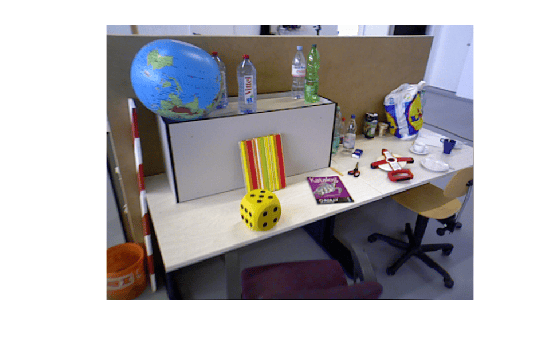
Visualize the indoor scene.
imshow(preview(imds))
Create SfM Object and Run Pipeline
Create an sfm object and execute each stage of the incremental SfM pipeline sequentially.
sfmObj = sfm(imds,intrinsics);
Connect image pairs based on visual similarity.
sfmObj = connectImagePairs(sfmObj);
Visualize the similarity matrix for the connected image pairs using the imagesc function.
imagesc(sfmObj.SimilarityMatrix)
title("Similarity Matrix for Connected Image Pairs")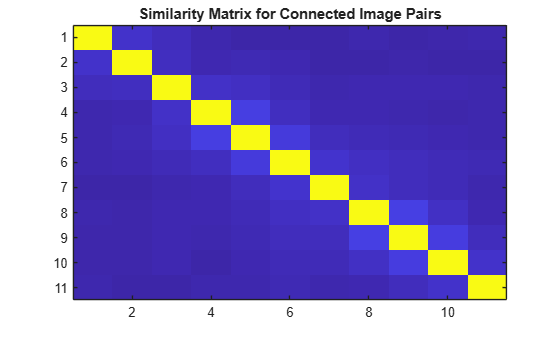
Verify that the view graph was created successfully before proceeding to geometric verification.
if isConnected(sfmObj)
    sfmObj = verifyImagePairs(sfmObj);
end
Visualize the similarity matrix for the refined image pair connections using the imagesc function.
imagesc(sfmObj.SimilarityMatrix)
title("Similarity Matrix after Refining Connected Image Pairs")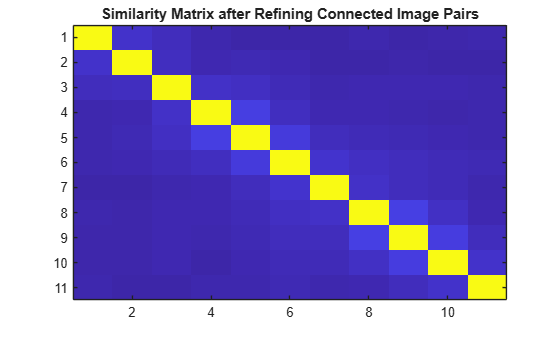
Confirm that geometric verification completed successfully before initializing the reconstruction. Specify a minimum median angle of 5 degrees and a maximum triangulation error of 4 pixels. Display the initialization metrics.
if isVerified(sfmObj)
    [sfmObj,info] = triangulateInitialViews(sfmObj,MinMedianAngle=5,MaxTriangulationError=4);
    disp(info)
end
                     ViewId1: 9
                     ViewId2: 10
                RelativePose: [1×1 rigidtform3d]
                     Matches: [380×2 uint32]
    MedianTriangulationAngle: 8.6016
       MeanReprojectionError: 0.2799
Confirm that initialization succeeded before running incremental reconstruction.
if isInitialized(sfmObj)
    sfmObj = reconstruct(sfmObj);
end
Retrieve Results
Retrieve the estimated camera poses and the sparse 3-D point cloud.
camPoses = poses(sfmObj);
sparsePoints = pointCloud(sfmObj);
Visualize Reconstruction
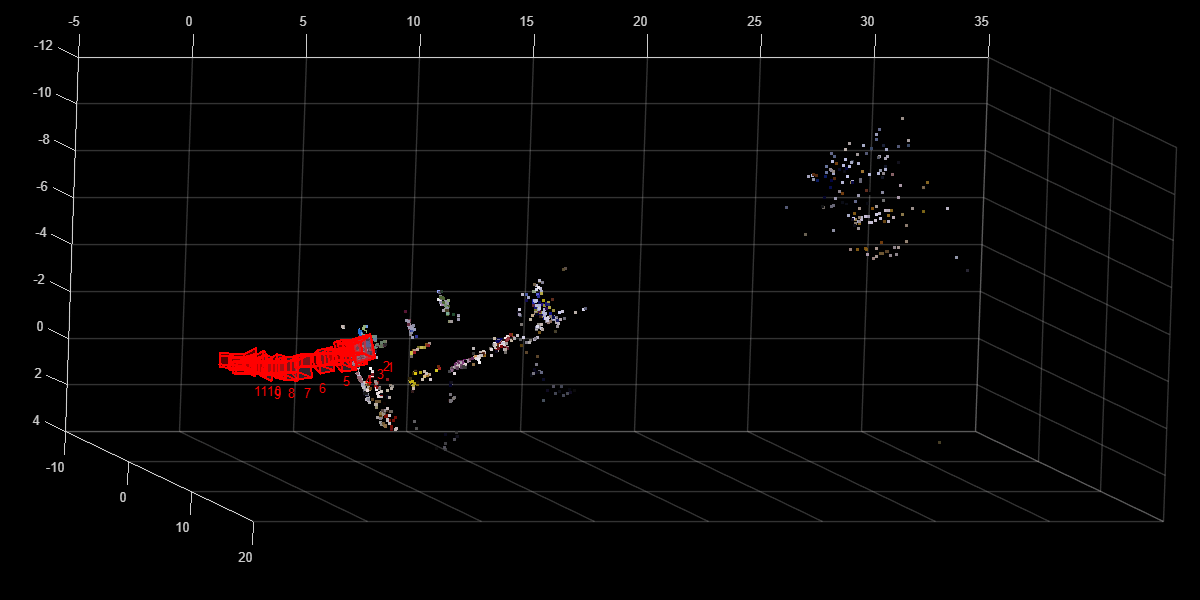
Display the reconstructed scene showing the camera trajectory and sparse point cloud. Adjust the view orientation and zoom for better visualization.
plot(sfmObj,CameraSize=0.5,MarkerSize=25)
view(82.69,-15.53)
camroll(-90)
camva(4.52)
This example shows you how to analyze and visualize the results of the connectImagePairs.
Create Image Datastore and Define Camera Intrinsics
Create an ImageDatastore from the image sequence. Specify the camera intrinsic parameters.
unzip("sfm_images.zip")
imageFolder = fullfile(pwd,"images");
imds = imageDatastore(imageFolder);
intrinsics = cameraIntrinsics([535.1307 532.1860],[323.3722 239.7986],[480 640]);
Visualize images in the sequence.
figure
montage(imds)
title("Image Sequence")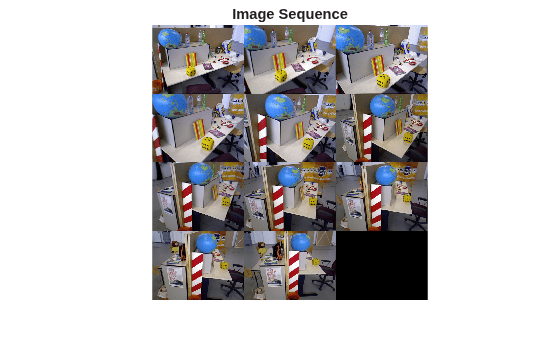
Create SfM Object and Connect Similar Images
Initialize the sfm object with the image datastore and camera intrinsics. As the first step in the SfM process, create a view graph by connecting visually similar image pairs.
sfmObj = sfm(imds,intrinsics);
sfmObjViewGraph = connectImagePairs(sfmObj, Verbose=true);
Extracting SIFT features: 10 / 11.
Matching features: 10 / 54
Matching features: 20 / 54
Matching features: 30 / 54
Matching features: 40 / 54
Matching features: 50 / 54
Visualize Similarity Matrix
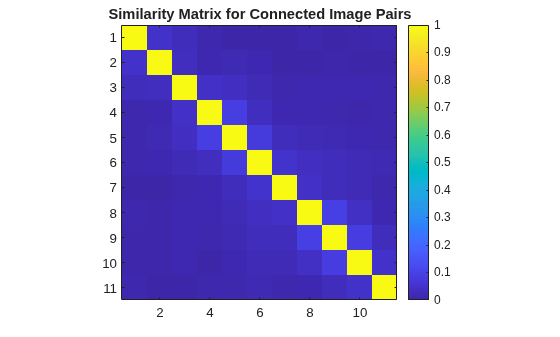
Visualize the connected images as a similarity matrix. This is helpful when images are captured and stored in a sequential fashion since the block diagonal structure of the matrix indicates that sequential images are visually similar with a very high similarity score.
imagesc(sfmObjViewGraph.SimilarityMatrix)
axis image
colorbar
title("Similarity Matrix for Connected Image Pairs")
Visualize View Graph
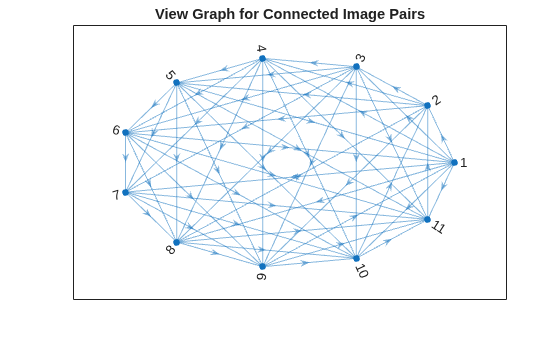
Visualize the connected images as a directed graph or digraph. This is helpful given an unordered collection of images. In the view graph, nodes represent images and edges denote pairs of images that are connected to each other based on visual similarity. Since all the images in this particular sequence are visually similar to each other, all nodes are connected to each other.
G = createPoseGraph(sfmObjViewGraph.ViewGraph);
figure
plot(G, NodeLabel=1:sfmObjViewGraph.NumImages, Layout="circle");
title("View Graph for Connected Image Pairs");
Effect of NumSimilarImages on Graph Connectivity
The NumSimilarImages name-value argument controls the number of similar images that are associated with each query image. Reducing this value results in a sparser graph with fewer connections which saves on computation time for later steps in 3-D reconstruction. However, setting this value too low can result in a disconnected view graph which can lead to unsuccessful 3-D reconstruction down the line.
Create two view graphs using different values of NumSimilarImages.
sfmObjVG1 = connectImagePairs(sfmObj, NumSimilarImages=2, Verbose=true);
Extracting SIFT features: 10 / 11.
sfmObjVG2 = connectImagePairs(sfmObj, NumSimilarImages=5, Verbose=true);
Extracting SIFT features: 10 / 11.
Matching features: 10 / 22
Matching features: 20 / 22
Visualize the view graphs created using the specified values of NumSimilarImages.
G1 = createPoseGraph(sfmObjVG1.ViewGraph);
G2 = createPoseGraph(sfmObjVG2.ViewGraph);
figure
subplot(1,2,1)
plot(G1, NodeLabel=1:sfmObjVG1.NumImages, Layout="circle");
title("NumSimilarImages=2");
subplot(1,2,2)
plot(G2, NodeLabel=1:sfmObjVG2.NumImages, Layout="circle");
title("NumSimilarImages=5");
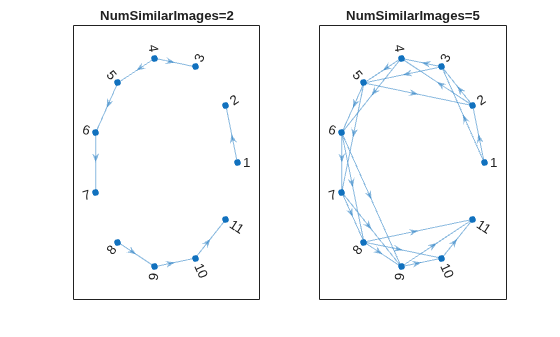
Assuming all images are taken of the same scene, the view graph is expected to be connected, where all images have at least one connection or edge. The three disconnected components in the first plot indicates that the value of 2 for NumSimilarImages is too low for this particular data.
Visualize Connected Images in View Graph
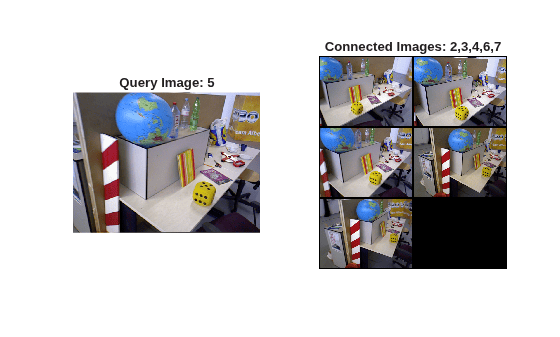
Each image in the view graph is connected to similar images based on appearance.
Select a query image and visualize its connected images.
queryIdx =5; queryImg = readimage(imds, queryIdx); viewTable = connectedViews(sfmObjVG2.ViewGraph, queryIdx); similarIdx = viewTable.ViewId; similarImages = cell(numel(similarIdx),1); for i = 1:numel(similarIdx) similarImages{i} = readimage(imds, double(similarIdx(i))); end figure subplot(1,2,1) imshow(queryImg) title("Query Image: " + queryIdx) subplot(1,2,2) montage(similarImages, BorderSize=5) title("Connected Images: " + strjoin(string(similarIdx), ","))
Input Arguments
Name-Value Arguments
Output Arguments
Tips
After using this object function on an
sfmobject, if theisConnectedfunction returnsfalse, useconnectImagePairsagain with an increased value for theNumSimilarImagesargument or a decreased value for theMinNumMatchesargument.To quickly assess which images are connected and identify gaps in coverage, visualize the similarity matrix in
sfmObj.SimilarityMatrixusing theimagescfunction.For larger data sets that contain more images, specifying the
Verboseargument astruecan help you monitor progress.For more information, see Best Practices for 3-D Reconstruction Using Structure from Motion.
Algorithms
In structure‑from‑motion (SfM), view graph construction represents each image as a node and connects pairs of images with edges when they share a sufficient number of matching feature points. The resulting graph captures camera view overlap and determines which image pairs are jointly considered during reconstruction. Organizing images as a view graph enables you to scale the SfM pipeline to large, unordered image collections while prioritizing the most promising image connections for accurate 3‑D reconstruction.
The function constructs the view graph in these stages:
Image retrieval — For each image, the function extracts SIFT features and uses a bag of words representation to retrieve a fixed number of visually similar images as candidate matches. The number of candidates retained per image is controlled by the
NumSimilarImagesargument, which limits the search to the most similar image pairs.Feature matching — For each candidate image pair, the function matches the feature descriptors using a ratio test, to filter ambiguous correspondences, and a matching threshold, to reject weak matches. The ratio test is governed by the
MaxRatioargument, while the descriptor matching threshold is controlled byMatchThreshold. The function adds image pairs that contain at least the minimum number of verified feature matches, as specified byMinNumMatches, as edges in the view graph.
Version History
Introduced in R2026b
See Also
sfm | isConnected | verifyImagePairs | triangulateInitialViews | reconstruct | poses | pointCloud | plot | isVerified | isInitialized

