clipNetwork
R2026bCreate pretrained CLIP deep learning neural network for vision-language tasks
Since R2026a
Description
Add-On Required: This feature requires the Computer Vision Toolbox Model for OpenAI CLIP Network add-on.
The clipNetwork object configures a pretrained Contrastive
Language-Image Pre-Training (CLIP) network. Use the CLIP network to connect and compare
images and text for tasks like image classification, retrieval, and zero-shot
learning.
Use the CLIP network for image retrieval and image classification.
Image retrieval — To search for images that best match a text query, first extract embeddings for each of the images in the data set using the
extractImageEmbeddingsobject function. Then, extract the embeddings for the text search terms using theextractTextEmbeddingsobject function, compute the similarity between the text embeddings and the image embeddings, and select the classes with the closest match.Zero-shot classification without retraining — To classify images by comparing extracted image features to the features of candidate class names or descriptions, use the
classifyobject function and select the classes with the closest match.
To perform a forward pass on the image and text encoders prior to training
the CLIP network, use the forward
object function.
Note
This functionality requires Deep Learning Toolbox™.
Creation
Description
net = clipNetwork( creates a
pretrained CLIP network with a pretrained image encoder,
backbone)backbone.
net = clipNetwork(
sets writable properties using one or more name-value arguments. For example,
backbone,Name=Value)ModelName="TrainedCLIP" specifies the CLIP network name as
"TrainedCLIP".
Input Arguments
Name-Value Arguments
Properties
Object Functions
classify | Classify image using CLIP network |
extractImageEmbeddings | Extract feature embeddings from image using CLIP network image encoder |
extractTextEmbeddings | Extract text embeddings from search text using CLIP network text encoder |
forward | Run forward pass on CLIP network |
Examples
Create a pretrained CLIP network.
clip = clipNetwork("resnet50")clip =
clipNetwork with properties:
ModelName: "resnet50"
ImageEncoderNetwork: [1×1 dlnetwork]
TextEncoderNetwork: [1×1 dlnetwork]
ImageNormalizationStatistics: [1×1 struct]
Create a pretrained CLIP network with the ViT-B/16 backbone.
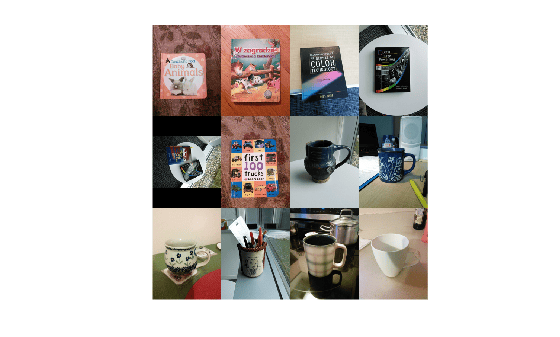
clip = clipNetwork("vit-b-16");Create a datastore of images, imds, and display a montage of the images.
pathToImages = fullfile(toolboxdir("vision"),"visiondata","imageSets");
imds = imageDatastore(pathToImages,IncludeSubfolders=true);
montage(imds)
Extract Image Embeddings
Extract the feature embeddings for each image in the datastore.
imageEmbeddings = extractImageEmbeddings(clip,imds);
Extract Text Embeddings
Define a search text search term, and extract the text embeddings using the CLIP network encoder. You can modify the search term to empirically test image retrieval.
search = "A photo of a children's book.";
textEmbeddings = extractTextEmbeddings(clip,search);
Retrieve Images Related to Search Text
Compute the cosine similarity between the text embeddings and all image embeddings.
function simScores = cosineSim(x,y)
    simScores = (x'*y)'./(vecnorm(x)*norm(y));
end
simScores = cosineSim(imageEmbeddings,textEmbeddings)
simScores = 1×12 single row vector

    0.3019    0.3202    0.2359    0.2261    0.1954    0.2838    0.1628    0.1735    0.2029    0.1854    0.1826    0.1993
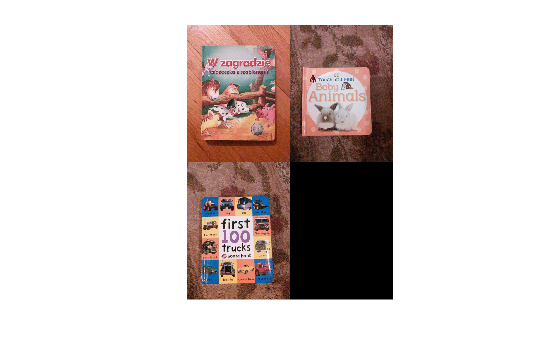
Identify the three highest similarity scores.
[~,topIdx] = maxk(simScores,3);
Display the images with the highest similarity scores related to the search text.
imageFiles = imds.Files(topIdx);
montage(imageFiles)
References
[1] Radford, Alec, et al. Learning Transferable Visual Models From Natural Language Supervision. arXiv, 2021. DOI.org (Datacite), https://doi.org/10.48550/ARXIV.2103.00020.
Version History
Introduced in R2026a

