Main Content

classify

Classify image using CLIP network

Since R2026a

    Description

    Add-On Required: This feature requires the Computer Vision Toolbox Model for OpenAI CLIP Network add-on.

    classes = classify(clip,I,classNames) assigns each image in I to one of the suggested classes classNames using a Contrastive Language-Image Pre-Training (CLIP) network.

    Note

    This functionality requires Deep Learning Toolbox™.

    example

    [classes,scores] = classify(clip,I,classNames) additionally returns the CLIP network prediction scores corresponding to the predicted classes classes.

    example

    [___] = classify(___,Name=Value) specifies options using one or more name-value arguments in addition to any combination of arguments from previous syntaxes. For example, MiniBatchSize=32 limits the batch size to 32 images.

    example

    Examples

    collapse all

    Create a pretrained CLIP network.

    clip = clipNetwork("vit-b-16");

    Create a datastore of test images.

    imageFiles = ["kobi.png","baby.jpg","flamingos.jpg","saturn.png"];
    imds = imageDatastore(imageFiles);

    Define the list of class suggestions for the test images.

    classNames = ["baby","dog","flamingo","planet"];

    Obtain the predicted classes for each image in the datastore.

    class = classify(clip,imds,classNames);

    Display the images along with their predicted classes.

    figure
    tiledlayout(2,2)
    
    for i = 1:length(imageFiles)
        nexttile
        imshow(read(imds))
        title(class(i))
    end

    Figure contains 4 axes objects. Hidden axes object 1 with title dog contains an object of type image. Hidden axes object 2 with title baby contains an object of type image. Hidden axes object 3 with title flamingo contains an object of type image. Hidden axes object 4 with title planet contains an object of type image.

    Create a pretrained CLIP network with a RestNet-50 backbone.

    clip = clipNetwork("resnet50")
    clip = 
      clipNetwork with properties:
    
                           ModelName: "resnet50"
                 ImageEncoderNetwork: [1×1 dlnetwork]
                  TextEncoderNetwork: [1×1 dlnetwork]
        ImageNormalizationStatistics: [1×1 struct]


    Load an image that contains the object to classify into the workspace, and display the image.

    I = imread("kobi.png");
    imshow(I)

    Figure contains an axes object. The hidden axes object contains an object of type image.

    Define the list of potential classes for the image.

    classNames = ["aardvark","bee","cat","dog"];

    Obtain the predicted class and prediction scores from the image.

    [class,scores] = classify(clip,I,classNames)
    class = categorical
         dog 
    
    
    scores = 1×4 single row vector
    
        0.5309    0.5131    0.5337    0.7217


    Create a pretrained CLIP network.

    clip = clipNetwork("vit-l-14");

    Load a satellite photo of the town of Concord, Massachusetts into the workspace, and display the image.

    I = imread("concordaerial.png");
    imshow(I)
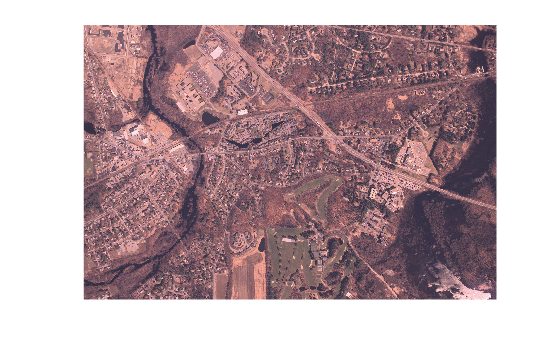
    Figure contains an axes object. The hidden axes object contains an object of type image.

    Define the list of class suggestions for the image. These classes are town or city names.

    classNames = ["Boston","Concord","Plymouth","Falmouth"];

    Define class descriptions that provide more context to the CLIP model for more accurate classification.

    classDescriptions = [ ...
        "A satellite photo of Boston, a city in Massachusetts."
        "A satellite photo of Concord, a suburb in Massachusetts."
        "A satellite photo of Plymouth, a town on the coast of Massachusetts."
        "A satellite photo of Falmouth, a town on Cape Cod in Massachusetts."
        ];

    Specify the suggested class names for each of the towns, as well as the more detailed class descriptions, to predict the town shown in the image using the CLIP network.

    class = classify(clip,I,classNames,ClassDescriptions=classDescriptions)
    class = categorical
         Concord 


    Input Arguments

    collapse all

    CLIP network, specified as a clipNetwork object.

    Image data, specified in one of these formats:

    • H-by-W-by-3-by-B numeric array representing a batch of B truecolor images.

    • H-by-W-by-1-by-B numeric array representing a batch of B grayscale images.

    • Datastore that reads and returns truecolor images.

    • Formatted dlarray (Deep Learning Toolbox) object with two spatial dimensions of the format "SSCB". You can specify multiple test images by including a batch dimension.

    Names of class suggestions, specified as a vector of strings or a categorical vector. You must specify class names in English using ASCII characters. The function automatically pads or truncates each text input so that it contains exactly 77 tokens.

    Name-Value Arguments

    collapse all

    Specify optional pairs of arguments as Name1=Value1,...,NameN=ValueN, where Name is the argument name and Value is the corresponding value. Name-value arguments must appear after other arguments, but the order of the pairs does not matter.

    Example: classify(clip,I,classNames,MiniBatchSize=32) limits the batch size to 32 images.

    Size of batches for processing large collections of images, specified as a positive integer. Larger batch sizes reduce processing time, but require more memory.

    Class descriptions used for classification by the CLIP network, specified as a C-element string array. C is the number of classes in classNames. By default, the CLIP model generates class descriptions from the labels specified by the classNames input argument.

    Use the ClassDescriptions name-value argument to create custom class descriptions. The classify function pads each description string with zeros or shortens it so that it contains exactly 77 tokens.

    Hardware resource on which to run the detector, specified as "auto", "gpu", or "cpu". The table shows the valid hardware resource values.

    Resource Action
    "auto" Use a GPU if it is available. Otherwise, use the CPU.
    "gpu" Use the GPU. To use a GPU, you must have Parallel Computing Toolbox™ and a CUDA® enabled NVIDIA® GPU. If a suitable GPU is not available, the function returns an error. For information about the supported compute capabilities, see GPU Computing Requirements (Parallel Computing Toolbox).
    "cpu" Use the CPU.

    Output Arguments

    collapse all

    Predicted classes, returned as a B-element categorical vector. B is the number of images in the batch.

    Prediction scores, returned as a B-by-C numeric matrix. B is the number of images in the batch, and C is the number of suggested classes specified using the classNames input argument.

    The classify function computes the scores using the CLIPScore algorithm. For an input image I and associated text T, the algorithm computes the score using the equation

    CLIPScore(I,T)=2.5max(cos(I,T),0).

    Version History

    Introduced in R2026a

    See Also