raylcdf
R2026bRayleigh cumulative distribution function
Description
p = raylcdf(___,"upper")x, using an
algorithm that more accurately computes the extreme upper-tail probabilities as compared
to subtracting the lower-tail value from 1. "upper" can follow any of
the input argument combinations in the previous syntaxes.
Examples
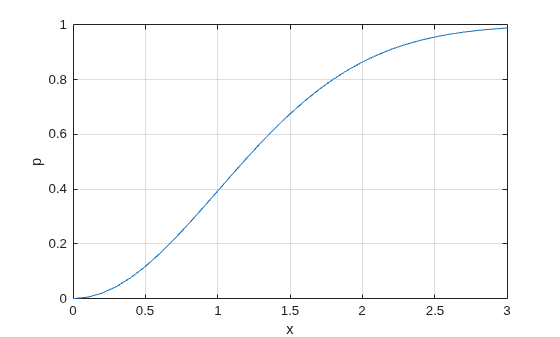
Compute the cumulative distribution function (cdf) of the Rayleigh distribution with the scale parameter b=1, for values ranging from 0 to 3.
x = 0:0.1:3;
p = raylcdf(x,1);
Plot the cdf.
plot(x,p)
grid on
xlabel("x")
ylabel("p")
Determine the probability of sampling a number greater than 10 from the Rayleigh distribution with the scale parameter b=1. To determine the probability, calculate the probability of sampling a number less than or equal to 10 and subtract result from 1.
p1 = 1 - raylcdf(10,1)
p1 =
0
The probability of sampling a number less than or equal to 10 is so close to 1 that subtracting the result from 1 gives 0.
To approximate the extreme upper-tail probability with greater precision, compute the complement of the Rayleigh cdf directly.
p2 = raylcdf(10,1,"upper")p2 = 1.9287e-22
The output indicates a small probability of sampling a number greater than 10.
Input Arguments
Output Arguments
More About
Alternative Functionality
raylcdfis a function specific to the Rayleigh distribution. Statistics and Machine Learning Toolbox™ also offers the generic functioncdf, which supports various probability distributions. To usecdf, create aRayleighDistributionprobability distribution object and pass the object as an input argument or specify the probability distribution name and its parameters. Note that the distribution-specific functionraylcdfis faster than the generic functioncdf.Use the Probability Distribution Function Tool to create an interactive plot of the cumulative distribution function (cdf) or probability density function (pdf) for a probability distribution.
References
[1] Evans, M., N. Hastings, and B. Peacock. Statistical Distributions. Hoboken, NJ: Wiley-Interscience, 2000. pp. 134–136.
Extended Capabilities
Version History
Introduced before R2006a

