SimBiology.Rule
R2026bHold rule for species and parameters
Description
The SimBiology.Rule object represents a rule,
which is a mathematical expression that modifies a species amount or a parameter value. For
details, see Definitions and Evaluations of Rules in SimBiology
Models.
Use dot notation to query the object properties or change properties that are not
read-only. You can also use the get and set commands.
The SimBiology Model Builder app also enables you to add reactions and rules to your model and edit them. For an example, see Incorporate Inhibitor PD Using Mathematical Equation.
Creation
Use addrule to create and add a rule to a
SimBiology® model.
Properties
Flag to use the rule object during simulation, specified as a numeric or logical 1
(true) or 0 (false). Use this property to test a
model with and without a rule.
Data Types: double | logical
Since R2026b
This property is read-only.
Unique name in the model hierarchy, represented as a character vector. The name encodes
the dot-separated path from the top-level model through each submodel to this component, for
example, "PBPK.Liver.Tissue.Drug".
If a component name is not a valid MATLAB variable name, the software encloses the name in
brackets, for example, "PBPK.[Lung Submodel].Tissue.Drug".
Data Types: char
SimBiology.Rule object name, specified as a character vector or string
scalar.
For details on requirements and recommendations for naming SimBiology components, see Guidelines for Naming Model Components.
Data Types: char | string
Additional information that you can add for the SimBiology object, specified as a character vector or string scalar.
Data Types: char | string
This property is read-only.
Parent object, specified as a SimBiology.Model object.
MATLAB expression defining how species and parameters interact with one another,
specified as a character vector or string. For example, a rule could state that the
total number of species A and species B must be
some value.
The Rule property is a MATLAB expression that defines the change in the Value
property of a species object quantity or a parameter object when the rule is
evaluated.
You can add a rule to a model object with and
remove the rule with addruledelete.
Note
If you set the Rule property for an algebraic rule, rate rule,
or repeated assignment rule, and the rule expression is not continuous and
differentiable, see Using Events to Address Discontinuities in Rule and Reaction Rate Expressions before simulating your model.
Data Types: char | string
Type of rule, specified as one of the following:
'initialAssignment'— Specify the initial value of a parameter, species, or compartment capacity, as a function of other model component values in the model.'repeatedAssignment'— Specify a value that holds at all times during simulation, and is a function of other model component values in the model.Tip
Consider using
SimBiology.Observableinstead of repeated assignment rules. UsingSimBiology.Observablecould speed up model simulations. For an example, see Calculate Statistics After Model Simulation Using Observables.'algebraic'— Specify mathematical constraints on one or more parameters, species, or compartments that must hold during a simulation.'rate'— Specify the time derivative of a parameter value, species amount, or compartment capacity.
Data Types: char | string
Object label, specified as a character vector or string scalar.
This property will be removed in a future release. Use Tags
instead.
Data Types: char | string
Since R2026b
Object labels, specified as a character vector, string scalar, string vector, or cell array of character vectors. The property value is stored and returned as a string vector.
Use the property to assign multiple tags to the object, for example, to classify and
group model components for selection and organization and then use
sbioselect to retrieve the components.
When you load a model having components that have a nonempty Tag
property value, and the Tags property is empty, the software copies
the Tag value into Tags as a scalar string.
This property is read-only.
Object type, specified as 'rule'. When you create a SimBiology object, the value of Type is automatically
defined.
Data Types: char
Data to associate with the object, specified as any MATLAB array. For example, you can specify a scalar, vector, character vector, table, or structure. Use this property to store arbitrary data on an object.
The object does not use this data directly, but you can access it
using dot notation or get.
Object Functions
Examples
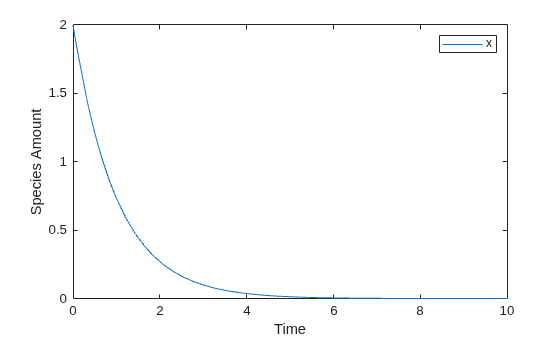
This example shows how to change the amount of a species similar to a first-order reaction using the first-order rate rule. For example, suppose the species x decays exponentially. The rate of change of species x is:
The analytical solution is:
where is the amount of species at time t, and is the initial amount. Use the following commands to set up a SimBiology model accordingly and simulate it.
m = sbiomodel('m'); c = addcompartment(m,'comp'); s = addspecies(m,'x','InitialAmount',2); p = addparameter(m,'k','Value',1); r = addrule(m,'x = -k * x','RuleType','rate'); [t,sd,species] = sbiosimulate(m); plot(t,sd); legend(species); xlabel('Time'); ylabel('Species Amount');
If the amount of a species x is determined by a rate rule and x is also in a reaction, x must have its BoundaryCondition property set to true. For example, with a reaction a -> x and a rate rule , set the BoundaryCondition property of species x to true so that a differential rate term is not created from the reaction. The amount of x is determined solely by a differential rate term from the rate rule. If the BoundaryCondition property is set to false, you will get the following error message such as Invalid rule variable 'x' in rate rule or reaction.
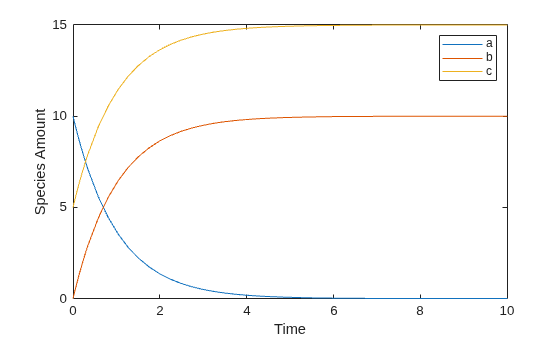
This example shows how to create a rate rule where a species from one reaction can determine the rate of another reaction if it is in the second reaction rate equation. Similarly, a species from a reaction can determine the rate of another species if it is in the rate rule that defines that other species. Suppose you have a SimBiology model with three species (a, b, and c), one reaction (a -> b), and two parameters (k1 and k2). The rate equation is defined as , and rate rule is . The solution for the species in the reaction are:
, .
Since the rate rule is dependent on the reaction, . The solution is:
Enter the following commands to set up a SimBiology model accordingly and simulate it.
m = sbiomodel('m'); c = addcompartment(m,'comp'); s1 = addspecies(m,'a','InitialAmount',10,'InitialAmountUnits','mole'); s2 = addspecies(m,'b','InitialAmount',0,'InitialAmountUnits','mole'); s3 = addspecies(m,'c','InitialAmount',5,'InitialAmountUnits','mole'); rxn = addreaction(m,'a -> b'); kl = addkineticlaw(rxn,'MassAction'); p1 = addparameter(kl,'k1','Value',1,'ValueUnits','1/second'); rule = addrule(m,'c = k2 * a','RuleType','rate'); kl.ParameterVariableNames = 'k1'; p2 = addparameter(m,'k2','Value',1,'ValueUnits','1/second'); [t,sd,species] = sbiosimulate(m); plot(t,sd); legend(species); xlabel('Time'); ylabel('Species Amount');
More About
If the model has a species defined in concentration, being varied by a
rate rule, and it is in a compartment with varying volume, you can only
use rate or initialAssignment rules to vary the
compartment volume.
Conversely, if you are varying a compartment's volume using a
repeatedAssignment or algebraic rules, then you
cannot vary a species (defined in concentration) within that compartment, with a
rate rule.
The reason for these constraints is that, if a species is defined in concentration and it is in a compartment with varying volume, the time derivative of that species is a function of the compartment's rate of change. For compartments varied by rate rules, the solver has that information.
Note that if you specify the species in amounts there are no constraints.
Version History
Introduced in R2006bUse the Tags property to assign multiple
tags to the object. When you load a model having components that have a nonempty
Tag property value, and the Tags property is empty,
the software copies the Tag value into Tags as a scalar string.
The Tag property will be removed in a future release. Use the
Tags property instead.
MATLAB Command
You clicked a link that corresponds to this MATLAB command:
Run the command by entering it in the MATLAB Command Window. Web browsers do not support MATLAB commands.
Select a Web Site
Choose a web site to get translated content where available and see local events and offers. Based on your location, we recommend that you select: .
You can also select a web site from the following list
How to Get Best Site Performance
Select the China site (in Chinese or English) for best site performance. Other MathWorks country sites are not optimized for visits from your location.
Americas
- América Latina (Español)
- Canada (English)
- United States (English)
Europe
- Belgium (English)
- Denmark (English)
- Deutschland (Deutsch)
- España (Español)
- Finland (English)
- France (Français)
- Ireland (English)
- Italia (Italiano)
- Luxembourg (English)
- Netherlands (English)
- Norway (English)
- Österreich (Deutsch)
- Portugal (English)
- Sweden (English)
- Switzerland
- United Kingdom (English)