Main Content

sdaOCTWaveformGenerator

R2026b

Generate SDA OCT waveform

Since R2026b

Description

The sdaOCTWaveformGenerator System object™ generates a Space Development Agency (SDA) Optical Communications Terminal (OCT) waveform, as defined in the SDA OCT standard version 4.0.0 [1].

You can use the object to generate waveforms for data, management, or idle frames, as defined in the SDA OCT standard.

To generate an SDA OCT waveform:

  1. Create the sdaOCTWaveformGenerator object and set its properties.

  2. Call the object with arguments, as if it were a function.

To learn more about how System objects work, see What Are System Objects?

Creation

Description

sdaOCTWaveObj = sdaOCTWaveformGeneratior creates a default SDA OCT waveform generation System object.

example

sdaOCTWaveObj = sdaOCTWaveformGeneratior(PropertyName=Value) sets writable properties using one or more name-value arguments. For example, sdaOCTWaveformGenerator(ARQMaxRetransmissions=3) sets the maximum number of retransmissions to 3.

example

Properties

expand all

Unless otherwise indicated, properties are nontunable, which means you cannot change their values after calling the object. Objects lock when you call them, and the release function unlocks them.

If a property is tunable, you can change its value at any time.

For more information on changing property values, see System Design in MATLAB Using System Objects.

Type of input modem frame, specified as one of these options.

  • "data" — Use this option to generate data frames.

  • "management" — Use this option to generate management frames.

  • "idle" — Use this option to generate the number of idle frames specified by numIdleFrames argument.

Tunable: Yes

Data Types: char | string

Maximum number of retransmissions, specified as an integer in the range [0, 5].

Set this property to a value greater than zero to enable automatic repeat request (ARQ). This property represents the maximum number of times the object can retransmit frames. The actual number of retransmission is specified in the property RetransmissionCount.

Dependencies

To enable this property, set the FrameType property to "data" or "management".

Because the ARQRetransmissions property is nontunable, you must configure it before generating idle frames if you intend to use the same object instance for subsequent data or management frame generation. Conversely, the FrameType property is tunable and can be modified during execution.

Data Types: double | uint8

ARQ hold-off span used to determine the ARQ cycle length, specified as an integer in the range [0, 255].

The effective number of frames in a single ARQ cycle is equal to ARQHoldOffSpan multiplied by 16. The deadline for receiving an acknowledgement corresponds to the time required to transmit all frames in one ARQ cycle.

Dependencies

To enable this property, you must satisfy these conditions.

  • Set the FrameType property to "data" or "management".

  • Set the ARQMaxRetransmissions property to a value greater than zero.

Because the ARQHoldOffSpan property is nontunable, you must configure it before generating idle frames if you intend to use the same object instance for subsequent data or management frame generation. Conversely, the FrameType property is tunable and can be modified during execution.

Data Types: double | uint8

Retransmission attempt number, specified as one of these options.

  • Integer in the range [0, ARQMaxRetransmissions] — Use this option to set the same value for all input frames.

  • Vector of integers in the range [0, ARQMaxRetransmissions] — Use this option to set an individual value for each input frame. The length of the vector must be equal to the number of input frames.

A value of 0 indicates an initial transmission.

Tunable: Yes

Dependencies

To enable this property, you must satisfy these conditions.

  • Set the FrameType property to "data" or "management".

  • Set the ARQMaxRetransmissions property to a value greater than zero.

Data Types: double | uint8

Presence of acknowledgement information in the current frame, specified as one of these options.

  • Numeric or logical 1 (true) or 0 (false) — Use this option to set the same value for all input frames.

    A value of true indicates the current frame contains valid acknowledgement information.

  • Vector with numeric or logical 1s and 0s — Use this option to set the values corresponding to the input frames. The length of the vector must be equal to the number of input frames.

Tunable: Yes

Dependencies

To enable this property, you must satisfy these conditions.

  • Set the FrameType property to "data" or "management".

  • Set the ARQMaxRetransmissions property to a value greater than zero.

Data Types: double | logical

Acknowledgement status of the frames, specified as one of these options.

  • Numeric or logical 1 (true) or 0 (false) — Use this option to set the same value for all input frames.

    A value of true indicates acknowledgement.

  • Vector with numeric or logical 1s and 0s — Use this option to set the values corresponding to the input frames. The length of the vector must be equal to the number of input frames.

The acknowledgement status applies to a range of consecutive frames from AckStartSeqNum to AckStartSeqNum + 2AckSpan.

For example, consider AckStartSeqNum = 5 and AckSpan = 2, the acknowledgement status is applicable from the fifth frame to the ninth frame because 5 + 2AckSpan = 5 + 22 = 9.

Tunable: Yes

Dependencies

To enable this property, you must satisfy these conditions.

  • Set the FrameType property to "data" or "management".

  • Set the ARQMaxRetransmissions property to a value greater than zero.

  • Set at least one element of the HasAck property to true.

Data Types: double | logical

Start sequence number of the acknowledged frame, specified as one of these options.

  • Nonnegative integer — Use this option to set the same value for all input frames.

  • Vector of nonnegative integers — Use this option to set an individual value for each input frame. The length of the vector must be equal to the number of input frames.

Tunable: Yes

Dependencies

To enable this property, you must satisfy these conditions.

  • Set the FrameType property to "data" or "management".

  • Set the ARQMaxRetransmissions property to a value greater than zero.

  • Set at least one element of the HasAck property to true.

Data Types: double | uint16

Acknowledgement status span applicable for a range of frames, specified as one of these options.

  • Integer in the range [0, 5] — Use this option to set the same value for all input frames.

  • Vector of integers in the range [0, 5] — Use this option to set an individual value for each input frame. The length of the vector must be equal to the number of input frames.

The acknowledgement applies to 2AckSpan consecutive frames.

Tunable: Yes

Dependencies

To enable this property, you must satisfy these conditions.

  • Set the FrameType property to "data" or "management".

  • Set the ARQMaxRetransmissions property to a value greater than zero.

  • Set at least one element of the HasAck property to true.

Data Types: double | uint8

Low density parity-check (LDPC) rate identifier, specified as one of these options.

  • Integer in the range [0, 4] — Use this option to set the same value for all input frames.

  • Vector of integers in the range [0, 4] — Use this option to set an individual value for each input frame. The length of the vector must be equal to the number of input frames.

This table shows the parity bits and code rates applicable for each PLRate value.

PLRate valueParity BitsCode Rate
0N/AN/A
1230411/13
2345622/29
349922/3
492161/2

Tunable: Yes

Dependencies

To enable this property, you must set the ModulationFormat property to "OOK-NRZ" or "Manchester".

Data Types: double | uint8

Seconds in the time‑of‑day (TOD) epoch, specified as one of these options.

  • Integer in the range [0, 59] — Use this option to set the same value for all input frames.

  • Vector of integers in the range [0, 59] — Use this option to set an individual value for each input frame. The length of the vector must be equal to the number of input frames.

Tunable: Yes

Data Types: double | uint8

Picoseconds within the TOD epoch, specified as one of these options.

  • Integer in the range [0, 999,999,999,999] — Use this option to set the same value for all input frames.

  • Vector of integers in the range [0, 999,999,999,999] — Use this option to set an individual value for each input frame. The length of the vector must be equal to the number of input frames.

For example, if the transmission begins at 12:40:32, TODEpoch captures the seconds value of 32, and PicoSecInTODEpoch captures the number of picoseconds that have elapsed between the 32nd and 33rd seconds.

Tunable: Yes

Data Types: double | uint64

Frame offset for the TOD epoch, specified as one of these options.

  • Integer in the range [0, 7] — Use this option to set the same value for all input frames.

  • Vector of integers in the range [0, 7] — Use this option to set an individual value for each input frame. The length of the vector must be equal to the number of input frames.

This property represents whether the TOD epoch applies to the current frame or to preceding frames.

Tunable: Yes

Data Types: double | uint8

Format identifier for fast control channel (FCCH) payload, specified as one of these options.

  • Binary-valued six-element column vector — Use this option to set the same value for all input frames.

  • 6-by-N matrix — Use this option to set an individual value for each input frame. Each column of the matrix corresponds to a single input frame. N is the number of input frames.

This property determines the format of the FCCH payload, as defined in the SDA OCT standard version 4.0.0 table 3-13 [1].

Tunable: Yes

Data Types: double | logical

Payload bits for FCCH, specified as one of these options.

  • Binary-valued 16-element column vector — Use this option to set the same value for all input frames.

  • 16-by-N matrix — Use this option to set an individual value for each input frame. Each column of the matrix corresponds to a single input frame. N is the number of input frames.

To map the FCCH payload values for a specific FCCH type, refer to SDA OCT standard version 4.0.0 table 3-14 [1].

Tunable: Yes

Data Types: double | logical

Physical layer modulation format, specified as one of these options.

  • "OOK-NRZ" — Use this option to set the modulation format to on-off keying with non-return-to-zero (OOK-NRZ).

  • "Manchester" — Use this option to set the modulation format to standard Manchester encoding.

  • "Manchester-BM12" — Use this option to set the modulation format to Manchester encoding with a burst modulation duty cycle of 1/12.

  • "Manchester-BM16" — Use this option to set the modulation format to Manchester encoding with a burst modulation duty cycle of 1/16.

Data Types: char | string

Modulation index, specified as real scalar from the set {0, 0.1, 0.2, 0.33} or in the range [0.8, 1].

The property represents the amplitude modulation depth applied to the waveform and enables you to control the amplitude modulation tracking tone. A value of 0 indicates amplitude tone modulation is off.

Dependencies

To enable this property, you must set the ModulationFormat property to "OOK-NRZ" or "Manchester".

Data Types: double

Optical signaling rate, in hertz, specified as 2500e6, 1250e6, 625e6, or 312.5e6.

Dependencies

To enable this property, you must set the ModulationFormat property to "OOK-NRZ" or "Manchester".

Data Types: double | uint32

Optical signaling rate in hertz, specified as 40e3 or 50e3.

Dependencies

To enable this property, you must satisfy either of these conditions.

  • Set the ModulationFormat property to "OOK-NRZ" or "Manchester", and set the ModulationIndex property to a value greater than zero.

  • Set the ModulationFormat property to "Manchester-BM12" or "Manchester-BM16".

Data Types: double | uint16

Peak power for the SDA OCT waveform, specified as a positive scalar.

Data Types: double

This property is read-only.

LDPC encoder code rate derived from the PLRate property, represented as one of these values.

  • "N/A" — Corresponds to PLRate = 0

  • "11/13" — Corresponds to PLRate = 1

  • "22/29" — Corresponds to PLRate = 2

  • "2/3" — Corresponds to PLRate = 3

  • "1/2" — Corresponds to PLRate = 4

Note

When you set the ModulationFormat property to "Manchester-BM12" or "Manchester-BM16", the object internally sets the LDPC encoder rate to "1/2".

Data Types: char | string

Usage

Description

waveform = sdaOCTWaveObj(fsn,payload) generates a time-domain SDA OCT waveform for the specified frame sequence number fsn and the specified data or management frames payload payload.

Note

This syntax is applicable when you set the FrameType property to "data" or "management".

waveform = sdaOCTWaveObj(fsn,numIdleFrames) generates a time-domain SDA OCT waveform for the specified frame sequence number fsn and the specified number of idle frames numIdleFrames.

Note

This syntax is applicable when you set the FrameType property to "idle".

Input Arguments

expand all

Frame sequence number of the outgoing frames, specified as an integer or vector.

  • If you specify fsn as an integer and the payload argument contains multiple frames, the object uses consecutive frame sequence numbers starting from the specified fsn value.

  • If you specify fsn as a vector, the length of the vector must be equal to the number of input frames.

  • The object does not support empty input.

The frame sequence number identifies each individual frame and enables detection of lost frames at the receiver. For example, specifying fsn as [2 4 6] transmits three data frames, with sequence numbers 2, 4, and 6. If the receiver receives only frames with sequence numbers 2 and 6, it sends an acknowledgement for those frames, and the transmitter retransmits the frame with sequence number 4.

Data Types: double | uint16

Data or management frames payload, specified as a binary-valued column vector. The length of the payload must be an integer multiple of the frame length of 8416.

payload must contain a sequence of data or management frames, as defined in the SDA OCT standard version 4.0.0 [1].

This argument is applicable only when you set the FrameType property to "data" or "management".

Data Types: double | int8 | logical

Number of idle frames to generate, specified as an integer.

This argument is applicable only when you set the FrameType property to "idle".

Data Types: double | uint16

Output Arguments

expand all

Generated SDA OCT waveform, returned as a column vector.

Data Types: double | uint16

Object Functions

To use an object function, specify the System object as the first input argument. For example, to release system resources of a System object named obj, use this syntax:

release(obj)

expand all

stepRun System object algorithm
releaseRelease resources and allow changes to System object property values and input characteristics
cloneCreate duplicate System object
isLockedDetermine if System object is in use
resetReset internal states of System object

Examples

collapse all

Generate a time‑domain SDA OCT waveform using Manchester burst modulation with a 1/12 duty cycle. Also, specify the peak transmit power of the waveform.

SDAOCTObj = sdaOCTWaveformGenerator;
SDAOCTObj.ModulationFormat = "Manchester-BM12";
SDAOCTObj.PeakPower = 24;

Generate random payload bits for two frames. Each frame requires 8416 bits, so set the payload length to an integer multiple of 8416.

frameLength = 8416;
numFrames = 2;
% Generate random payload bits for two frames
payload = randi([0 1],frameLength*numFrames,1);

Specify the FSN as a scalar. For a multi-frame with scalar FSN, the object assigns consecutive FSNs for the frames in the payload.

Generate the waveform.

fsn = 1;                                % Resulting FSN are 1, 2
% Generate time-domain SDA OCT waveform
SDADataWaveform = SDAOCTObj(fsn,payload);

Plot the waveform using different time scales to show its structure at both microsecond and nanosecond scales.

samplesPerSlot = 10;
sampleRate = samplesPerSlot*SDAOCTObj.SignalingRate;
samples = repelem(SDADataWaveform,samplesPerSlot);
% Create time vector
tsamp = 1/sampleRate;
t = 0:tsamp:tsamp*(length(samples)-1);

% Plot waveform at different time scales
tl = tiledlayout(3,1);

% Plot 1: Show a longer segment to visualize overall burst structure.
ax(1) = nexttile;
samplesToPlot = floor(length(samples)/10);
plot(t(1:samplesToPlot)*1e6,samples(1:samplesToPlot))

% Plot 2: Zoom in further to examine finer transitions within the burst region.
ax(2) = nexttile;
samplesToPlot = floor(length(samples)/30);
plot(t(1:samplesToPlot)*1e6,samples(1:samplesToPlot))

% Plot 3: Zoom in to the nanosecond scale to observe sample-level waveform detail.
ax(3) = nexttile;
samplesToPlot = floor(length(samples)/4e3);
plot(t(1:samplesToPlot)*1e9,samples(1:samplesToPlot))

xlabel(ax(1:2),"Time (\musec)")
xlabel(ax(3),"Time (nsec)")
ylabel(ax,"Amplitude",FontSize=8)
title(tl,"Plot for SDA OCT Waveform Modulated Using " + SDAOCTObj.ModulationFormat)
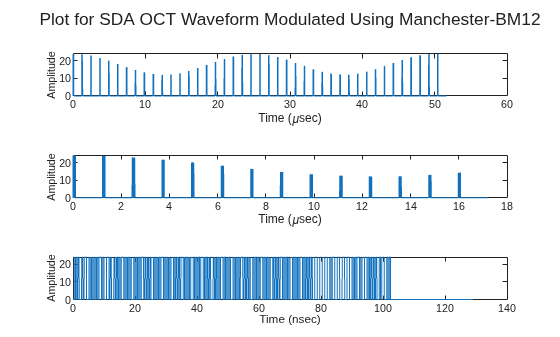
Figure contains 3 axes objects. Axes object 1 with xlabel Time (\musec), ylabel Amplitude contains an object of type line. Axes object 2 with xlabel Time (\musec), ylabel Amplitude contains an object of type line. Axes object 3 with xlabel Time (nsec), ylabel Amplitude contains an object of type line.

Generate data, idle, and management SDA OCT waveforms using Manchester modulation with an amplitude tracking tone.

SDAOCTObj = sdaOCTWaveformGenerator;
SDAOCTObj.ModulationFormat = "Manchester";
SDAOCTObj.SignalingRate = 625e6;
SDAOCTObj.ModulationIndex = 0.2;
SDAOCTObj.AMFrequency = 40e3;

Set the number of frames for each frame type, and then generate random payload bits for data and management frames. Each frame uses 8416 payload bits.

% Specify number of frames
numDataFrames = 2;
numIdleFrames = 2;
numMgmtFrames = 2;

% Specify payload size
frameLength = 8416;

% Generate random payload bits
dataPayload = randi([0 1],frameLength*numDataFrames,1);
mgmtPayload = randi([0 1],frameLength*numMgmtFrames,1);

Assign FSNs for data, idle, and management frames.

When you specify FSN as a vector, its length must be equal to the number of input frames.

% Specify starting FSN
startFsn = 100;

% Assign FSNs for each frame type
dataFSN = startFsn:startFsn+numDataFrames-1;
idleFSN = dataFSN(end)+1:dataFSN(end)+numIdleFrames;
mgmtFSN = idleFSN(end)+1:idleFSN(end)+numMgmtFrames;

Generate the waveform for each frame type.

% Generate waveform for data frames
SDAOCTObj.FrameType = "data";
dataSignal = SDAOCTObj(dataFSN,dataPayload);
fprintf("Generated %d data frames\n",numDataFrames);
Generated 2 data frames
% Generate waveform for idle frames
SDAOCTObj.FrameType = "idle";
idleSignal = SDAOCTObj(idleFSN,numIdleFrames);
fprintf("Generated %d idle frames\n",numIdleFrames);
Generated 2 idle frames
% Generate waveform for management frames
SDAOCTObj.FrameType = "management";
mgmtSignal = SDAOCTObj(mgmtFSN,mgmtPayload);
fprintf("Generated %d management frames\n",numMgmtFrames)
Generated 2 management frames

Concatenate the waveform segments in order, and then plot the resulting waveform versus time.

% Concatenate data, idle, and management waveforms
SDAWaveform = [dataSignal; idleSignal; mgmtSignal];

% Create time vector
tsamp = 1/(2*SDAOCTObj.SignalingRate);
t = 0:tsamp:tsamp*(length(SDAWaveform)-1);

% Plot waveform
plot(t,SDAWaveform)
xlabel("Time (sec)")
ylabel("Amplitude")
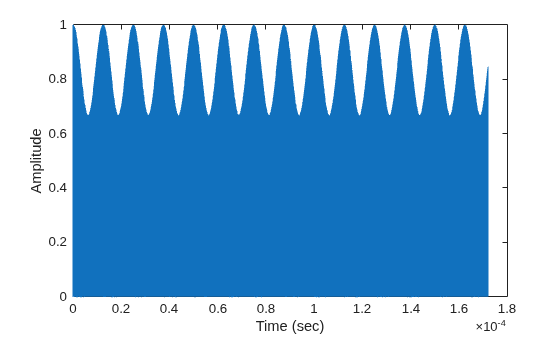
Figure contains an axes object. The axes object with xlabel Time (sec), ylabel Amplitude contains an object of type line.

Generate a time-domain SDA OCT waveform for multiple data frames, and model ARQ retransmissions and acknowledgment signaling.

Create a three-frame random payload and specify the starting FSN.

% Specify number of frames and payload size
numFrames = 3;
frameLength = 8416;

% Specify starting FSN
fsn = 52;              % Resulting FSN are 52, 53, and 54                            

% Generate random payload bits for three frames
payload = randi([0 1],frameLength*numFrames,1);

Create the waveform generator, and enable ARQ by setting the maximum number of retransmissions.

SDAOCTObj = sdaOCTWaveformGenerator;
% Generate data frames and enable ARQ retransmissions
SDAOCTObj.FrameType = "data";
SDAOCTObj.ARQMaxRetransmissions = 5;

Configure the retransmission count and acknowledgment-related properties.

SDAOCTObj.RetransmissionCount = 1;
% Indicate which frames carry acknowledgment information
SDAOCTObj.HasAck = [1 1 0];
% Specify acknowledgment status and its span of applicability
SDAOCTObj.AckStatus = [1 0 0];
SDAOCTObj.AckStartSequenceNum = [1 100 0];
SDAOCTObj.AckSpan = [2 1 0];

% Specify payload FEC encoding rate identifier per frame
SDAOCTObj.PLRate = [1 2 3];

Set the modulation format to OOK-NRZ. Disable amplitude tone modulation by setting the modulation index to 0.

SDAOCTObj.ModulationFormat = "OOK-NRZ";
SDAOCTObj.ModulationIndex = 0;

Generate the SDA OCT waveform for the specified frames.

SDAWaveform = SDAOCTObj(fsn,payload);

Plot the generated SDA OCT waveform sample versus time.

samplesPerSlot = 5;
samplesToPlot = 60;
samples = repelem(SDAWaveform(1:samplesToPlot),samplesPerSlot);

% Create time vector
tsamp = 1/(samplesPerSlot*SDAOCTObj.SignalingRate);
t = 0:tsamp:tsamp*(length(samples)-1);

% Plot waveform
plot(t,samples)
xlabel("Time (sec)")
ylabel("Amplitude")
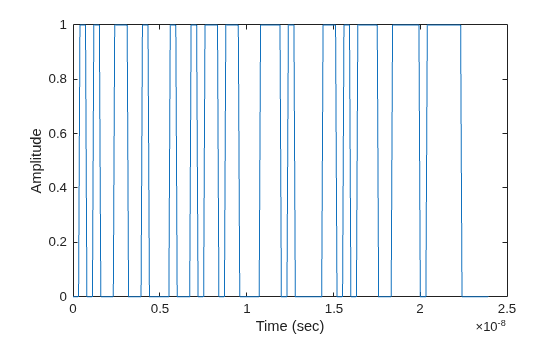
Figure contains an axes object. The axes object with xlabel Time (sec), ylabel Amplitude contains an object of type line.

References

[1] Space Development Agency (SDA). Optical Communications Terminal (OCT) Standard Version 4.0.0. Washington DC: SDA United States Space Force, June 28, 2024.

Extended Capabilities

expand all

Version History

Introduced in R2026b