sdaOCTModulator
R2026bGenerate modulated SDA OCT waveform
Description
The sdaOCTModulator
System object™ generates a modulated Space Development Agency (SDA) Optical Communications
Terminal (OCT) waveform, by implementing physical layer modulation, as defined in the SDA OCT
standard version 4.0.0 [1].
To modulate a SDA OCT waveform:
Create the
sdaOCTModulatorobject and set its properties.Call the object with arguments, as if it were a function.
To learn more about how System objects work, see What Are System Objects?
Creation
Description
sdaOCTModObj = sdaOCTModulator
sdaOCTModObj = sdaOCTModulator(PropertyName=Value)sdaOCTModulator(ModulationFormat="Manchester-BM12") sets the
modulation format to Manchester encoding with a burst modulation duty cycle of
1/12.
Properties
Usage
Description
Input Arguments
Output Arguments
Object Functions
To use an object function, specify the
System object as the first input argument. For
example, to release system resources of a System object named obj, use
this syntax:
release(obj)
Examples
Create random bits to modulate.
% Input length must be a multiple of 128 for Manchester burst modulation
numBits = 12800;
txBits = randi([0 1],numBits,1);
Create an SDA OCT modulator object, and set the modulation format and peak power.
modObj = sdaOCTModulator;
modObj.ModulationFormat = "Manchester-BM16";
modObj.PeakPower = 12;
Modulate the bits to generate an SDA OCT modulated waveform.
modOut = modObj(txBits);
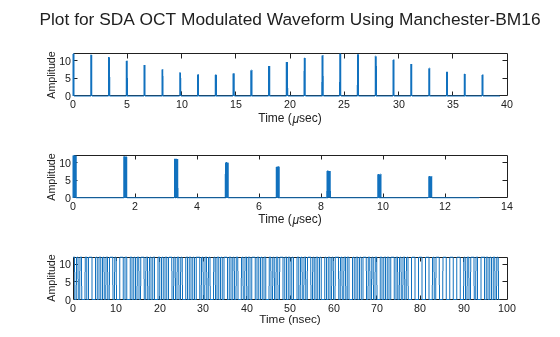
Plot the waveform using different time scales to show its structure at both microsecond and nanosecond scales.
samplesPerSlot = 10;
samples = repelem(modOut,samplesPerSlot);
% Create time vector for plotting
tsamp = 1/(samplesPerSlot*modObj.SignalingRate);
t = 0:tsamp:tsamp*(length(samples)-1);

% Plot waveform at different time scales
tl = tiledlayout(3,1);

% Plot 1: Show a longer segment to visualize overall burst structure.
ax(1) = nexttile;
samplesToPlot = floor(length(samples)/10);
plot(t(1:samplesToPlot)*1e6,samples(1:samplesToPlot))

% Plot 2: Zoom in further to examine finer transitions within the burst region.
ax(2) = nexttile;
samplesToPlot = floor(length(samples)/30);
plot(t(1:samplesToPlot)*1e6,samples(1:samplesToPlot))

% Plot 3: Zoom in to the nanosecond scale to observe sample-level waveform detail.
ax(3) = nexttile;
samplesToPlot = floor(length(samples)/4e3);
plot(t(1:samplesToPlot)*1e9,samples(1:samplesToPlot))

xlabel(ax(1:2),"Time (\musec)")
xlabel(ax(3),"Time (nsec)")
ylabel(ax,"Amplitude",FontSize=8)
title(tl,"Plot for SDA OCT Modulated Waveform Using " + modObj.ModulationFormat)
Create random bits to modulate.
numBits = 1e6;
txBits = randi([0 1],numBits,1);
Create an SDA OCT modulator object, and set the modulation format. Set the modulation index to a nonzero value to enable the amplitude tracking tone.
modObj = sdaOCTModulator( ...
    ModulationFormat="OOK-NRZ", ...
    ModulationIndex=0.8, ...        % Nonzero value enables amplitude tracking tone
    AMFrequency=50e3);              % Tracking tone frequency (Hz)
Modulate the binary input data to return the time-domain SDA OCT waveform.
modOut = modObj(txBits);
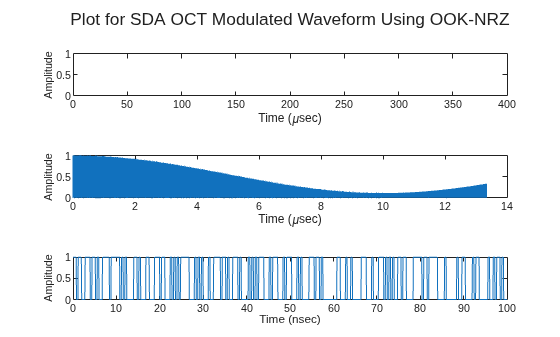
Plot the waveform using different time scales to show its structure at both microsecond and nanosecond scales.
samplesPerSlot = 5;
samples = repelem(modOut,samplesPerSlot);
% Create time vector for plotting
tsamp = 1/(samplesPerSlot*modObj.SignalingRate);
t = 0:tsamp:tsamp*(length(samples)-1);

% Plot waveform at different time scales
% Use a tiled layout to compare waveform structure at multiple zoom levels.
tl = tiledlayout(3,1);

% Plot 1: Show the full waveform to view overall behavior.
ax(1) = nexttile;
samplesToPlot = floor(length(samples));                % Plot all samples
plot(t(1:samplesToPlot)*1e6,samples(1:samplesToPlot))  % Time in microseconds

% Plot 2: Zoom in to observe transitions and tone-related variation more clearly.
ax(2) = nexttile;
samplesToPlot = floor(length(samples)/30);             % Plot shorter segment
plot(t(1:samplesToPlot)*1e6,samples(1:samplesToPlot))  % Time in microseconds

% Plot 3: Zoom in further to see fine-scale sample-level detail.
ax(3) = nexttile;
samplesToPlot = floor(length(samples)/4e3);            % Plot very short segment
plot(t(1:samplesToPlot)*1e9,samples(1:samplesToPlot))  % Time in nanoseconds


xlabel(ax(1:2),"Time (\musec)")
xlabel(ax(3),"Time (nsec)")
ylabel(ax,"Amplitude", FontSize= 8)
title(tl,"Plot for SDA OCT Modulated Waveform Using " + modObj.ModulationFormat)
References
[1] Space Development Agency (SDA). Optical Communications Terminal (OCT) Standard Version 4.0.0. Washington DC: SDA United States Space Force, June 28, 2024.
Extended Capabilities
Version History
Introduced in R2006b

