Main Content

trainWithEvolutionStrategy

Train DDPG, TD3 or SAC agent using an evolutionary strategy within a specified environment

Since R2023b

    Description

    trainStats = trainWithEvolutionStrategy(agent,env,ESOpts) trains agent within the environment env, using the evolution strategy training options object ESOpts. Note that agent is a handle object and it is updated during training, despite being an input argument. For more information on the training algorithm, see Train agent with evolution strategy.

    example

    Examples

    collapse all

    This example shows how to train a DDPG agent using an evolutionary strategy.

    Load the predefined environment object representing a cart-pole system with a continuous action space. For more information on this environment, see Use Predefined Control System Environments.

    env = rlPredefinedEnv("CartPole-Continuous");

    The constructor functions initialize the agent networks randomly. Ensure reproducibility of the section by fixing the seed of the random generator.

    rng(0)

    Create a DDPG agent with default networks.

    agent = rlDDPGAgent(getObservationInfo(env),getActionInfo(env));

    To create an evolution strategy options object, use rlEvolutionStrategyTrainingOptions.

    evsTrainingOpts = rlEvolutionStrategyTrainingOptions( ...
        PopulationSize=10 , ...
        ReturnedPolicy="BestPolicy" , ...
        StopTrainingCriteria="AverageReward" , ...
        StopTrainingValue=496);

    To train the agent, use trainWithEvolutionStrategy.

    doTraining = false;
    if doTraining
        trainStats = trainWithEvolutionStrategy(agent,env,evsTrainingOpts);
    else
        load("rlTrainUsingESAgent.mat","agent");
    end
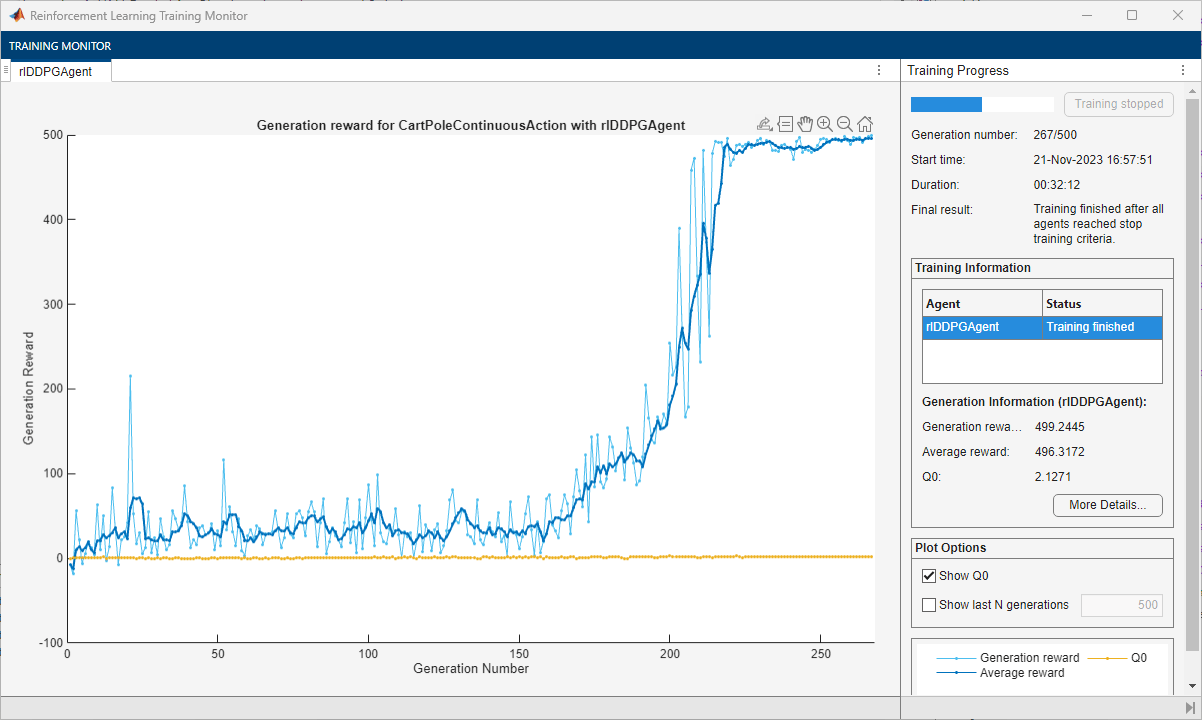
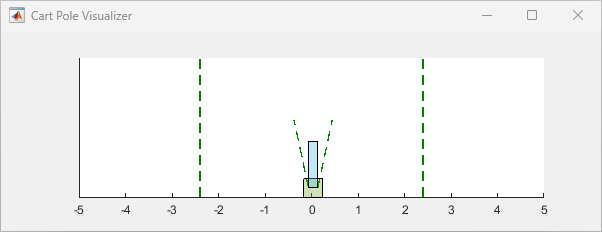
    Simulate the agent and display the episode reward.

    simOptions = rlSimulationOptions(MaxSteps=500);
    experience = sim(env,agent,simOptions);
    totalReward = sum(experience.Reward)
    totalReward = 
    497.8374
    

    The agent is able to balance the cart-pole system for the whole episode.

    Input Arguments

    collapse all

    Agent to train, specified as an rlDDPGAgent, rlTD3Agent, or rlSACAgent object.

    Note

    trainWithEvolutionStrategy updates the agent as training progresses. For more information on how to preserve the original agent, how to save an agent during training, and on the state of agent after training, see the notes and the tips section in train. For more information about handle objects, see Handle Object Behavior.

    For more information about how to create and configure agents for reinforcement learning, see Reinforcement Learning Agents.

    Example: agent = rlSACAgent(rlNumericSpec([2 1]),rlNumericSpec([1 1])) creates the default rlSACAgent object agent for an environment with an observation channel carrying a continuous two-element vector and an action channel carrying a continuous scalar.

    Environment, specified as follows:

    • MATLAB® environment, represented by one of the following objects.

    • Simulink® environment, represented by a SimulinkEnvWithAgent object, and created using:

      • rlSimulinkEnv — This environment is created from a model already containing one or more agents block.

      • createIntegratedEnv — This environment is created from a model that does not already contain an agent block.

      A Simulink-based environment object acts as an interface so that trainWithEvolutionStrategy calls the (compiled) Simulink model to generate experiences for the agents. Such an environment does not support using the reset and step functions.

    Note

    Multiagent environments do not support training agents with an evolution strategy.

    Note

    env is a handle object, so a function that does not return it as output argument, such as train, can still update its internal states. For more information about handle objects, see Handle Object Behavior.

    For more information on reinforcement learning environments, see Reinforcement Learning Environments and Create Custom Simulink Environments.

    Example: env = rlPredefinedEnv("DoubleIntegrator-Continuous") creates a predefined environment that implements a continuous-action double-integrator system and assigns it to the variable env.

    Parameters and options for training using an evolution strategy, specified as an rlEvolutionStrategyTrainingOptions object. Use this argument to specify parameters and options such as:

    • Population size

    • Population update method

    • Number training epochs

    • Criteria for saving candidate agents

    • How to display training progress

    For details, see rlEvolutionStrategyTrainingOptions.

    Example: rlEvolutionStrategyTrainingOptions(MaxGenerations=1000)

    Output Arguments

    collapse all

    Evolution strategy training results, returned as an rlEvolutionStrategyTrainingResult object. The following properties pertain to the rlEvolutionStrategyTrainingResult object:

    Generation number, returned as the column vector [1;2;…;N], where N is the number of generations in the training run. This vector is useful if you want to plot the evolution of other quantities from generation to generation.

    Reward for each generation, returned in a column vector of length N. Each entry contains the reward for the corresponding generation. Depending on how you set the ReturnedPolicy property of the ESOpts argument, the returned generation reward is either the best individual reward or the average reward among the surviving population.

    Average reward over the averaging window specified in trainOpts, returned as a column vector of length N. Each entry contains the average award computed at the end of the corresponding generation.

    Critic estimate of expected discounted cumulative long-term reward using the current agent and the environment initial conditions, returned as a column vector of length N. Each entry is the critic estimate (Q0) for the agent at the beginning of the corresponding episode.

    Environment simulation information, returned as:

    • An EvolutionStrategySimulationStorage object, if SimulationStorageType is set to "memory" or "file".

    • An empty array, if SimulationStorageType is set to "none".

    An EvolutionStrategySimulationStorage object contains information collected during simulation, which you can access by indexing into the object using the specific number of generation, citizen, and episode for the individual.

    For example, if res is an rlEvolutionStrategyTrainingResult object returned by trainWithEvolutionStrategy, you can access the environment simulation information related to the fourth run (episode), of the third citizen, in the second generation as:

    mySimInfo234 = res.SimulationInfo(2,3,4)
    • For MATLAB environments, mySimInfo234 is a structure containing the field SimulationError. This structure contains any errors that occurred during simulation for the fourth episode, of the third citizen, in the second generation.

    • For Simulink environments, mySimInfo234 is a Simulink.SimulationOutput object containing simulation data. Recorded data includes any signals and states that the model is configured to log, simulation metadata, and any errors that occurred for the second generation, third citizen, and fourth run.

    In both cases, mySimInfo234 also contains a StatusMessage field or property indicating that the corresponding run (episode) has terminated successfully.

    An EvolutionStrategySimulationStorage object also has the following read-only properties:

    Total number of simulations ran in the entire training, returned as a positive integer. It is equal to the number of generations multiplied by the population size, multiplied by the number of simulation episodes per individual. These three numbers correspond to the MaxGenerations, PopulationSize, and EvaluationsPerIndividual properties of rlEvolutionStrategyTrainingOptions, respectively.

    Example: 3000

    Type of storage for the environment data, returned as either "memory" (indicating that data is stored in memory) or "file" (indicating that data is stored on disk). For more information, see the SimulationStorageType property of rlEvolutionStrategyTrainingOptions and Address Memory Issues During Training.

    Example: "file"

    Training options object, returned as an rlEvolutionStrategyTrainingOptions object.

    Version History

    Introduced in R2023b

    expand all