writePixel
R2026bWrite the specified color to an individual pixel at the specified row and column of LED Matrix
Description
writePixel(
writes the specified pixel color value at the specified pixel location on the LED
Matrix.mysh,pixelLocation,pixelValue)
Specify the pixel location as 1x2 [row column] value. Specify the color as a 1x3 [R G B] value.
Note
To generate C/C++ code for this function, you must have an Embedded Coder® license.
writePixel(
writes the specified color at the specified location on the LED Matrix.mysh,pixelLocation,color)
Specify the pixel location as 1x2 [row column] value. Specify the color by name.
You can specify the following colors by name:
‘red’ or ‘r’
‘blue’ or ‘b’
‘green’ or ‘g’
‘cyan’ or ‘c’
‘magenta’ or ‘m’
‘yellow’ or ‘y’
‘white’ or ‘w’
‘black’ or ‘k’
Examples
Input Arguments
Connection to a SenseHAT board, specified as a sensehat object.
Example: mysensehat
The row-column value at which the specified color should be written. Pixel location specified as [1 2] refers to the pixel in the first row and the second column. The row and column values can range from 1 to 8.
The following image shows the pixel locations:
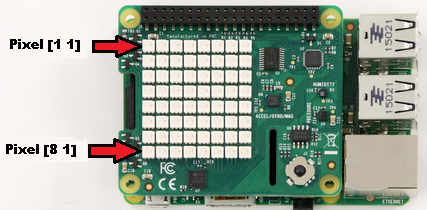
Example: [1 2]
Pixel value that should written at the specified location.
Example: [255, 0, 255]
The color that should written at the specified location.
Example: ‘m’
Extended Capabilities
Version History
Introduced in R2016b

