acsch
Inverse hyperbolic cosecant
Syntax
Description
Examples
Find the inverse hyperbolic cosecant of the elements of vector X. The acsch function acts on X element-wise.
X = [2 -3 1+2i]; Y = acsch(X)
Y = 1×3 complex
0.4812 + 0.0000i -0.3275 + 0.0000i 0.2156 - 0.4016i
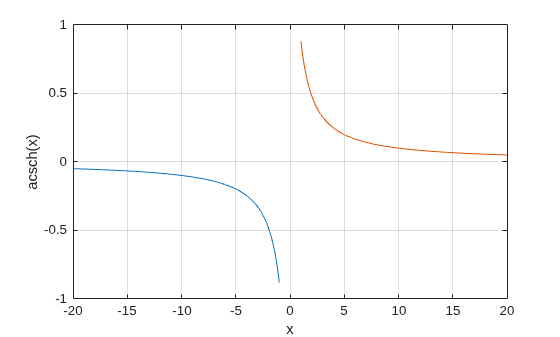
Plot the inverse hyperbolic cosecant function over the intervals and .
x1 = -20:0.01:-1; x2 = 1:0.01:20; plot(x1,acsch(x1),x2,acsch(x2)) grid on xlabel('x') ylabel('acsch(x)')
Input Arguments
Hyperbolic cosecant of angle, specified as a scalar, vector, matrix,
multidimensional array, table, or timetable. The acsch operation is
element-wise when X is nonscalar.
Data Types: single | double | table | timetable
Complex Number Support: Yes
More About
For real values in the domain and , the inverse hyperbolic cosecant satisfies
For complex numbers , the call acsch(z) returns complex results.
Extended Capabilities
The
acsch function fully supports tall arrays. For more information,
see Tall Arrays.
C/C++ Code Generation
Generate C and C++ code using MATLAB® Coder™.
GPU Code Generation
Generate CUDA® code for NVIDIA® GPUs using GPU Coder™.
The acsch function fully supports
thread-based environments. For more information, see Run MATLAB Functions in Thread-Based Environment.
The acsch function
fully supports GPU arrays. To run the function on a GPU, specify the input data as a gpuArray (Parallel Computing Toolbox). For more information, see Run MATLAB Functions on a GPU (Parallel Computing Toolbox).
The acsch function fully supports
distributed arrays. For more information, see Run MATLAB Functions with Distributed Arrays (Parallel Computing Toolbox).
Version History
Introduced before R2006aThe acsch function can calculate on all variables within a table or
timetable without indexing to access those variables. All variables must have data types
that support the calculation. For more information, see Direct Calculations on Tables and Timetables.
MATLAB Command
You clicked a link that corresponds to this MATLAB command:
Run the command by entering it in the MATLAB Command Window. Web browsers do not support MATLAB commands.
Select a Web Site
Choose a web site to get translated content where available and see local events and offers. Based on your location, we recommend that you select: .
You can also select a web site from the following list
How to Get Best Site Performance
Select the China site (in Chinese or English) for best site performance. Other MathWorks country sites are not optimized for visits from your location.
Americas
- América Latina (Español)
- Canada (English)
- United States (English)
Europe
- Belgium (English)
- Denmark (English)
- Deutschland (Deutsch)
- España (Español)
- Finland (English)
- France (Français)
- Ireland (English)
- Italia (Italiano)
- Luxembourg (English)
- Netherlands (English)
- Norway (English)
- Österreich (Deutsch)
- Portugal (English)
- Sweden (English)
- Switzerland
- United Kingdom (English)