binscatter
R2026bBinned scatter plot

Syntax
Description
Vector Data
binscatter(
displays a binned scatter plot of x,y)x and y.
A binned scatter plot partitions the data space into rectangular bins and
displays each bin as a tile. The bin counts are indicated by the color or
opacity of the tile, depending on the number of data sets you plot. If you zoom
into the plot, the tile sizes automatically adjust to show finer resolution.
To plot one data set, specify
xandyas vectors of the same length. Within the resulting distribution, the tile colors come from a colormap, with color indicating the bin counts.To plot multiple data sets, specify at least one of
xoryas a matrix. Each resulting distribution displays a different color. Within a distribution, variations in opacity indicate the bin counts. (since R2026b)
Table Data
Since R2026a
Additional Options
binscatter(___,
specifies property values with one or more name-value pair arguments. For
example, Name=Value)binscatter(x,y,ShowEmptyBins="on") colors areas with
no data points. For a full list of properties, see Binscatter Properties. Use this option with any of the input argument
combinations in previous syntaxes.
binscatter( plots
into the axes specified by ax,___)ax instead of into the current
axes (gca). The ax input can precede any
of the input argument combinations in previous syntaxes.
Examples
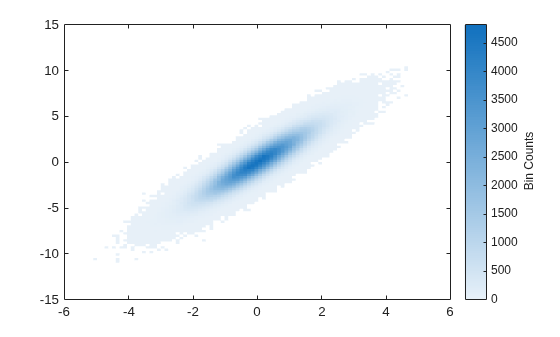
Generate random numbers in both the x and y dimensions and create a binned scatter plot. The binscatter function automatically chooses an appropriate number of bins to cover the range of values in the data.
x = randn(1e6,1);
y = 2*x + randn(1e6,1);
binscatter(x,y)
Plot a binned scatter plot of 10,000 random numbers sorted into 30 bins in the x dimension and 10 bins in the y dimension.
rng default % for reproducibility
x = randn(1e4,1);
y = randn(1e4,1);
h = binscatter(x,y,[30 10]);
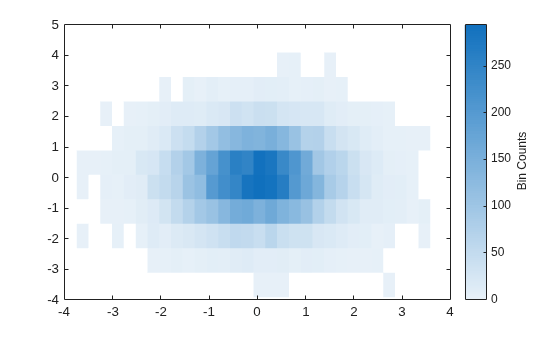
Find the bin counts. The result is a matrix with the top left element corresponding to the bin count of the bottom left bin in the plot. The x bins are in the rows of the matrix and the y bins are in the columns.
counts = h.Values;
Since R2026a
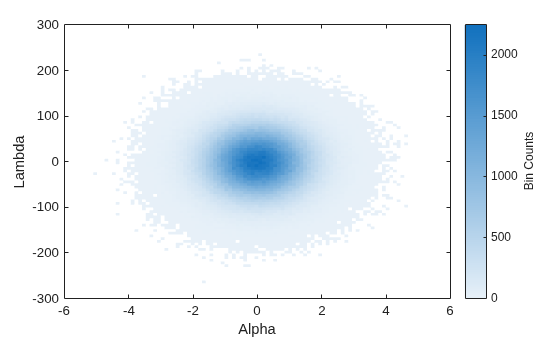
Create a table and plot the variables. When you pass a table to the binscatter function, the axis labels display the variable names.
Alpha = randn(1e6,1);
Lambda = 50*randn(1e6,1);
tbl = table(Alpha,Lambda);
binscatter(tbl,"Alpha","Lambda")
Create a binned scatter plot of some random data points.
x = randn(1e5,1);
y = randn(1e5,1);
binscatter(x,y)
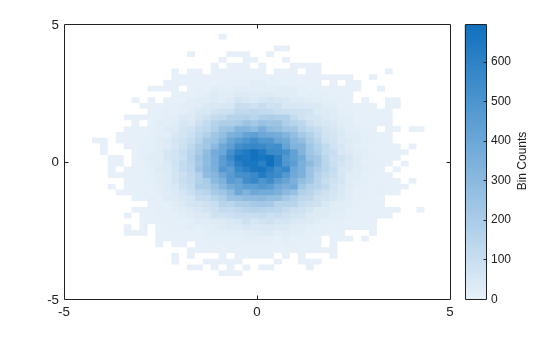
The default color map ranges from light colors (for small values) to dark colors (for large values). Switching to a color map that uses dark colors for small values can make it easier to spot outliers.
Use the colormap function to change the colors in the plot. Pass in the current axes handle using gca.
colormap(gca,"parula")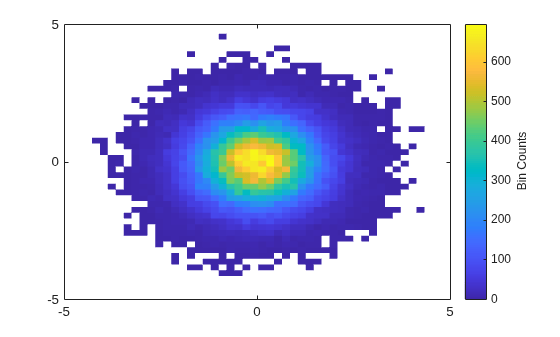
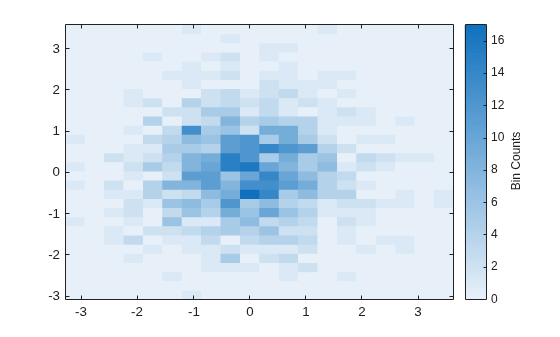
Generate 1,000 random numbers and create a binned scatter plot. Return the Binscatter object to adjust properties of the plot without recreating the entire plot.
x = randn(1000,1);
y = randn(1000,1);
h = binscatter(x,y)
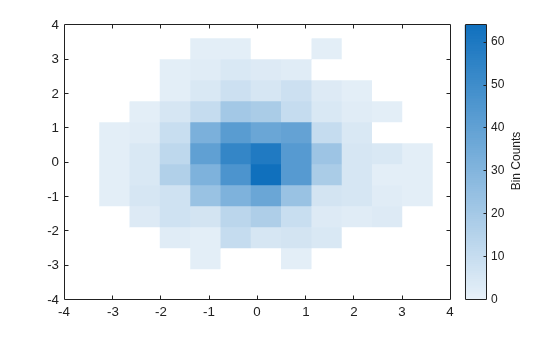
h =
  Binscatter with properties:

      NumBins: [11 11]
    XBinEdges: [-3.2764 -2.6485 -2.0206 -1.3927 -0.7648 -0.1369 0.4910 1.1189 1.7468 2.3747 3.0026 3.6305]
    YBinEdges: [-3.1155 -2.5034 -1.8914 -1.2794 -0.6674 -0.0553 0.5567 1.1687 1.7808 2.3928 3.0048 3.6168]
       Values: [11×11 double]
      XLimits: [-3.2764 3.6305]
      YLimits: [-3.1155 3.6168]
    FaceAlpha: 1

  Show all properties
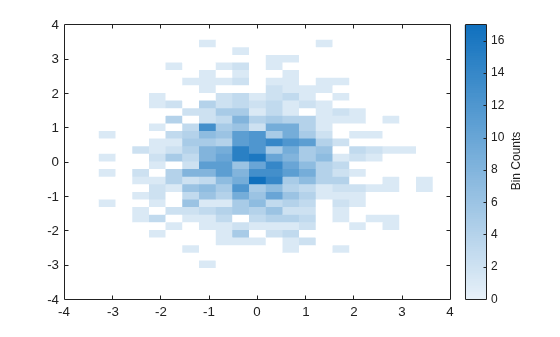
Specify exactly how many bins to use in each direction.
h.NumBins = [20 30];
Turn on the display of empty bins in the plot.
h.ShowEmptyBins = "on";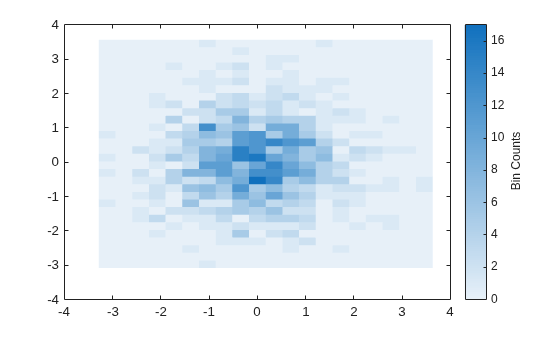
Specify the extent of the axes with the XLimits and YLimits properties. Then limit the bin limits in the x direction with a vector.
xlim(gca,h.XLimits);
ylim(gca,h.YLimits);
h.XLimits = [-1 1];
Since R2026b
One way to plot multiple binned scatter plots is to specify x and y as matrices of the same size, where each pair of corresponding columns represents a different data set. Another way is to use the hold on command between calls to binscatter, but this approach requires specifying some name-value arguments. This example shows both techniques.
Create two vectors of x-values and two vectors of y-values. Then use them to create two matrices of data to plot.
x1 = randn(1e6,1);
x2 = randn(1e6,1) + 3;
y1 = 50*randn(1e6,1);
y2 = 50*randn(1e6,1) + 100;
x = [x1 x2];
y = [y1 y2];
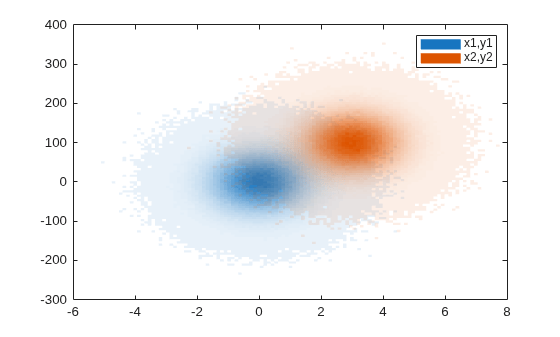
Plot both matrices and add a legend. Each distribution has a different overall hue, and within each distribution, the tiles vary in opacity according to the bin counts. Higher bin counts have a more opaque, intense color.
figure
binscatter(x,y)
legend("x1,y1","x2,y2")

Now plot two distributions using the hold on command after the first call to binscatter.
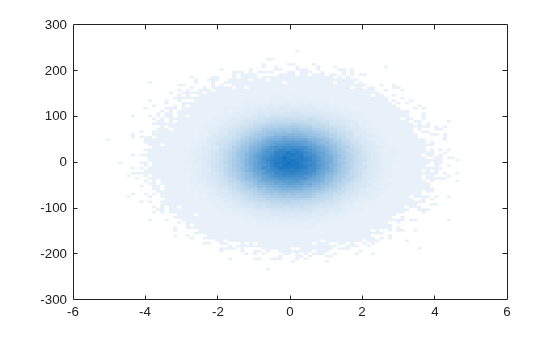
Plot the x1 and y1 vectors. Ensure that the plot displays the same hue with different tile opacities by specifying the FaceAlpha name-value argument as "flat".
figure
b1 = binscatter(x1,y1,FaceAlpha="flat");
hold on
Plot the second data set. Then add a legend.
binscatter(x2,y2,FaceAlpha="flat")
legend("x1,y1","x2,y2")
hold off
Input Arguments
Input data, specified vectors of the same length, matrices of the same
size, or a vector and a matrix that share the same length in one dimension.
The values of x and y must be
real.
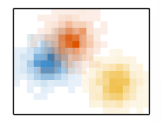
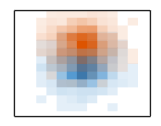
This table shows how the different shapes of x and
y affect the default (light theme) appearance of a
plot. You can change the plot colors and opacity by setting the FaceColor and FaceAlpha properties.
x and y | Result | Appearance |
|---|---|---|
Two vectors of the same length | One binned scatter plot that uses a colormap to distinguish bin counts. The default
colormap is By default, a colorbar showing the correspondence between the colors and the bin counts appears next to the plot (not shown in the illustration). |
|
Two matrices of the same size | Multiple binned scatter plots, each with a different color. Within each plot, the tile opacity varies from translucent (low count) to fully opaque (high count). By default, the colors
repeat after seven plots. You can specify other
color palettes that have more colors by using the
Use
the |
|
A vector and a matrix that share the same length in one dimension | Multiple binned scatter plots that share one set of coordinates. Each plot has a
different color. Within each plot, the tile opacity
varies from translucent (low count) to fully opaque
(high count). By default, the colors repeat after
seven plots. You can specify other color palettes
that have more colors by using the
Use the
|
|
Data Types: single | double | int8 | int16 | int32 | int64 | uint8 | uint16 | uint32 | uint64 | logical | datetime | duration
Source table containing the data to plot, specified as a table or timetable.
Table variables containing the x- and
y-coordinates, specified as one or more table
variable indices each. The table variables you specify can contain numeric,
logical, datetime, or duration values. Within each argument, the specified
variables must have the same type. If you specify multiple table variable
indices for both xvar and yvar,
the number of indices must match.
Specify the table variable indices using any of the following indexing schemes.
| Indexing Scheme | Examples |
|---|---|
Variable names:
|
|
Variable indices:
|
|
Variable type:
|
|
Plot One or Multiple Data Sets
Binned scatter plots have a different appearance depending on whether you specify one table variable index each or multiple table variables.
This table shows the default (light theme) appearance of plots created
from one or multiple table variables. You can change the plot colors and
opacity by setting the FaceColor and FaceAlpha properties.
xvar and
yvar | Result | Appearance |
|---|---|---|
One table variable index each | One binned scatter plot that uses a colormap to distinguish bin counts. The default
colormap is By default, a colorbar showing the correspondence between the colors and the bin counts appears next to the plot (not shown in the illustration). |
|
Multiple table variable indices each (since R2026b) | Multiple binned scatter plots, each with a different color. Within each plot, the tile opacity varies from translucent (low count) to fully opaque (high count). By default, the colors
repeat after seven plots. You can specify other
color palettes that have more colors by using the
Use
the |
|
One table
variable index for either | Multiple binned scatter plots that share one set of coordinates. Each plot has a
different color. Within each plot, the tile opacity
varies from translucent (low count) to fully opaque
(high count). By default, the colors repeat after
seven plots. You can specify other color palettes
that have more colors by using the
Use the
|
|
Example: binscatter(tbl,"Input","Output") specifies the
table variable named "Input" for the
x-coordinates and the variable named
"Output" for the
y-coordinates.
Example: binscatter(tbl,2,"Output") specifies the second
table variable for the x-coordinates and the variable
named "Output" for the
y-coordinates.
Example: binscatter(tbl,["X1","X2"],["Y1","Y2"])
specifies two table variables for the x-coordinates
and two table variables for the
y-coordinates. (since R2026b)
Number of bins, specified as a scalar or two-element vector [Nx
Ny].
If
Nis a two-element vector[Nx Ny], thenbinscatterusesNxbins in the x dimension andNybins in the y dimension.If
Nis a scalar, thenNxandNyare both set to the scalar value.
binscatter uses Nx and
Ny bins along the x and
y dimensions in the initial plot, when the axes are
not zoomed in. (The axes are not zoomed in when the
XLimMode and YLimMode properties
are both "auto".) When zooming,
binscatter adjusts the number of bins to maintain a
bin size such that the visible portion of the plot is approximately divided
into Nx-by-Ny bins.
The maximum number of bins in each dimension is 250. The default number of bins is computed based on the data size and standard deviation and does not exceed 100.
Example:
[10 20]
Data Types: single | double | int8 | int16 | int32 | int64 | uint8 | uint16 | uint32 | uint64
Target axes, specified as an Axes object. If you do not
specify the axes, then binscatter uses the current axes
(gca).
Name-Value Arguments
Specify optional pairs of arguments as
Name1=Value1,...,NameN=ValueN, where Name is
the argument name and Value is the corresponding value.
Name-value arguments must appear after other arguments, but the order of the
pairs does not matter.
Example: binscatter(x,y,ShowEmptyBins="on") turns on the display
of empty bins in the plot.
The properties listed here are only a subset. For a complete list, see Binscatter Properties.
Data limits in x-dimension, specified as a two-element vector
[Xmin Xmax].
binscatter only displays data points that fall within the
specified data limits inclusively, .
Example:
[0 10]
Data Types: single | double | int8 | int16 | int32 | int64 | uint8 | uint16 | uint32 | uint64 | datetime | duration
Data limits in y-dimension, specified as a two-element vector
[Ymin Ymax].
binscatter only displays data points that fall within the
specified data limits inclusively, .
Example:
[0 10]
Data Types: single | double | int8 | int16 | int32 | int64 | uint8 | uint16 | uint32 | uint64 | datetime | duration
Toggle to show empty bins, specified as either "off" or
"on", or as numeric or logical 1
(true) or 0 (false). A value of
"on" is equivalent to true, and
"off" is equivalent to false. Thus, you can use the
value of this property as a logical value. The value is stored as an on/off logical value of
type matlab.lang.OnOffSwitchState.
Specify "on" or true to color tiles in the plot that
fall within the bin limits, but have no data points.
Since R2026b
Tile color, specified as one of these values:
"flat"— Tile colors vary according to the bin counts. By default, the colors come from theskycolormap (in the light theme) or theabysscolormap (in the dark theme). You can change the colormap by calling thecolormapfunction after plotting.Color name (or short name) — Tiles have a uniform color. Specify
"red"(or"r"),"green"(or"g"),"blue"(or"b"),"cyan"(or"c"),"magenta"(or"m"),"yellow"(or"y"),"black"(or"k"), or"white"(or"w").RGB triplet — Tiles have a uniform color. An RGB triplet is a three-element row vector whose elements specify the intensities of the red, green, and blue components of the color. The intensities must be in the range
[0,1]; For example,[0.4 0.6 0.7].Hexadecimal color code — Tiles have a uniform color. A hexadecimal color code is a string scalar or character vector that starts with a hash symbol (
#) followed by three or six hexadecimal digits, which can range from0toF. The values are not case sensitive. The color codes"#FF8800","#ff8800","#F80", and"#f80"are equivalent."none"— Tiles have no color.
This table lists the default color palettes for plots in the light and dark themes. You can use the colors from these palettes to match other plots.
| Palette | Palette Colors |
|---|---|
Before R2025a: Most plots use these colors by default. |
|
|
|


To get the RGB triplets and hexadecimal color codes for these palettes , use the
orderedcolors
and rgb2hex
functions. For example, get the RGB triplets for the "gem" palette and
convert them to hexadecimal color
codes.
RGB = orderedcolors("gem");
H = rgb2hex(RGB);
Example:
binscatter(x,y,FaceColor="g") creates a binned scatter plot with green
tiles.
Example:
binscatter(x,y,FaceColor="#8B6CE0") creates a binned scatter plot with
purple tiles.
Example:
binscatter(x,y,FaceColor="flat") creates a binned scatter plot with tile
colors that vary according to the bin counts.
Transparency of the tiles, specified as "flat" or as a scalar in the
range [0, 1].
"flat"— Vary the tile transparency according to the bin counts, where more opaque bins have higher counts. You can adjust the mapping of bin counts to the transparency levels using thealphaandalphamapfunctions. Specifying theFaceAlphavalue as"flat"can cause theFaceColorproperty to change to a uniform color for all the bins instead of using a colormap. This change happens when theFaceColorModeproperty of theBinscatterobject has a value of"auto"(the default value).Scalar in the range [0, 1] — Use the same transparency for all the tiles. A value of
1means fully opaque and0means completely transparent (invisible).
Example:
binscatter(x,y,FaceAlpha=0.5) creates a binned scatter plot with
semitransparent bins.
Example:
binscatter(x,y,FaceAlpha="flat") creates a binned scatter plot with
tile transparencies that vary according to the bin counts. (since R2026b)
Output Arguments
Tips
Change the
ColorScaleproperty of the axes to"log"to produce better bin coloring when a few bins dominate the plot.ax = gca; ax.ColorScale = "log";

