Add Custom Basemaps from WMS Data
R2026bThis topic shows how to add custom basemaps from data stored in WMS servers by using the addCustomBasemap function. You can use custom basemaps with map display objects that have a Basemap property, including geographic axes objects and geographic globe objects. When you add a custom basemap by using the addCustomBasemap function, the basemap remains available for use in future MATLAB® sessions.
Add Basemap from WMS Layer
Search the WMS Database for layers from the GEBCO WMS server. Refine the list to include the "GEBCO_LATEST_2_sub_ice_topo" layer, which contains color-shaded elevation and under-ice topography for the globe. Synchronize the layer with the WMS server.
layers = wmsfind("gebco.net",SearchField="serverurl");
iceTopoLayer = refine(layers,"GEBCO_LATEST_2_sub_ice_topo");
iceTopoLayer = wmsupdate(iceTopoLayer);
Add a custom basemap from the WMS layer by using the addCustomBasemap function. Specify an attribution by using the Attribution name-value argument and the title of the layer.
attribution = iceTopoLayer.LayerTitle;
addCustomBasemap("gebcoIceTopo",iceTopoLayer,Attribution=attribution)
Create a geographic globe that uses the custom basemap. Position the camera above Europe.
uif = uifigure;
g = geoglobe(uif,Basemap="gebcoIceTopo");

campos(g,33,8,4e6)
campitch(g,-70)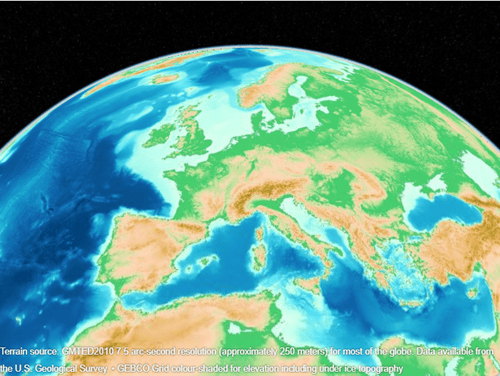
Add Basemap from WMS GetMap Request URL
Get information about a WMS server from NOAA's Environmental Research Division Data Access Program (ERDDAP). Extract the list of layers.
info = wmsinfo("https://coastwatch.pfeg.noaa.gov/erddap/wms/NOAA_DHW/request?");
layers = info.Layer;
Refine the list to include sea surface temperatures and a land mask.
sst = refine(layers,"dhw_5km:CRW_SST",MatchType="exact");
mask = refine(layers,"LandMask",MatchType="exact");
sstMasked = [sst mask];
Create a WMS map request from the layers. Request data from January 1, 2000 by updating the Time property of the map request.
mapRequest = WMSMapRequest(sstMasked);
mapRequest.Time = "2000-01-01";
Get the WMS GetMap request URL from the map request. Then, add a custom basemap using the URL. Specify an attribution by using the Attribution name-value argument and the title of the server.
urlJan2000 = mapRequest.RequestURL;
attribution = info.ServerTitle;
addCustomBasemap("sstJan2000",urlJan2000,Attribution=attribution)
Display the basemap in a geographic axes object by using the geobasemap function. Add a title using the time stored in the map request.
figure
geobasemap sstJan2000
title(mapRequest.Time)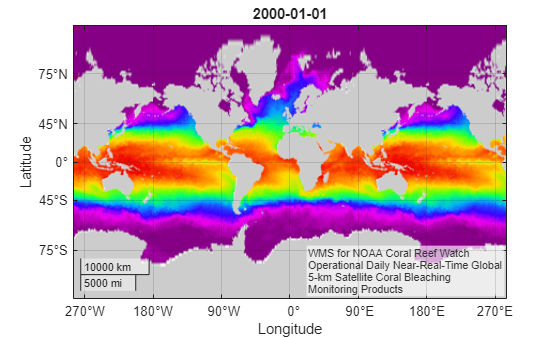
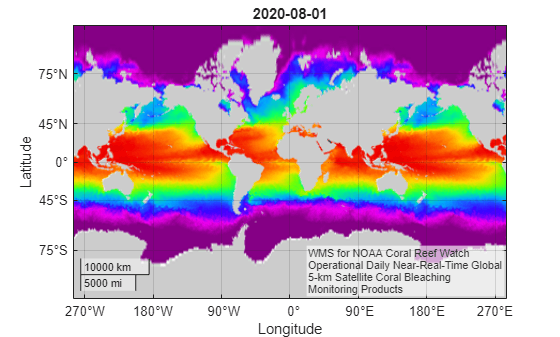
Add a second basemap using temperatures from August 1, 2020. Update the Time property of the map request, get the updated WMS GetMap request URL, and add the basemap using the updated URL.
mapRequest.Time = "2020-08-01";
urlAug2020 = mapRequest.RequestURL;
addCustomBasemap("sstAug2020",urlAug2020,Attribution=attribution)
Display the second basemap in a new geographic axes object.
figure
geobasemap sstAug2020
title(mapRequest.Time)