uvmbuild
R2026bGenerate UVM testbench from Simulink model
Description
Add-On Required: This feature requires the ASIC Testbench for HDL Verifier add-on.
uvmbuild(
generates a SystemVerilog top module, which includes a universal verification methodology
(UVM) testbench and a behavioral design under test (DUT). The UVM testbench includes a
sequence, a scoreboard, monitors, and drivers. The dut,sequence,scoreboard)uvmbuild function
maps:
The Simulink® DUT subsystem to a generated SystemVerilog DPI behavioral DUT
The Simulink sequence subsystem to a UVM sequence block
The Simulink scoreboard subsystem to a UVM scoreboard
The uvmbuild function supports these HDL simulators:
Siemens® Questa™
Siemens ModelSim™
Synopsys® VCS® (Supported on Linux® or cross-platform workflows)
Cadence® Xcelium™ (Supported on Linux or cross-platform workflows)
For cross platform support, see Generate Cross-Platform UVM Components.
uvmbuild(___, specifies options
using one or more name-value pair arguments in addition to the input arguments in the
previous syntax. For example, Name=Value)Driver='mySLTopModule/myDriver' generates a
UVM driver from the Simulink subsystem specified as 'mySLTopModule/myDriver'.
Examples
Simulink Model Structure
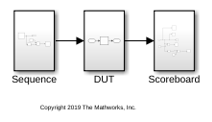
This example uses a Simulink® model, that includes these three subsystems.
A sequence subsystem, which generates stimulus for the DUT.
A DUT subsystem, which represents your HDL design.
A scoreboard subsystem, which collects the outputs and checks them. In this example the DUT is a simple delay block.
open_system('hdlv_uvmbuild');
Generate UVM Testbench
Generate a UVM testbench from this Simulink model, specifying the paths to the DUT, sequence, and scoreboard subsystems.
uvmbuild('hdlv_uvmbuild/DUT','hdlv_uvmbuild/Sequence','hdlv_uvmbuild/Scoreboard');
Observe Generated Output
The uvmbuild function creates a directory named hdlv_uvmbuild_uvmbuild containing the uvm_testbench directory. The uvm_testbench directory includes these subdirectories.
The
topdirectory includes a SystemVerilog top module and generated scripts to execute in your HDL simulation environment.The
DPI_dutdirectory contains the SystemVerilog-DPI behavioral DUT.The
sequencedirectory contains the generated sequence transaction type and a UVM sequencer, which drives the transaction to the DUT.The
scoreboarddirectory contains the generated UVM scoreboard.The
uvm_artifactsdirectory contains UVM components, such as monitors, drivers, and agents, required for the UVM environment.
Run Generated UVM Testbench
Start Modelsim™ or Questasim in GUI mode.
In the HDL simulator, navigate to the top directory:
cd hdlv_uvmbuild_uvmbuild\uvm_testbench\top\In the HDL simulator, enter this command to run your simulation:
do run_tb_mq.do

