sschdl.generateOptimizedModel
R2026bReplace Simscape switches, converter blocks, and machine blocks with optimized equivalents for FPGA deployment
Since R2024a
Syntax
Description
generatedModel = sschdl.generateOptimizedModel(input)
generatedModel = sschdl.generateOptimizedModel(input,Name=Value)
The generated optimized model has the same name as input but
with the suffix _generated. Once the optimized model is generated, open
the model and verify the connection. Connect any gate signal inports of the replaced
blocks to their respective sources and remove additional Simulink-PS Converter (Simscape) blocks.
Examples
Open the three-phase PMSM drive model at the MATLAB® command prompt.
open_system("sschdlexThreePhasePMSMDrive")
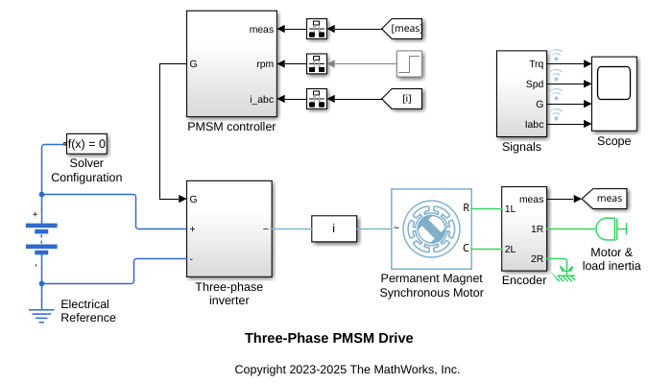
Open the Three-phase inverter subsystem that contains Simscape blocks.
open_system("sschdlexThreePhasePMSMDrive/Three-phase inverter")
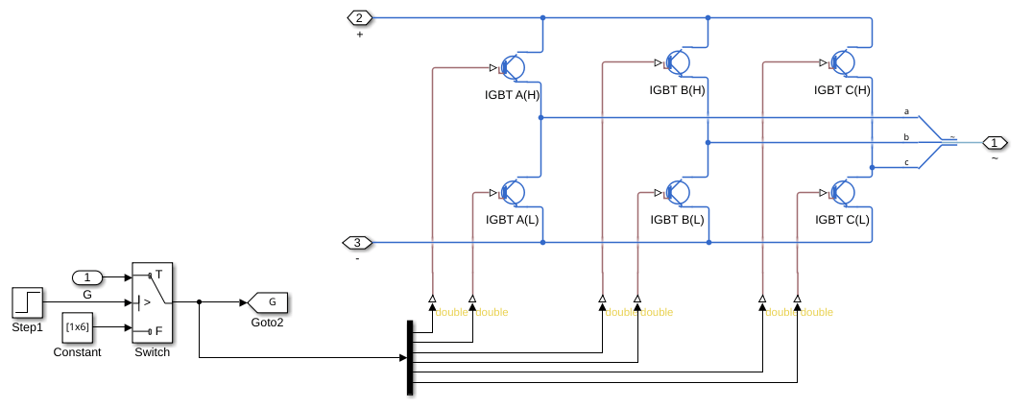
To optimize the model for FPGA deployment, use the ReplaceSwitches name-value argument and run the sschdl.generateOptimizedModel function at the MATLAB command prompt.
generatedModel = sschdl.generateOptimizedModel("sschdlexThreePhasePMSMDrive",ReplaceSwitches=true);
The following blocks have been replaced:
'sschdlexThreePhasePMSMDrive/Three-phase inverter/IGBT A(H)'
'sschdlexThreePhasePMSMDrive/Three-phase inverter/IGBT A(L)'
'sschdlexThreePhasePMSMDrive/Three-phase inverter/IGBT B(H)'
'sschdlexThreePhasePMSMDrive/Three-phase inverter/IGBT B(L)'
'sschdlexThreePhasePMSMDrive/Three-phase inverter/IGBT C(H)'
'sschdlexThreePhasePMSMDrive/Three-phase inverter/IGBT C(L)'

Saving sschdlexThreePhasePMSMDrive as sschdlexThreePhasePMSMDrive_generated and replacing switch and converter blocks with equivalent FPGA HIL supported blocks.
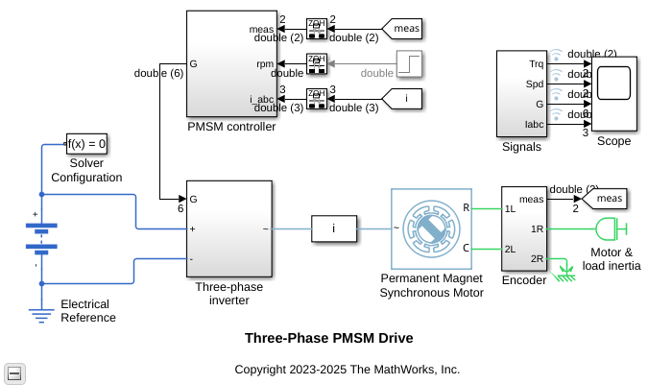
The generated optimized model for the three-phase PMSM drive model is saved as sschdlexThreePhasePMSMDrive_generated. In this model, the Three-phase inverter subsystem contains the replaced blocks.
Open the PMSM drive model.
open_system("sschdlexPMSMDriveSimscapeMotor")
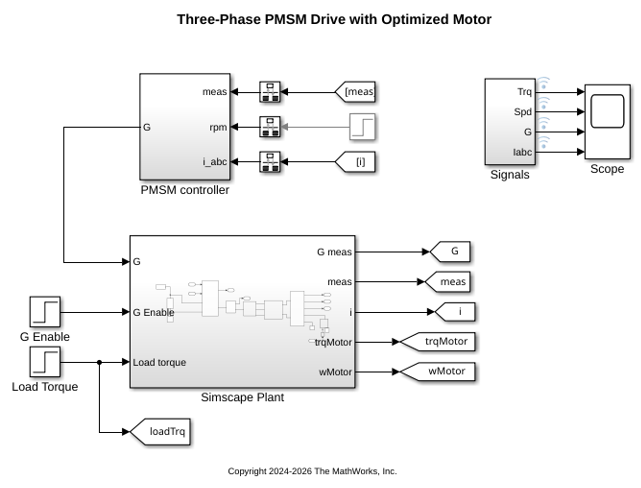
Optimize the model for FPGA deployment by replacing the Simscape™ PMSM (Simscape Electrical) block with an optimized equivalent.
Use the ReplacePMSM name-value argument with the sschdl.generateOptimizedModel function at the MATLAB command prompt.
generatedModel = sschdl.generateOptimizedModel("sschdlexPMSMDriveSimscapeMotor",ReplacePMSM=true);
Warning: 'ReplacePMSM' is being deprecated and will be removed in a future
release. Please use 'ReplaceMachines' instead of 'ReplacePMSM'.
The following blocks have been replaced:
'sschdlexPMSMDriveSimscapeMotor/Simscape Plant/Permanent Magnet Synchronous Motor'

The following Rotational Motion Sensor blocks have been replaced:
'sschdlexPMSMDriveSimscapeMotor/Simscape Plant/Encoder/Ideal Rotational Motion Sensor'
 These blocks now output angular position values wrapped in the range [0,2pi).
The HIL optimized machine blocks operate in either Torque-driven or Speed-driven mode. In the machine block, set the appropriate mode for the External load parameter based on whether there is a torque or speed source in the mechanical network. Inertia in the mechanical system must be modeled externally to the machine (in Speed-driven mode) or within the machine (in Torque-driven mode). The optimized machine block does not support modeling external inertia while in Torque-driven mode.
Saving sschdlexPMSMDriveSimscapeMotor as sschdlexPMSMDriveSimscapeMotor_generated and replacing switch, converter, and machine blocks with equivalent FPGA HIL supported blocks.
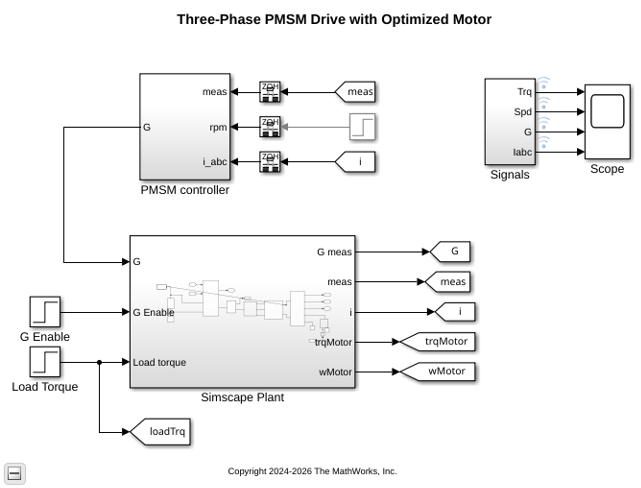
The generated optimized model for the three-phase PMSM drive model is saved as sschdlexPMSMDriveSimscapeMotor_generated. In this model, the Simscape PMSM block is replaced with an optimized PMSM block.
Input Arguments
Name-Value Arguments
Output Arguments
Limitations
In the model, if a parameter references any workspace variable or an expression, then the parameter value is replaced by the evaluated value.
To be compatible for replacement with the
ReplaceMachinesoption, the Simscape machine blocks must use the parameter configurations listed in this table:Parameter PMSM (Simscape Electrical) BLDC (Simscape Electrical) FEM-Parameterized PMSM (Simscape Electrical) Hybrid Excitation PMSM (Simscape Electrical) Switched Reluctance Machine (Simscape Electrical) Modeling option No thermal portNo thermal port2-D partial derivative data | No thermal portNo thermal portNo thermal portElectrical connection Expanded three-phase portsExpanded three-phase ports— Expanded three-phase portsExpanded three-phase portsWinding type Wye-woundorDelta-woundWye-woundorDelta-woundWye-woundorDelta-woundWye-woundorDelta-wound— Modeling fidelity Constant Ld, Lq and PMConstant Ld and Lq— Constant Ld, Lq, Lmf, Lf, and PM— Stator parameterization Specify Ld, Lq, and L0Specify Ld, Lq, and L0— Specify Ld, Lq, and L0Specify parametric dataPermanent magnet flux linkage parameterization Specify flux linkage— — — — Zero sequence ExcludeExclude— Exclude— Rotor angle definition Angle between the a-phase magnetic axis and the q-axisAngle between the a-phase magnetic axis and the q-axis— Angle between the a-phase magnetic axis and the q-axis— Model NoneNoneNone— NoneRotor damping '0''0''0''0''0'Ld matrix, Ld(id,iq) Nonzero Nonzero Nonzero Nonzero — Lq matrix, Lq(id,iq) Nonzero Nonzero Nonzero Nonzero — Back EMF profile — All Back EMF profile options supported — — — Interpolation method — — Linear— — The generated optimized machine block operates in either torque-driven or speed-driven mode. Set the External load parameter to
'Torque-driven'or'Speed-driven'based on whether the mechanical network applies a torque or speed load to the motor. In torque-driven mode, model inertia within the motor. In speed-driven mode, model inertia externally in the mechanical network. The optimized machine block does not support modeling external inertia in the mechanical network while in torque-driven mode.
Version History
Introduced in R2024aSee Also
sschdladvisor | sschdl.tuneOptimizedModel
Topics
- Generate HDL Code for Simscape Models by Using Dynamic Switch Approximation
- Synchronous Buck Converter for Real-Time FPGA Deployment
- Tune Parameter Values for Dynamic Switches in Half-Wave Rectifier Model
- Linearize Models with Converters Using Averaged Switching (Simscape Electrical)
- Generate Optimized Simscape Three-Phase PMSM Drive Model for Real-Time FPGA HIL Deployment

