plot
Description
Add-On Required: This feature requires the Scenario Builder for Automated Driving Toolbox add-on.
plot( plots trajectories in the
input trajectory)Trajectory
object trajectory.
plot(
specifies options using one or more name-value arguments. For example,
trajectory,Name=Value)MarkerSize=5 plots the GPS waypoints with a marker size of 5.
returns a
figure handle as a figHandle = plot(___)Figure object using any combination of input arguments
from previous syntaxes.
Examples
Load recorded GPS trajectory data into the workspace.
load("recordedGPSData.mat","X","Y","Z","timestamps")
Create a trajectory object by using the loaded timestamps and xyz-coordinates.
traj1 = scenariobuilder.Trajectory(timestamps,X,Y,Z)
traj1 =
Trajectory with properties:
Name: ''
NumSamples: 392
Duration: 19.5498
SampleRate: 20.0513
SampleTime: 0.0500
Timestamps: [392×1 double]
Position: [392×3 double]
Orientation: [392×3 double]
Velocity: [392×3 double]
Course: [392×1 double]
GroundSpeed: [392×1 double]
Acceleration: [392×3 double]
AngularVelocity: [392×3 double]
LocalOrigin: [0 0 0]
TimeOrigin: 0
Attributes: []
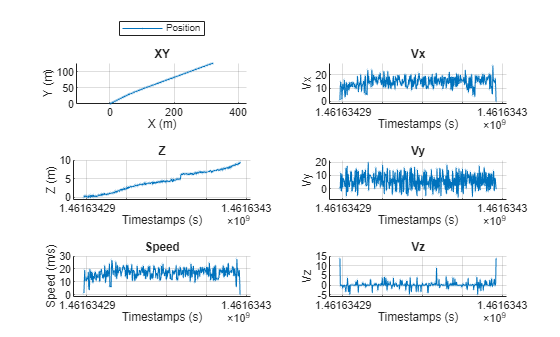
Plot the trajectory object.
plot(traj1,ShowZ=true,ShowSpeed=true,ShowVelocity=true,LineWidth=0.1,MarkerSize=1)
Combine the xyz-coordinates into a waypoint matrix, and create another trajectory by using the timestamps and waypoints.
waypoints = [X Y Z]; traj2 = scenariobuilder.Trajectory(timestamps,waypoints)
traj2 =
Trajectory with properties:
Name: ''
NumSamples: 392
Duration: 19.5498
SampleRate: 20.0513
SampleTime: 0.0500
Timestamps: [392×1 double]
Position: [392×3 double]
Orientation: [392×3 double]
Velocity: [392×3 double]
Course: [392×1 double]
GroundSpeed: [392×1 double]
Acceleration: [392×3 double]
AngularVelocity: [392×3 double]
LocalOrigin: [0 0 0]
TimeOrigin: 0
Attributes: []
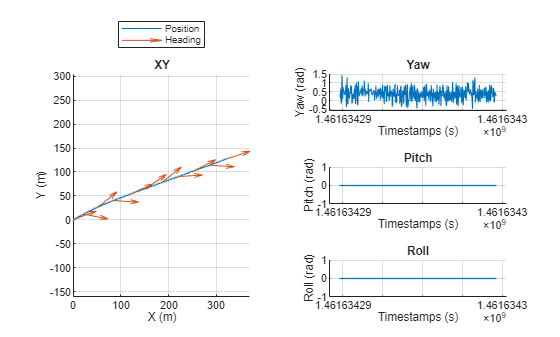
Plot the trajectory object.
plot(traj2,ShowHeading=true,ShowOrientation=true,LineWidth=0.1,MarkerSize=1)
Input Arguments
Trajectory with timestamps and waypoints, specified as a Trajectory
object.
Name-Value Arguments
Specify optional pairs of arguments as
Name1=Value1,...,NameN=ValueN, where Name is
the argument name and Value is the corresponding value.
Name-value arguments must appear after other arguments, but the order of the
pairs does not matter.
Example: plot(trajectory,MarkerSize=5) plots the trajectories with a
marker size of 5.
Parent figure, specified as a Figure object or
Panel object. If you do not specify Parent,
the function plots the trajectory in a new figure.
Plot z-coordinates across timestamps, specified as a logical
1 (true) or 0
(false).
Data Types: logical
Plot speed values across timestamps, specified as a logical 1
(true) or 0 (false).
Data Types: logical
Plot heading angles across timestamps, specified as a logical 1
(true) or 0 (false).
Data Types: logical
Plot orientation angles across timestamps, specified as a logical
1 (true) or 0
(false).
Data Types: logical
Plot velocity values across timestamps, specified as a logical
1 (true) or 0
(false).
Data Types: logical
Plot acceleration values across timestamps, specified as a logical
1 (true) or 0
(false).
Data Types: logical
Plot angular velocity values across timestamps, specified as a logical
1 (true) or 0
(false).
Data Types: logical
Line style, marker, and color, specified as a string scalar or character vector
containing symbols. For more information, see LineSpec in another
plot function.
Data Types: string | char
Line width, specified as a positive scalar in points, where 1 point = 1/72 of an inch. If the line has markers, then the line width also affects the marker edges.
The line width cannot be thinner than the width of a pixel. If you set the line width to a value that is less than the width of a pixel on your system, the line displays as one pixel wide.
Data Types: double
Marker size, specified as a positive scalar in points, where 1 point = 1/72 of an inch.
Data Types: double
Marker fill color, specified as "none",
"auto", an RGB triplet, a hexadecimal color code, a color name,
or a short color name. The "auto" option uses the same color as the
Color property of the parent axes. If you specify
"auto" and the axes plot box is invisible, the marker fill color
is the color of the figure. For more information, see MarkerFaceColor in another
plot function. The "none" option renders the
markers without a fill color.
Number of points to skip between heading makers, specified as a positive integer.
This value must be between 0 and the value of
NumSamples property of the input
trajectory object.
Data Types: uint8 | uint16 | uint32 | uint64
Orientation units, specified as "radians" or
"degrees".
Data Types: string | char
Line color, specified as an RGB triplet, a hexadecimal color code, a color name,
or a short color name. For more information, see Color in another
plot function.
Output Arguments
Figure handle, returned as a Figure object. You can use the figure
handle to query and modify figure properties. For more information, see Figure.
Version History
Introduced in R2024b
See Also
GPSData | Trajectory | CameraData | LidarData | recordedSensorData
MATLAB Command
You clicked a link that corresponds to this MATLAB command:
Run the command by entering it in the MATLAB Command Window. Web browsers do not support MATLAB commands.
Select a Web Site
Choose a web site to get translated content where available and see local events and offers. Based on your location, we recommend that you select: .
You can also select a web site from the following list
How to Get Best Site Performance
Select the China site (in Chinese or English) for best site performance. Other MathWorks country sites are not optimized for visits from your location.
Americas
- América Latina (Español)
- Canada (English)
- United States (English)
Europe
- Belgium (English)
- Denmark (English)
- Deutschland (Deutsch)
- España (Español)
- Finland (English)
- France (Français)
- Ireland (English)
- Italia (Italiano)
- Luxembourg (English)
- Netherlands (English)
- Norway (English)
- Österreich (Deutsch)
- Portugal (English)
- Sweden (English)
- Switzerland
- United Kingdom (English)