Identify Function Call with Run-Time Error
R2026bThis tutorial shows how to identify the function call that causes a run-time error in the function body.
If a function contains two different colors on the same operation for two different calls, the software combines the call contexts and displays an orange check on the operation. For example, when some function calls cause a red or orange check on an operation in the function body and other calls cause a green check, in your verification results, the operation is orange.
You have to distinguish orange checks that arise from combination of call contexts because an orange check can arise from other causes. Using the option Sensitivity context, make this distinction by storing individual call contexts for a function.
In this tutorial, a function is called twice. You identify which function call causes a run-time error in the function body.
Run analysis on this code and open the results.
void func(int arg) {
    int loc_var = 0;
    loc_var = 1/arg;
}

void main(void) {
    int num = 1;
    func(num + 10);
    func(num - 1);
}
A red Non-terminating call check appears on the second call to
func. In the body offunc, there is an orange Division by zero check on the/operation.Specify that you want to store individual call context information for the function
func.In your project configuration, navigate to the Static Analysis tab. Under Run Time Errors select Precision.
Set Sensitivity context to
custom.Add the function you want to store call context for. To do so, you can either:
Click
 to add a new function from a predefined list.
Select
to add a new function from a predefined list.
Select funcfrom the list of functions on the left then add it to the table by clicking and OK.
Click
 to add a new row. Type
funcinto the empty row.
Run verification and open the results.
This time, a dark orange Division by zero check appears in the body of
func. In the Results List, this dark orange check is denoted by a mark. Instead of a red Non-terminating
call check on the second call to
mark. Instead of a red Non-terminating
call check on the second call to func, a dashed, red line appears.Select the dark orange check in the Results List.
The Result Details pane shows the calling context for the check. You can see that one call produces a red check on the
/operation and the other call produces a green check. You can click each call to navigate to it in your source code.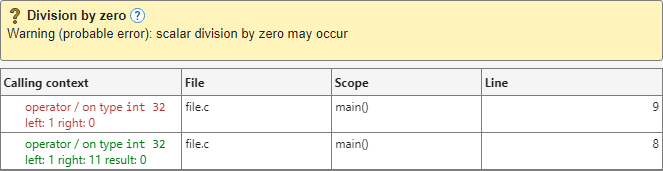
See Also
Non-terminating call (NTC) | Sensitivity context
(-context-sensitivity)

