optimizeWithPlots
R2026bOptimize custom evaluation function and plot population density and convergence
Since R2025a
Description
opt = optimizeWithPlots(obj,iterations)obj using the number of iterations in iterations and
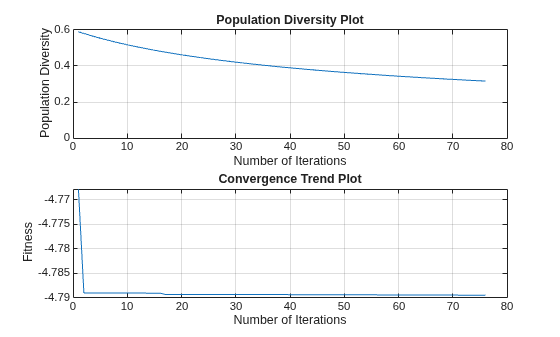
plots the population density and convergence.
Examples
Create a dipole antenna resonating at 75 MHz and calculate its maximum directivity.
Choose its length and width as design variables. Provide lower and upper bounds of length and width.
referenceAnt = design(dipole,75e6);
InitialDirectivity = max(max(pattern(referenceAnt,75e6)))
InitialDirectivity =
2.1002
length_lb = 3; % Lower bound for length
length_ub = 7; % Upper bound for length
width_lb = 0.11; % Lower bound for width
width_ub = 0.13; % Upper bound for width
Bounds = [length_lb width_lb; length_ub width_ub];
Use the SADEA optimizer to optimize this dipole antenna for its directivity. Specify an evaluation function for optimization using the CustomEvaluationFunction property of the OptimizerSADEA object. The evaluation function used in this example is defined at the end of this example.
s = OptimizerSADEA(Bounds);
s.CustomEvaluationFunction = @customEvaluationOnlyObjective;
Validate the optimizer setup.
validateSetup(s)
ans = logical
   1
Run the optimization for 100 iterations.
figure
optimizeWithPlots(s,100);
View the best member data.
bestDesign = s.getBestMemberData
bestDesign =
  bestMemberData with properties:

             member: [4.8004 0.1100]
       performances: -4.7895
            fitness: -4.7895
    bestIterationId: 72
bestDesignValues = bestDesign.member
bestDesignValues = 1×2

    4.8004    0.1100
Update the reference antenna with best design values from the optimizer. Calculate directivity of the optimized design.
Observe an increase in directivity value after optimization.
referenceAnt.Length = bestDesignValues(1);
referenceAnt.Width = bestDesignValues(2);
postOptimizationDirectivity = max(max(pattern(referenceAnt,75e6)))
postOptimizationDirectivity =
4.7895
View the surrogate model data used for prediction.
InitialData = s.getInitializationData
InitialData =
  initializationData with properties:

         members: [30×2 double]
    performances: [30×1 double]
         fitness: [30×1 double]
View the data for all iterations.
iterData = s.getIterationData
iterData =
  iterationData with properties:

         members: [75×2 double]
    performances: [75×1 double]
         fitness: [75×1 double]
Check if the algorithm has converged.
ConvergenceFlag = s.isConverged
ConvergenceFlag = logical
   1
Check how many times the evaluation function is computed.
numEvaluations = s.getNumberOfEvaluations
numEvaluations =
105
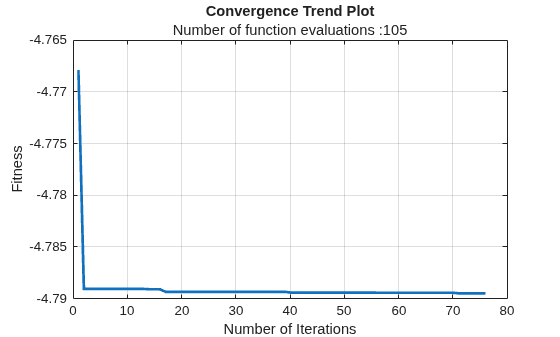
Plot the convergence trend.
s.showConvergenceTrend
This code defines the evaluation function used in this example.
function fitness = customEvaluationOnlyObjective(designVariables)

        % Create geometry
        ant = design(dipole,75e6);
        ant.Length = designVariables(1);
        ant.Width = designVariables(2);

        % Calculate directivity
        % Optimizer always minimizes the objective hence reverse the sign to maximize gain.
        objective = max(max(pattern(ant,75e6)));
        objective = -objective;

        % As there are no constraints, fitness equals objective.
        fitness = objective;

end
Input Arguments
Output Arguments
Version History
Introduced in R2025a

