pre6GReferenceSignal
R2026bDescription
Add-On Required: This feature requires the 6G Exploration Library for 5G Toolbox add-on.
sym = pre6GReferenceSignal(___,Name=Value)UseGPU="on" enables GPU processing.
Examples
Create a pre-6G carrier configuration object with default parameters. Set a batch size of five. Create an empty resource grid for the configuration and batch size.
carrier = pre6GCarrierConfig;
B = 5;
grid = pre6GResourceGrid(carrier,1,BatchSize=B);
Create a reference signal configuration object with default parameters. Get 0-based reference signal indices for the reference signal configuration.
rs = pre6GReferenceSignalConfig;
rs.SymbolLocations = (0:7)';
rs.TimeDomainCDM = 8;
rsInd = pre6GReferenceSignalIndices(carrier,rs,BatchSize=B);
Create a data channel configuration object. Use the reference signal indices as reserved resource elements for the physical channel configuration object.
Get 0-based data indices and resource mapping information for the physical channel configuration.
ch = pre6GPhysicalChannelConfig(ReservedRE=rsInd-1);
[dataInd,info] = pre6GPhysicalChannelIndices(carrier,ch,BatchSize=B);
Generate a random codeword for the physical channel. Generate the data and reference signal symbols. Assign the data and reference symbols to the grid.
cw = randi([0 1],[info.G,B]);
sym = pre6GPhysicalChannel(carrier,ch,cw);
rsSym = pre6GReferenceSignal(carrier,rs,BatchSize=B);
grid(rsInd) = rsSym;
grid(dataInd) = sym;
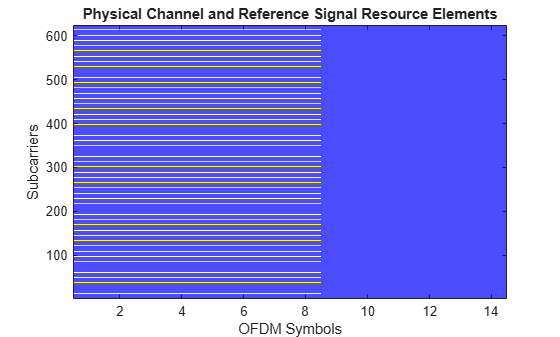
Plot the resource element assignments for the first batch element.
map = zeros(size(grid,1),size(grid,2));
map(dataInd(:,1,1)) = 1;
map(rsInd(:,1,1)+1) = 2;

figure;
image(map+1);
axis xy;
colormap([1 1 1; 0.3 0.3 1; 1 1 0]);
xlabel('OFDM Symbols');
ylabel('Subcarriers');
title('Physical Channel and Reference Signal Resource Elements');
Low-PAPR Type 1 Sequence with Custom Cyclic Shifts
Create a carrier configuration object and an RS configuration object. Configure the RS to use a type 1 low-PAPR sequence on every second subcarrier in the last four OFDM symbols of the slot. Use a frequency-domain CDM length of 4 so that four ports share the same resource elements (REs).
carrier = pre6GCarrierConfig;
rs = pre6GReferenceSignalConfig;
rs.Modulation = "low-papr-type1";
rs.FrequencyDomainCDM = 4;
rs.SubcarrierLocations = (0:2:10).';
rs.SymbolLocations = (10:13).';
rs.PortSet = 0:3;
Specify the cyclic shift index of each port (rows) in each OFDM symbol (columns).
rs.CyclicShifts = [0 2 1 3; 1 3 2 0; 2 0 3 1; 3 1 0 2];
Display the cyclic shift index that each port uses in each OFDM symbol.
rs.CyclicShiftsTable
ans = 4×5 table
    p    FD-CDM group    TD-CDM group        OFDM symbol           Cyclic shift
    _    ____________    ____________    ____________________    ________________

    0         0               0          10    11    12    13    0    2    1    3
    1         0               0          10    11    12    13    1    3    2    0
    2         0               0          10    11    12    13    2    0    3    1
    3         0               0          10    11    12    13    3    1    0    2

	Get insights using Copilot
Because the ports use cyclic shifts instead of orthogonal cover codes (OCCs), the frequency-domain and time-domain CDM weights are 1 for every port.
rs.CDMTable
ans = 4×5 table
    p    FD-CDM group    TD-CDM group    w_f    w_t
    _    ____________    ____________    ___    ___

    0         0               0           1      1
    1         0               0           1      1
    2         0               0           1      1
    3         0               0           1      1

	Get insights using Copilot
Generate the RS symbols. The output contains 1248 symbols (312 subcarriers in each of 4 OFDM symbols) for each port.
sym = pre6GReferenceSignal(carrier,rs);
disp(size(sym))
1248 4
Confirm that the symbols have constant amplitude.
disp([min(abs(sym(:))) max(abs(sym(:)))])
1.0000 1.0000
Confirm that the ports are mutually orthogonal.
C = abs(sym'*sym)/size(sym,1);
disp(round(C,6))
     1     0     0     0
     0     1     0     0
     0     0     1     0
     0     0     0     1
Custom Complex Frequency-Domain CDM Weights
Configure an RS with the same port structure as the 5G NR Release 18 enhanced PUSCH DM-RS for configuration type 1 with double-symbol DM-RS. This configuration supports up to 16 ports. Use two FD-CDM groups, each on every second subcarrier, and a pair of adjacent OFDM symbols. Use a frequency-domain CDM length of 4 and a time-domain CDM length of 2.
rs = pre6GReferenceSignalConfig;
rs.FrequencyDomainCDM = 4;
rs.SubcarrierLocations = [(0:2:10).' (1:2:11).'];
rs.TimeDomainCDM = 2;
rs.SymbolLocations = [2; 3];
rs.PortSet = 0:15;
By default, the frequency-domain OCCs have elements equal to 1 or -1. Specify the frequency-domain OCCs that the enhanced PUSCH DM-RS uses instead. Each row of the matrix is the frequency-domain OCC for one port within an FD-CDM group. The last two rows are complex.
rs.FrequencyWeights = [1 1 1 1; 1 -1 1 -1; 1 1j -1 -1j; 1 -1j -1 1j];
Display the CDM weights that each port uses. Ports 8 to 15 use the complex frequency-domain OCCs. The time-domain OCCs use the default values.
rs.CDMTable
ans = 16×5 table
    p     FD-CDM group    TD-CDM group                        w_f                          w_t
    __    ____________    ____________    ___________________________________________    _______

     0         0               0          1+0i         1+0i         1+0i         1+0i    1     1
     1         0               0          1+0i        -1+0i         1+0i        -1+0i    1     1
     2         1               0          1+0i         1+0i         1+0i         1+0i    1     1
     3         1               0          1+0i        -1+0i         1+0i        -1+0i    1     1
     4         0               0          1+0i         1+0i         1+0i         1+0i    1    -1
     5         0               0          1+0i        -1+0i         1+0i        -1+0i    1    -1
     6         1               0          1+0i         1+0i         1+0i         1+0i    1    -1
     7         1               0          1+0i        -1+0i         1+0i        -1+0i    1    -1
     8         0               0          1+0i         0+1i        -1+0i         0-1i    1     1
     9         0               0          1+0i         0-1i        -1+0i         0+1i    1     1
    10         1               0          1+0i         0+1i        -1+0i         0-1i    1     1
    11         1               0          1+0i         0-1i        -1+0i         0+1i    1     1
    12         0               0          1+0i         0+1i        -1+0i         0-1i    1    -1
    13         0               0          1+0i         0-1i        -1+0i         0+1i    1    -1
    14         1               0          1+0i         0+1i        -1+0i         0-1i    1    -1
    15         1               0          1+0i         0-1i        -1+0i         0+1i    1    -1

	Get insights using Copilot
Generate the RS symbols and indices, and map them to a resource grid. Confirm that the ports are mutually orthogonal.
sym = pre6GReferenceSignal(carrier,rs);
ind = pre6GReferenceSignalIndices(carrier,rs);
grid = pre6GResourceGrid(carrier,numel(rs.PortSet));
grid(ind) = sym;
grid = reshape(grid,[],numel(rs.PortSet));
C = abs(grid'*grid)/size(sym,1);
disp(round(C,6))
     1     0     0     0     0     0     0     0     0     0     0     0     0     0     0     0
     0     1     0     0     0     0     0     0     0     0     0     0     0     0     0     0
     0     0     1     0     0     0     0     0     0     0     0     0     0     0     0     0
     0     0     0     1     0     0     0     0     0     0     0     0     0     0     0     0
     0     0     0     0     1     0     0     0     0     0     0     0     0     0     0     0
     0     0     0     0     0     1     0     0     0     0     0     0     0     0     0     0
     0     0     0     0     0     0     1     0     0     0     0     0     0     0     0     0
     0     0     0     0     0     0     0     1     0     0     0     0     0     0     0     0
     0     0     0     0     0     0     0     0     1     0     0     0     0     0     0     0
     0     0     0     0     0     0     0     0     0     1     0     0     0     0     0     0
     0     0     0     0     0     0     0     0     0     0     1     0     0     0     0     0
     0     0     0     0     0     0     0     0     0     0     0     1     0     0     0     0
     0     0     0     0     0     0     0     0     0     0     0     0     1     0     0     0
     0     0     0     0     0     0     0     0     0     0     0     0     0     1     0     0
     0     0     0     0     0     0     0     0     0     0     0     0     0     0     1     0
     0     0     0     0     0     0     0     0     0     0     0     0     0     0     0     1
Input Arguments
Name-Value Arguments
Output Arguments
Extended Capabilities
Version History
Introduced in R2026a

