DO Qualification Kit provides documentation, test cases, and procedures that let you qualify Simulink and Polyspace software verification tools for projects based on DO-178C, DO-278A, DO-254, and related supplements. The kit contains tool qualification plans, tool operational requirements, and other materials required for qualifying software verification tools.
Tool qualification kits are available for specific versions of Simulink and Polyspace verification tools based on DO-330. You can modify the artifacts in the tool qualification kit for your specific project and include them in the DO-178C, DO-278A, and DO-254 certification packages submitted for certification.


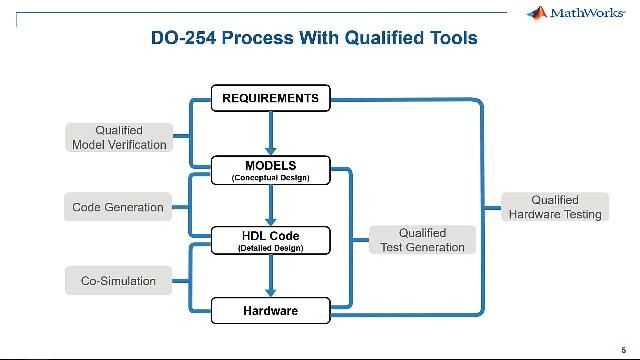
Certify Avionic System Hardware with DO-254
DO Qualification Kit provides workflow guidance and other materials to facilitate your use of Simulink verification tools in demonstrating DO-254 compliance.
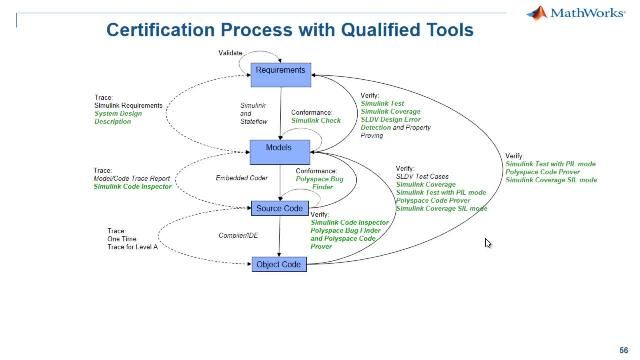
Qualify Tools
Implement the tool qualification approach specified in DO-178C using kit-provided document templates, test cases, and test procedures for qualifying supported Simulink and Polyspace products.
Product Resources:

“With Model-Based Design we had a successful first flight; there were no issues from a control or integration standpoint. Generating the control law code from our Simulink model with Embedded Coder eliminated the slowdowns caused by manual code generation and freed the team to work on meeting the broader program goals.”
DO Qualification Kit (for DO-178) FAQs
The DO Qualification Kit is a collection of documentation, test cases, and procedures that helps you qualify MathWorks verification tools—such as Simulink® and Polyspace®–based tools—for airborne software and hardware projects that must comply with standards including DO-178C, DO-254, and DO-278A. The DO Qualification Kit is designed to support the development of aviation systems in accordance with guidance used by certification authorities by providing a structured way to show that the tools perform their intended verification functions correctly and do not introduce errors.
The DO Qualification Kit provides qualification artifacts for projects based on DO-178C, DO-331, DO-254, and DO-278A. The DO Qualification Kit focuses on MathWorks verification and validation tools used in a Model-Based Design workflow, including the Simulink verification and validation products and Polyspace static analysis and code testing tools. These tools are used to automate model checks, coverage analysis, test execution, and model-to-code consistency checks in DO-178C/DO-331 and DO-254 workflows. For the current, detailed list of supported tools and features, see the DO Qualification Kit documentation in the product help.
No. The DO Qualification Kit does not “prequalify” tools. Tool qualification must be performed in the context of each specific project and operational environment. The tool user is ultimately responsible for qualification, including showing that the tool is adequate for its intended use and verifying its operation in the installed environment. The DO Qualification Kit provides artifacts—such as planning documents, tool operational requirements, qualification test cases, and test reports—to support that project-specific qualification effort and to reduce the amount of custom documentation and testing you need to create.
The DO Qualification Kit helps you show compliance for tool usage within a DO-178C or DO-254 project by providing: Tool qualification plans and templates (for example, PSAC- and TQP-related content for verification tools). Tool operational requirements, test specifications, and automated qualification test cases you can run in your environment. Workflow documents that map the use of Simulink, Embedded Coder, Simulink Code Inspector, Polyspace, and related tools to DO-178C and DO-254 objectives. These artifacts are intended to be integrated into your project plans, traceability, and configuration management so that, during an audit, you can show how tool qualification activities support the objectives in DO-178C, DO-254, DO-330, and DO-331
A typical way to get started with the DO Qualification Kit is: Open the DO Qualification Kit app and example projects from MATLAB or Simulink. From the app you can open the DO-178C and DO-254 example projects, review the project structure, and explore the shipped artifacts. Review the DO-178C and DO-254 workflow documents included with the kit to understand how qualified tools fit into your system, software, and hardware development processes. Adapt the provided plans, checklists, and reports (for example, tool qualification plans and checklists) to match your development process, standards supplements, and certification plans. Execute the supplied qualification test cases in your environment, review results, and incorporate the generated evidence into your project’s configuration management and certification data set. Many DO Qualification Kit customers start by following the shipped DO-178C/DO-254 example and then tailoring the workflow and artifacts to their own system architecture, DAL, and toolchain.

