Main Content

insert

Insert component or pipeline into existing pipeline

Since R2026a

    Description

    newPipeline = insert(pipeline,sources,pipe) inserts the component or pipeline pipe in the pipeline pipeline between the components or ports specified by sources and the components directly connected to any output of sources. The function uses tags to connect ports. For more information, see Port Tags for Automatic Connection.

    newPipeline = insert(pipeline,pipe,destinations) inserts the component or pipeline pipe in the pipeline pipeline between the components or ports specified by destinations and the components directly connected to any input of destinations.

    newPipeline = insert(pipeline,sources,pipe,destinations) inserts pipe in pipeline between sources and destinations. Edges, or connections, that start at a source component and end at a destination component are cut and rerouted through pipe. Ports of pipe with tags that are not present in the source components or destination components are connected to the nearest reachable tag-compatible port.

    example

    newPipeline = insert(___,Name=Value) specifies options using one or more name-value arguments in addition to any of the input argument combinations in previous syntaxes. For example, you can specify whether to preserve existing pipeline connections or update ports.

    Examples

    collapse all

    Create a simple pipeline where the components are connected in series.

    removeMissing = observationRemoverComponent;
    ecoc = classificationECOCComponent;
    pipeline = series(removeMissing,ecoc);

    Display the names of the components in the pipeline.

    pipeline.Components
    
    ans = 
    
      struct with fields:
    
        ObservationRemover: [1×1 observationRemoverComponent]
        ClassificationECOC: [1×1 classificationECOCComponent]

    The name of the first component is ObservationRemover, and the name of the second component is ClassificationECOC.

    Insert a principal component analysis component between the two components in pipeline.

    pcaTransformer = pcaComponent;
    newPipeline = insert(pipeline,"ObservationRemover", ...
        pcaTransformer,"ClassificationECOC");

    insert automatically connects the correct output of the removeMissing component to the input of the pcaTransformer component. Similarly, the function automatically connects the output of the pcaTransformer component to the correct input of the ecoc component.

    To confirm the connections, view the pipeline.

    view(newPipeline)
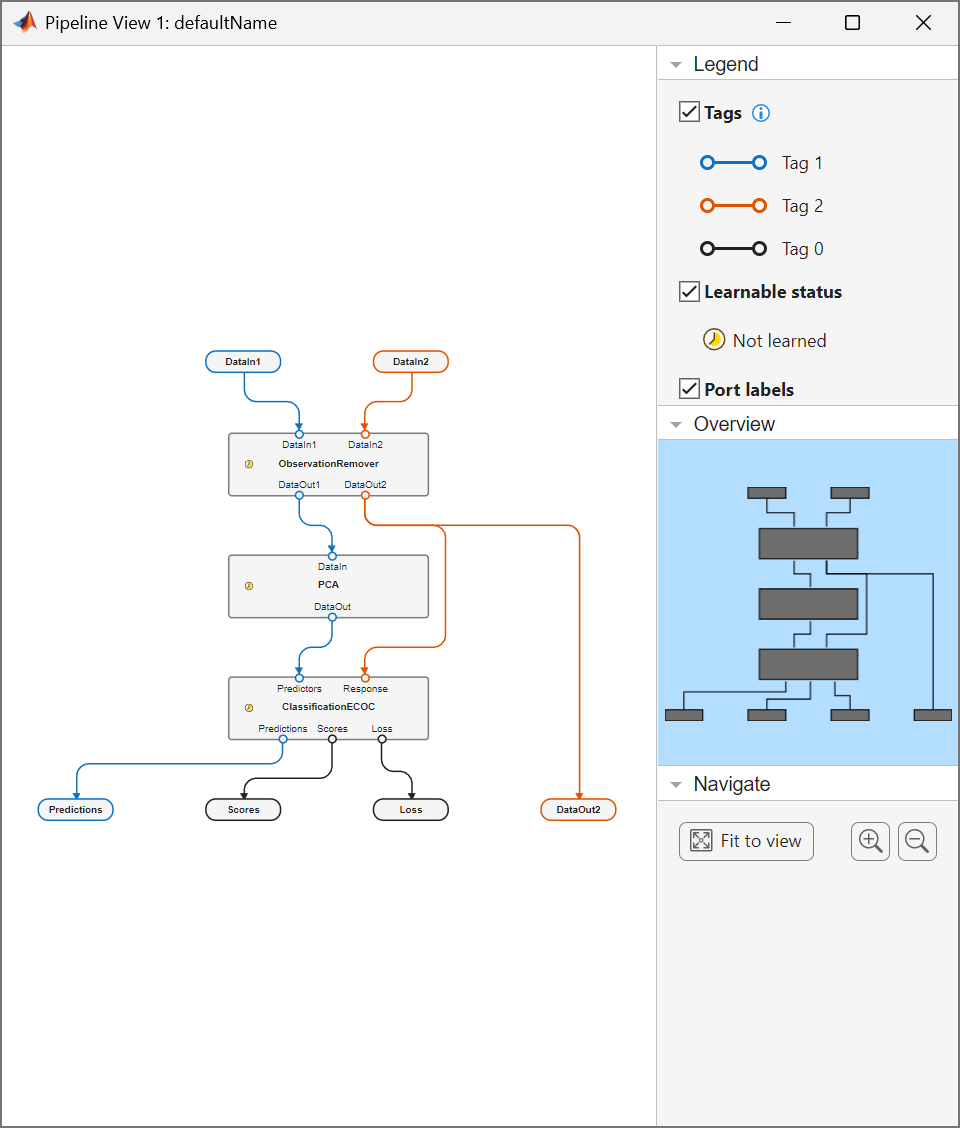
    Display pipeline connections

    Input Arguments

    collapse all

    Existing pipeline, specified as a LearningPipeline object.

    Names of the components to connect from in the existing pipeline, specified as a character vector, string array, or cell array of character vectors. You can find the name of a component in a pipeline by accessing the Name property of the component (for example, pipeline.Components.ObservationRemover.Name).

    Data Types: char | string | cell

    Pipeline or component to insert in the existing pipeline, specified as a LearningPipeline or learning component object. Edges that start at source components (sources) and end at destination components (destinations) are cut and rerouted through pipe.

    For a list of learning component objects, see pipe.

    Names of the components to connect to in the existing pipeline, specified as a character vector, string array, or cell array of character vectors. You can find the name of a component in a pipeline by accessing the Name property of the component (for example, pipeline.Components.ObservationRemover.Name).

    Data Types: char | string | cell

    Name-Value Arguments

    collapse all

    Specify optional pairs of arguments as Name1=Value1,...,NameN=ValueN, where Name is the argument name and Value is the corresponding value. Name-value arguments must appear after other arguments, but the order of the pairs does not matter.

    Example: insert(pipeline,"ObservationRemover",pcaComponent,"ClassificationSVM",PreserveEdges=true) specifies to preserve the connections in pipeline.

    Flag for preserving the existing connections in the pipeline, specified as true or false. If you set PreserveEdges to true, then the software does not cut any connections in the pipeline when inserting new components or pipelines.

    Example: PreserveEdges=true

    Data Types: logical

    Flag for updating the ports in the pipeline, specified as true or false. If you set UpdatePorts to false, then the software makes no connections to any components other than those specified by sources and destinations.

    Example: UpdatePorts=false

    Data Types: logical

    Output Arguments

    collapse all

    Pipeline with the new component or pipeline pipe, returned as a LearningPipeline object.

    Version History

    Introduced in R2026a