Design Finite State Machines in Stateflow
R2026bStateflow® is a graphical programming environment that allows you to use finite state machines to create control logic in Simulink® models. Additionally, you can:
Reuse and share your logic across models.
Use MATLAB® code or Simulink subsystems as functions in a state machine.
Visualize your logic with live animation.
Debug your logic by using breakpoints and logging simulation data.
Stateflow also supports truth tables and flow charts. For more information, see Use Truth Tables to Model Combinatorial Logic and Create Flow Charts in Stateflow.
Define Logic by Using States and Transitions
Finite state machines model the operating modes of a system as states. A state can modify data, execute code and events, or contain other states.
Finite state machines execute in a series of steps. During each step, each state is either active or inactive. Active states can perform actions or execute code, while inactive states cannot. As the conditions in the state machine change, so do the active states.
Consider an automatic transmission in a car, in which the gears are the operating mode. This animated image models the gears as states, represented by rectangles. As the speed of the car changes, the transmission shifts gears, represented by blue highlighting.

In a state machine, a transition represents the path from one state to another. For example, an automatic transmission system can shift from first gear to second gear, from second gear to first or third gear, and so on.
The animated image represents the transitions in the transmission system as
arrows between states. Each transition has a condition that determines when the
active state changes. For example, the car shifts from first to second gear when
the speed of the car becomes greater than 10.
Model State Machines by Using State Transition Tables and Charts
With Stateflow, you can model state machines as State Transition Table or Chart blocks.
Use State Transition Tables
State transition tables represent states and transitions as entries in a table. For example, this state transition table models the gears of an automatic transition as states.
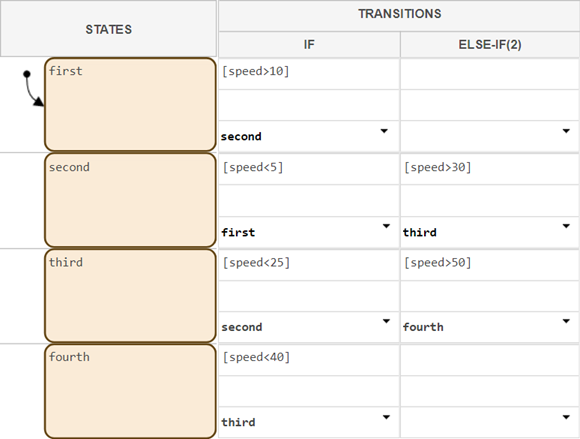
Consider using a state transition table if you want to focus on implementing logic without worrying about the graphical layout of your states.
For a tutorial on creating state transition tables, see Model Rechargeable Battery System by Using a State Transition Table.
Use Charts
When you create a chart, you model the state machine by arranging rectangles and arrows that represent states and transitions on a canvas, as in the previous animation. Consider using a chart if your design requires:
Reusable components. For example, you can reuse states in multiple places in one chart, or use the same state in multiple charts.
Event-driven operating modes. For example, you can change states when one component of a chart receives a signal from a different component.
Non-linear flow. For example, you can design a logical flow that uses loops or branching paths.
For a tutorial on creating Stateflow charts, see Model Rechargeable Battery System as Chart.

