TCP Client
R2026bConfigure TCP client
TCP Client block
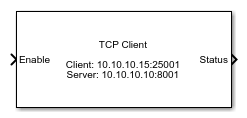
To add a block to a model, double-click the canvas and start typing the block name. Then, select the block from the list.
Libraries:
Simulink Real-Time /
IP
Description
The TCP Client block configures a TCP client.
The parameters Client IP address and Client port are optional. The Client IP address applies when the block executes in a real-time application on a Speedgoat® target computer or in a model simulation on a MATLAB® development computer. If your model is running in Simulink® on the development computer, you can use this block to transmit data to a remote device. In this case, the Windows® operating system determines the network connection.
If the TCP Client in the real-time application cannot establish the connection immediately, the connection is established asynchronously and becomes available in the next time step.
Examples

Target to Development Computer Communication by Using TCP
Use TCP blocks to send data from the target computer to MATLAB running on the development computer.
Ports
Input
Output
Parameters
Programmatic Use: Add Block
To add the block programmatically, use the add_block function with one of these library block paths as the source.
"slrealtimeiplib/TCP Client"
Example: add_block("slrealtimeiplib/TCP Client","myModel/myBlock",MakeNameUnique="on")

