Test Condition
R2026bConstrain signal values in test cases
Test Condition block

To add a block to a model, double-click the canvas and start typing the block name. Then, select the block from the list.
Libraries:
Simulink Design Verifier /
Objectives and Constraints
Description
The Test Condition block defines test conditions for signals in models that are operating in test generation mode. (See Workflow for Test Generation). Use the Values parameter to specify constraints on signal values. The block applies the specified Values parameter to its input signal and attempts to produce test cases.
You can use the block to:
Enable or disable the condition.
Specify whether the block should display its Values parameter in the Simulink® Editor.
Specify whether the block should display its output port.
When you generate code using Simulink and Simulink Coder™, the Test Condition block is ignored. The Test Condition block does not modify the signal during model simulation, and only uses the signal to generate test conditions.
Examples
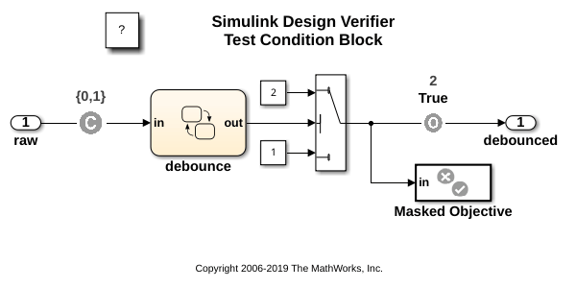
This example shows how to constrain input values. The Test Condition block forces the input value to be either 0 or 1.
open_system('sldvdemo_debounce_testconblk');
Limitations
Test Condition block with a nonvirtual bus as an input is incompatible with Simulink Design Verifier™ analysis.
Ports
Input
Output
Dependencies
To enable this port, select Pass through style (show Outport).
Parameters
Select this parameter to generate tests for a model. Clearing this option disables the block. If this option is cleared, the block appears dimmed in the Simulink Editor.
Specify whether the block behaves as a Test Condition or Proof Assumption
block. Select Assumption to transform the Test
Condition block into a Proof Assumption block.
Use the Values parameter to constrain signal values in test cases. Specify any combination of scalars and intervals in the form of a MATLAB® cell array. For more information, see Set Parameters Using Parameter Configuration File.
Alternatively, you can specify scalar values using the
Sldv.Point constructor, which accepts a single value
as its argument. You can also specify intervals using the
Sldv.Interval constructor, which requires two input
arguments, one for the lower bound and one for the upper bound for the
interval.
For example, the Values parameter
{0, [1, 3]}specifies:
0— A scalar[1, 3]— A closed interval
The Values parameter
{Sldv.Interval(0, 1, '[)'), Sldv.Point(1)}specifies:
Sldv.Interval(0, 1, '[)')— The right-open interval [0, 1)Sldv.Point(1)— A scalar
If you specify multiple scalars and intervals for a Test Condition block, the Simulink Design Verifier software combines them using a logical OR operation when generating test cases. Consequently, the software considers the entire test condition to be satisfied if any single scalar or interval is satisfied.
Within a single scalar or interval, a test condition is generated with a logical AND operation. In this case, all signals must satisfy the constraints in order for the input to satisfy the condition.
For example, consider a two-dimensional open interval:
Sldv.Interval([-5 -5],[5 2],'()')
The zero vector [0 0] satisfies the condition because
the zero elements are within the intervals -5 to
5 and -5 to
2.
The vector [0 3] does not satisfy the condition because
the second element 3 falls outside the interval -5 to
2.
Specify whether the block displays the contents of its Values parameter in the Simulink Editor.
If selected, the block displays its output port, which allows the input signal to pass through to the block output. If not selected, the block hides its output port and terminates the input signal.
Example: The following graphics illustrate the appearance of the block in each case.
Pass through style: Selected

Pass through style: Cleared

Programmatic Use: Add Block
To add the block programmatically, use the add_block function with one of these library block paths as the source.
"sldvlib/Objectives and Constraints/Test Condition"
Example: add_block("sldvlib/Objectives and Constraints/Test Condition","myModel/myBlock",MakeNameUnique="on")
Extended Capabilities
Version History
Introduced in R2007a

