Advisor.addExclusion
R2026bAdd exclusions to model or exclusion file
Syntax
Description
exclusionInfo = Advisor.addExclusion(modelName,filterType,entityIdentifier)modelName, and returns an object
exclusionInfo that contains information about the exclusion. The type
of exclusion is specified by the filterType argument. The entity is
specified by the entityIdentifier argument.
exclusionInfo = Advisor.addExclusion(___,Name,Value)checks argument to
exclude an entity from specific Model Advisor checks or the rationale
argument to provide a reason for the exclusion.
Note
If you add an exclusion, you can save time during model development and verification by limiting the scope of the analysis that Model Advisor has to perform on your model.
Examples
Create a model, add an exclusion to a block, and then display the exclusion information.
Create and open a model named myAdvisorModel.
modelName = 'myAdvisorModel';
new_system(modelName);
open_system(modelName);
Add a Gain block to the model.
add_block('simulink/Math Operations/Gain',[modelName '/Gain']);
Exclude the Gain block from Model Advisor analysis.
exclusions = Advisor.addExclusion(modelName,'Block',[modelName '/Gain']);
Display the exclusion information.
exclusions(1)
ans =

  AdvisorFilterSpecification with properties:
     filteredItem: [1×1 advisor.filter.IFilter]
         metadata: [1×1 advisor.filter.Metadata]
             mode: Exclude
    commentThread: [1×0 advisor.filter.Metadata Sequence]
             type: Block
               id: 'myAdvisorModel:1'
           checks: [1×1 String Sequence]
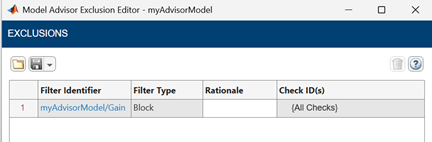
You can also view the exclusion in the Model Advisor Exclusion Editor by right-clicking the Simulink® canvas and selecting Model Advisor > Open Model Advisor Exclusion Editor.
The Model Advisor Exclusion Editor shows a table with a row for the
Gain block exclusion. The Filter Identifier column
shows the pathname specified by the entityIdentifier argument and
the Filter Type column shows the exclusion filter type specified by
the filterType argument. The Rationale and
Check ID(s) columns are empty because no
rationale or checks were specified.
Continue from the previous example to add an exclusion with a
rationale using the rationale name-value argument.
Using the myAdvisorModel model from the previous example, add a
Constant block and exclude it with a
rationale.
add_block('simulink/Sources/Constant',[modelName '/Constant']);
exclusions = Advisor.addExclusion(modelName,'Block',[modelName '/Constant'],'rationale','Block verified manually.');
Display the exclusion information.
exclusions(1)
ans =

  AdvisorFilterSpecification with properties:
     filteredItem: [1×1 advisor.filter.IFilter]
         metadata: [1×1 advisor.filter.Metadata]
             mode: Exclude
    commentThread: [1×0 advisor.filter.Metadata Sequence]
             type: Block
               id: 'myAdvisorModel:2'
           checks: [1×1 String Sequence]
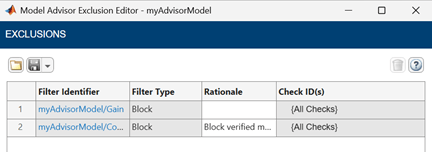
You can view the exclusion in the Model Advisor Exclusion Editor by right-clicking the Simulink canvas and selecting Model Advisor > Open Model Advisor Exclusion Editor.
The Rationale column in the Model Advisor Exclusion Editor
shows Block verified manually for the Constant block
exclusion.
Input Arguments
Name-Value Arguments
Output Arguments
Alternative Functionality
Model Advisor Exclusion Editor
You can also add exclusions from the Simulink canvas by using the Model Advisor Exclusion Editor. To add an exclusion from the Simulink canvas, right-click an entity, select Model Advisor, and select the menu option for the type of exclusion that you want to add. For more information, see Exclude Blocks from Model Advisor Check Analysis.

