Control Variant Condition Propagation Using Bounded Regions and Signal-Level Isolation
R2026bDuring simulation, Simulink® blocks within the region propagates variant conditions to connected blocks both upstream and downstream along signal paths. A block becomes conditional when a variant condition propagates to it from a connected variant block. In complex models, variant condition propagation can extend beyond the intended scope, causing blocks to become conditional unintentionally. Unconstrained propagation introduces unintended behavior during simulation, and generates unwanted conditional logic in the code.
To limit how far variant conditions propagate, confine them to a specific set of blocks or stop them at specific points in the signal path. Use any of these approaches:
Create bounded regions using Variant Start and Variant End blocks in a single hierarchy level without introducing additional subsystems.
Use a Variant Subsystem block to encapsulate alternative implementations in a single subsystem, where variant conditions are contained by default.
Limit variant condition propagation at specific points along a signal path using Variant Source and Variant Sink blocks with Terminator and Ground blocks.
Choose an Approach for Limiting Variant Condition Propagation
The approach you choose depends on your model structure, the scope of variant logic, and whether you can introduce additional levels of model hierarchy. Use this table to determine which approach suits your needs.
| Variant Start and Variant End Blocks | Variant Subsystem Blocks | Variant Source and Variant Sink Blocks | |
|---|---|---|---|
| Creates a bounded region | Yes | Yes | No |
| Introduces additional hierarchy | No | Yes | No |
| Requires same interface for all choices | No | Yes (matching inports and outports) | No |
| Scope of control | Group of blocks in a region | Entire subsystem as a logical unit | Individual signal paths |
| Use when: |
|
|
|
Limit Variant Condition Propagation Within Bounded Regions Using Variant Subsystem Blocks
By default, variant conditions in a Variant Subsystem block do not propagate to blocks outside it, and the variant choices within the subsystem do not affect the rest of the model. When all variant choices share the same number of inputs and outputs, the subsystem forms a bounded region that contains the variant conditions within its boundaries.
If you select the Propagate variant conditions outside of variant subsystem parameter, variant conditions propagate beyond the Variant Subsystem block boundaries. In this configuration, the interface of the Variant Subsystem block adapts to match the interface of the active variant choice, and the subsystem no longer forms a bounded region. For more information, see Propagate Variant Conditions to Define Variant Regions Outside Variant Subsystems to Promote Consistency and Reduce Errors.
Use a Variant Subsystem block when:
All variant logic can be grouped in a single logical unit.
Introducing a new level of hierarchy is acceptable or beneficial for model organization.
All variant choices share the same interface.
Explore the Model
Open the model slexVariantSubsystems. The Variant Subsystem block Controller contains two variant choices that represent the two possible variations of the block.
model = "slexVariantSubsystems";
open_system(model)
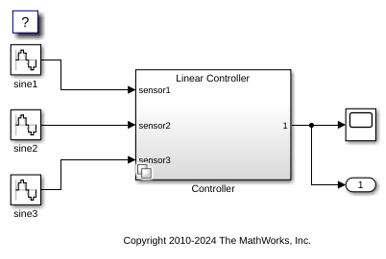
The first variant choice is a Linear Controller block, and the second variant choice is a Nonlinear Controller block.
open_system(model + "/Controller")
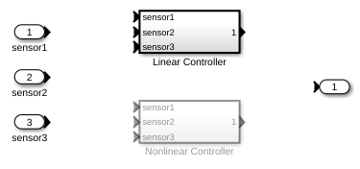
The variant choice Linear Controller has a variant control expression set to V == 1 and the variant choice Nonlinear Controller has a variant control expression set to V == 2.
When you set the variant control variable V to 1 and run the simulation, the variant control expression V == 1 evaluates to true. The Linear Controller block becomes active, and the Nonlinear Controller block remains inactive. The variant conditions stay contained within the Controller block and do not extend to blocks outside the subsystem, forming a bounded region.
V = 1;
sim(model);
To visualize the propagated variant conditions, use the Variant Legend. For more information, see Visualize Propagated Variant Conditions and Bounded Regions in Variant Legend.
Limit Variant Condition Propagation Using Variant Source and Variant Sink Blocks Without Bounded Regions
During variant condition propagation, Simulink® automatically assigns variant conditions to blocks. The conditionality of a block depends on the presence of variant conditions and the behavior of its inputs. If a block is connected to at least one unconditional input, it is considered unconditional. However, the presence of certain blocks, such as the Scope block or Terminator block, can influence the propagation of variant conditions and the conditionality of connected blocks.
You can use Variant Source and Variant Sink blocks with Terminator or Ground blocks to limit variant condition propagation at specific points in a model without creating a bounded region. To contain variant conditions entirely within a section of the model, use Variant Start and Variant End blocks or a Variant Subsystem block instead.
Use this approach when you want to:
Stop variant condition propagation beyond a specific point on a signal path.
Isolate variant logic to an individual signal without introducing a bounded region that limits propagation of variant conditions.
Manage optional inputs or outputs that are relevant only for specific variant choices.
Limit propagation in legacy models where introducing Variant Start and Variant End blocks is not supported.
Explore the Model
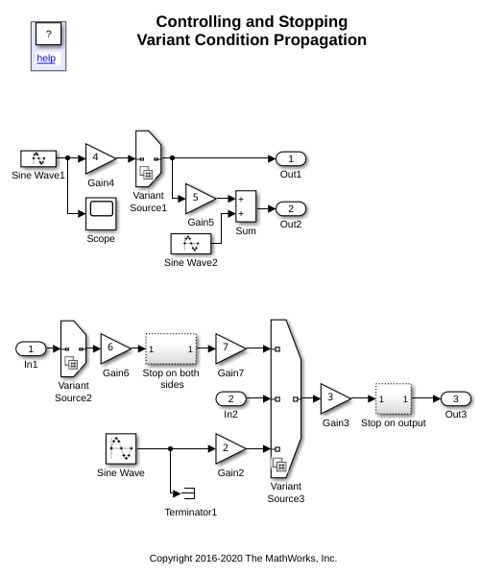
Open the slexVariantStopCondProp model. The model contains Variant Source blocks with variant conditions that propagate to connected blocks. In the first part of the model, variant conditions propagate without limits. In the second part, Ground and Terminator blocks prevent variant conditions from propagating beyond specific blocks.
model = "slexVariantStopCondProp";
open_system(model);
Simulate the Model
Simulate the model to view the variant condition propagation and observe the propagated variant conditions.
sim(model);
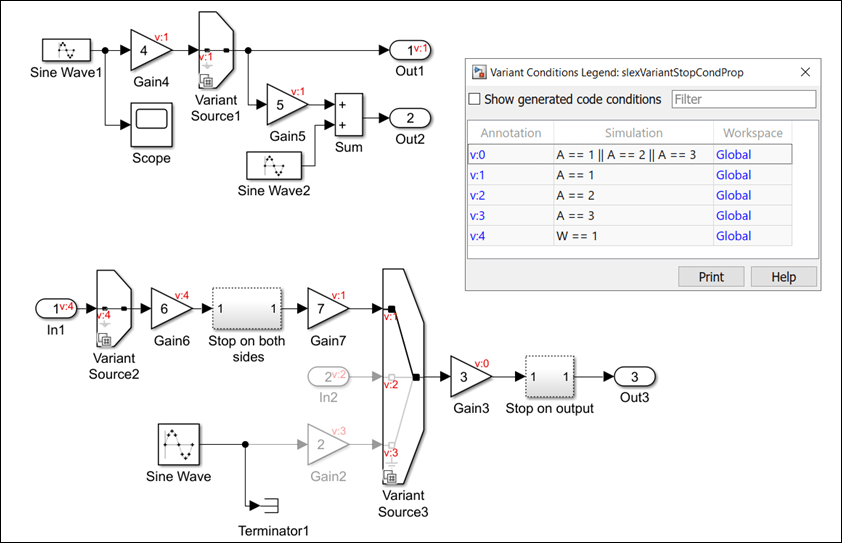
The Variant Source1 block has the variant condition A == 1, which propagates both backward and forward to the connected blocks. The variant condition affects the behavior of connected blocks.
The Sine Wave1 block is connected to a Scope block that is not influenced by variant conditions. The Scope block always displays the signal it receives from Sine Wave1, regardless of the active variant choice. This connection to the Scope block makes the Sine Wave1 block unconditional. The variant condition propagates to the Sine Wave1 block only if you remove the Scope block, making it conditional.
If you replace the Scope block with a Terminator block, the Sine Wave1 block remains unconditional. The Terminator block ends the signal flow without any conditional logic, so it does not affect the conditionality of the Sine Wave1 block.
The input of the Sum block is connected to the Gain5 (conditional) block and the Sine Wave2 (unconditional) block. Because the Sine Wave2 block is unconditional, its output is always available to the Sum block. Therefore, the Sum block is unconditional because it can perform the summation using the unconditional input from the Sine Wave2 block.
Stop Propagation of Variant Conditions Upstream and Downstream
Consider the section of the model that is connected to the Variant Source2 and Variant Source3 blocks. When you simulate the model, the variant conditions from the Variant Source2 block and the Variant Source3 blocks propagate upstream and downstream.
The Stop on both sides block prevents the variant conditions from propagating upstream or downstream. Double-click the Stop on both sides block to view its components.
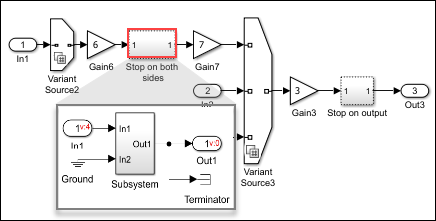
The Stop on both sides block uses a Terminator block to stop variant condition propagation upstream to the Subsystem block. To stop variant condition propagation downstream to the Subsystem block, one of the inports is connected to a Ground block, which is unconditional.
Stop Propagation of Variant Condition Downstream
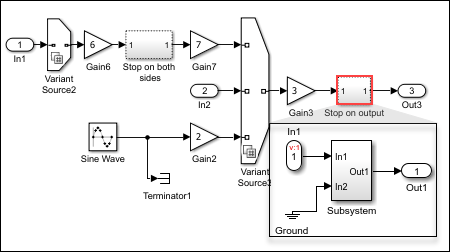
Double-click Stop on output block. Here, one input port of the Subsystem block is unconditional because it receives input from the unconditional Ground block. This makes the Subsystem block unconditional, stopping the propagation of the variant condition downstream.
See Also
Propagate Variant Conditions to Define Variant Regions with Variant Blocks

