Compare To Zero
R2026bDetermine how signal compares to zero
Compare To Zero block

To add a block to a model, double-click the canvas and start typing the block name. Then, select the block from the list.
Libraries:
Simulink /
Logic and Bit Operations
HDL Coder /
Logic and Bit Operations
Description
The Compare To Zero block compares an input signal to zero. Specify how the input is compared to zero with the Operator parameter.
The output is 0 if the comparison is false, and
1 if it is true.
Examples
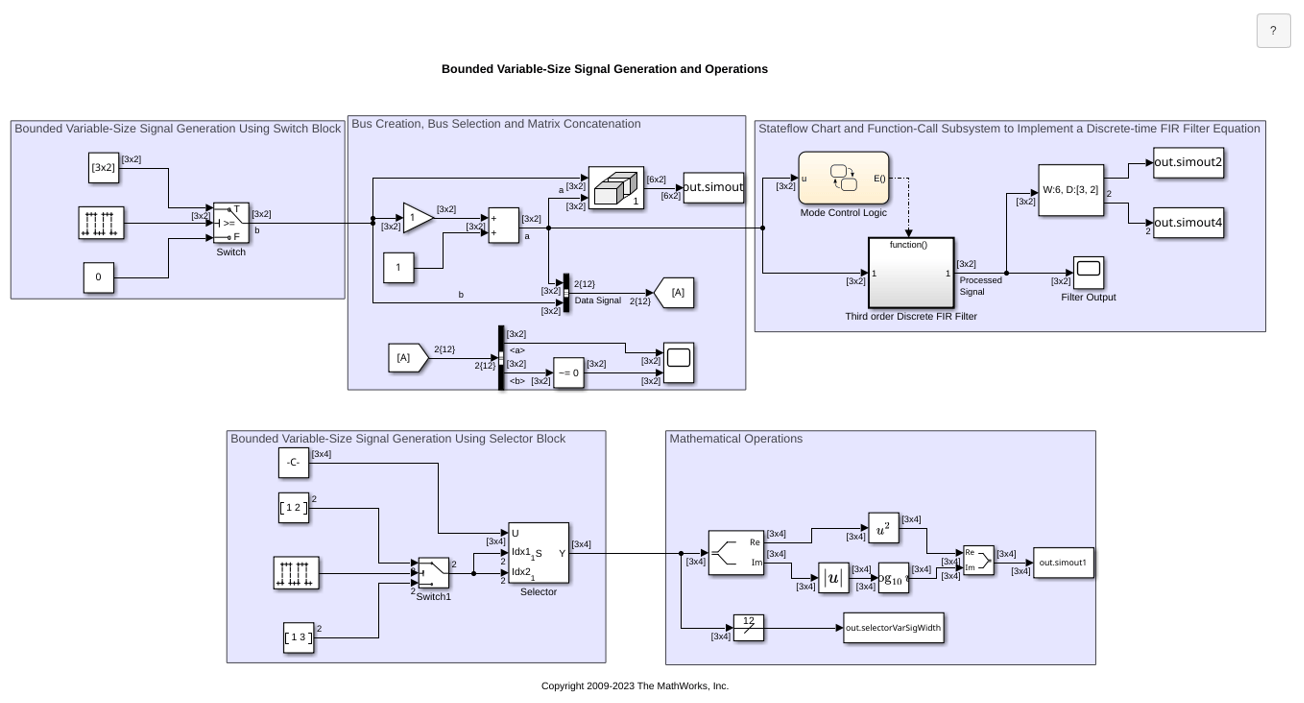
Bounded Variable-Size Signal Basic Operations
Generate bounded variable-size signals and illustrates some of the operations using those signals. In this example, you generate variable-size signals using the Selector block and the Switch block. The signals are used in math operations, bus creation, bus selection, matrix concatenation and to implement a discrete filter equation.
Ports
Input
Input signal, specified as scalar, vector, or matrix, is compared with
zero. If the input data type cannot represent zero, parameter overflow
occurs. To detect this overflow, go to the Diagnostics >
Data Validity pane of the Configuration Parameters dialog
box and set Parameters > Detect overflow to
warning or
error.
In this case, the block compares the input signal to the
ground value of the input data type. For
example, if you have an input signal of type
fixdt(0,8,2^0,10), the input data type can
represent unsigned 8-bit integers from 10 to 265 due to a bias of 10.
The ground value is 10, instead of 0.
Data Types: half | single | double | int8 | int16 | int32 | int64 | uint8 | uint16 | uint32 | uint64 | Boolean | fixed point
Output
The output is 0 if the comparison is false, and
1 if it is true.
The block output is uint8 or
boolean, depending on your selection for the
Output data type parameter.
Data Types: uint8 | Boolean
Parameters
This parameter can have the following values:
==— Determine whether the input is equal to zero.~
=— Determine whether the input is not equal to zero.<— Determine whether the input is less than zero.<=— Determine whether the input is less than or equal to zero.>— Determine whether the input is greater than zero.>=— Determine whether the input is greater than or equal to zero.
Programmatic Use
Block Parameter:
relop |
| Type: character vector |
Values: '=='
| '~='| '<'
|'<='| '>='|
'>' |
Default:
'<=' |
Specify the data type of the output, boolean or
uint8.
Programmatic Use
Block Parameter:
OutDataTypeStr |
| Type: character vector |
Values:'boolean' |
'uint8'
|
Default:
'boolean' |
Select to enable zero-crossing detection. For more information, see Zero-Crossing Detection.
Programmatic Use
Block Parameter:
ZeroCross |
| Type: character vector |
Values:
'off' | 'on' |
Default:
'on' |
Block Characteristics
Data Types |
|
Direct Feedthrough |
|
Multidimensional Signals |
|
Variable-Size Signals |
|
Zero-Crossing Detection |
|
Programmatic Use: Add Block
To add the block programmatically, use the add_block function with one of these library block paths as the source.
"simulink/Logic and Bit Operations/Compare To Zero"
"hdlsllib/Logic and Bit Operations/Compare To Zero"
Example: add_block("simulink/Logic and Bit Operations/Compare To Zero","myModel/myBlock",MakeNameUnique="on")
More About
If you have a Simulink® Coverage™ license, the Compare To Zero block receives condition coverage.
Condition coverage measures:
The number of times that the comparison between the input and zero is true
The number of times that the comparison between the input and zero is false
If you select the Relational boundary (Simulink Coverage) coverage metric, the Compare To Zero block receives relational boundary coverage. For more information, see Relational Boundary Coverage (Simulink Coverage).
Extended Capabilities
C/C++ Code Generation
Generate C and C++ code using Simulink® Coder™.
HDL Coder™ provides additional configuration options that affect HDL implementation and synthesized logic.
This block has one default HDL architecture.
General
| HDL Property | Description |
|---|---|
| ConstrainedOutputPipeline | Number of registers to place at
the outputs by moving existing delays in the design. Distributed pipelining
does not redistribute these registers. The default value is
|
| InputPipeline | Number of input pipeline stages
to insert in the generated code. Distributed pipelining and constrained
output pipelining can move these registers. The default value is
|
| OutputPipeline | Number of output pipeline stages
to insert in the generated code. Distributed pipelining and constrained
output pipelining can move these registers. The default value is
|
| SynthesisAttributes |
Specifies the synthesis attributes for the blocks and block output signals in the model. The generated HDL code contains these attributes. For more information, see SynthesisAttributes (HDL Coder). |
This table lists the data types that the input port supports for HDL code generation:
| Input Port | Dimensions | Fixed-Point Values | Floating-Point Values | Built-in Integers | Bus Signals | Boolean Values | Complex Values |
|---|---|---|---|---|---|---|---|
| Port_1 | Scalar Vector Matrices up to two dimensions | Yes | Half Single Double | Yes | No | No | Yes |
The output port outputs data type uint8 or
boolean, depending on the value of the Output
data type parameter.
To generate HDL code using native floating-point input data types, open the HDL Code Generation > Floating-Point pane in the Configuration Parameters dialog box and select the Use floating-point parameter. For more information, see Generate Target-Independent HDL Code with Native Floating-Point (HDL Coder).
When you use half, single, or
double data types as inputs to the block, you can use the
Latency Strategy (HDL Coder) model configuration parameter to
specify whether the blocks latency maps to minimum or maximum latency values
when using native floating-point libraries. The block supports these native
floating-point latency values:
| Floating-Point Data Type | Latency Strategy Setting | Latency Cycles | Custom Latency Support |
|---|---|---|---|
double | MIN | 1 | No |
MAX | 3 | ||
single | MIN | 1 | No |
MAX | 3 | ||
half | MIN | 1 | No |
MAX | 2 |
The block uses multicycle implementations to introduce additional latency in the generated code. To see the added latency, view the generated model or validation model. See Generated Model and Validation Model (HDL Coder).
You can use these HDL Coder optimizations to optimize the speed, area, and I/Os.
Area Optimization
| Optimization | Description |
|---|---|
| Resource Sharing (HDL Coder) | Resource sharing is an area optimization in which HDL Coder identifies multiple functionally equivalent resources and replaces them with a single resource. |
| Streaming (HDL Coder) | Streaming is an area optimization in which HDL Coder transforms a vector data path to a scalar data path or to several smaller-sized vector data paths. |
Speed Optimization
| Optimization | Description |
|---|---|
| Specify Distributed Pipelining Settings (HDL Coder) | Distributed pipelining, or register retiming, is a speed optimization that moves existing delays in a design to reduce the critical path while preserving functional behavior. |
| Clock-Rate Pipelining (HDL Coder) | Clock-rate pipelining is an optimization framework that allows other speed and area optimizations to introduce latency at the clock rate. |
| Specify Adaptive Pipelining Settings (HDL Coder) | Adaptive pipelining optimization creates patterns or combination of blocks with registers that can improve the achievable clock frequency and reduce the area usage on the FPGA boards by inserting pipeline registers to the blocks in your design. |
| Critical Path Estimation (HDL Coder) | To quickly identify the most likely critical path in your design, use critical path estimation. Critical path estimation speeds up the iterative process of finding the critical path. To know blocks that are characterized in critical path estimation, see Characterized Blocks (HDL Coder). |
PLC Code Generation
Generate Structured Text code using Simulink® PLC Coder™.
Fixed-Point Conversion
Design and simulate fixed-point systems using Fixed-Point Designer™.
Version History
Introduced before R2006aYou can now generate synthesizable HDL code for the Compare to Zero
block when using native floating-point data types, including
half, single, or
double.
You can also use various HDL optimizations, such as distributed pipelining, hierarchy flattening, or delay balancing to generate optimized HDL code for the block.
Use the SynthesisAttributes HDL block property to specify the synthesis attributes for the block and its output signals. HDL Coder includes these attributes in the generated HDL code.
See Also
Compare To Constant | Logical Operator | Bitwise Operator | String Compare
MATLAB Command
You clicked a link that corresponds to this MATLAB command:
Run the command by entering it in the MATLAB Command Window. Web browsers do not support MATLAB commands.


Select a Web Site
Choose a web site to get translated content where available and see local events and offers. Based on your location, we recommend that you select: .
You can also select a web site from the following list
How to Get Best Site Performance
Select the China site (in Chinese or English) for best site performance. Other MathWorks country sites are not optimized for visits from your location.
Americas
- América Latina (Español)
- Canada (English)
- United States (English)
Europe
- Belgium (English)
- Denmark (English)
- Deutschland (Deutsch)
- España (Español)
- Finland (English)
- France (Français)
- Ireland (English)
- Italia (Italiano)
- Luxembourg (English)
- Netherlands (English)
- Norway (English)
- Österreich (Deutsch)
- Portugal (English)
- Sweden (English)
- Switzerland
- United Kingdom (English)