Single simulation output
R2026bOption to return simulation results as single
Simulink.SimulationOutput object
Model Configuration Pane: Data Import/Export
Description
The Single simulation output parameter provides an option to always
return simulation results as a single Simulink.SimulationOutput object. Using the single-output format makes
processing results from multiple simulations easier and provides better support for
parallel and batch simulations. When you enable the Single simulation
output parameter, you can use the same code to process results, no matter
how you run the simulation.
The Single simulation output parameter affects how results are returned for:
Simulations run from a user interface, such as the Simulink Editor
Simulations run by specifying the name of the model as the only input to the sim function, except when fast restart is enabled
Even if you clear Single simulation output, the simulation returns results as a single output for simulations run:
Using the Multiple Simulations panel
By specifying one or more
Simulink.SimulationInputobjects as input to thesim,parsim, orbatchsimfunctionUsing a
SimulationobjectBy specifying the name of the model and one or more additional arguments as input to the
simfunctionBy specifying the name of the model as the only input to the
simfunction when fast restart is enabled in the model
Settings
on (default) | offonAll simulation data logged to the workspace is returned as a single
Simulink.SimulationOutputobject. By default, the name of the variable that stores theSimulink.SimulationOutputobject isout. To use a different variable name, specify a valid MATLAB® variable name in the text box.When you simulate a model programmatically, the name of the variable to which you assign the return argument overrides the name you specify in the text box. The
Simulink.SimulationOutputobject is stored in the variable to which you assign the return argument. For example, for this simulation,simoutis the name of the variable that stores the single simulation output.simout = sim(simin);
offLogged simulation results are returned as one or more variables, depending on the logging options configured in the model and how you run the simulation.
The
simfunction returns a vector of the simulation time steps if the only input argument is the name of the model and fast restart is disabled. To ensure simulations return results in a consistent format, save the model with the Single simulation output parameter enabled. Alternatively, specify the parameter as a name-value argument for thesimfunction.out = sim(mdl,ReturnWorkspaceOutputs="on");Syntaxes of the
simfunction that return multiple arguments are not recommended. For more information, see Syntaxes that return multiple output arguments are not recommended.
Examples
The model in this example logs data using several different logging methods.
The output of the Sine Wave block is logged using signal logging.
The output of the Gain block is logged using a To Workspace block.
The output of the Chirp Signal block is connected to a Scope block that is configured to log data to the workspace.
The outputs of the Gain, Chirp Signal, and Square Wave Generator blocks are logged using a Record block.
The output of the Square Wave Generator block is logged using output logging.
The model is also configured to log time data.
Open the model.
mdl = "LoggingBlocks_NotSSO";
open_system(mdl)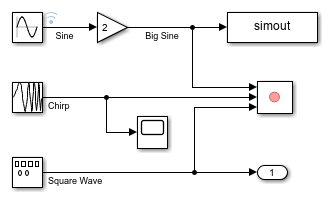
Access Data Not Returned in Single Simulation Output
The model LoggingBlocks_NotSSO is saved with the Single simulation output parameter disabled. In some workflows, simulating the model does not return the simulation results as a single Simulink.SimulationOutput object.
To simulate the model, click Run. Alternatively, in the Command Window, issue the start simulation command.
set_param(mdl,SimulationCommand="start")
When a simulation does not return results as a single output, the software saves data from each logging method and logging block to a separate variable in the workspace. For example, data logged for top-level output ports is saved to the workspace with the default variable name yout.
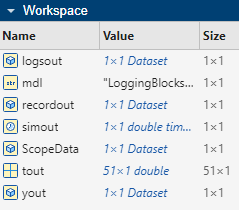
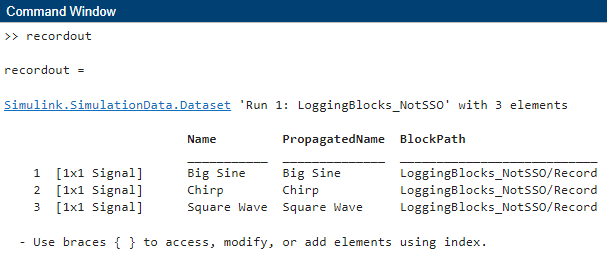
You can access logged data programmatically using the name of the variable associated with the logging method. For example, to access the data logged using the Record block, in the Command Window, type recordout.
Because the Single simulation output parameter is disabled, if you simulate the model programmatically by using the model-name syntax of the sim function without specifying any name-value arguments, the simulation returns only the time vector.
out = sim(mdl)
out = 51×1

         0
    0.2000
    0.4000
    0.6000
    0.8000
    1.0000
    1.2000
    1.4000
    1.6000
    1.8000
    2.0000
    2.2000
    2.4000
    2.6000
    2.8000
      ⋮
Access Data Returned as Single Simulation Output
To return simulation results as a single output, in the Configuration Parameters dialog box, select Single simulation output.
In the Simulink Toolstrip, on the Modeling tab, click Model Settings.
In the Configuration Parameters dialog box, select the Data Import/Export pane.
Select Single simulation output.
Click OK.
Alternatively, enable the Single simulation output parameter programmatically using the set_param function.
set_param(mdl,ReturnWorkspaceOutputs="on")When you enable the Single simulation output parameter, all simulations return data logged to the workspace as a single Simulink.SimulationOutput object with the default variable name out.
To better see the effect that returning simulation data in a single SimulationOutput object has on the workspace, clear the variables that contain logging data from the previous simulation from the workspace.
clear logsout recordout ScopeData simout tout yout
Simulate the model again. Click Run or simulate the model programmatically using the sim function.
out = sim(mdl);
Now, a single variable named out contains all simulation data logged to the workspace.
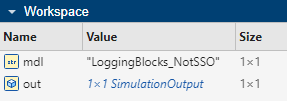
The Simulink.SimulationOutput object out contains a property for each logging method and logging block used in the simulation.
out
out =
  Simulink.SimulationOutput:

              ScopeData: [1x1 Simulink.SimulationData.Dataset]
                logsout: [1x1 Simulink.SimulationData.Dataset]
              recordout: [1x1 Simulink.SimulationData.Dataset]
                 simout: [1x1 timeseries]
                   tout: [51x1 double]
                   yout: [1x1 Simulink.SimulationData.Dataset]

     SimulationMetadata: [1x1 Simulink.SimulationMetadata]
           ErrorMessage: [0x0 char]
You can access logged data using dot notation. For example, access the data logged using the Record block.
out.recordout
ans =
Simulink.SimulationData.Dataset 'Run 2: LoggingBlocks_NotSSO' with 3 elements

                         Name         PropagatedName  BlockPath
                         ___________  ______________  ___________________________
    1  [1x1 Signal]      Big Sine     Big Sine        LoggingBlocks_NotSSO/Record
    2  [1x1 Signal]      Chirp        Chirp           LoggingBlocks_NotSSO/Record
    3  [1x1 Signal]      Square Wave  Square Wave     LoggingBlocks_NotSSO/Record

  - Use braces { } to access, modify, or add elements using index.
To access an element of the Dataset object, use curly braces. For example, access the signal Big Sine using the index 1.
out.recordout{1}ans =
Simulink.SimulationData.Signal
Package: Simulink.SimulationData
Properties:
Name: 'Big Sine'
PropagatedName: 'Big Sine'
BlockPath: [1×1 Simulink.SimulationData.BlockPath]
PortType: 'outport'
PortIndex: 1
Values: [1×1 timeseries]
Methods, Superclasses
The signal data is stored in the Values property of the Signal object as a timeseries object.
out.recordout{1}.Values timeseries
Common Properties:
Name: 'Big Sine'
Time: [51x1 double]
TimeInfo: [1x1 tsdata.timemetadata]
Data: [51x1 double]
DataInfo: [1x1 tsdata.datametadata]
More properties, Methods
The time values are in the Time property of the timeseries object. The signal values are in the Data property.
out.recordout{1}.Values.Dataans = 51×1
0
0.3973
0.7788
1.1293
1.4347
1.6829
1.8641
1.9709
1.9991
1.9477
1.8186
1.6170
1.3509
1.0310
0.6700
⋮
Tips
When you log data using the To File block, the data logs to the specified file and does not appear in the single
Simulink.SimulationOutputobject.When you select Log data to file, the
Simulink.SimulationOutputobject does not include data that logs to the file.Results returned as a single simulation output are not available when the
StopFcnmodel callback executes. To process simulation results, use thePostSimFcncallback of theSimulink.SimulationInputobject instead.To view a list of the variables in a
Simulink.SimulationOutputobject, use thewhofunction.To use the Logging intervals parameter, you must select Single simulation output.
Programmatic Use
Parameter: ReturnWorkspaceOutputs |
| Type: string | character vector |
Value:
"on" | "off" |
Default:
'on' |
Parameter: ReturnWorkspaceOutputsName |
| Type: string | character vector |
| Value: valid MATLAB variable name |
Default:
'out' |
Version History
Introduced in R2009b

