Translational Spring
R2026bIdeal spring in mechanical translational systems
Translational Spring block

To add a block to a model, double-click the canvas and start typing the block name. Then, select the block from the list.
Libraries:
Simscape /
Foundation Library /
Mechanical /
Translational Elements
Description
The Translational Spring block represents an ideal mechanical linear spring, described with the following equations:
where
F is force transmitted through the spring.
K is spring rate.
x is relative displacement, that is, spring deformation.
xinit is initial displacement, that is, initial spring deformation. If
xinit >
            0
, the spring is initially compressed. Ifxinit < 0, the spring is initially stretched.xR and xC are absolute displacements of ports R and C, respectively.
v is relative velocity.
t is time.
The block positive direction is from port R to port C. This means that the force is positive if it acts in the direction from R to C.
Variables
To set the priority and initial target values for the block variables prior to simulation, use the Initial Targets section in the block dialog box or Property Inspector. For more information, see Set Priority and Initial Target for Block Variables.
Nominal values provide a way to specify the expected magnitude of a variable in a model. Using system scaling based on nominal values increases the simulation robustness. Nominal values can come from different sources, one of which is the Nominal Values section in the block dialog box or Property Inspector. For more information, see Modify Nominal Values for a Block Variable.
Examples
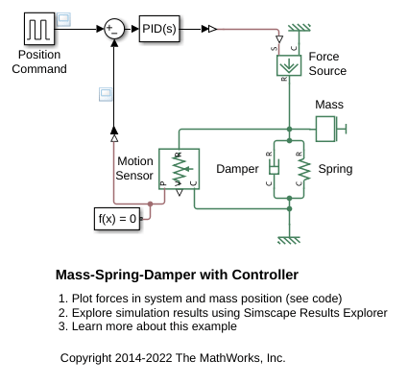
Mass-Spring-Damper with Controller
A controlled mass-spring-damper. A controller adjusts the force on the mass to have its position track a command signal. The initial velocity for the mass is 10 meters per second. The controller adjusts the force applied by the Force Source to track the step changes to the input signal.
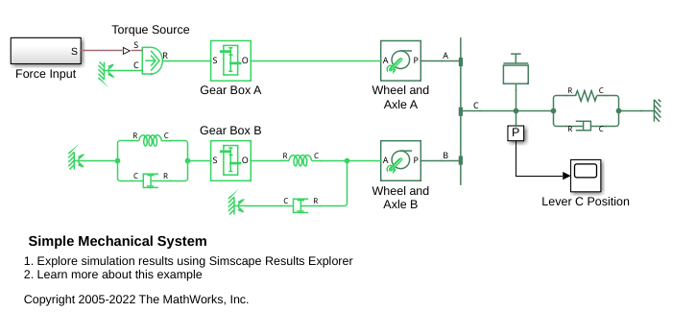
Simple Mechanical System
A model of a system that connects rotational and translational motion. A summing lever drives a load consisting of a mass, viscous friction, and a spring connected to its joint C. Joint B is suspended on two rotational springs connected to reference point through a wheel and axle and a gear box. Joint A is connected to a torque source through a gear box and a wheel and axle mechanism.
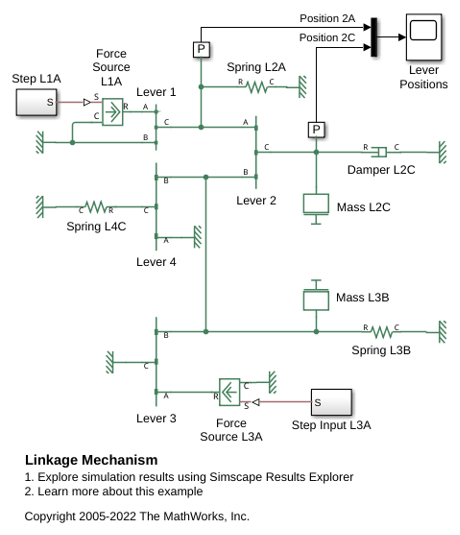
Linkage Mechanism
The use of the Simscape™ Lever block in a linkage mechanism. Lever 1 and Lever 4 are first class levers with the fulcrum at the end. Lever 3 is a second class lever with the fulcrum in the middle. Lever 2 is a summing lever driven by the first and the third levers.
Ports
Conserving
Parameters
Programmatic Use: Add Block
To add the block programmatically, use the add_block function with one of these library block paths as the source.
"fl_lib/Mechanical/Translational Elements/Translational Spring"
Example: add_block("fl_lib/Mechanical/Translational Elements/Translational Spring","myModel/myBlock",MakeNameUnique="on")
For information about programmatic access to individual block parameters, see the Programmatic Use section of parameter descriptions on this page.
Extended Capabilities
Version History
Introduced in R2007a

