Main Content

fitEISModel

R2026b

Perform impedance parameter estimation for battery fractional-order model from frequency-based EIS data

Since R2025a

Description

The fitEISModel function performs impedance parameter estimation for a battery fractional-order equivalent circuit model (FOECM) from frequency-based electrochemical impedance spectroscopy (EIS) data. These parameters are then stored inside an EISModel object that you can use to analyze or interpret battery or fuel cell impedance data.

This figure shows the typical workflow to estimate the parameters of an FOECM:
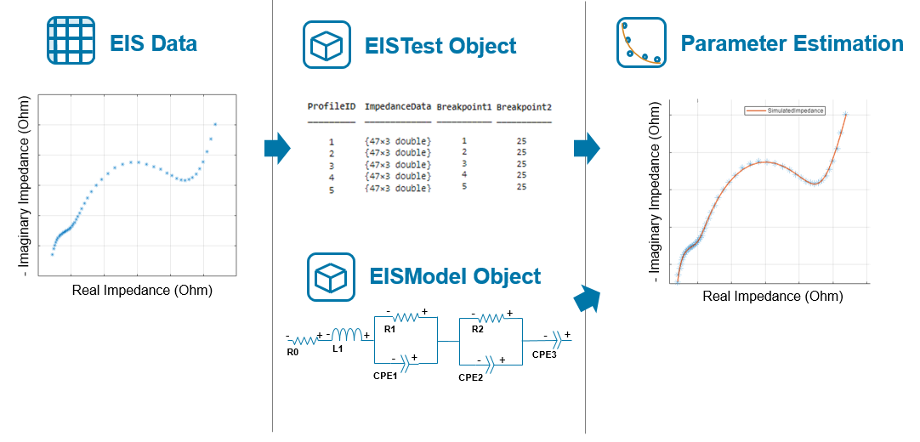
Workflow to estimate the parameters of a fractional-order equivalent circuit model. You start with an EIS data. You feed this data into an EISTest Object and then create an EISModel object. Finally, you run the parameter estimation.

batteryEISModel = fitEISModel(eisData) performs impedance parameter estimation for an EISModel object with default properties from the EIS data, eisData. The function returns an EISModel object with the estimated parameters.

batteryEISModel = fitEISModel(eisData,Name=Value) performs impedance parameter estimation from the EIS data, eisData, and specifies additional options using name-value arguments. The function returns an EISModel object with the estimated parameters.

Input Arguments

collapse all

EIS data that the fitEISModel function uses to estimate the EIS model parameters from, specified as a matrix, table, or EISTest object.

Name-Value Arguments

collapse all

Specify optional pairs of arguments as Name1=Value1,...,NameN=ValueN, where Name is the argument name and Value is the corresponding value. Name-value arguments must appear after other arguments, but the order of the pairs does not matter.

Example: batteryEISModel = fitEISModel(myData,FittingMethod="fmincon")

Fractional-order equivalent circuit model used to fit the EIS data, specified as an EISModel object.

Initial parameter values of the fractional-order equivalent circuit model used in the first iteration of the optimization, specified as a vector of positive elements.

Data Types: double

Lower parameter bounds of the fractional-order equivalent circuit parameters used in the optimization, specified as a vector of nonnegative elements.

Data Types: double

Upper parameter bounds of the fractional-order equivalent circuit parameters used in the optimization, specified as a vector of nonnegative elements.

Data Types: double

Lower and upper cut-off values used to filter the frequency-based impedance data, specified as a vector of two positive elements.

Data Types: double

Option to remove all high-frequency data points that display inductive behavior, specified as "false", "true", or as numeric or logical 1 (true) or 0 (false).

Data Types: logical

Indices to remove from the frequency-based impedance data, specified as a scalar or vector.

Data Types: double

Optimization weighting factors applied to every point in the frequency-based impedance data, specified as a column vector with the same length as the impedance data.

Data Types: double

Optimization options that the optimization or fitting method uses, specified as a structure or an options object. For more information about options object, see Set Optimization Options (Optimization Toolbox).

Data Types: struct

Optimization or fitting method used to find the parameters of the EISModel object that best fit the frequency-based impedance data, specified as one of these options:

  • "fminsearch" — Default fitting method in Simscape™ Battery™.

  • "fmincon" — Requires Optimization Toolbox™.

  • "lsqnonlin" — Requires Optimization Toolbox.

  • "patternsearch" — Requires Global Optimization Toolbox.

Data Types: char | string

Sign convention for the imaginary impedance relative to the high-frequency inductive behavior, specified as "standard" or "reversed". The default convention treats the high-frequency inductive behavior as positive.

Data Types: string | char

Whether to initialize each optimization sequentially or reuse the initial estimates, specified as "sequential" or "reuseInitialEstimates". For sequential initialization, the fitEISModel object uses the output values from the first optimization for the next iteration.

Data Types: string | char

Since R2026b

Option to perform parallel optimization for multiple datasets using a parallel pool of workers, specified as one of these values:

  • "off" — Run in serial on the MATLAB® client.

  • "auto" — Use a parallel pool if one is open or if MATLAB can automatically create one. If a parallel pool is not available, run in serial on the MATLAB client.

  • "on" — Use a parallel pool if one is open or if MATLAB can automatically create one. If a parallel pool is not available, throw an error.

If you do not have a parallel pool open and automatic pool creation is enabled, MATLAB opens a pool using the default cluster profile. To use a parallel pool to run computations in MATLAB, you must have Parallel Computing Toolbox™.

Parallel optimization does not support sequential initialization strategy. If you set this argument to "on" or "auto", you must set the InitializationStrategy argument to "reuseInitialEstimates".

Data Types: string | char

Output Arguments

collapse all

Fractional-order equivalent circuit model with estimated parameters, returned as an EISModel object.

Version History

Introduced in R2025a

expand all