mbcrunner Class
Description
The mbcrunner class is a handle class.
Use the mbcrunner class and methods to programmatically run
CAGE operations.
Creation
Description
creates an
obj = mbcrunnermbcrunner handle object to the current project in the CAGE
app.
creates an obj = mbcrunner(projectFile)mbcrunner handle object to the CAGE project specified by
projectFile.
opens the specified project in the CAGE app when you specify
obj = mbcrunner(projectFile,inBrowser)inBrowser as true.
Input Arguments
CAGE project filename, specified as a string scalar.
Data Types: string
Option to use the current project in the CAGE browser, specified as
false or true.
Data Types: logical
Properties
Name of the CAGE Project, specified as a string.
Attributes:
GetAccess | public |
SetAccess | private |
Data Types: string
Table names of all nonempty lookup tables in the CAGE project, specified as a vector of strings.
Attributes:
GetAccess | public |
SetAccess | private |
Table values for the current CAGE project, specified as a structure.
Attributes:
GetAccess | public |
SetAccess | private |
Data Types: struct
Names of all runnable optimizations in the CAGE project, specified as a vector of strings.
Attributes:
GetAccess | public |
SetAccess | private |
Names of features that have fill settings defined in the CAGE project, specified as a vector of strings.
Attributes:
GetAccess | public |
SetAccess | private |
Names of the models in the CAGE project, specified as a vector of strings.
Attributes:
GetAccess | public |
SetAccess | private |
Names of the variables in the CAGE project, specified as a vector of strings.
Attributes:
GetAccess | public |
SetAccess | private |
Methods
characterizeBattery | Characterize equivalent circuit battery in CAGE project |
evaluateFeature | Evaluate feature in CAGE project with data set |
exportCalibration | Export calibration items from CAGE project |
fill | Fill feature in CAGE project |
importModels | Import new models into CAGE project |
importOptimizationData | Import data for optimization in CAGE project |
loadProject | Load CAGE project |
optimizationResults | Retrieve optimization results |
runOptimization | Run optimization in CAGE project |
saveProject | Save CAGE project |
updateBreakpoints | Update lookup table breakpoints in CAGE project |
updateConstraints | Update optimization constraint bounds in CAGE project |
Examples
Use the mbcrunner class and methods to perform these operations programmatically for a CAGE project:
Update project constraints.
Import new models and rerun optimizations and feature filling.
Retrieve the optimization results to calculate the sum objective and visualize the results.
Load Model Project
Use the mbcmodel.LoadProject method to load the gasolineOneStage.mat model project from the mbctraining folder.
proj = mbcmodel.LoadProject(fullfile( ... matlabroot,'toolbox', 'mbc', 'mbctraining', 'gasolineOneStage.mat'));
Create mbcrunner Object
Load the Gasoline_optimization.cag project from the mbctraining folder as the template for the mbcrunner object.
runner = mbcrunner(fullfile( ... matlabroot,"toolbox","mbc","mbctraining","Gasoline_optimization.cag"));
Update CAGE Project Constraints
Use the updateConstraints method to update the RESIDFRAC constraint to 24 in the BTQ_Optimization optimization.
updateConstraints(runner,"BTQ_Optimization","RESIDFRAC",24);
Update the RESIDFRAC constraint to 24 in the Sum_BTQ_Optimization optimization.
updateConstraints(runner,"Sum_BTQ_Optimization","RESIDFRAC",24);
Import Models and Rerun Optimizations
Use the importModels method to import the models from the model project to the CAGE project and rerun the optimizations and feature filling.
[models,updatedItems,updatedTables,msg] = importModels(runner,proj);
Retrieve Optimization Results
Use the optimizationResults method to retrieve the results of the Sum_BTQ_Optimization optimization.
results = optimizationResults(runner,"Sum_BTQ_Optimization");Calculate Sum Objective
To calculate the sum objective, multiply the weights by the model values and sum all the elements.
objectiveValue = sum(results.BTQ_weights.*results.BTQ);
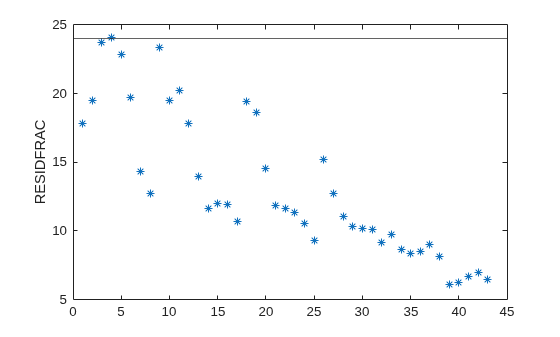
Visualize Residual Fraction Constraint Results
Plot the residual fraction results to review which operating points are near the limit of 24.
plot(results.RESIDFRAC, '*'); yline(24); ylabel("RESIDFRAC");
Version History
Introduced in R2024b
See Also
MATLAB Command
You clicked a link that corresponds to this MATLAB command:
Run the command by entering it in the MATLAB Command Window. Web browsers do not support MATLAB commands.
Select a Web Site
Choose a web site to get translated content where available and see local events and offers. Based on your location, we recommend that you select: .
You can also select a web site from the following list
How to Get Best Site Performance
Select the China site (in Chinese or English) for best site performance. Other MathWorks country sites are not optimized for visits from your location.
Americas
- América Latina (Español)
- Canada (English)
- United States (English)
Europe
- Belgium (English)
- Denmark (English)
- Deutschland (Deutsch)
- España (Español)
- Finland (English)
- France (Français)
- Ireland (English)
- Italia (Italiano)
- Luxembourg (English)
- Netherlands (English)
- Norway (English)
- Österreich (Deutsch)
- Portugal (English)
- Sweden (English)
- Switzerland
- United Kingdom (English)